Your subscription renewal just failed. Again. But this time it's not a declined card or insufficient funds. It's a 3D Secure authentication challenge your customer never completed—maybe because they didn't see the prompt, maybe because their bank's app crashed, or maybe because they were trying to pay from their phone while walking the dog.
For SaaS businesses with EU and UK customers, these payment failures have become painfully common since Strong Customer Authentication (SCA) regulations rolled out. And here's the frustrating part: many of these customers want to pay you. They just got stuck somewhere in the authentication flow and need a little help getting unstuck.
The difference between losing that customer and keeping them often comes down to one thing: how quickly and clearly your support team reaches out with the right message.
TL;DR: SCA-related payment failures are recoverable with timely, clear outreach. This guide gives you ready-to-use email templates for your first contact, follow-up, and final notice—plus scripts for handling common customer replies. Scroll to the email templates if you need them now.
What's Actually Happening When 3D Secure Payments Fail
Understanding the mechanics helps you write better support emails—and answer customer questions without sounding like you're reading from a payment processor's technical documentation.
Strong Customer Authentication (SCA) is a European regulatory requirement under PSD2 that kicked in fully around 2021. It requires banks to verify the customer's identity for most online payments using at least two of three factors: something they know (like a password), something they have (like their phone), and something they are (like a fingerprint) [1].
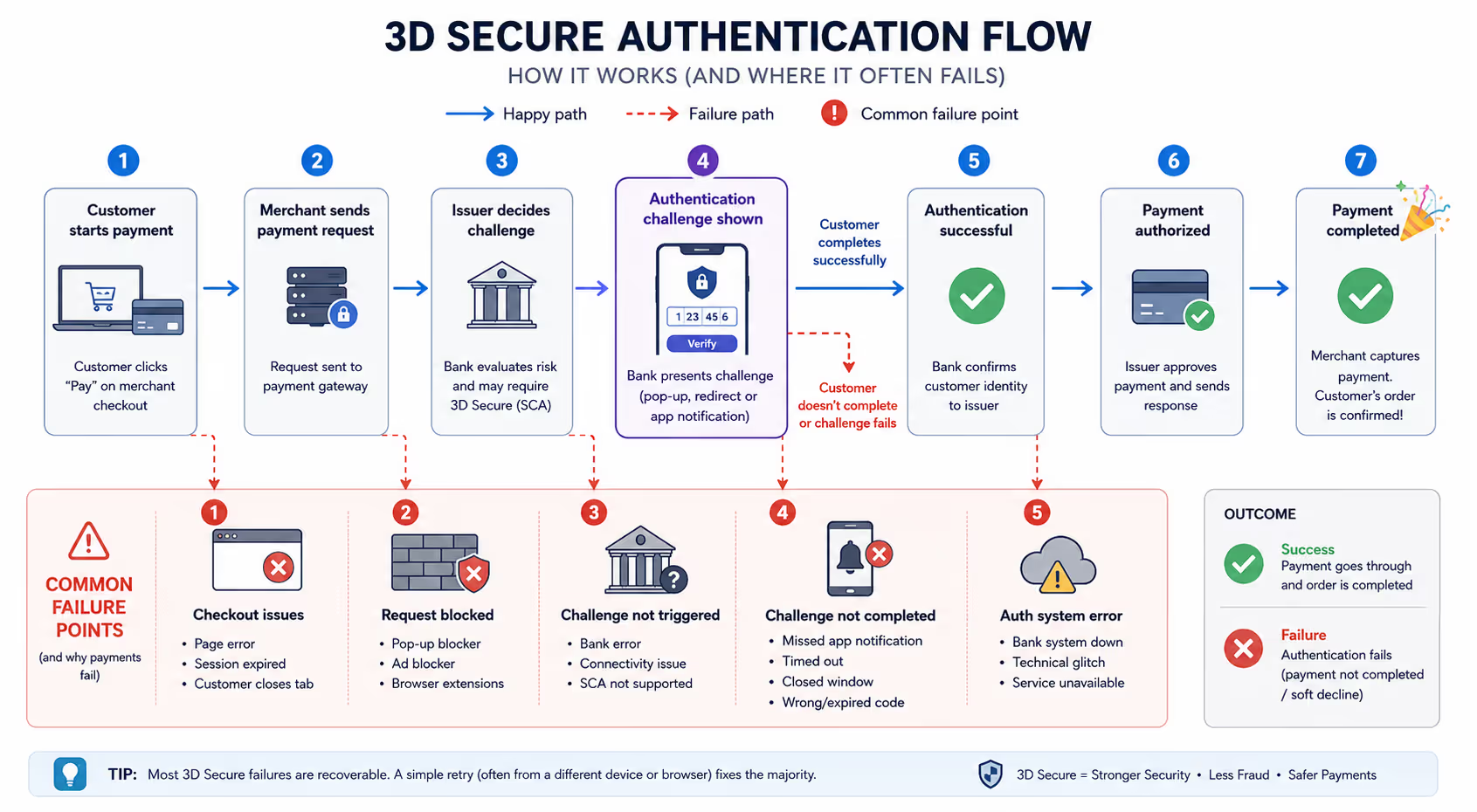
3D Secure is the technical protocol that makes SCA happen. When a customer pays, their bank might trigger a "challenge"—a pop-up, redirect, or push notification asking them to verify the transaction. If they don't complete it, the payment fails.
Why Renewals Fail Even When They're "Exempt"
Here's something that trips up a lot of SaaS operators: recurring payments are technically exempt from SCA after the initial authentication. These are called Merchant Initiated Transactions (MITs), and the rules say banks shouldn't challenge them.
In practice? Banks frequently issue "soft declines" anyway, demanding step-up authentication even on renewals. This happens because:
The bank's fraud systems flagged something unusual
The card was reissued since the original authentication
The bank's SCA implementation is overly cautious
The exemption request from your payment processor wasn't accepted
The result is the same: your customer's renewal fails, and they need to re-authenticate. Your payment processor (Stripe, Chargebee, Recurly, etc.) should flag these distinctly from hard declines, which matters for your messaging.
Common Reasons Authentication Fails
When the customer does get prompted to authenticate, here's why it often doesn't complete:
They closed the browser tab before the challenge loaded
Their banking app notification got buried or missed entirely
The challenge timed out while they were finding their phone
Pop-up blockers intercepted the authentication window
They were on a mobile device with spotty connectivity
Their bank's authentication system had a temporary glitch
The key insight? Most of these aren't "hard" payment failures. They're friction failures. And friction failures are recoverable with the right support response.
The Real Cost of Ignoring SCA-Related Churn
Here's something most SaaS founders don't fully appreciate: a significant portion of failed payments in the EU/UK market are now SCA-related, and many are recoverable with timely outreach [2].
When a 3D Secure authentication fails and you don't reach out, a few things happen:
Passive churn kicks in. The customer doesn't realize their subscription lapsed. By the time they notice, they've moved on or found an alternative.
Trust erodes. If their service suddenly stops working with no explanation, they assume you messed up. Even if they eventually figure out what happened, the relationship is damaged.
Support tickets pile up later. Instead of one proactive email solving the problem, you end up fielding confused "why can't I log in?" messages days or weeks later.
The math is simple: a well-timed email costs you almost nothing. Losing a customer costs you their lifetime value plus the acquisition cost of replacing them.
Your 3D Secure Payment Failure Email Flow
Here's a practical email sequence you can adapt for your SaaS or subscription business. These templates assume you're reaching out after detecting a failed payment that looks like an incomplete 3D Secure challenge (your payment processor should flag these distinctly from standard declines).
Email 1: The Immediate Heads-Up (Send Within Hours)
Subject line options:
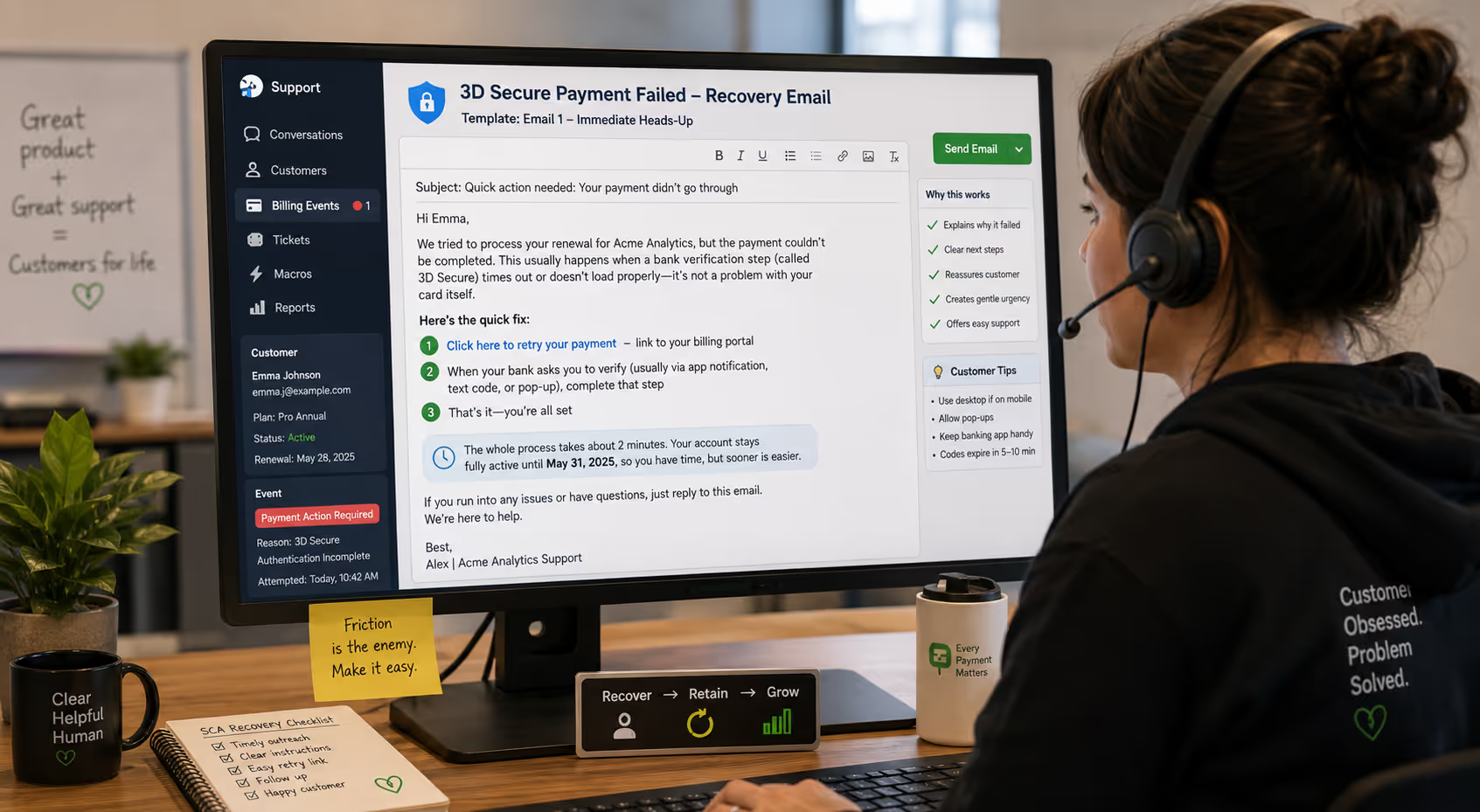
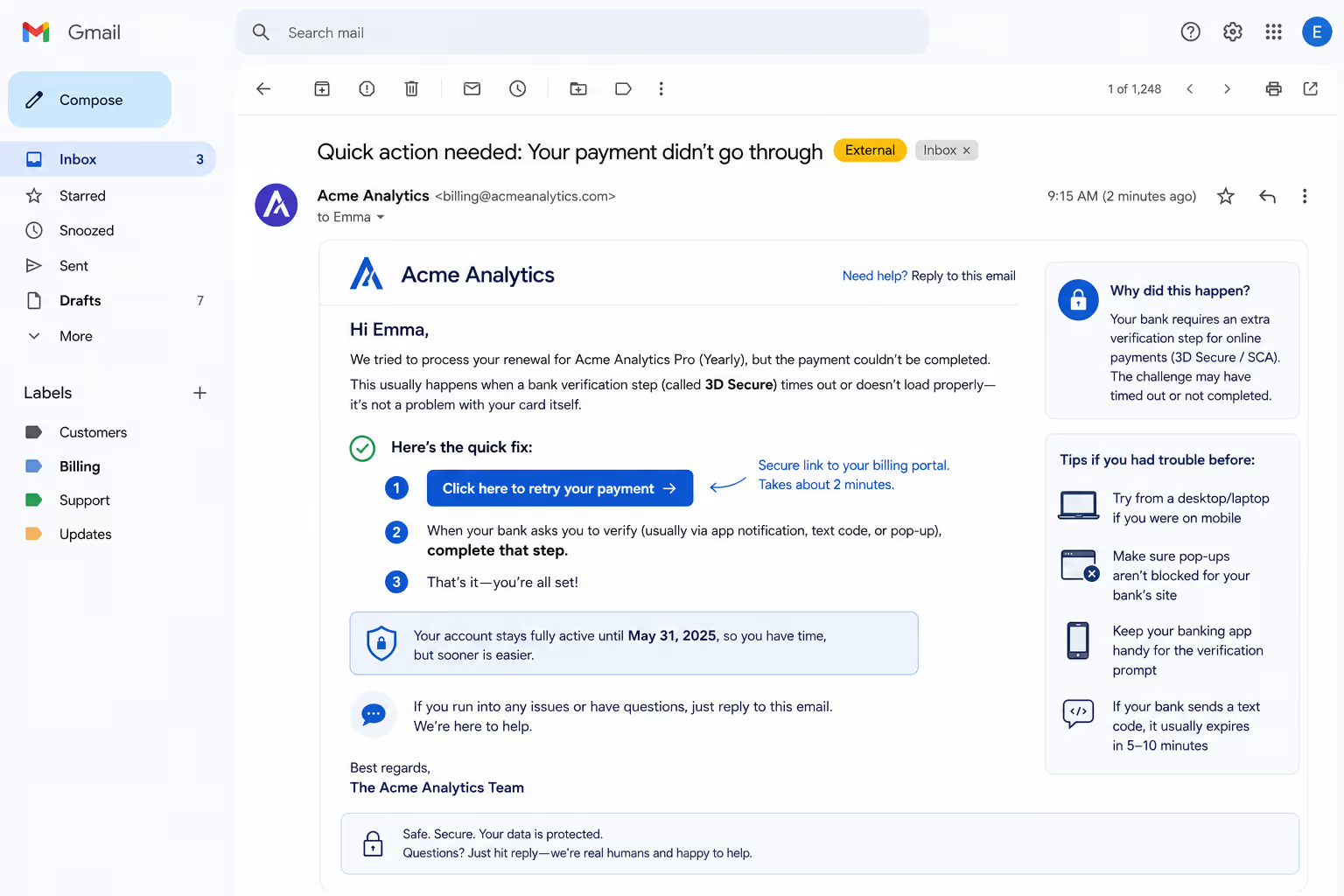
Quick action needed: Your payment didn't go through
Your [Product Name] renewal needs a quick retry
Payment hiccup—here's how to fix it in 2 minutes
Body:
Hi [First Name],
We tried to process your renewal for [Product Name], but the payment couldn't be completed. This usually happens when a bank verification step (called 3D Secure) times out or doesn't load properly—it's not a problem with your card itself.
Here's the quick fix:
[Click here to retry your payment] — link to your billing portal
When your bank asks you to verify (usually via app notification, text code, or pop-up), complete that step
That's it—you're all set
The whole process takes about 2 minutes. Your account stays fully active until [date], so you have time, but sooner is easier.
If you run into any issues or have questions, just reply to this email. We're here to help.
[Your name or "The [Company] Team"]
Why this works:
Explains why it failed without getting technical
Gives clear, numbered steps
Reassures them their card isn't the problem
Creates urgency without panic
Offers an easy out (reply for help)
Email 2: The Gentle Reminder (Send 2–3 Days Later)
Subject line options:
Still need that quick payment retry
Your [Product Name] access expires soon
Following up: payment retry needed
Body:
Hi [First Name],
Just a quick follow-up—your recent payment for [Product Name] still needs a retry. Your bank's verification step didn't complete last time, which is an easy fix.
What to do:[Retry your payment here] — should take about 2 minutes
A few tips if you had trouble before:
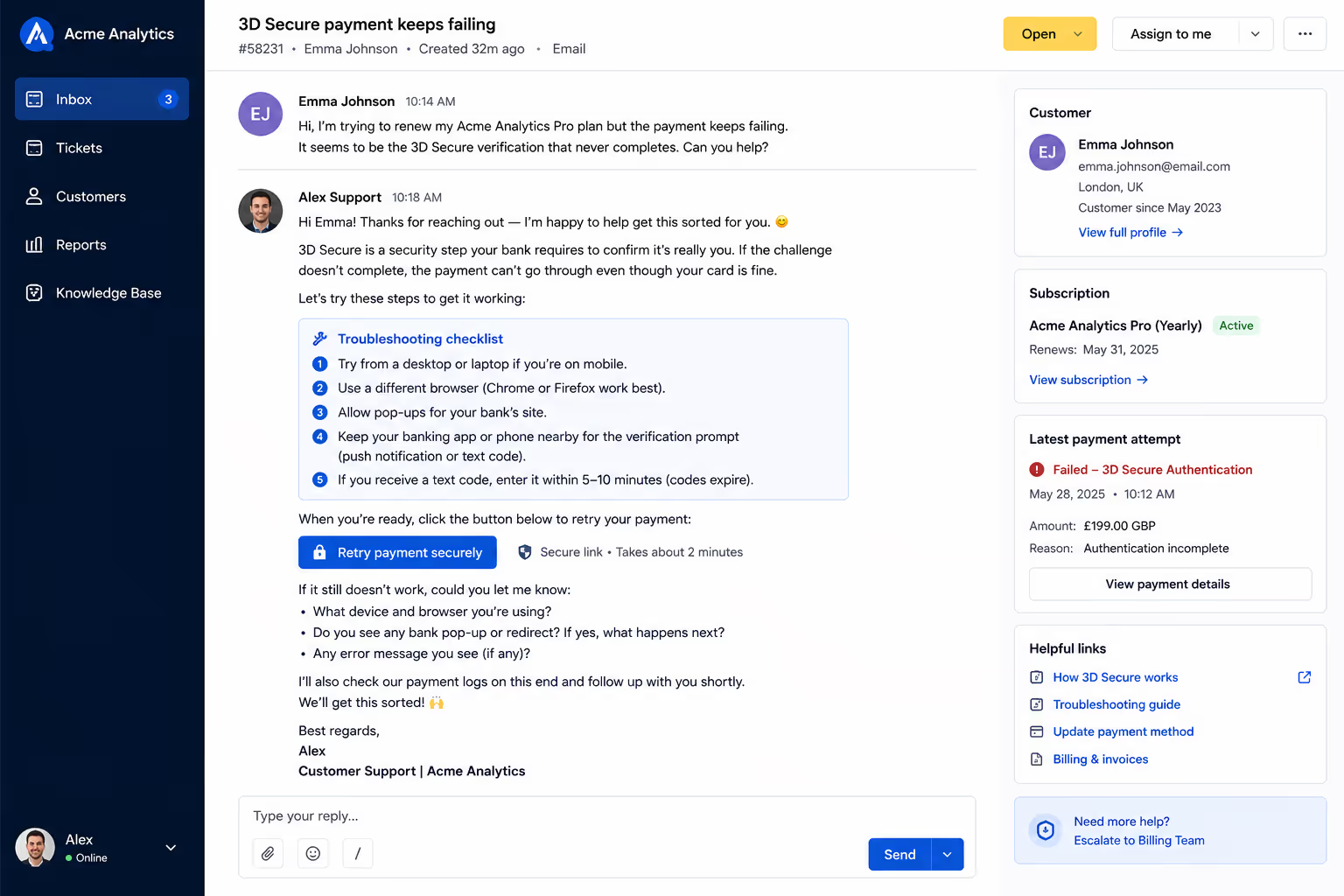
Try from a desktop/laptop if you were on mobile
Make sure pop-ups aren't blocked for your bank's site
Keep your banking app handy for the verification prompt
If your bank sends a text code, it usually expires in 5–10 minutes
Your access continues until [date]. After that, your subscription will pause until payment goes through.
Questions? Just hit reply—happy to help troubleshoot.
[Your name]
Why this works:
Acknowledges they might have tried and failed
Provides concrete troubleshooting tips
Clarifies the deadline and consequence
Keeps the tone helpful, not naggy

Email 3: The Final Notice (Send 1–2 Days Before Access Ends)
Subject line options:
Your [Product Name] access ends tomorrow
Last chance to keep your account active
Action needed to avoid service interruption
Body:
Hi [First Name],
Your [Product Name] subscription is set to pause on [date] because we haven't been able to process your renewal payment.
I know these bank verification steps can be frustrating—if something's not working on your end, I'd genuinely like to help figure it out.
The easiest path forward: [Retry your payment now] — if you haven't had a chance yet, this is the quickest fix.
If you've tried and something isn't working, just reply and tell me what's happening. Sometimes there's a workaround we can try together.
And if you've decided [Product Name] isn't right for you anymore, no hard feelings—just let me know and I'll make sure your account is handled properly.
Your data and settings will be saved for [X days] after your subscription pauses, so nothing is lost permanently. But I'd rather help you stay if we can sort this out.
[Your name]
Why this works:
Creates appropriate urgency without being aggressive
Leads with a single clear action
Offers personal help for those who've tried and failed
Acknowledges the possibility they might want to cancel (builds trust)
Reassures them about data preservation
Handling Common Customer Replies
Once you send these emails, you'll get replies. Here are scripts for the most common scenarios:
"I tried but it keeps failing"
Thanks for trying again—let's figure this out together.
A few questions that'll help me troubleshoot:
What device/browser are you using?
When you click to pay, does a bank verification pop-up or redirect appear at all?
If it does appear, what happens when you try to complete it?
In the meantime, two things often help:
Try a different browser (Chrome and Firefox tend to work best)
If you're on mobile, switch to desktop temporarily—some bank authentication flows are finicky on phones
I'll dig into our payment logs on this end too. Reply with those details and we'll get this sorted.
"I don't know what 3D Secure is / I never set this up"
Totally understand the confusion! 3D Secure isn't something you set up—it's a security step your bank automatically requires for many online payments now (especially for EU and UK cards).
When you try to pay, your bank should prompt you to verify it's really you. This might look like:
A push notification in your banking app
A text message with a one-time code
A pop-up asking for a password or fingerprint
If you're not seeing any of these prompts, it's possible they're getting blocked or your bank's system is having issues.
Want to try the payment again and let me know exactly what you see? I can help troubleshoot from there.
"Can I just use a different card?"
Absolutely—sometimes that's the easiest solution, especially if you have a card from a different bank.
Here's where you can update your payment method: [link to billing settings]
Just a heads up: if the new card is also from an EU or UK bank, you'll still go through a verification step. But different banks handle it differently, so it might be smoother.
Let me know once you've updated it, and I'll keep an eye on the payment to make sure it goes through.
"I want to cancel"
No problem at all. I'll process that for you right now.
Your access will continue through [current billing period end date], and I've made sure no further charges will be attempted.
If you'd like, I can share a quick summary of your account data or help export anything you need before then.
Thanks for being a [Product Name] customer—if anything changes down the road, we'd be glad to have you back.
Operationalizing These Emails in Your Billing Stack
These templates only work if they actually get sent. Here's how to set them up depending on your payment infrastructure:
If You Use Stripe Billing
Stripe's Smart Retries and revenue recovery features handle some of this automatically, but you'll want to customize the messaging. In your Stripe Dashboard:
Go to Settings → Billing → Subscriptions and emails
Configure your failed payment email templates
Set up webhook listeners for invoice.payment_action_required events to trigger your own custom emails for SCA-specific failures
For more control, consider using Stripe's hosted invoice page links in your emails—they handle the 3D Secure flow cleanly.
If You Use Chargebee or Recurly
Both platforms have built-in dunning management with customizable email sequences. The key is to:
Create a separate dunning sequence for "soft decline" or "authentication required" failures
Customize the email copy using the templates above
Set appropriate retry intervals (more frequent early on, then spacing out)
If You're Using a CRM or Support Tool
Tools like Intercom, HubSpot, or even a simple Zapier workflow can trigger these emails based on payment failure webhooks from your processor. The advantage is you can personalize more heavily and track engagement alongside your other customer communications.
The critical piece: make sure SCA-related failures are tagged or segmented separately so you're sending the right message. A generic "your card was declined" email won't help someone whose card is fine but whose bank verification timed out.
Best Practices for Your Support Team
Beyond the scripts, here are some operational principles that make SCA-related support actually work:
Speed matters more than perfection. The first email should go out within hours of the failed payment, not days. Automated triggers are your friend here. Customers who get a same-day heads-up are far more likely to successfully retry than those who hear about it a week later.
Don't assume they know what happened. Many customers have no idea why their payment failed. They might assume their card is maxed out, your billing is broken, or—worst case—that you're trying to charge them for something they didn't authorize. Your email needs to explain and reassure simultaneously.
Track which failures are SCA-related. Work with your payment processor to distinguish 3D Secure failures from regular declines. This lets you send the right message (and troubleshooting tips) instead of generic "payment failed" emails that don't actually help.
Make retry dead simple. The "click here to retry" link should take them directly to a payment page with their info pre-filled if possible. Every extra step is friction, and friction is the whole problem we're trying to solve. Most billing platforms offer hosted payment links specifically for this purpose—use them.
Monitor your retry success rate. If you're sending these emails but nobody's successfully retrying, something's broken in your payment flow. Dig into whether the issue is your emails, your checkout, or your payment processor's configuration.
When to Escalate Beyond Email
Sometimes email alone won't cut it. Here are signals that warrant a different approach:
Multiple failed retry attempts: If a customer has tried 3+ times, something systemic is wrong. Offer to hop on a quick call or screen share to troubleshoot together.
High-value accounts: For customers with significant annual contracts or long tenure, consider a personal phone call on the first failure. The investment is worth it.
Enterprise or B2B customers: Their finance team might need invoicing instead of card payments. Be ready to offer alternatives like wire transfer or ACH.
Repeated SCA failures across multiple customers using the same bank: This might indicate a problem on the bank's end or with your payment processor's integration. Worth flagging to your processor.
Ready to Stop Losing Customers to Payment Friction?
Managing SCA-related payment failures well isn't complicated, but it does require consistent, timely outreach that most small support teams struggle to maintain—especially when you're juggling product questions, bug reports, and feature requests at the same time.
If you're spending hours each week chasing failed payments instead of growing your business, that's exactly the kind of billing-lifecycle support that can be systematized and handled by a dedicated team.
Book a call with Evergreen Support to talk about how we handle renewal failures, dunning emails, and payment troubleshooting for SaaS companies. We'll make sure every recoverable customer actually gets recovered.
Frequently Asked Questions
What's the difference between SCA and 3D Secure?
SCA (Strong Customer Authentication) is the regulatory requirement under PSD2 that mandates two-factor verification for most online payments in Europe. 3D Secure is the technical protocol that payment networks use to fulfill that requirement. Think of SCA as the law and 3D Secure as the implementation. Your customers experience 3D Secure as a bank verification prompt during checkout.
How quickly should we reach out after a 3D Secure payment failure?
Within hours is ideal—same business day at minimum. The longer you wait, the less likely the customer is to successfully retry. Many payment processors can trigger automated emails immediately upon failure, which you can then follow up with personalized outreach if the automated retry doesn't work.
Why do recurring payments fail if subscriptions are exempt from SCA?
While recurring payments (Merchant Initiated Transactions) are technically exempt from SCA after the first authentication, banks frequently issue "soft declines" demanding step-up authentication anyway. This happens when the bank's fraud systems flag something, when a card has been reissued, or simply because the bank's SCA implementation is conservative. Your payment processor handles exemption requests, but acceptance isn't guaranteed.
Do these authentication requirements apply to customers outside the EU/UK?
SCA specifically applies to payments where both the business and the customer's bank are in the European Economic Area or UK. However, many banks worldwide are adopting 3D Secure as a fraud prevention measure, so you may see similar authentication challenges from customers elsewhere. The good news: the same support scripts work regardless of where the requirement originates.
What if a customer wants to pay but their bank's verification keeps failing?
First, have them try a different device and browser. If that doesn't work, suggest they contact their bank—sometimes the issue is on the bank's end. As a fallback, offer alternative payment methods if you support them (PayPal, wire transfer, etc.). For high-value customers, consider extending their access while they sort it out with their bank.
Can we exempt certain payments from 3D Secure to reduce friction?
There are legitimate exemptions under SCA (like low-value transactions under €30, trusted beneficiaries, and recurring payments after initial authentication), but applying these is your payment processor's responsibility. Talk to your processor about their exemption strategy. Be aware that requesting too many exemptions can increase decline rates, so it's a balance.
E-E-A-T: Why Trust This Advice
This guidance comes from Evergreen Support, a US-based customer support agency that handles billing inquiries, payment troubleshooting, and subscription management for SaaS and e-commerce businesses. Our team has direct experience managing payment failure workflows across multiple subscription platforms and payment processors, including the specific challenges that came with SCA implementation for businesses serving EU and UK customers.
Works Cited
[1] European Banking Authority — "Opinion of the European Banking Authority on the elements of strong customer authentication under PSD2." https://www.eba.europa.eu/sites/default/documents/files/documents/10180/1807545/38e2d687-e0b3-442b-b28b-38339c6f60c7/Opinion%20on%20the%20elements%20of%20SCA%20under%20PSD2%20%28EBA-Op-2019-06%29.pdf
[2] Stripe — "Strong Customer Authentication: Your guide to the regulation." https://stripe.com/docs/strong-customer-authentication