
A ticket lands in your queue at 4:47 PM on a Friday. The customer is furious. Their invoice shows a charge they didn't authorize, their dashboard says "payment failed," and they want answers now.
You stare at the ticket. Is this a support issue? A billing platform glitch? Something for RevOps? Engineering? You forward it to your co-founder, who forwards it to your bookkeeper, who responds Monday morning with "I think this is a Stripe thing?"
By then, the customer has already left a scathing review.
For small SaaS teams, billing tickets are uniquely treacherous. They sit at the intersection of technical systems, financial operations, and customer relationships—and without a clear escalation matrix, they bounce between team members like a pinball until someone (usually the founder) finally catches them.
This guide gives you a ready-to-implement billing escalation matrix designed specifically for tiny teams. No enterprise complexity. No 47-step approval chains. Just a clear, one-page framework that tells everyone exactly who handles what, when, and how.
Why Billing Tickets Derail Small SaaS Teams
Billing issues aren't like other support tickets. A "how do I reset my password" question has one clear owner. A billing dispute? It might involve your payment processor, your subscription logic, your accounting records, and your product's usage tracking—all at once.
The problem compounds when you're running lean. In a 3-person startup, the same person might handle support, manage Stripe, and occasionally peek at the codebase. Role boundaries blur. Ownership becomes ambiguous. And ambiguity breeds delay.
Here's what typically happens without a defined escalation path:
The Ping-Pong Effect. A ticket gets forwarded from support to the founder to the developer and back to support. Each handoff adds hours (or days) of latency. The customer waits. Frustration builds.
The "I Thought You Had It" Problem. Two people both assume the other is handling a refund request. Neither acts. The customer follows up three times before anyone notices.
The Inconsistent Response. One team member approves a 50% refund for a billing error. Another denies the same request from a different customer. Now you have policy confusion and an angry comparison on Twitter.
When money is involved, customers expect fast, accurate, and empathetic responses. According to Zendesk's Customer Experience Trends research, the majority of customers will switch to a competitor after just one bad experience. Slow or confused replies signal that your company doesn't have its act together—and that's a trust-killer for any subscription business.
The Core Problem: Billing vs. Bug Classification
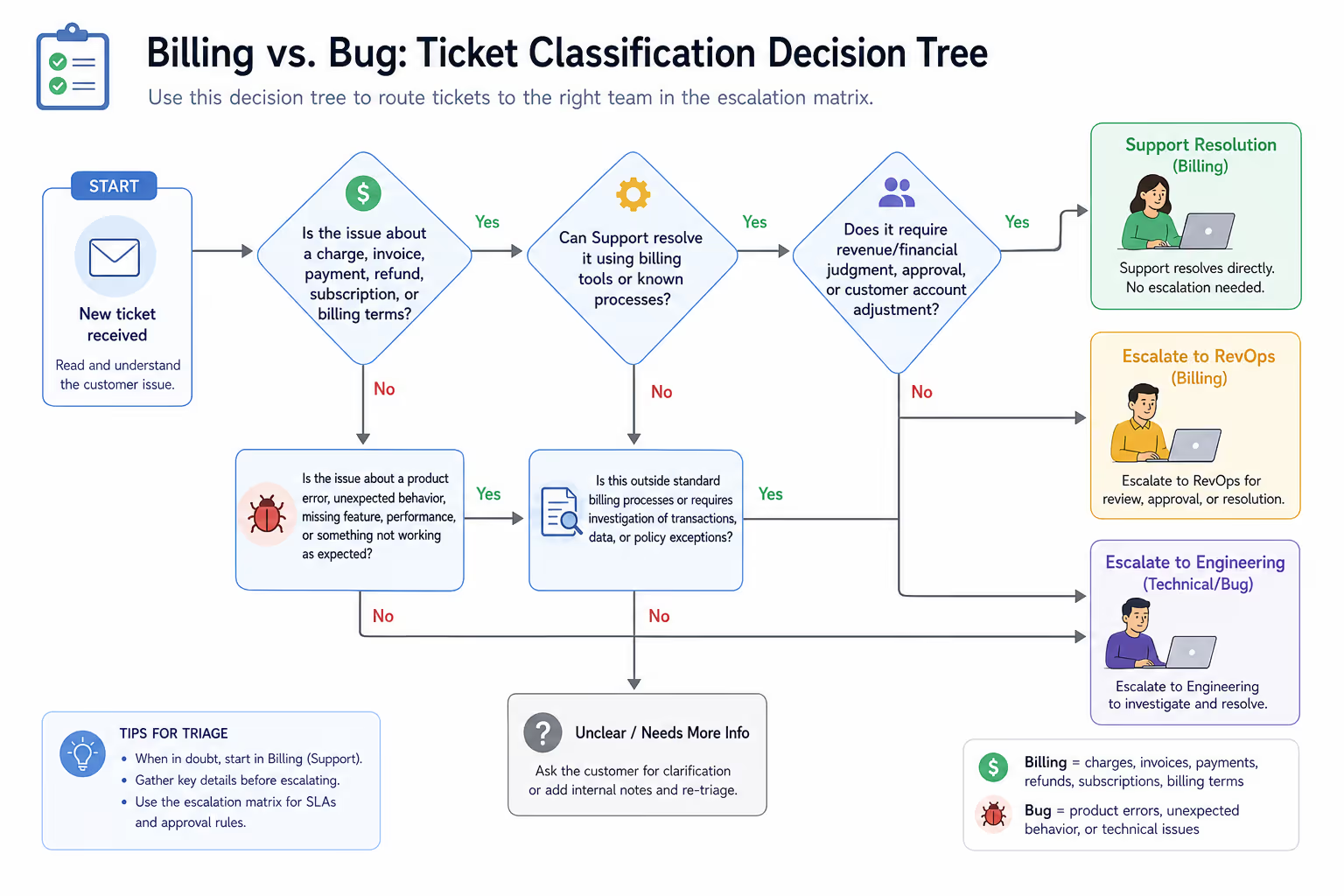
Before you can route a ticket, you need to classify it. This is where most small teams stumble first.
A customer writes: "I was charged twice this month."
Is that a billing issue (duplicate charge in Stripe) or a bug (your subscription logic fired twice)? The answer determines who should own the ticket—and getting it wrong means wasted time and a longer resolution.
Here's a simple classification framework:
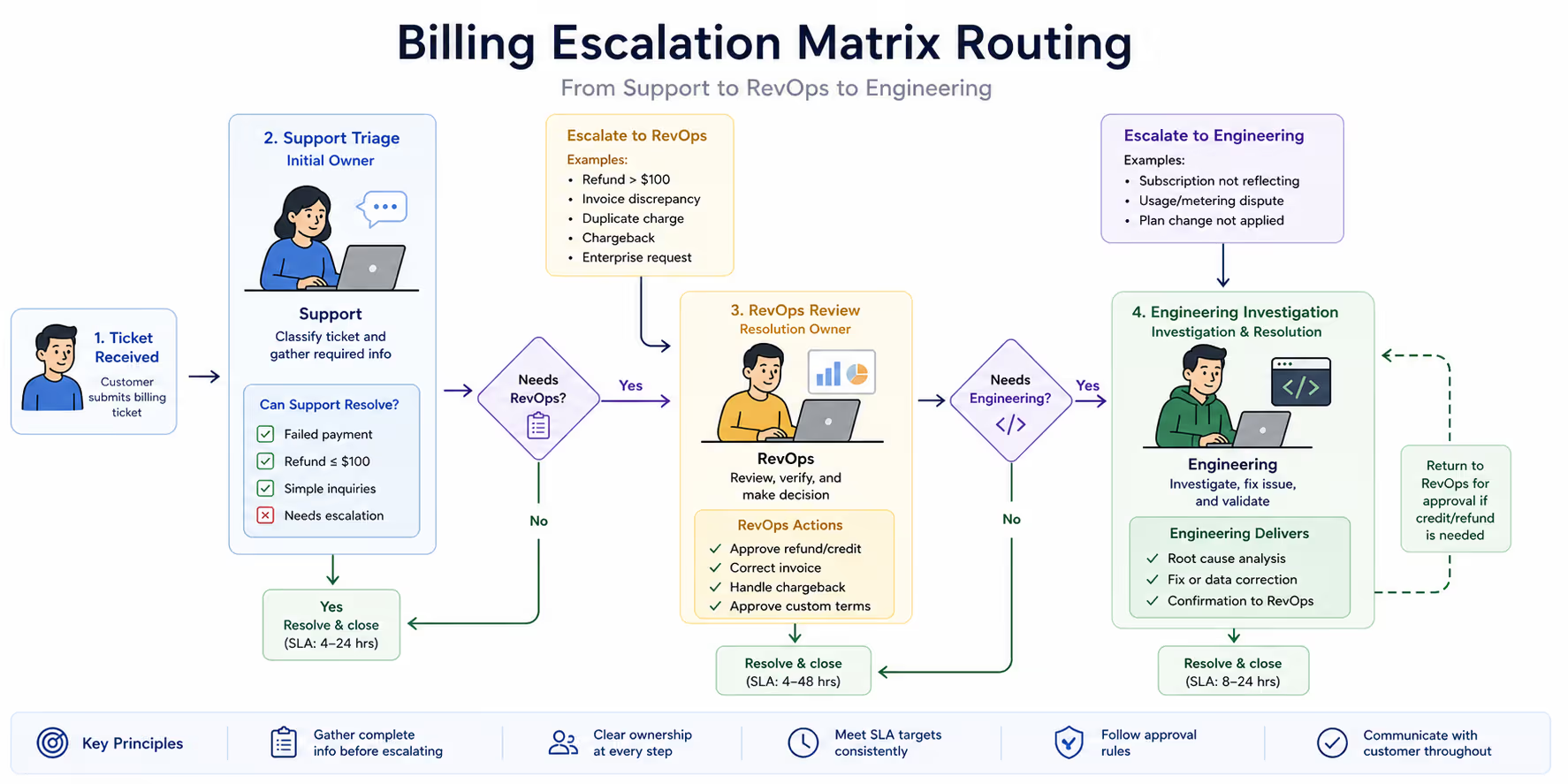
Pure Billing Issues involve the payment layer itself. Failed charges, incorrect amounts, refund requests, invoice discrepancies, payment method updates. These typically live in your billing platform (Stripe, Chargebee, Paddle) and don't require code changes to resolve.
Billing-Adjacent Bugs involve your product's interaction with the billing layer. Subscription status not syncing, usage metering errors, trial-to-paid conversion failures, feature access not matching plan tier. These require engineering investigation, even if the symptom looks like a billing problem.
Hybrid Issues have elements of both. A customer was charged the wrong amount (billing) because your pricing logic calculated their usage incorrectly (bug). These need coordinated handoffs.
The classification question to ask: Can this be fully resolved inside our billing dashboard, or does it require looking at code or logs?
If the answer is "billing dashboard only," it stays with Support or RevOps. If code or logs are involved, Engineering needs to be looped in.
Building Your Billing Escalation Matrix
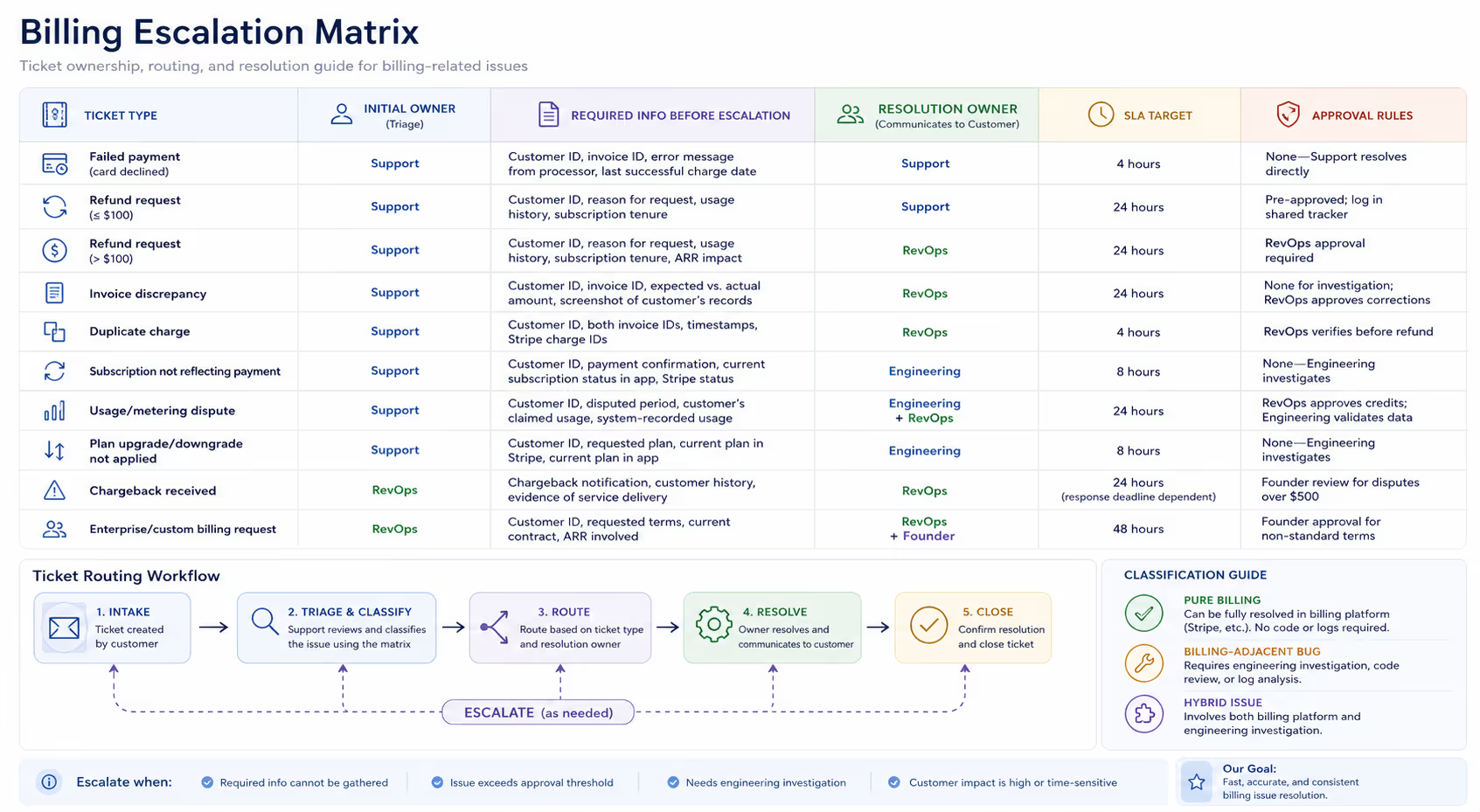
Here is how this framework looks in practice. This matrix assumes a typical small SaaS structure: a support function (which might be one person or an outsourced team), someone handling revenue operations (often a founder or ops lead), and engineering capacity (even if that's also a founder).
The matrix answers five questions for every billing ticket type:
Who owns initial triage?
What information must be gathered before escalation?
Who owns resolution?
What's the SLA target?
What approval rules apply?
The One-Page Matrix
| Ticket Type | Initial Owner | Required Info Before Escalation | Resolution Owner | SLA Target | Approval Rules |
| Failed payment (card declined) | Support | Customer ID, invoice ID, error message from processor, last successful charge date | Support | 4 hours | None—Support resolves directly |
| Refund request (≤$100) | Support | Customer ID, reason for request, usage history, subscription tenure | Support | 24 hours | Pre-approved; log in shared tracker |
| Refund request (>$100) | Support | Customer ID, reason for request, usage history, subscription tenure, ARR impact | RevOps | 24 hours | RevOps approval required |
| Invoice discrepancy | Support | Customer ID, invoice ID, expected vs. actual amount, screenshot of customer's records | RevOps | 24 hours | None for investigation; RevOps approves corrections |
| Duplicate charge | Support | Customer ID, both invoice IDs, timestamps, Stripe charge IDs | RevOps | 4 hours | RevOps verifies before refund |
| Subscription not reflecting payment | Support | Customer ID, payment confirmation, current subscription status in app, Stripe status | Engineering | 8 hours | None—Engineering investigates |
| Usage/metering dispute | Support | Customer ID, disputed period, customer's claimed usage, system-recorded usage | Engineering + RevOps | 24 hours | RevOps approves credits; Engineering validates data |
| Plan upgrade/downgrade not applied | Support | Customer ID, requested plan, current plan in Stripe, current plan in app | Engineering | 8 hours | None—Engineering investigates |
| Chargeback received | RevOps | Chargeback notification, customer history, evidence of service delivery | RevOps | 24 hours (response deadline dependent) | Founder review for disputes over $500 |
| Enterprise/custom billing request | Support | Customer ID, requested terms, current contract, ARR involved | RevOps + Founder | 48 hours | Founder approval for non-standard terms |
How to Read and Use This Matrix
Initial Owner is who triages and gathers information. Even if they won't resolve the ticket, they're responsible for getting everything needed before handoff.
Required Info Before Escalation is non-negotiable. If Support escalates a ticket to Engineering without the Stripe charge IDs, Engineering has to go hunting—wasting time that could have been saved upfront.
Resolution Owner is who actually fixes the problem and communicates the resolution to the customer. Ownership is singular even when collaboration is needed.
SLA Target is your internal commitment. This isn't necessarily what you promise customers externally, but it's the standard your team holds itself to.
Approval Rules define who can authorize financial decisions. This is where small teams often get tripped up—either everything requires founder approval (creating bottlenecks) or nothing does (creating inconsistency).
Implementing Refund Approval Thresholds
Refund approvals are the most common billing decision point, so they deserve extra attention.
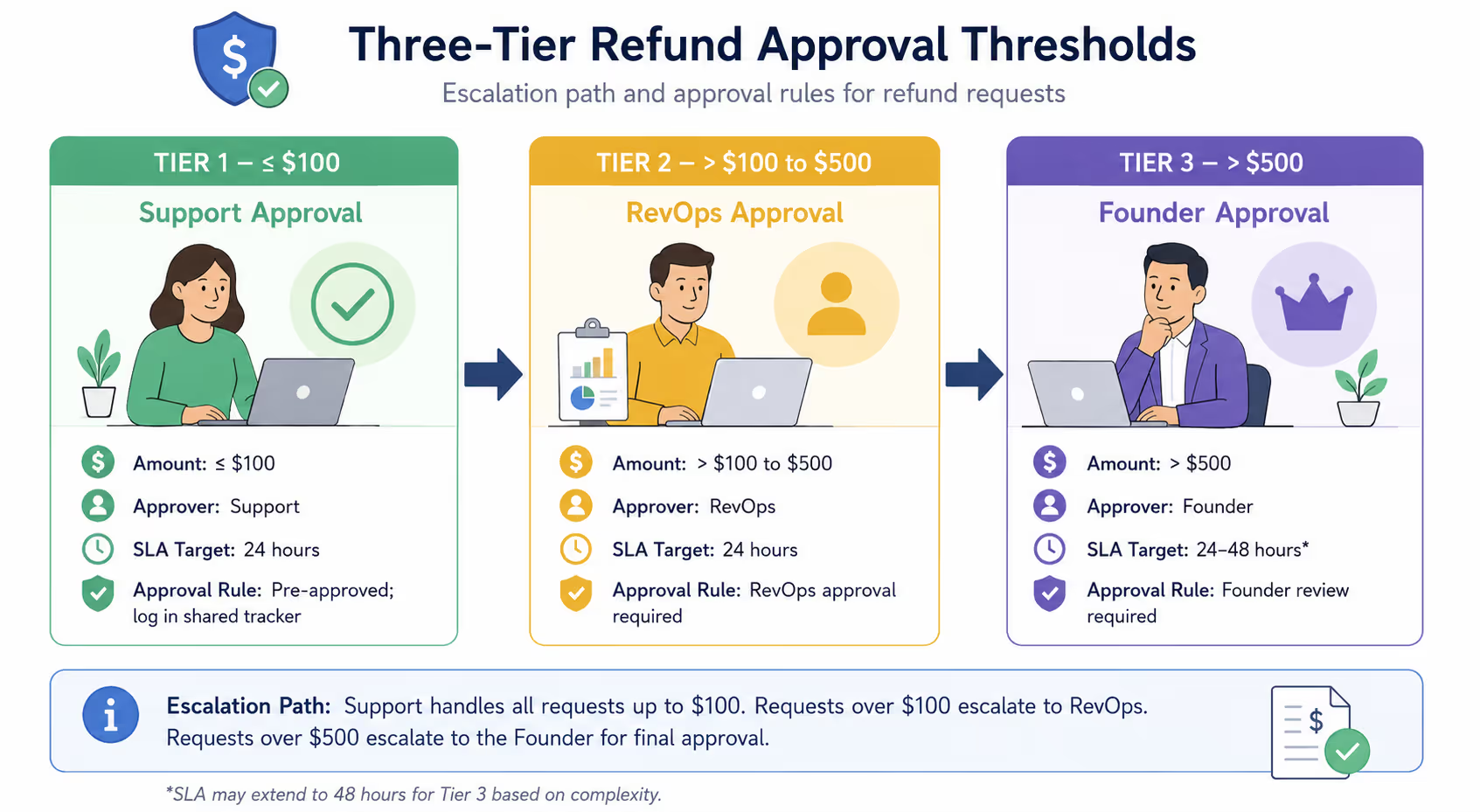
The goal is to empower your support function to resolve most requests quickly while maintaining financial controls for larger amounts. Here's a tiered approach that works for most small SaaS companies:
Tier 1: Auto-Approved (Support resolves directly)
Refunds ≤ $100
Customer tenure < 30 days (trial-period refunds)
Documented service outage affecting the customer
Tier 2: RevOps Approval Required
Refunds $101–$500
Partial refunds for disputed usage
Goodwill credits exceeding one month's subscription value
Tier 3: Founder Approval Required
Refunds > $500
Any refund for annual prepaid subscriptions
Non-standard arrangements (extended trials, custom discounting)
The specific dollar thresholds should match your economics. If your average monthly subscription is $50, a $100 auto-approval threshold covers two months—generous but reasonable. If your average is $500, you might set auto-approval at $250 instead.
Document these thresholds somewhere visible to everyone involved. A shared Notion page, a pinned Slack message, a note in your helpdesk—anywhere that prevents the "I didn't know the policy" excuse.
The RevOps Handoff: Getting It Right
When a ticket needs to move from Support to RevOps, the handoff quality determines whether resolution takes hours or days.
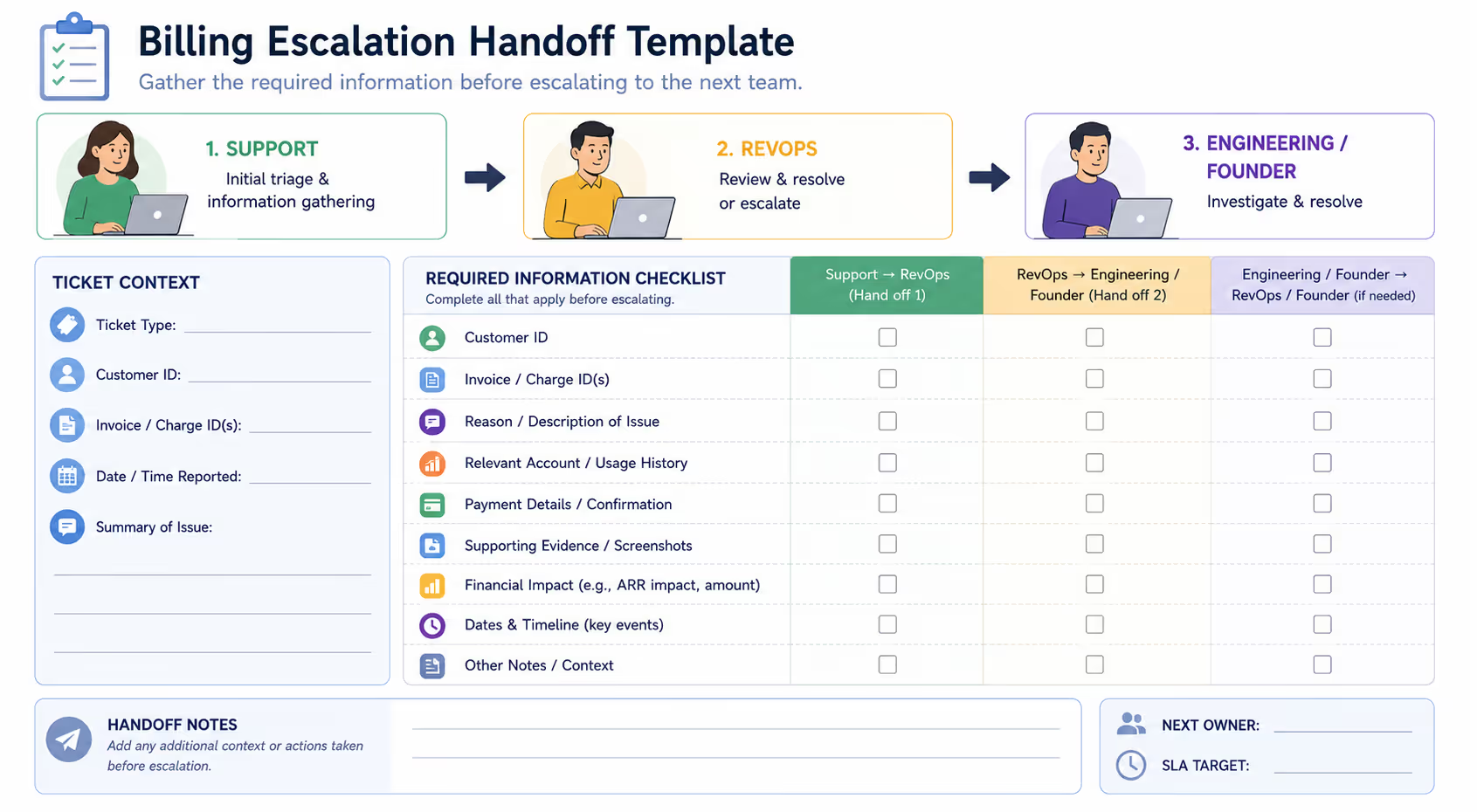
A good escalation message includes:
Context Summary. One or two sentences explaining what happened and why it's being escalated. "Customer reports being charged for a plan upgrade they didn't request. Stripe shows the charge was triggered by our system, not customer action. Needs RevOps verification before refund."
All Required Information. Reference the matrix. Every field in the "Required Info" column should be included in the escalation. Missing information is the #1 cause of handoff delays.
Customer Communication Status. Has the customer been told their issue is being escalated? What was their last message? Are they expecting a follow-up by a specific time?
Recommended Resolution. Support's assessment of what should happen. "I recommend a full refund plus a $20 credit for the inconvenience, pending your approval." This gives RevOps a starting point and speeds decisions.
Making Handoffs Work in Your Helpdesk
Where does this handoff actually happen? The answer depends on your tools, but here are practical options:
In Zendesk or similar helpdesks: Use internal notes for the escalation template, then assign the ticket to your RevOps person or a "Billing-RevOps" queue. Zendesk's side conversations feature lets you loop in RevOps without cluttering the customer-facing thread.
In Intercom: Use private notes and the "assign to teammate" function. Create a saved reply template for billing escalations so your team doesn't have to remember the format.
In Slack (for very small teams): If you don't have a formal helpdesk, a dedicated #billing-escalations channel with a simple workflow can work. Post the escalation details, tag the RevOps owner, and use thread replies to track resolution.
Here's a template you can adapt:
Escalation Type: [Refund Request / Invoice Discrepancy / etc.]
Customer ID: [ID]
Amount Involved: [$X]
Stripe/Payment Reference: [link or ID]
Summary: [What happened]
Required Info: [All gathered data]
Customer Last Contacted: [Date/time]
Recommended Action: [Your suggestion]
This standardization eliminates the back-and-forth of "Wait, what's their Stripe ID?" and "Did you already tell them we're looking into it?"
When Engineering Gets Involved
Billing bugs are a special category. They're stressful for customers ("Am I being overcharged?"), visible to leadership ("Our billing system is broken?"), and often tricky to reproduce.
The Support-to-Engineering handoff requires technical specificity that general support tickets don't:
Reproduction Steps. What did the customer do, and when? Even if you can't reproduce it internally, document the customer's sequence of actions.
System State. What does the database show? What does Stripe show? Where's the mismatch?
Scope Assessment. Is this affecting one customer or potentially many? Engineering needs to know whether they're debugging an edge case or triaging a fire.
Business Impact. For billing issues, always include the financial impact. "This customer was overcharged $47" carries different urgency than "This bug may have overcharged our last 200 signups."
For true billing emergencies—widespread overcharging, subscription downgrades affecting many users, payment processing completely broken—establish a direct escalation path that bypasses normal queue prioritization. A dedicated Slack channel, a phone call, whatever works for your team. Define your emergency criteria in advance so there's no ambiguity when something breaks at 2 AM.
Putting It Into Practice: Two Examples
Example 1: The Confusing Invoice
A customer emails: "My invoice says $149 but I'm supposed to be on the $99 plan. What's going on?"
Step 1: Support Triages. Check the customer's current plan in your app. Check their plan in Stripe. Compare the invoice line items to their subscription record.
Step 2: Classification. The invoice shows $99 base + $50 overage charge for exceeding their usage limit. This isn't a billing error—it's a usage-based charge the customer didn't expect.
Step 3: Resolution Path. This stays with Support. Explain the overage charge clearly. If the customer disputes the usage, escalate to Engineering + RevOps per the matrix (usage/metering dispute). Otherwise, this is a customer education issue that Support resolves directly.
Example 2: The Duplicate Charge
A customer emails: "I was charged twice on June 1st. Please refund the duplicate."
Step 1: Support Triages. Pull both charges from Stripe. Verify they're genuinely duplicates (same amount, same day, same customer) and not, say, a legitimate charge plus a prorated upgrade.
Step 2: Classification. Confirmed duplicate charge. This needs RevOps verification before refund.
Step 3: Handoff. Support escalates with both Stripe charge IDs, screenshots of the duplicate invoices, and a recommendation to refund the duplicate. RevOps verifies and approves. Support processes the refund and communicates to customer.
Step 4: Follow-Up. If duplicates are a new occurrence, flag for Engineering investigation—there may be a webhook or subscription logic issue causing them.
Making the Matrix Work Long-Term
A matrix only works if people actually use it. Here's how to ensure adoption:
Keep It Visible. Pin it in Slack. Add it to your helpdesk as a macro or saved reply. Print it (yes, really) if your team works in person. The matrix you can't find is the matrix you don't follow.
Review Monthly. Set a recurring 15-minute review to ask: What billing tickets were misrouted last month? What new ticket types emerged? Does the matrix need updating?
Track Patterns. If the same billing issues keep appearing, that's a signal. Maybe your pricing page is unclear. Maybe your subscription logic has a bug. Maybe your receipts don't explain charges well. Use your billing ticket data to improve upstream.
Adjust Thresholds Annually. As your business grows and average deal sizes change, revisit your approval thresholds. The $100 auto-approval that made sense at $10K MRR might be too low at $100K MRR.
Let Someone Else Handle the Inbox
Building a billing escalation matrix is straightforward. Actually staffing the support layer that triages, gathers information, and handles Tier-1 resolutions? That's where most founders get stuck.
If you're still the one triaging billing tickets at 6 PM—or worse, letting them sit until "tomorrow"—you know the cost. Every hour spent in the inbox is an hour not spent on product, sales, or strategy.
Evergreen Support provides US-based, human-powered email support for small SaaS and ecommerce teams. We handle Tier-1 billing inquiries, gather the information your RevOps or Engineering teams need, and execute escalations cleanly—so tickets move through your matrix without you babysitting every handoff.
Curious whether outsourcing your support makes sense? Book a call and we'll walk through your current setup together.
Frequently Asked Questions
What if we don't have a dedicated RevOps person?
In most small SaaS teams, "RevOps" is whoever manages your billing platform and financial operations—often a founder or operations lead. The matrix still applies; you're just assigning that role to whoever currently does that work. The key is explicit ownership, not a formal title.
How do we handle billing tickets outside business hours?
Define what "urgent" means for billing. A duplicate charge can usually wait until morning. A payment processing outage affecting all customers cannot. For non-urgent billing tickets, acknowledge receipt with an auto-responder noting your business hours, then resolve within your SLA the next business day.
Should we share our escalation matrix with customers?
Not directly—internal processes don't need to be customer-facing. But your customer communications should reflect the matrix's intent. If a customer's issue needs RevOps approval, tell them "I've escalated this to our billing team and expect to have an answer within 24 hours." Transparency about timelines builds trust.
What's the difference between a billing ticket and a billing emergency?
A billing ticket follows normal queue prioritization. A billing emergency—widespread overcharging, payment system down, incorrect pricing affecting multiple customers—bypasses the queue entirely. Define your emergency criteria in advance and establish a direct escalation path (dedicated Slack channel, phone tree, whatever fits your team) so emergencies get immediate attention.
How do we prevent the same billing issues from recurring?
Track your billing tickets by category. If "subscription status not syncing" appears repeatedly, that's a bug worth prioritizing, not just a series of one-off tickets. Build a feedback loop from Support to Product/Engineering so patterns drive roadmap decisions.
About Evergreen Support
This guide comes from Evergreen Support, a customer support agency built specifically for small SaaS and ecommerce businesses. We're a team of US-based humans (not bots, not scripts) who specialize in email support that sounds like your team—because we become part of it. Our founders built this company after experiencing the exact pain we now solve: great products undermined by support that can't keep up. We handle the inbox so you can handle everything else.


