
You don't have a QA team. You probably don't have a dedicated support manager either. Maybe you're the founder answering tickets between product calls, or a two-person operation where "quality assurance" means hoping nothing blows up.
Here's the thing: you still need a way to know if your support is actually good.
Not "good" in the vague sense of "nobody's screaming at us on Twitter." Good as in: Are we solving problems on the first reply? Do customers feel heard? Are we getting faster or slower? Without some kind of review process, you're flying blind—and small teams can't afford that.
The good news? Customer support QA doesn't require enterprise software, a dedicated manager, or hours of your week.
This guide walks you through exactly how to build that ritual from scratch.
What "QA" Actually Means for Small Support Teams
Quality assurance sounds corporate. It conjures images of call center supervisors with clipboards and color-coded spreadsheets. But at its core, QA is just answering one question: Are we helping customers the way we intend to?
For a small team, that breaks down into a few practical sub-questions:
Are replies accurate and complete?
Do they sound like us (brand voice, tone)?
Are we resolving issues efficiently—or creating unnecessary back-and-forth?
Are customers actually satisfied after interacting with us?
Traditional QA programs review hundreds of tickets weekly with multiple reviewers and statistical sampling. You don't need that. What you need is a lightweight system that catches patterns before they become problems.
Think of it like a weekly health check, not an annual physical. You're looking for early warning signs—a reply that missed the mark, a process that's creating friction, a knowledge gap that keeps appearing—so you can fix them while they're small.
The 30-Minute Weekly QA Ritual
Here's a simple framework that works for teams of one to five people. The entire process takes about 30 minutes per week and produces actionable insights without creating busywork.
Step 1: Pull Your Sample (5 Minutes)
You don't need to review every ticket. You need a representative sample that's small enough to actually review and large enough to spot patterns.
For teams handling fewer than 100 tickets per week: Review 5-10 tickets, randomly selected across the week.
For teams handling 100-300 tickets per week: Review 10-15 tickets, ensuring you capture different days and different issue types.
Selection method matters. Don't just grab the most recent tickets—you'll over-index on whatever happened yesterday. Instead, pull tickets from throughout the week. Most helpdesk tools let you export or filter by date range. If yours doesn't, manually pick one ticket from Monday, one from Wednesday, one from Friday, and so on.
Include at least one "edge case." Beyond your random sample, deliberately include one or two tickets that felt tricky when you handled them. These often reveal the most useful insights about process gaps or unclear policies.
Step 2: Score Each Ticket Against Your Rubric (15 Minutes)
A rubric sounds formal, but it's really just a checklist of what "good" looks like for your team. Without one, you're evaluating tickets based on vibes—and vibes are inconsistent.
A minimal viable QA rubric has four categories:
1. Accuracy (Did we give correct information?)
All facts, policies, and instructions were correct
No misleading or outdated information
If uncertain, we acknowledged uncertainty appropriately
2. Completeness (Did we fully address the issue?)
Answered all questions the customer asked
Anticipated obvious follow-up questions
Provided clear next steps where relevant
3. Tone and Voice (Did we sound like us?)
Matched the appropriate level of formality
Showed empathy where the situation called for it
Maintained brand voice without sounding robotic
4. Efficiency (Did we resolve this well?)
Minimized unnecessary back-and-forth
Used appropriate resources (templates, knowledge base) effectively
Response was timely relative to our standards
For each ticket, rate these four categories on a simple 1-3 scale:
3 = Met expectations (solid, no issues)
2 = Partially met (minor gaps, room for improvement)
1 = Did not meet (significant problem, needs follow-up)
Don't overthink the scoring. The goal isn't statistical precision—it's spotting patterns. If you're debating between a 2 and a 3, pick one and move on.
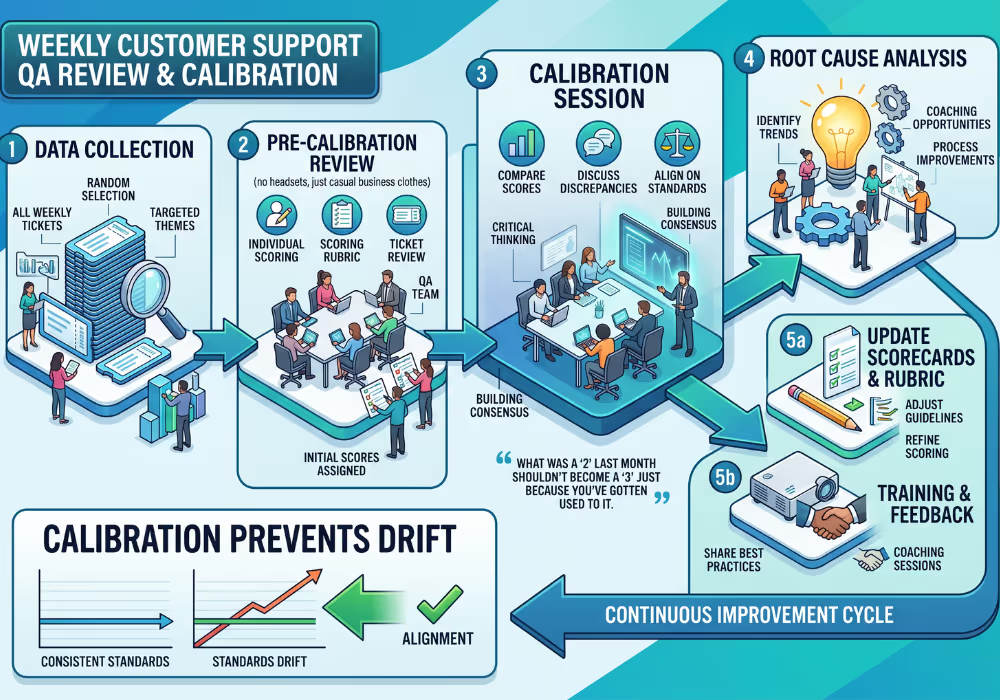
Step 3: Hold a Calibration Chat (10 Minutes)
If you're a team of one, this is a brief self-reflection. If you're two or more people, this is a quick sync—ideally live, but async works too.
The calibration chat answers three questions:
What patterns did we see this week?
Look across your scored tickets. Did accuracy scores dip? Were several tickets missing the same information? Did tone feel off in a particular type of conversation?
Patterns matter more than individual scores. One ticket with a tone issue is a one-off. Three tickets with tone issues around refund requests is a process problem.
What's one thing we should do differently next week?
Be specific. "Be better at tone" isn't actionable. "When handling shipping delay complaints, lead with empathy before explaining the timeline" is actionable.
Pick one thing. Small teams improve by stacking small changes, not implementing sweeping overhauls.
Did we score consistently?
This is the "calibration" part. If two people reviewed the same ticket, would they score it similarly? If you're reviewing your own work, are you being honest or generous with yourself?
Calibration prevents standards from drifting over time. What was a "2" last month shouldn't become a "3" just because you've gotten used to it.
Building Your QA Rubric From Scratch
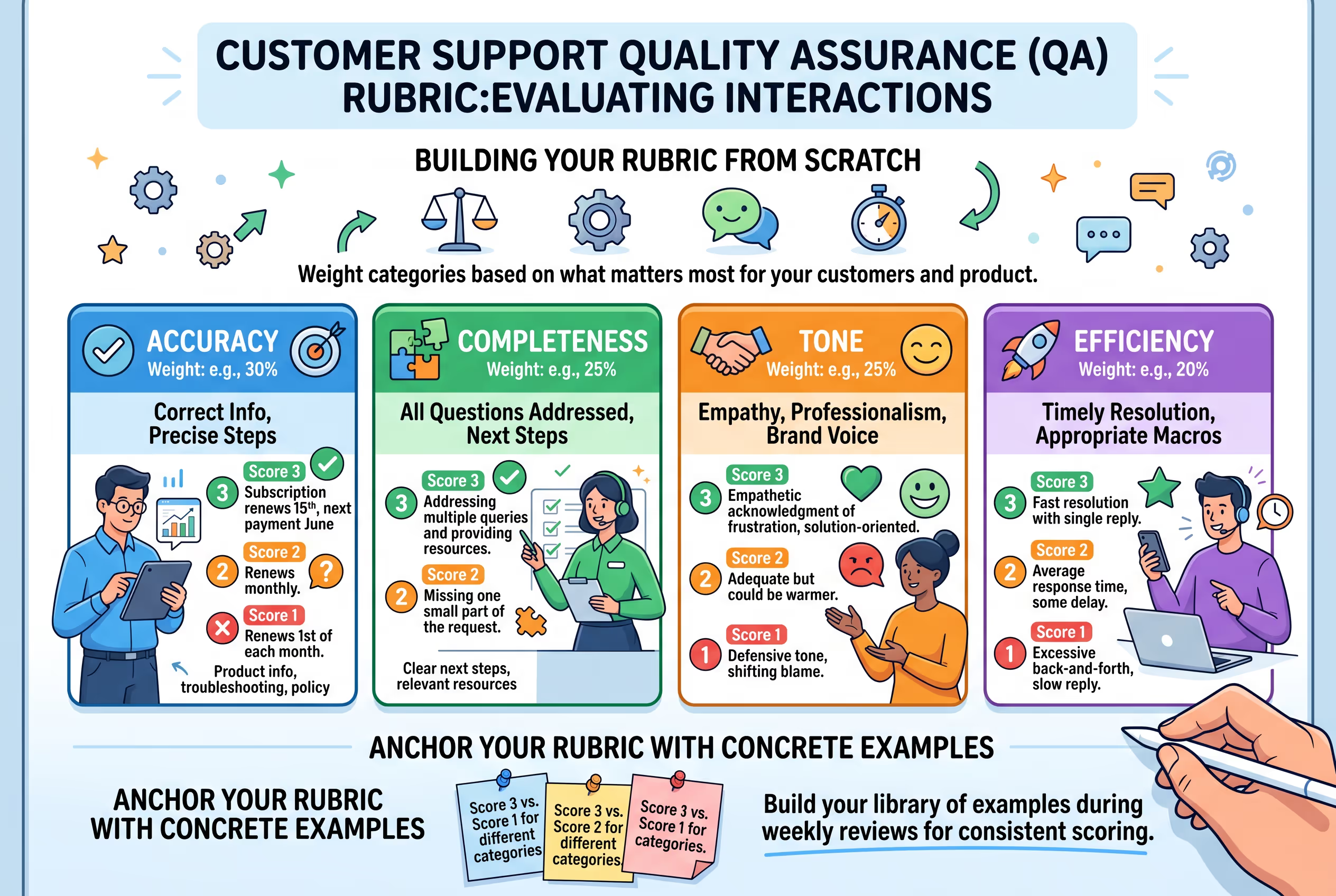
The four-category rubric above is a starting point. Your actual rubric should reflect what matters most for your customers and your product.
Start With Your Biggest Failure Modes
Think about the last few customer complaints or internal frustrations. What went wrong?
If customers frequently say replies don't answer their actual question, weight completeness heavily. If your product is technical and wrong information causes real problems, accuracy is paramount. If you're building a brand that competes on warmth and personality, tone deserves extra attention.
Example rubric for a SaaS company:
| Category | Weight | What We're Looking For |
| Accuracy | 30% | Correct product information, accurate troubleshooting steps, proper policy application |
| Completeness | 25% | All customer questions addressed, clear next steps provided, relevant resources linked |
| Tone | 25% | Friendly but professional, empathetic acknowledgment of frustration, brand voice consistent |
| Efficiency | 20% | Single-reply resolution where possible, appropriate use of macros, timely response |
Example rubric for an e-commerce brand:
| Category | Weight | What We're Looking For |
| Accuracy | 25% | Order details correct, shipping/return policies accurately stated, inventory info current |
| Completeness | 20% | Order status fully explained, all questions answered, proactive updates where relevant |
| Tone | 35% | Warm and personal, reflects brand personality, makes customer feel valued |
| Efficiency | 20% | Fast resolution, appropriate compensation where warranted, minimal back-and-forth |
Notice how the weights shift based on what matters most. There's no universal "correct" distribution—it depends on your business.
Document Specific Examples
Generic criteria like "shows empathy" are hard to apply consistently. Anchor your rubric with concrete examples of what each score looks like.
Accuracy example:
Score 3: "Your subscription renews on the 15th of each month. I've confirmed your next payment is scheduled for June 15th."
Score 2: "Your subscription renews monthly." (Correct but incomplete—didn't confirm specific date when customer asked)
Score 1: "Your subscription renews on the 1st of each month." (Incorrect date provided)
Tone example:
Score 3: "I completely understand how frustrating it is when your order doesn't arrive as expected. Let me look into this and get you sorted out right away."
Score 2: "Sorry about that. Here's what happened with your order." (Adequate but could be warmer)
Score 1: "Your order was delayed because of the carrier. There's nothing we can do about that." (Defensive, lacks empathy)
Building this example library takes time, but it makes scoring dramatically faster and more consistent. Add examples as you encounter good illustrations during your weekly reviews.
Using CSAT Comments to Guide Your QA Focus
If you collect customer satisfaction feedback—even simple thumbs up/down or a one-question survey—you have a goldmine for QA.
The CSAT Comment Analysis Loop
Once a week (can be part of your 30-minute ritual), review the free-text comments from dissatisfied customers. Not the scores—the comments.
Look for phrases that indicate specific failures:
"Didn't answer my question" → Completeness issue
"Felt like I was talking to a robot" → Tone issue
"They gave me wrong information" → Accuracy issue
"Took five emails to resolve" → Efficiency issue
These comments tell you where to focus your rubric attention. If customers keep saying "I felt like no one was listening," your calibration chat needs to address active listening and paraphrasing, even if your internal scores look fine.
Cross-Reference Comments With Reviewed Tickets
When a ticket receives negative feedback, pull it into your weekly sample specifically. Score it against your rubric, then compare your internal assessment to the customer's perception.
This reveals blind spots. Maybe you scored a ticket "3" on completeness, but the customer said they had to follow up twice. Either the customer's experience was different than what the ticket shows, or your completeness standard needs adjustment.
The customer's perception is the reality that matters. QA exists to improve their experience, not to generate satisfying internal metrics.
Common QA Pitfalls for Small Teams
The "We Don't Have Time" Trap
You're right that you don't have hours to spend on QA. That's why this ritual is 30 minutes per week.
But here's what happens when you skip QA entirely: problems compound silently. That slightly confusing refund process creates two extra emails per ticket. That knowledge gap makes every billing question take twice as long. Those inefficiencies cost you far more than 30 minutes per week—you just don't see them because you're not measuring.
The ritual isn't overhead. It's how you spot inefficiencies before they eat your week.
The Self-Review Bias Problem
If you're reviewing your own tickets (common in teams of one or two), you'll naturally be generous with yourself. You remember the context, you know what you meant to say, you give yourself credit for intent.
Combat this by:
Reviewing tickets at least a few days after you wrote them (fresh eyes)
Asking "What would I think if a customer showed me this reply?"
Having a teammate occasionally blind-review tickets you wrote, and vice versa
The "We Need Software" Delay
Dedicated QA tools like Klaus, MaestroQA, or Scorebuddy are excellent—for teams that have the volume and budget to justify them. If you're handling a few hundred tickets per week with a small team, a spreadsheet works fine.
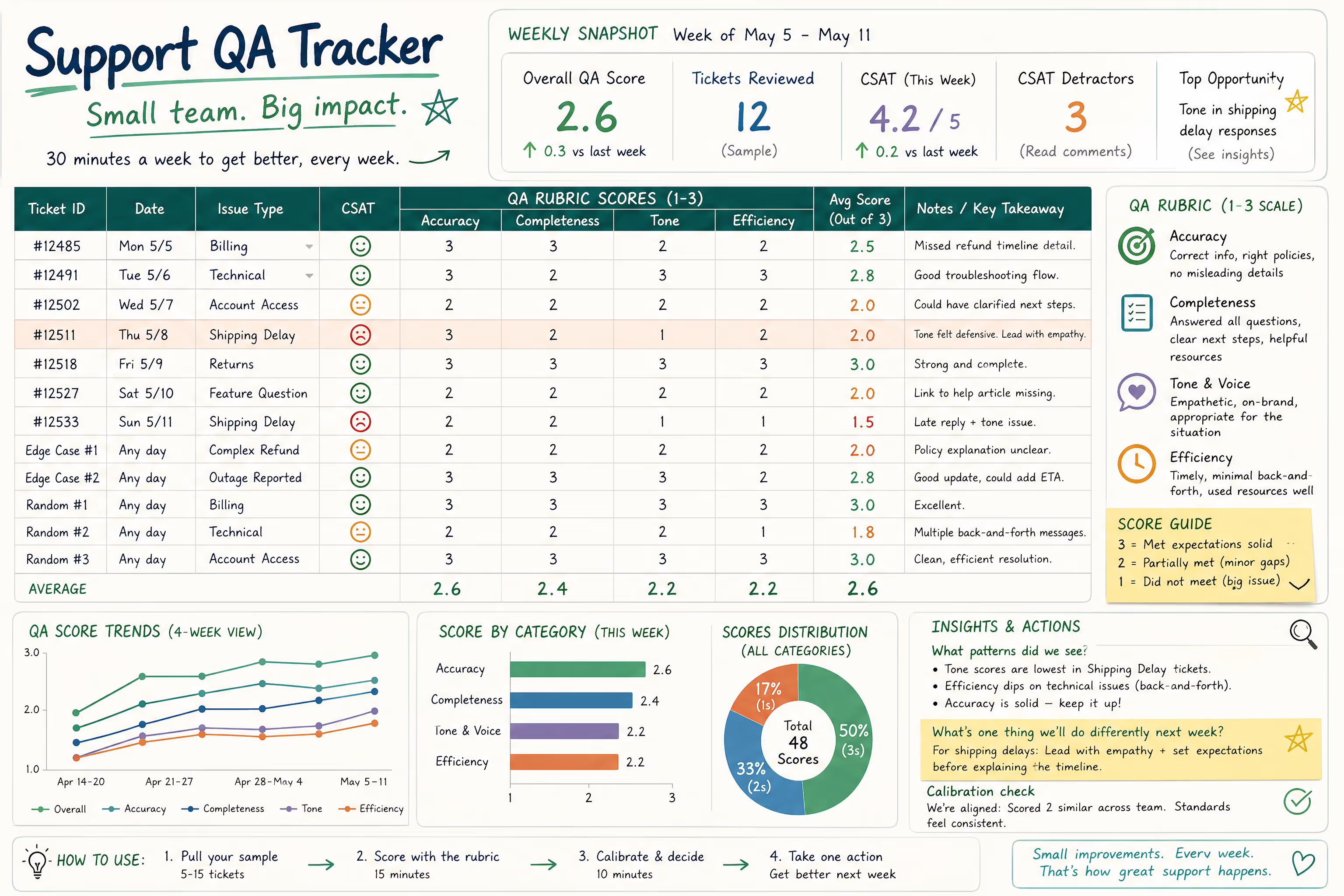
Simple QA tracking setup:
Create a spreadsheet with columns for:
Ticket ID or link
Date reviewed
Agent (if applicable)
Accuracy score (1-3)
Completeness score (1-3)
Tone score (1-3)
Efficiency score (1-3)
Notes/patterns observed
Review this spreadsheet monthly. Are scores trending up or down? Is one category consistently lower than others? Are certain issue types scoring worse?
You can always upgrade to dedicated software later. Don't let "we need to pick the right tool" delay implementing any QA process.
Scaling the Ritual as Your Team Grows
This 30-minute process works for teams of one to five. As you grow beyond that, you'll need to evolve—but the core principles remain.
At 5-10 people: Consider having team leads review tickets from their direct reports. Calibration becomes more important—hold monthly calibration sessions where multiple reviewers score the same tickets and discuss differences.
Beyond 10 people: A dedicated QA role or shared QA responsibility starts making sense. The weekly ritual becomes a daily habit distributed across reviewers.
But even at larger scale, the foundational elements stay the same: random sampling, consistent rubric, regular calibration, action-oriented follow-up.
Your Next Step
You can implement this entire process this week. Here's the sequence:
Today: Draft your rubric (use the four categories above as a starting point)
This week: Pull 5-10 tickets and score them
End of week: Hold your first calibration chat (even if it's with yourself)
Next week: Repeat, focusing on one improvement area from your calibration
Thirty minutes per week. No manager required. No enterprise software needed.
The teams that maintain quality as they scale are the ones that build habits early—before "we should probably review some tickets" becomes "we have no idea if our support is any good."
If tracking quality, coaching your team, and maintaining consistency sounds like exactly what you need but not what you have time to manage—that's what Evergreen Support does for small SaaS and ecommerce teams. Our managed email support includes QA review and calibration as part of the service. Book a call to see if it's a fit.
Frequently Asked Questions
How many tickets should I review each week?
For most small teams handling under 300 tickets weekly, reviewing 5-15 tickets provides enough signal without overwhelming you. The key is consistency—reviewing the same number each week lets you spot trends. If your volume is under 50 tickets per week, reviewing 5 tickets gives you roughly 10% coverage, which is more than adequate for pattern detection.
What if I'm a solo founder reviewing my own support work?
Self-review is better than no review. Wait at least three days before reviewing your own tickets so you're reading them with fresh eyes. Be honest about gaps—the goal isn't to prove you're doing great, it's to catch issues before customers do. If possible, ask a trusted advisor or peer to occasionally review a handful of tickets for a calibration check.
Should I tell my team I'm doing QA reviews?
Absolutely. QA shouldn't feel like surveillance—it should feel like coaching. Frame it as "we're building a system to help us all get better" rather than "I'm checking up on you." Share the rubric openly, include team members in calibration discussions, and celebrate improvements. Secretive QA breeds resentment; transparent QA builds skills.
How do I handle a ticket that scores poorly?
One low-scoring ticket isn't cause for alarm—it's a coaching opportunity. Discuss it in your calibration chat with curiosity rather than blame: "What was happening here? Was this a knowledge gap, a process gap, or just a rough day?" If the same issue appears multiple times, address it systematically with better templates, documentation, or training.
What's more important: QA scores or CSAT scores?
They measure different things. QA scores reflect whether replies meet your internal standards; CSAT scores reflect whether customers felt satisfied. Ideally, they correlate—high QA scores should predict high CSAT. If they diverge (high internal scores but low customer satisfaction), your rubric needs adjustment. Customer perception is the ultimate benchmark.
About Evergreen Support
Evergreen Support provides human-powered email support for small SaaS and e-commerce businesses across the US, UK, and Europe. Founded by Emma Fletcher and Ellis Annichine after experiencing the support challenges of small teams firsthand, Evergreen helps founders reclaim their time while maintaining the personal touch their customers expect. Every team member is US-based, and the service includes quality review and process documentation—so you're not just getting ticket coverage, you're getting a partner invested in making your support genuinely excellent.
Works Cited
Support Driven — "The Support QA Starter Guide." https://supportdriven.com/
Nicereply — "Customer Satisfaction Measurement Best Practices." https://www.nicereply.com/
Klaus — "Quality Assurance for Customer Service Teams." https://www.klausapp.com/