
Last Tuesday at 11pm, a founder I know was still in her inbox. Not because she wanted to be—but because a billing dispute had bounced between her, her part-time VA, and her co-founder for three days. Nobody knew who owned the decision. The customer was furious. And she was supposed to be on vacation.
The problem wasn't her team. It was the absence of clear escalation rules telling everyone exactly when to pass an issue up, who receives it, and what information needs to travel with it. Without those guardrails, tickets ping-pong between people, response times balloon, and customers feel ignored.
An escalation policy fixes this. It's a documented set of triggers and handoff procedures that route complex issues to the right person—fast. For small SaaS and ecommerce teams handling email support, a well-designed escalation policy can dramatically cut resolution time and keep founders from getting pulled into every tricky ticket.
Research backs this up: according to Zendesk's 2023 CX Trends Report, 72% of customers expect immediate service, and tickets that require multiple handoffs take significantly longer to resolve, directly impacting satisfaction scores [1]. Clear escalation paths eliminate guesswork and reduce those costly back-and-forth exchanges.
Below, you'll find three ready-to-use escalation policy blueprints built specifically for small online businesses. Each includes concrete triggers, sample handoff language, and internal SLA guidance you can adapt in an afternoon.
What an Escalation Policy Actually Does
An escalation policy is your team's decision tree for handling issues that fall outside routine support. It answers three questions:
When should a ticket move to someone else?
Who receives it?
What information must travel with it?
Without documented escalation triggers, support agents either guess (causing delays) or escalate everything (overwhelming decision-makers). Neither serves your customers well.
A strong policy creates predictable handoffs. The frontline agent knows exactly which situations warrant escalation. The receiving party gets a consistent, complete handoff note every time. And the customer experiences a seamless transition instead of repeating their story.
For small teams especially, escalation policies prevent the founder from becoming a bottleneck. When every complex issue lands in your lap by default, you can't focus on product, marketing, or growth. Clear escalation criteria let your support team handle more independently while protecting your time for issues that genuinely require your input.
Escalation Policy vs. Escalation Matrix: What's the Difference?
You might hear these terms used interchangeably, but they serve slightly different purposes:
An escalation policy defines the rules, triggers, and procedures for when and how issues get escalated. It's the "operating manual" for handoffs.
An escalation matrix is typically a visual reference chart showing who handles what type of issue at each tier—often displayed as a grid mapping issue categories to responsible parties.
Think of the policy as the full playbook; the matrix is the quick-reference cheat sheet your team keeps pinned in Slack. The blueprints below give you both: detailed policies you can adapt, plus summary formats you can turn into at-a-glance matrices.
Core Components of Every Escalation Policy
Before diving into specific blueprints, here's the anatomy of an effective escalation policy:
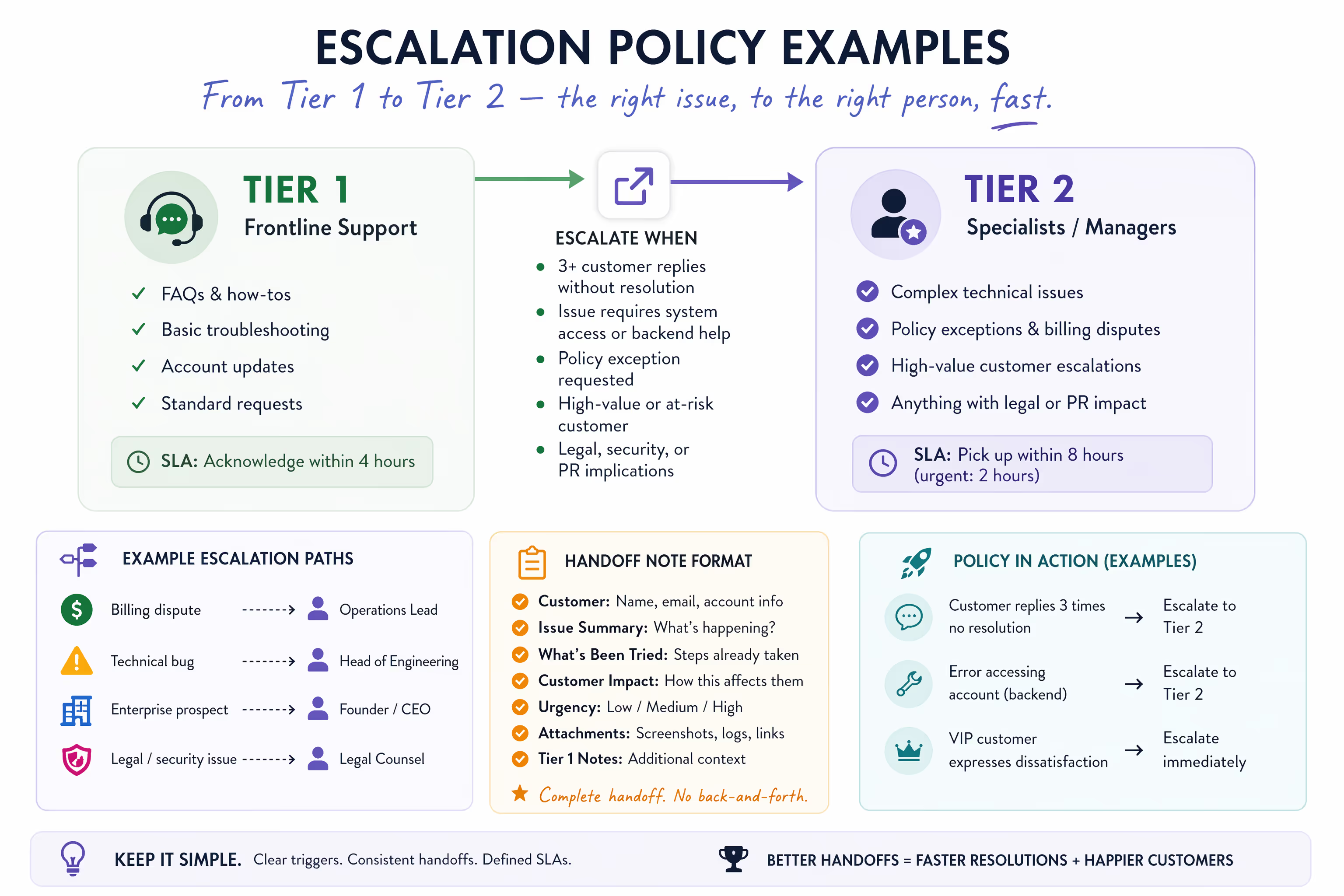
Escalation Triggers
These are the specific conditions that prompt a handoff. Triggers should be concrete and observable—not judgment calls that require interpretation. "Customer seems upset" is vague. "Customer has replied three or more times without resolution" is actionable.
Escalation Tiers
Most small teams need just two tiers:
Tier 1: Frontline support handles routine inquiries, FAQs, basic troubleshooting, and standard requests.
Tier 2: Specialists, managers, or founders handle technical issues requiring system access, policy exceptions, high-value customers, or anything with legal or PR implications.
Handoff Note Format
Consistency matters. Every escalation should include the same core information so the receiving party can act immediately. A standardized format eliminates "let me look into this" delays.
Internal SLAs
Response time expectations for escalated tickets. If Tier 1 acknowledges customer emails within four hours, what's the target for Tier 2 to pick up an escalated issue? Define this explicitly.
Escalation Paths
Who receives what type of escalation? A billing dispute might go to your operations lead. A feature request from an enterprise prospect might go directly to the founder. Map these paths in advance.
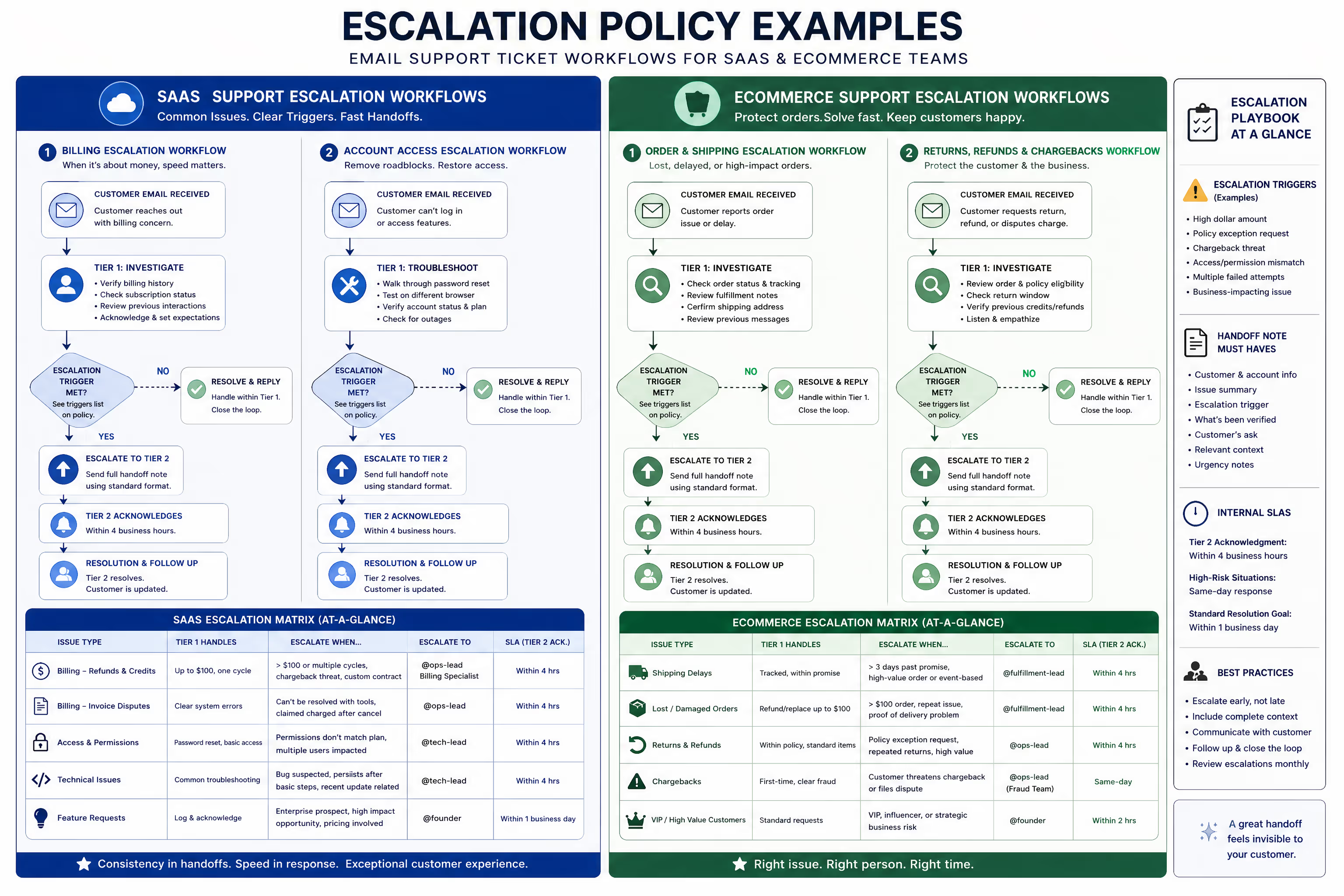
Blueprint 1: SaaS Billing Escalation Policy
Billing issues create friction fast. A customer who can't access what they paid for—or who sees an unexpected charge—isn't in the mood for delays. This blueprint handles the most common SaaS billing scenarios.
Escalation Triggers
Escalate to Tier 2 (billing specialist or founder) when any of the following occur:
Refund request exceeds $100 or involves more than one billing cycle
Customer disputes a charge and mentions filing a chargeback or contacting their bank
Subscription involves a custom contract, enterprise pricing, or negotiated terms
Customer claims they were charged after canceling
Invoice discrepancy cannot be resolved with standard billing system tools
Customer requests a pricing exception, extended trial, or payment plan
Account shows conflicting subscription states across systems (payment processor vs. application)
Tier 1 Responsibilities
Before escalating, Tier 1 should:
Verify the customer's billing history in your payment processor
Confirm current subscription status and most recent charge
Check for any pending refunds or credits already processed
Review the customer's previous support interactions regarding billing
Acknowledge the customer's concern and set expectations for next steps
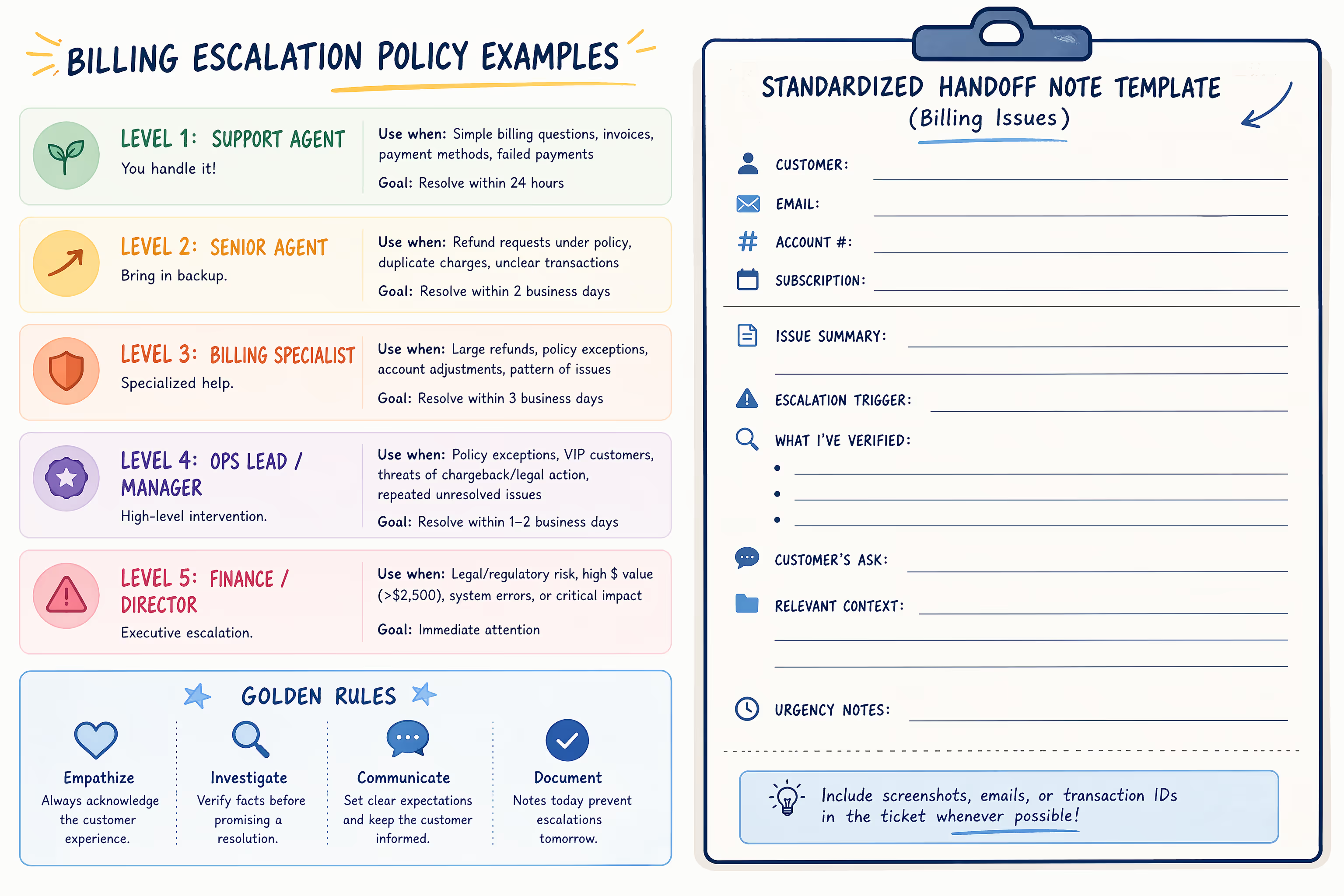
Handoff Note Format
When escalating, use this standardized format:
ESCALATION: Billing Issue
Customer: [Name, email, account ID]
Subscription: [Plan name, monthly/annual, price point]
Issue Summary: [One sentence describing the core problem]
Escalation Trigger: [Which specific trigger applies]
What I've Verified:
Current subscription status: [Active/Canceled/Past Due]
Last charge: [Date, amount]
Refund history: [Any previous refunds or credits]
Customer's Ask: [Exactly what the customer wants]
Relevant Context: [Any additional details that might affect the decision]
Urgency Notes: [Chargeback deadline, customer sentiment, etc.]
Sample Escalation Message (Internal)
Escalating to @ops-leadCustomer: Sarah Chen, sarah@company.com, Account #4521Subscription: Pro Plan, Annual, $588Issue Summary: Customer was charged for annual renewal after requesting cancellation via email last month.Escalation Trigger: Customer claims charged after cancelingWhat I've Verified:Current subscription status: Active (renewed 3 days ago)Last charge: June 12, $588Refund history: NoneCustomer's Ask: Full refund of $588 annual chargeRelevant Context: I found an email from the customer on May 28 asking to cancel. No record of cancellation being processed. Customer has been with us 2 years.Urgency Notes: Customer mentioned disputing the charge with their bank if not resolved by Friday.
Sample Acknowledgment to Customer
While the escalation happens internally, the customer should receive a prompt response:
Hi Sarah,Thank you for reaching out about this charge. I can see how frustrating it would be to see a renewal after requesting cancellation.I've reviewed your account and found your cancellation email from May 28. I'm escalating this to our billing team now so they can process your refund as quickly as possible.You can expect to hear back from us within one business day with a resolution. I'll make sure this gets the attention it needs.Thanks for your patience,[Agent Name]
Internal SLA Guidelines
| Situation | Target Response Time |
| Tier 2 acknowledgment | Within 4 business hours |
| Standard billing issues | Resolution within 1 business day |
| Chargeback-risk situations | Same-day response required |
Blueprint 2: SaaS Account Access Escalation Policy
When customers can't log in or access features they're paying for, urgency is high. Access issues often require backend intervention that frontline support can't perform. This blueprint routes those tickets efficiently.
Escalation Triggers
Escalate to Tier 2 (technical lead or founder) when any of the following occur:
Customer cannot log in after standard troubleshooting (password reset, cache clear, incognito test)
Account shows access permissions that don't match the customer's subscription tier
Customer reports features or data missing that should exist based on their plan
Issue affects multiple users on the same account or organization
Problem persists across multiple devices and browsers
Customer is locked out due to two-factor authentication issues your Tier 1 team cannot resolve
Access issue coincides with a recent system update or migration
Customer indicates the access issue is blocking critical business operations
Tier 1 Responsibilities
Before escalating, Tier 1 should:
Confirm the customer's subscription tier and expected feature access
Walk through standard troubleshooting (password reset, different browser, clearing cache)
Verify the account isn't suspended, past due, or in a trial-expired state
Check your status page or internal channels for known outages
Document the specific error messages or behaviors the customer encounters
Note the customer's browser, device, and operating system if relevant
Handoff Note Format
ESCALATION: Account Access Issue
Customer: [Name, email, account ID]
Subscription: [Plan name, expected access level]
Issue Summary: [One sentence describing what the customer cannot access]
Escalation Trigger: [Which specific trigger applies]
Troubleshooting Completed:
Password reset: [Yes/No, result]
Different browser tested: [Yes/No, result]
Cache cleared: [Yes/No, result]
Account status verified: [Active/Suspended/etc.]
Known outages checked: [Yes/No, any relevant info]
Error Details: [Exact error message or behavior]
Environment: [Browser, device, OS if collected]
Business Impact: [How this affects the customer's operations]
Sample Escalation Message (Internal)
Escalating to @tech-leadCustomer: Marcus Webb, marcus@startup.io, Account #7832Subscription: Team Plan, 5 seatsIssue Summary: Customer's admin account cannot access team management features available on Team Plan.Escalation Trigger: Account shows access permissions that don't match subscription tierTroubleshooting Completed:Password reset: Yes, successful loginDifferent browser tested: Yes, same issue in Chrome and FirefoxCache cleared: Yes, no changeAccount status verified: Active, paid through AugustKnown outages checked: Yes, none reportedError Details: When clicking "Team Settings," customer sees "Upgrade to access this feature" despite being on Team Plan.Environment: Chrome 125, macOS SonomaBusiness Impact: Customer is trying to add new team member today for a project launch tomorrow.
Sample Acknowledgment to Customer
Hi Marcus,I understand how frustrating it is to hit a roadblock when you're trying to manage your team—especially with a project launch coming up.I've verified your account is on our Team Plan with full access to team management features. The "Upgrade" prompt you're seeing shouldn't appear, so I'm escalating this to our technical team for immediate investigation.Given your timeline, I've flagged this as urgent. Someone will follow up within the next few hours with an update or resolution.In the meantime, if you can share the email address of the team member you're trying to add, we may be able to add them directly on our end to unblock your launch.Thanks for your patience,[Agent Name]
Internal SLA Guidelines
| Situation | Target Response Time |
| Tier 2 acknowledgment | Within 2 business hours |
| Business-critical access issues | Response within 1 hour during business hours |
| Resolution target | Within 4 business hours for issues blocking customer operations |
Blueprint 3: Ecommerce Refunds and Shipments Escalation Policy
For ecommerce businesses, shipping delays and refund disputes are daily occurrences. Most can be handled at Tier 1 with clear policies. But some situations—high-value orders, suspected fraud, carrier disputes—require escalation. This blueprint sorts them out.
Escalation Triggers
Escalate to Tier 2 (operations lead or founder) when any of the following occur:
Refund-Related:
Refund request exceeds your standard threshold (define this—commonly $150-$250)
Customer requests refund outside your stated return window
Item was marked "final sale" or excluded from standard return policy
Customer claims item arrived damaged but photos show unclear evidence
Suspected fraud indicators (new account, expedited shipping to different address, high-value items)
Customer threatens legal action or public complaint
Shipping-Related:
Package shows delivered but customer claims non-receipt for order over $100
Carrier dispute requires filing a claim
International shipment is held in customs
Order requires reshipping at company expense due to our error
Shipping delay exceeds 7 business days past estimated delivery with no carrier update
Customer requests shipping to address different from billing after order placed
Tier 1 Responsibilities
Before escalating, Tier 1 should:
Verify the order details, shipping address, and carrier tracking
Review the customer's order history and previous support interactions
Check tracking for actual status and any exception notes
Confirm the order value and applicable return policy
Document what the customer is requesting and any photos or evidence provided
For "delivered but not received" claims, confirm delivery address matches order
Handoff Note Format
ESCALATION: [Refund Request / Shipping Issue]
Customer: [Name, email, customer ID]
Order: [Order number, date, total value]
Items: [Product names, quantities, individual prices]
Shipping Status: [Current tracking status, carrier, tracking number]
Issue Summary: [One sentence describing the core problem]
Escalation Trigger: [Which specific trigger applies]
What I've Verified:
Order history: [Number of previous orders, any past issues]
Tracking details: [Last scan, expected delivery, exceptions]
Return policy applies: [Yes/No, why]
Customer's Ask: [Exactly what the customer wants]
Evidence Provided: [Photos, screenshots, or documentation customer supplied]
Risk Assessment: [Fraud indicators, chargeback likelihood, social media presence]
Sample Escalation Message (Internal)
Escalating to @ops-leadCustomer: Jennifer Martinez, jen.m@email.com, Customer #12847Order: #ORD-89234, June 8, $312.00Items: 2x Premium Wireless Earbuds ($129 each), 1x Charging Case ($54)Shipping Status: Delivered June 11 per USPS, signed by "J MARTINEZ"Issue Summary: Customer claims package was not received despite tracking showing delivery with signature.Escalation Trigger: Package shows delivered but customer claims non-receipt for order over $100What I've Verified:Order history: First-time customer, no previous ordersTracking details: Delivered to front door, signature on file matches customer nameReturn policy applies: N/A, customer claims non-receiptCustomer's Ask: Full refund or replacement shipmentEvidence Provided: None yet—I asked for any photos of delivery areaRisk Assessment: Signature matches customer name, which is unusual for theft scenarios. First-time customer with high-value order to apartment complex. Recommend contacting carrier for GPS delivery coordinates before deciding.
Sample Acknowledgment to Customer
Hi Jennifer,I'm sorry to hear your order hasn't arrived as expected. I can see how concerning it is when tracking shows delivery but the package isn't there.I've reviewed the tracking, which shows a delivery with signature on June 11. To help resolve this, I'm escalating to our shipping team so we can investigate further with the carrier.In the meantime, it would help to know:Have you checked with neighbors or building management?Does your building have a package room or locker system?Would you be able to send a photo of your typical delivery area?We'll follow up within one business day with next steps. I want to make sure we get this sorted out for you.Thanks,[Agent Name]
Internal SLA Guidelines
| Situation | Target Response Time |
| Tier 2 acknowledgment | Within 4 business hours |
| High-value orders or fraud-risk situations | Response within 2 business hours |
| Resolution target | Within 2 business days (may depend on carrier investigation timelines) |
| Chargebacks or legal threats | Same-day response required |
Implementing Your Escalation Policy in Your Helpdesk
Having a policy document is one thing. Getting your team to use it consistently is another. Here's how to make these blueprints stick—including practical ways to build them into the tools you already use.
Start With Your Highest-Volume Pain Points
Don't implement all three blueprints at once. Identify which category generates the most escalation friction for your team right now. Start there, refine it for a few weeks, then expand.
Make Triggers Visible
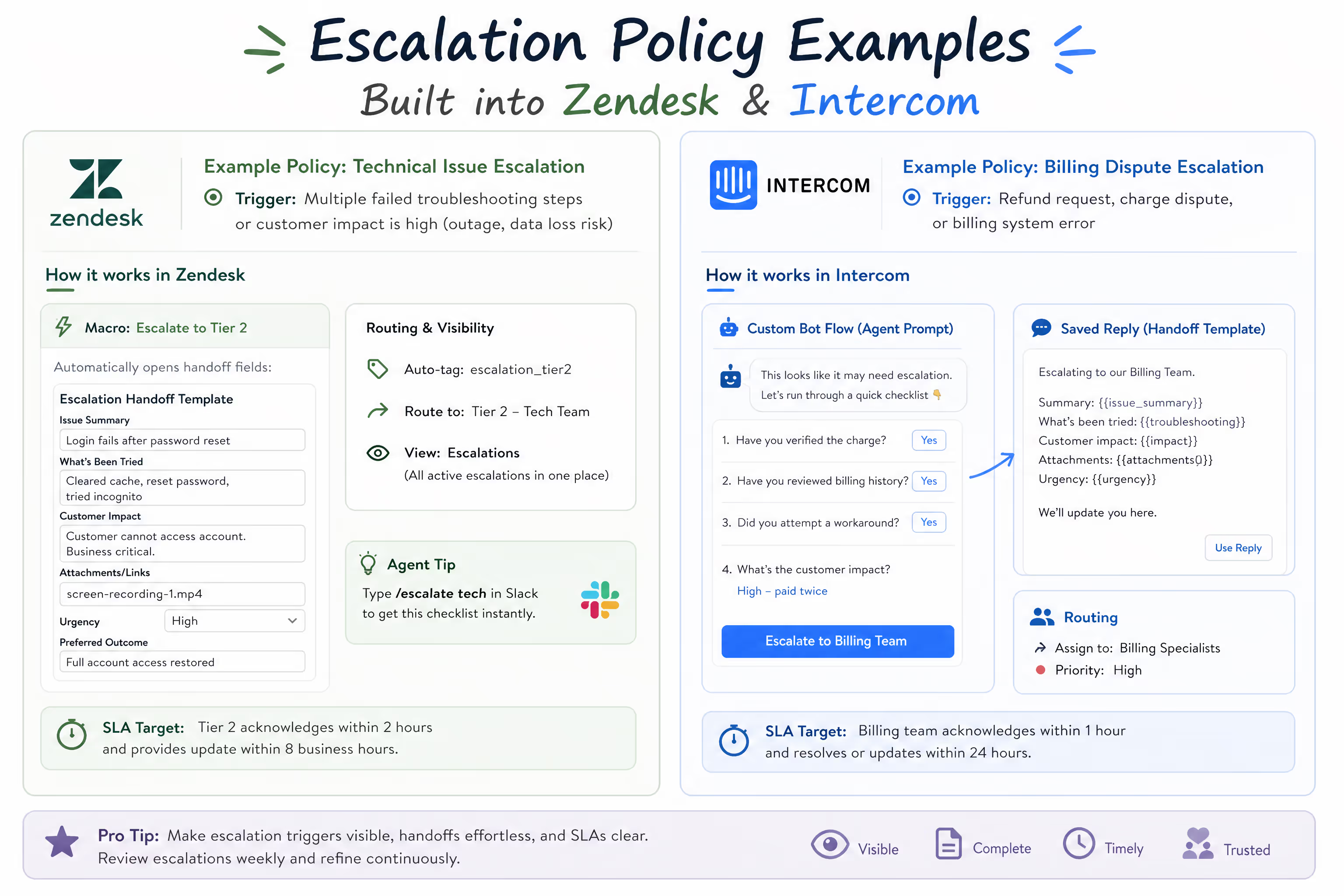
Your support agents shouldn't have to dig through a document every time they need to decide. Post escalation triggers in your helpdesk as macros, canned responses, or quick-reference notes.
In Zendesk: Create a macro that populates the handoff template fields automatically when an agent selects "Escalate to Tier 2."
In Intercom: Use custom bot flows or saved replies that prompt agents through the escalation checklist before routing to a specific teammate.
In Gorgias: Set up rules that auto-tag tickets matching certain conditions (e.g., order value over $150 + "refund" keyword) and route them to your escalation view.
In Help Scout: Use saved replies with the handoff template pre-built, plus workflows that assign escalated conversations to specific team members based on tags.
Some teams also create a Slack command that surfaces trigger criteria instantly—type /escalate billing and get the checklist.
Build the Handoff Template Into Your Workflow
If possible, create a template in your helpdesk or internal communication tool. When an agent clicks "escalate," they should see the handoff format pre-populated with the fields they need to complete. Reduce friction, increase compliance.
Review Escalations Weekly
For the first month, review every escalation as a team. Ask:
Did the trigger apply correctly?
Did the handoff note contain everything needed?
Could this have been resolved at Tier 1 with more training or resources?
Does this trigger need adjustment?
This feedback loop catches gaps quickly.
Communicate SLAs to the Team
Everyone—Tier 1 and Tier 2—should know the response time targets. When escalations sit unacknowledged, trust erodes and customers suffer. If your Tier 2 can't consistently meet SLAs, that's a staffing or prioritization problem to address, not a policy failure.
When to Revisit Your Escalation Policy
Escalation policies aren't set-and-forget. Revisit yours when:
You launch new products or features. New offerings mean new potential issues. Update triggers accordingly.
Your team grows. More agents might mean more tiers or more specialized escalation paths.
Patterns emerge. If certain issues escalate repeatedly but could be handled at Tier 1 with better training or documentation, adjust.
Customer expectations shift. Faster competitors or industry changes might require tighter SLAs.
A quarterly review typically catches most necessary updates without creating policy fatigue.
Take the Back-and-Forth Out of Your Support Queue
Clear escalation policies reduce resolution time, prevent customer frustration, and free founders from becoming the default answer to every hard question. The blueprints above give you concrete starting points—but they only work if they're documented, accessible, and consistently followed.
If you're spending more time in your support inbox than you'd like, escalation policies are only part of the puzzle. Sometimes the real solution is handing Tier 1 to a team that already has the processes, templates, and experience to run it smoothly.
Ready to stop managing escalations and start focusing on your business? Book a call with Evergreen Support to see how we implement escalation policies like these and handle your day-to-day email support.
Frequently Asked Questions
How many escalation tiers does a small team actually need?
Two tiers work for most small SaaS and ecommerce teams. Tier 1 handles routine inquiries and follows documented procedures. Tier 2 handles exceptions, technical issues requiring backend access, and decisions that need manager or founder input. Adding more tiers often creates confusion and delays rather than efficiency—save the complex hierarchies for enterprise call centers.
What if my support team escalates too many tickets?
Over-escalation usually signals unclear triggers or undertrained Tier 1 agents. Review recent escalations to identify patterns. If tickets are being escalated that could have been resolved with better documentation or more authority, address those root causes. Sometimes expanding what Tier 1 is empowered to handle (like refunds up to a certain amount) solves the problem faster than tightening triggers.
Should escalation policies be shared with customers?
Generally, no. Customers don't need to see your internal routing logic. What they need is acknowledgment, clear communication about next steps, and fast resolution. Your escalation policy is an operational tool, not a customer-facing document. The customer should experience a seamless handoff, not see the mechanics behind it.
How do I handle escalations when the Tier 2 person is unavailable?
Define a backup path for each escalation type. If your operations lead handles billing escalations but is on vacation, who's the alternate? Document this explicitly. For truly urgent situations, establish an "all hands" escalation path—usually the founder's phone or a shared emergency channel. The worst outcome is an escalated ticket sitting untouched because no one knows who's responsible.
Can we use these blueprints exactly as written?
These blueprints are designed as starting frameworks. Adapt the triggers to match your specific policies, price thresholds, and team structure. The handoff format should work universally, but customize the fields if your workflow requires additional information. The goal is consistency within your team, not rigid adherence to someone else's template.
About Evergreen Support
Evergreen Support is a US-based customer support agency built for small SaaS and ecommerce businesses. Founded by Emma Fletcher and Ellis Annichine in 2021, the team handles day-to-day email support for founders who need reliable coverage without the overhead of hiring in-house. Every client works with two dedicated support specialists who learn the business, build internal documentation, and follow escalation policies exactly like those outlined above. The team operates on a humans-helping-humans philosophy—no AI chatbots, no overseas call centers, just experienced support professionals who treat your customers like their own.
Works Cited
[1] Zendesk — "CX Trends 2023." https://www.zendesk.com/blog/cx-trends-report/
[2] Evergreen Support — "Outsource Customer Support Costs vs In-House: 2025 Guide." https://www.evergreensupport.co/blog/outsource-customer-support-cost-comparison
[3] Evergreen Support — "How a Customer Service Agency Elevates E-Commerce CX with Email (and Boosts Sales)." https://www.evergreensupport.co/blog/customer-service-agency-ecommerce-email-support
[4] Evergreen Support — "Fractional Customer Support Teams: A Startup's Complete Guide to Scaling Without Full-Time Hiring." https://www.evergreensupport.co/blog/fractional-customer-support-teams-startups-guide


