
What You'll Get From This Guide
A prioritized 30-day content calendar based on your actual ticket data
Specific article templates for SaaS and ecommerce's highest-volume categories
A search-term mining process to close content gaps
Measurement framework to prove deflection is working
Checklist for every article before you publish
You're answering the same questions every week. "How do I reset my password?" "Where's my order?" "Can I get a refund?" Each one pulls you away from work that actually moves the business forward.
A well-built help center can answer those questions before customers ever hit "send." The right articles, published in the right order, create a self-service resource that genuinely reduces support volume. Not by 100%—customers will always need human help for complex issues—but enough to give you breathing room.
This guide gives you a practical 30-day editorial calendar for building a help center that deflects tickets. We'll cover how to identify which articles to write first, what each piece needs to include, and how to measure whether it's actually working.
No fluff. Just a concrete plan you can start tomorrow.
Why Most Help Centers Fail at Ticket Deflection
Most knowledge bases collect dust instead of solving problems. Three patterns show up repeatedly.
They're built from the inside out. Companies write articles about features they think are important rather than questions customers actually ask. The result? Beautifully formatted content that nobody searches for.
They use internal language. Your team calls it "subscription management." Your customers search for "how to cancel." That disconnect means they never find your perfectly written article.
They're not structured for findability. Articles exist, but navigation is confusing, search doesn't work well, and customers give up after 30 seconds of clicking around.
A help center that actually deflects tickets does three things differently:
It answers the questions customers already ask (in their words)
It surfaces content at the exact moment of need
It makes self-service faster than emailing support
The 30-day calendar that follows focuses relentlessly on these three principles.
Week Zero: Mining Your Ticket Data for Article Ideas
You need data before you write a single word. Specifically, you need to know what customers ask about most frequently.
How to Extract Your Top Ticket Drivers
Pull your last 90 days of support tickets and categorize them. If you're using a helpdesk like HelpScout, Zendesk, or Intercom, you can often export this data directly or run reports by tag or category [1].
For SaaS companies, the typical top categories include:
Account access issues (login, password reset, authentication)
Billing and subscription questions (charges, upgrades, cancellations)
Feature how-tos (using specific functionality)
Technical troubleshooting (bugs, errors, integrations)
Onboarding confusion (getting started, setup)
For ecommerce businesses, expect:
Order status and tracking
Returns and refunds
Shipping questions (costs, timeframes, international)
Product information (sizing, compatibility, availability)
Payment issues (failed transactions, payment methods)
Creating Your Priority Matrix
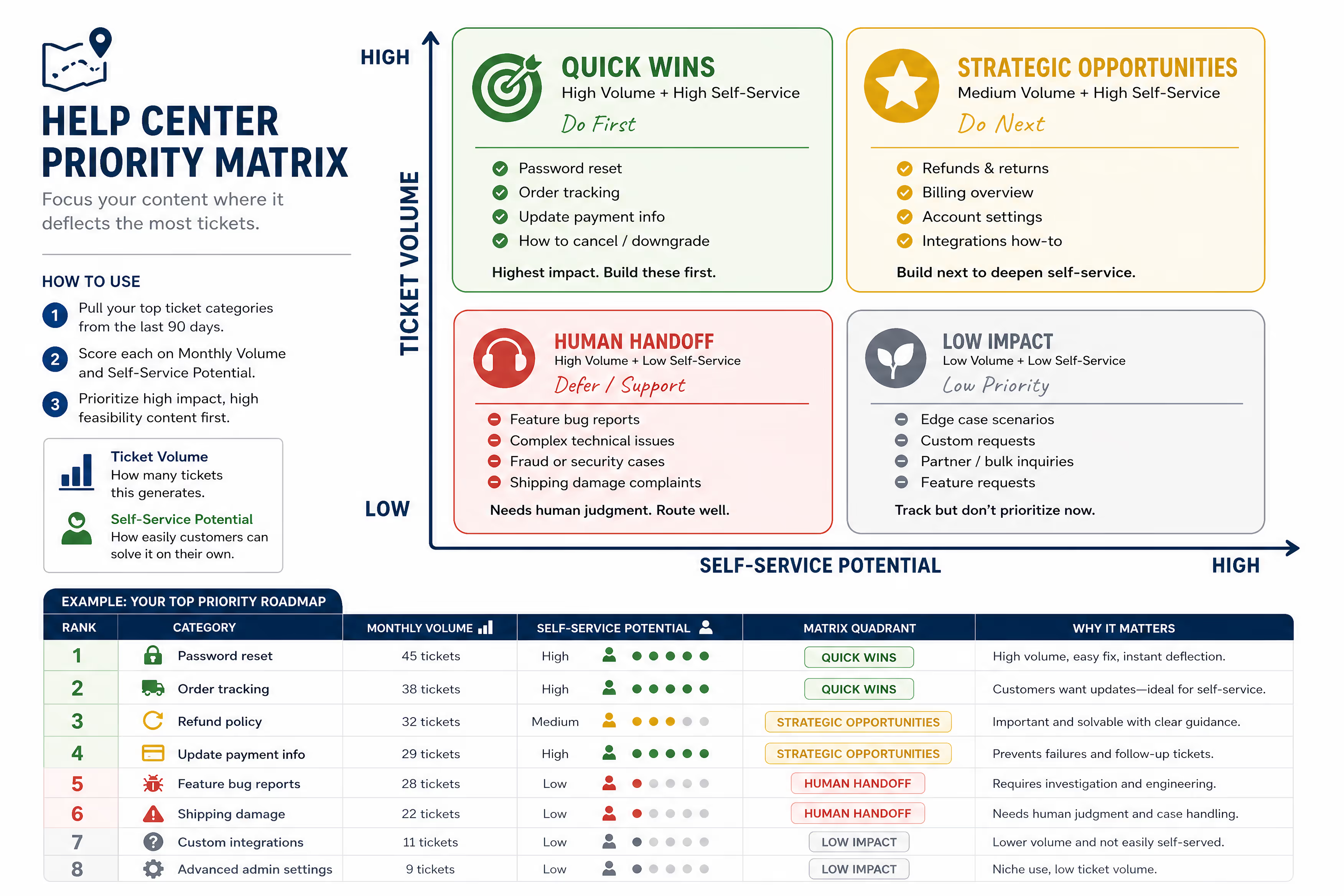
Once you have categories, rank them by two factors:
Volume: How many tickets does this category generate monthly?
Ease of self-service: Can a customer realistically solve this without human intervention?
High volume plus high self-service potential equals your first articles. A password reset article? High priority. A complaint about shipping damage? That needs human judgment—lower priority for your help center.
| Category | Monthly Volume | Self-Service Potential | Priority |
| Password reset | 45 tickets | High | 1 |
| Order tracking | 38 tickets | High | 2 |
| Refund policy | 32 tickets | Medium | 3 |
| Feature bug reports | 28 tickets | Low | 8 |
Build your own version of this matrix before moving forward. It becomes your content roadmap.
The 30-Day Help Center Editorial Calendar
This calendar assumes you're starting from scratch or rebuilding a neglected knowledge base. Adjust the pace based on your capacity—the sequence matters more than the exact timeline.
Days 1–3: Foundation Articles
Day 1: Getting Started Guide
Your single most important article. This answers the question every new customer has: "Okay, I signed up. Now what?"
Include:
First three actions a new user should take
Links to relevant follow-up articles (even if they don't exist yet—placeholder them)
Screenshots of key screens they'll encounter
Expected timeframe ("Setup takes about 10 minutes")
Day 2: Account Access Article
Cover password resets, login troubleshooting, and account recovery. This single article can deflect dozens of tickets monthly.
Must include:
Step-by-step password reset instructions with screenshots
"I never received the reset email" troubleshooting
Two-factor authentication issues
Account lockout procedures
Day 3: Contact Us / How to Get Help
Counterintuitive, right? But a clear "how to reach us" article actually reduces frustration. Customers who can't find answers get increasingly annoyed. Showing them exactly how to get human help—while surrounded by self-service options—keeps them calm.
Include your response time expectations here. If you promise replies within 24 hours Monday through Friday, say so. Managing expectations prevents escalation.
Days 4–7: Billing and Payment (SaaS) or Orders and Shipping (Ecommerce)
Day 4: Billing Overview / Order Process Overview
For SaaS: Explain your billing cycle, when charges occur, and how to access invoices.
For ecommerce: Walk through what happens after checkout—confirmation email, processing time, shipping notification.
Day 5: Updating Payment Information
For SaaS: Screenshot-heavy guide to changing credit cards, updating billing addresses.
For ecommerce: How to change payment method on an existing order (if possible) or for future orders.
Day 6: Understanding Charges / Tracking Your Order
For SaaS: Explain what each line item on an invoice means. Address the "I don't recognize this charge" concern directly.
For ecommerce: How to find tracking numbers, what carriers you use, estimated delivery windows.
Day 7: Refunds and Cancellations
Be direct here. State your policy clearly, explain the process step-by-step, and set expectations for timing. Customers searching for refund information are already frustrated—don't make them hunt for answers.
Days 8–14: Your Top Five Feature or Product Questions
This week tackles the specific questions unique to your business. Pull the top five feature-related (SaaS) or product-related (ecommerce) questions from your ticket data.
Day 8–10: Feature/Product Article #1, #2, #3
Write one substantial article per day covering your three highest-volume feature or product questions.
Each article should:
Answer the primary question in the first paragraph
Include step-by-step instructions where applicable
Add screenshots for any multi-step process
Link to related articles
End with "Still need help? Contact us" language
Day 11–12: Feature/Product Article #4, #5
Complete your top five. By now, you should have articles addressing roughly 60–70% of your ticket volume.
Day 13–14: Troubleshooting Compilation Article
Create a "Common Issues and Solutions" article that aggregates the smaller problems that don't warrant full articles. This becomes a catchall for edge cases and quick fixes.
Structure it as a bulleted FAQ format:
Problem statement (in customer language)
Quick solution
Link to full article if one exists
Days 15–21: Search Optimization and Gap Filling
Day 15: Audit Your Search Terms
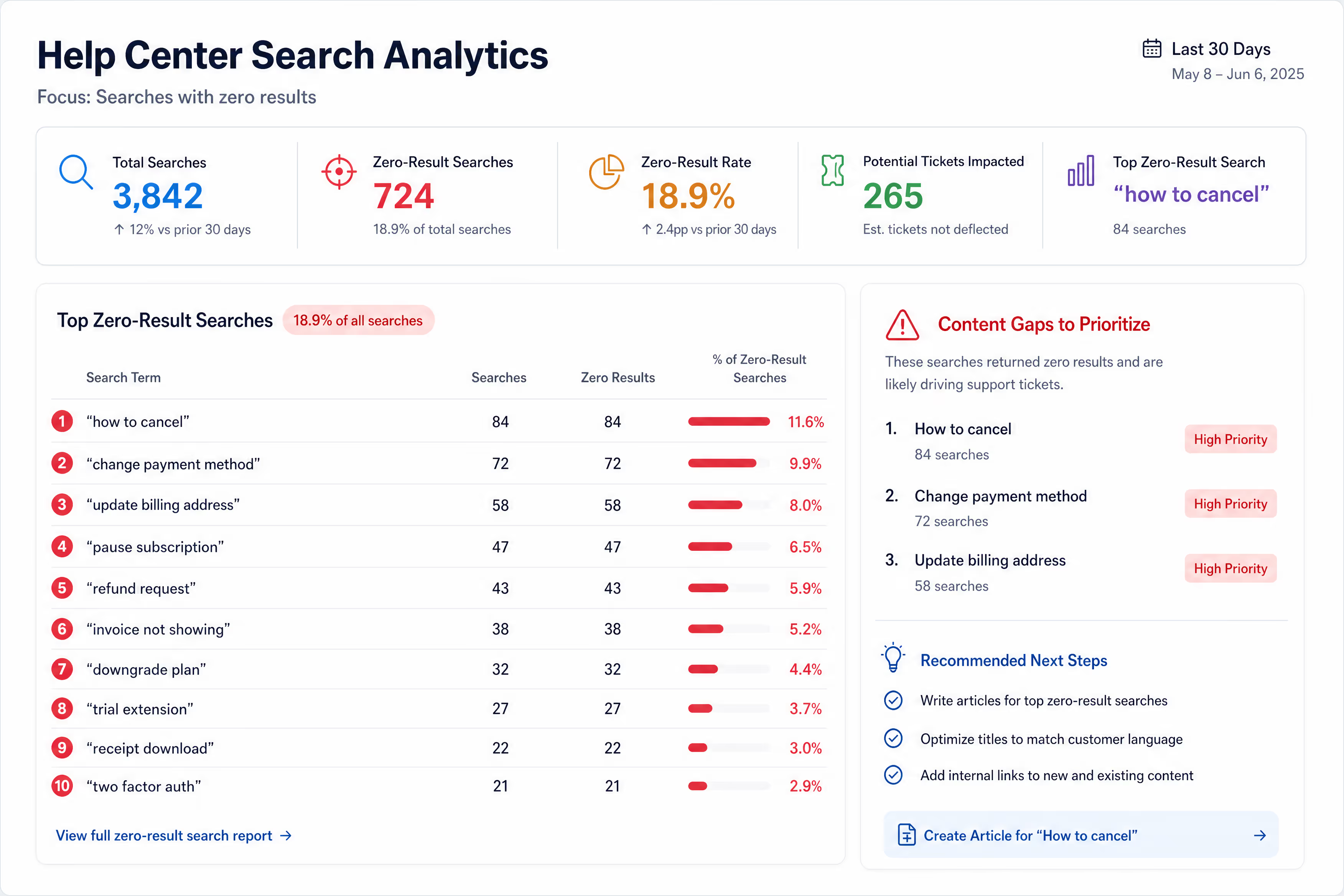
If your helpdesk or knowledge base platform tracks search queries, pull that data now. You're looking for:
Searches with zero results (content gaps you need to fill)
Searches with results but low click-through (poor titles or irrelevant content)
High-volume searches (confirm you have strong content here)
Most platforms like HelpScout, Zendesk, and Intercom provide this data in their analytics dashboards [2].
Day 16–18: Write Articles for Zero-Result Searches
Pick the top three searches that returned no results and write articles for them. These represent customers who tried to self-serve, failed, and likely submitted tickets instead.
Day 19: Title and Keyword Optimization
Review all existing articles. Update titles to match how customers actually search, not how you internally describe things.
Examples:
"Subscription Management" → "How to Cancel or Change Your Plan"
"Returns Policy" → "How to Return an Item and Get a Refund"
"Authentication Settings" → "Setting Up Two-Factor Authentication"
Day 20–21: Internal Linking Audit
Go through each article and add relevant internal links. Every article should link to at least two others. This keeps customers in your help center instead of bouncing to email.
Days 22–28: Proactive, Contextual, and AI-Ready Content
Day 22–23: Pre-Emptive Articles
Write content that answers questions customers don't know they have yet—but will.
For SaaS:
"What Happens When My Trial Ends"
"How [Feature] Works with [Integration]"
For ecommerce:
"What to Do If Your Package Shows Delivered But You Haven't Received It"
"How to Check If [Product] Is Compatible with [Use Case]"
Day 24–25: Seasonal or Event-Based Content
If you have predictable support spikes (Black Friday, end of quarter, product launches), draft articles now.
Create:
Holiday shipping deadlines article
Sale and promotion FAQ
New feature announcement template
Day 26–27: Video and Visual Enhancement
Return to your top five articles and add:
Short screen recordings (Loom works well for quick captures)
Annotated screenshots highlighting specific buttons or fields
GIFs showing multi-step processes
Research consistently shows that visual instructions improve comprehension and reduce follow-up questions [3].
Day 28: Structuring Content for AI Chatbots
If you use (or plan to use) AI-powered support tools like Intercom's Fin, Zendesk AI, or similar, your help center articles become the knowledge source these bots draw from. Poorly structured articles mean poor bot answers.
Format articles so AI tools can parse them accurately:
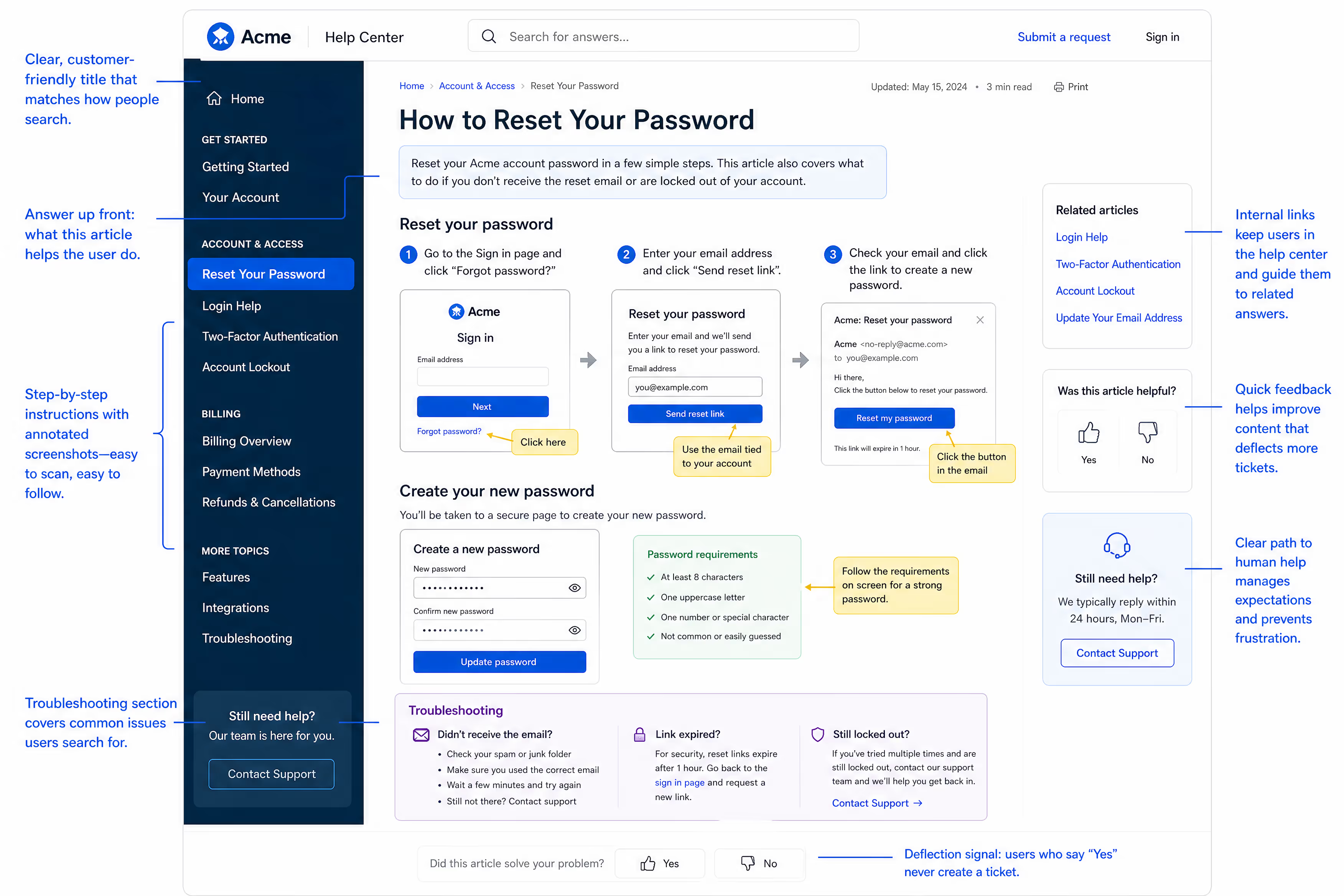
Use clear, specific headings. "How to Reset Your Password" works better than "Account Troubleshooting."
Front-load the answer. Put the direct answer in the first sentence or two of each section. Bots often pull the first relevant chunk they find.
Use consistent formatting. Numbered steps for procedures, bullets for lists, bolded key terms.
Avoid ambiguity. If a process differs by plan type or product version, create separate sections with explicit labels ("For Pro Plan users:" / "For Starter Plan users:").
Include the question in the content. Phrasing like "To change your billing address, follow these steps..." helps bots match user queries to the right answer.
Well-structured articles improve both human readability and automated deflection accuracy.
Days 29–30: Measurement Setup and Baseline
Day 29: Implement Deflection Tracking
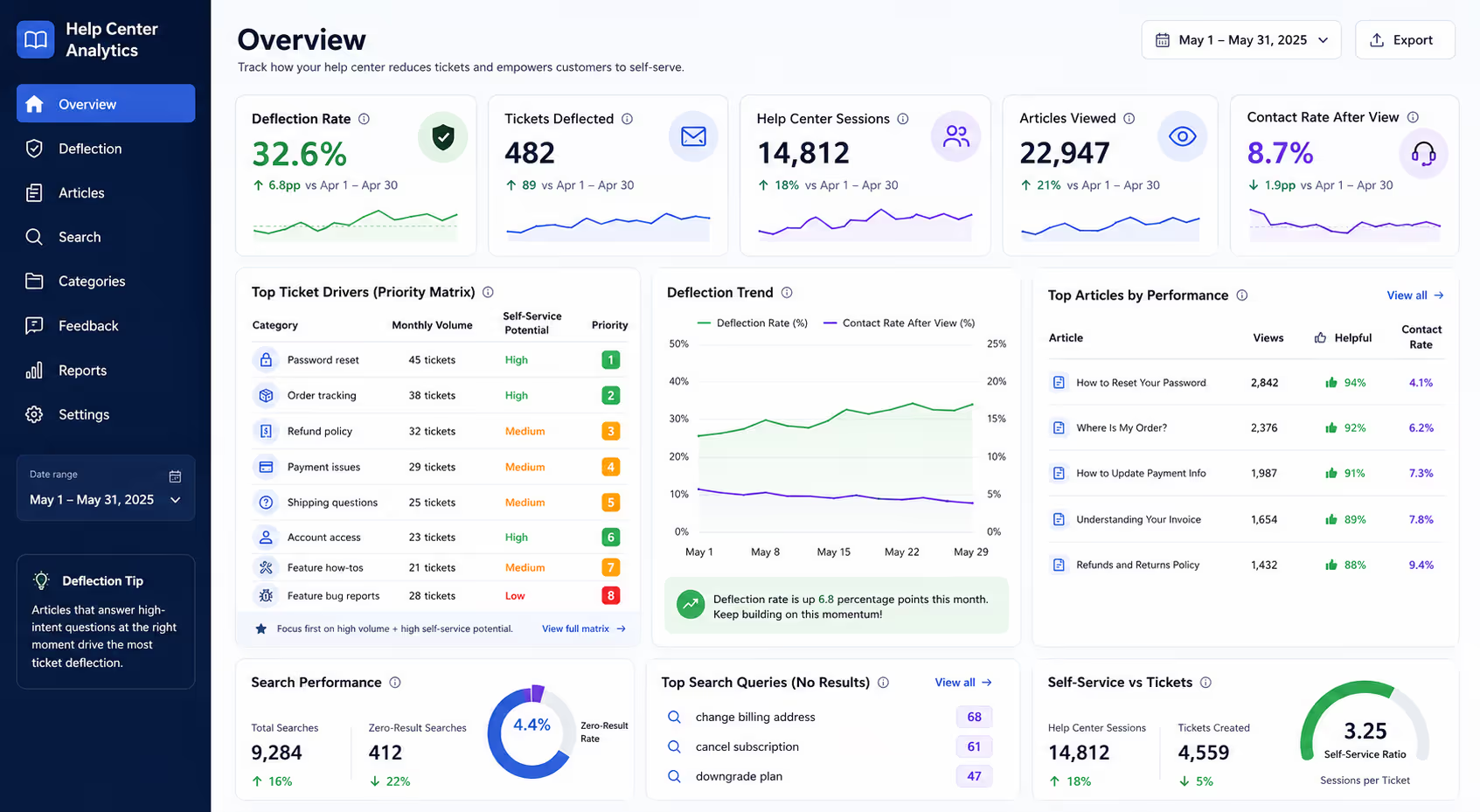
True deflection measurement requires tracking whether customers who viewed help content subsequently submitted tickets. Not all platforms make this easy, but here's what to measure:
Basic metrics:
Article views (which content gets traffic)
Search queries (what people look for)
Contact rate after article view (did they still email?)
Advanced metrics:
Ticket volume by category over time
Self-service ratio (help center sessions vs. tickets)
Time to resolution for tickets that reference articles
Most helpdesk platforms provide at least basic article analytics. Well-maintained knowledge bases typically reduce support volume in relevant categories by 20–40% over time, though deflection rates for complex technical issues will be considerably lower than for straightforward transactional questions like password resets [4].
Day 30: Document Your Baseline
Record current metrics:
Total monthly ticket volume
Volume by category
Help center page views
Contact rate from help center
You'll compare against these numbers monthly to measure progress.
What Each Help Center Article Needs: A ChecklistBefore publishing any article, run through this checklist:Structure:[ ] Clear, searchable title using customer language[ ] Answer to the main question in the first paragraph[ ] Logical step-by-step flow for procedural content[ ] Headers that allow skimmingVisuals:[ ] At least one screenshot for any multi-step process[ ] Annotations highlighting relevant buttons or fields[ ] Video for complex procedures (optional but recommended)Findability:[ ] Keywords matching actual search terms[ ] Category placement that makes sense[ ] Internal links to related articlesCompleteness:[ ] Edge cases addressed ("What if X doesn't work?")[ ] Clear next steps[ ] Contact option for unresolved issues
Measuring Deflection: How to Know It's Working
Publishing articles is just the beginning. The real question: are fewer people emailing you about these topics?
The 60-Day Deflection Check
Wait 60 days after completing your initial help center build, then compare:
Ticket volume by category: Did password reset tickets drop after publishing that article? Track each category individually.
Self-service ratio: Divide monthly help center sessions by monthly tickets. A rising ratio suggests more people are finding answers without emailing.
Search success rate: Are zero-result searches decreasing? Is click-through improving?
Article feedback: If your platform supports thumbs up/down ratings, monitor which articles need improvement.
Red Flags That Indicate Problems
Article has high views but low helpfulness rating → Content doesn't actually answer the question
Search term has high volume but article has low views → Findability issue (title mismatch or poor search indexing)
Ticket volume unchanged despite article views → Article may be unclear, or the issue genuinely requires human help

Maintaining Momentum: After the First 30 Days
Your help center isn't a "set it and forget it" asset. Plan for ongoing maintenance:
Weekly: Review new ticket trends for emerging questions. Add quick updates to relevant articles.
Monthly: Analyze search data and fill content gaps. Update screenshots after any product/site changes.
Quarterly: Full audit of top 10 articles. Refresh outdated information, improve underperforming content.
Ongoing: Every time you resolve a ticket with a detailed explanation, ask yourself: "Could this be an article?" If you typed it once, you'll type it again.
The Bottom Line
A help center that actually deflects tickets isn't complicated. It requires:
Understanding what customers actually ask (from your ticket data)
Writing clear answers in their language
Making content findable when they need it
Measuring and improving continuously
This 30-day calendar gives you a structured path to building that resource. The sequence prioritizes high-impact content first, so even if you only complete the first two weeks, you'll have addressed your most common questions.
Most small businesses don't have time to build and maintain a help center while also answering the inbox every day. If that sounds familiar, consider whether outsourcing your email support could free up the capacity you need. One Evergreen Support client—a SaaS founder who'd been personally answering every ticket for years—finally built out his knowledge base after handing off daily support. He'd always known the articles would help; he just never had the hours to write them.
A team that handles daily tickets while you build better self-service resources can break the cycle of perpetual inbox overwhelm.
Ready to stop answering the same questions every week? Book a call with Evergreen Support to discuss how we can handle your inbox while you build the help center your customers deserve.
Frequently Asked Questions
How many articles does a good help center need?
Quality matters more than quantity. A focused help center with 15–20 strong articles covering your top ticket drivers will outperform a bloated library of 100 thin articles. Start with the content that addresses your highest-volume, most self-serviceable questions and expand from there based on data.
What's a realistic deflection rate to expect?
Deflection rates vary significantly by industry and issue type. Well-maintained knowledge bases typically reduce relevant ticket categories by 20–40% over time [4]. Straightforward topics like password resets may see even higher deflection, while complex or emotionally charged issues will always require human support.
Should I gate my help center behind a login?
Generally, no. Public help centers get indexed by search engines, allowing customers to find answers directly from Google. Gating content adds friction and reduces discoverability. Only gate content that's truly sensitive or contains customer-specific information.
How often should I update help center articles?
Review your top 10 articles monthly and update immediately after any product changes that affect the content. Screenshots become outdated quickly—budget time to refresh visuals whenever your interface changes. Set calendar reminders for quarterly full audits.
What if customers still email even when the answer is in the help center?
This happens. Some customers prefer human contact, and that's okay. Others simply don't find the article—which signals a findability problem to investigate. When responding to tickets with existing help center answers, include a link to the article. Over time, this trains customers to check the help center first.
About Evergreen Support
Evergreen Support provides US-based customer support for small online businesses, handling day-to-day email tickets so founders and small teams can focus on growing their business. Our team becomes an extension of yours—learning your brand voice, documenting your processes, and ensuring your customers get fast, friendly responses. We're humans helping humans, not bots reading scripts. With month-to-month flexibility and pricing based on your actual ticket volume, outsourcing support doesn't mean losing control or breaking your budget.
Cited Works
[1] HelpScout — "Getting Started with Reports." https://docs.helpscout.com/article/166-getting-started-with-reports
[2] Zendesk — "Analyzing Knowledge Base Search Results." https://support.zendesk.com/hc/en-us/articles/4408835062938-Analyzing-your-knowledge-base-search-results
[3] Nielsen Norman Group — "How Users Read on the Web." https://www.nngroup.com/articles/how-users-read-on-the-web/
[4] HubSpot — "The Ultimate Guide to Knowledge Base Management." https://blog.hubspot.com/service/knowledge-base-management


