
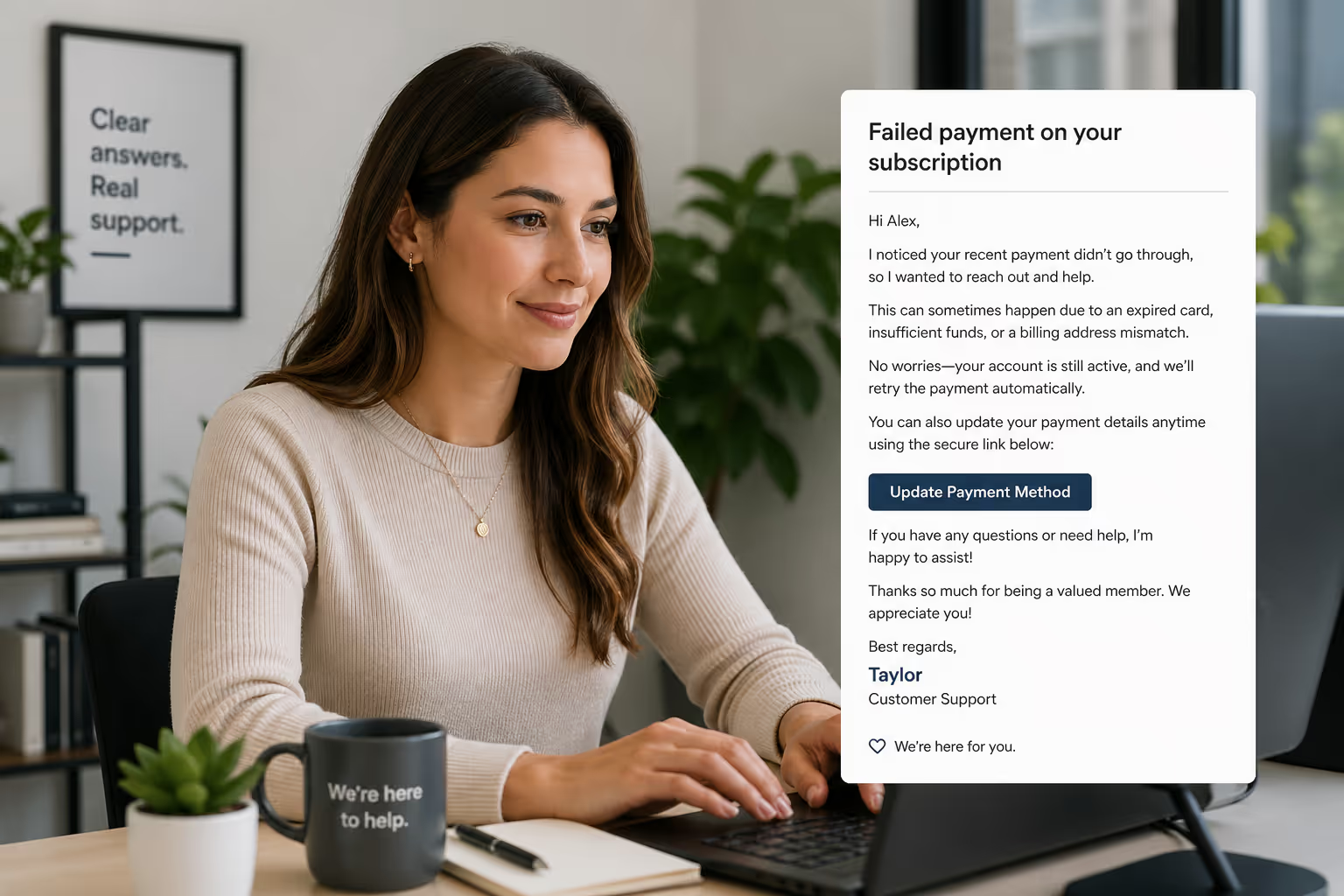
A customer's card fails. Your automated dunning email fires off. Then nothing happens.
That silence costs SaaS and e-commerce businesses real money. Involuntary churn—customers who leave because their payment didn't go through, not because they wanted to cancel—accounts for 20-40% of total subscription churn for many businesses [1]. These customers wanted to stay. They just hit a billing snag.
Most small teams treat failed-payment emails as purely technical problems. Fire off an automated retry, maybe send a generic "update your card" message, and hope for the best. But there's a human on the other side of that declined transaction. Someone who might feel embarrassed, confused, or completely unaware anything happened.
This guide covers exactly how to handle failed-payment tickets—from the moment you see "card declined" in your inbox to the follow-up cadence that actually recovers revenue. No fancy dunning software required. Just smart, human-powered email support.
Why Failed-Payment Tickets Deserve Special Handling
Most involuntary churn is preventable.
When a payment fails, you have a narrow window—typically 7-14 days—before that customer slips away for good. Miss that window, and you've lost someone who was perfectly happy with your product. They didn't cancel. They didn't complain. They just disappeared from your revenue.
Research from Recurly found that businesses using strategic payment recovery can reclaim up to 70% of failed transactions [2]. That's revenue sitting in your support inbox, waiting for the right response.
Failed-payment support is tricky for small teams for a few reasons:
It feels awkward. Reaching out about someone's payment failure can feel like discussing their finances. It's not. You're helping them maintain access to something they're already paying for.
Timing matters more than tone. A perfect email sent two weeks late recovers nothing. A decent email sent within 24 hours recovers most customers.
One size doesn't fit all. A soft decline (temporary issue, card will work again) needs different handling than a hard decline (card canceled, definitely won't work). Treating them the same wastes time and frustrates customers.
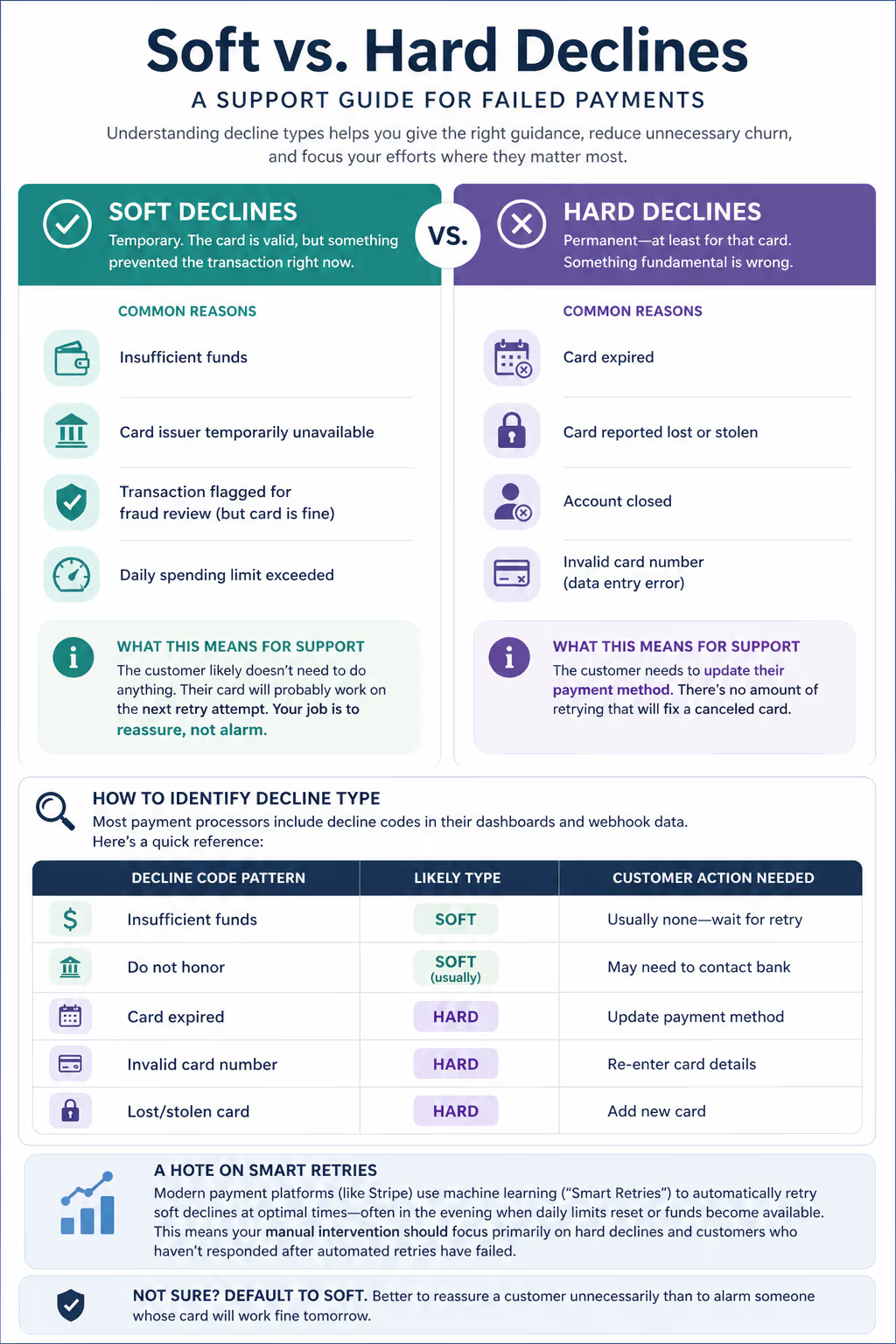
Understanding Decline Types: Soft vs. Hard
Before you reply to a single failed-payment ticket, you need to understand what actually happened. Your payment processor (Stripe, Braintree, Square, etc.) categorizes declines differently, and your response should follow suit.
Soft Declines
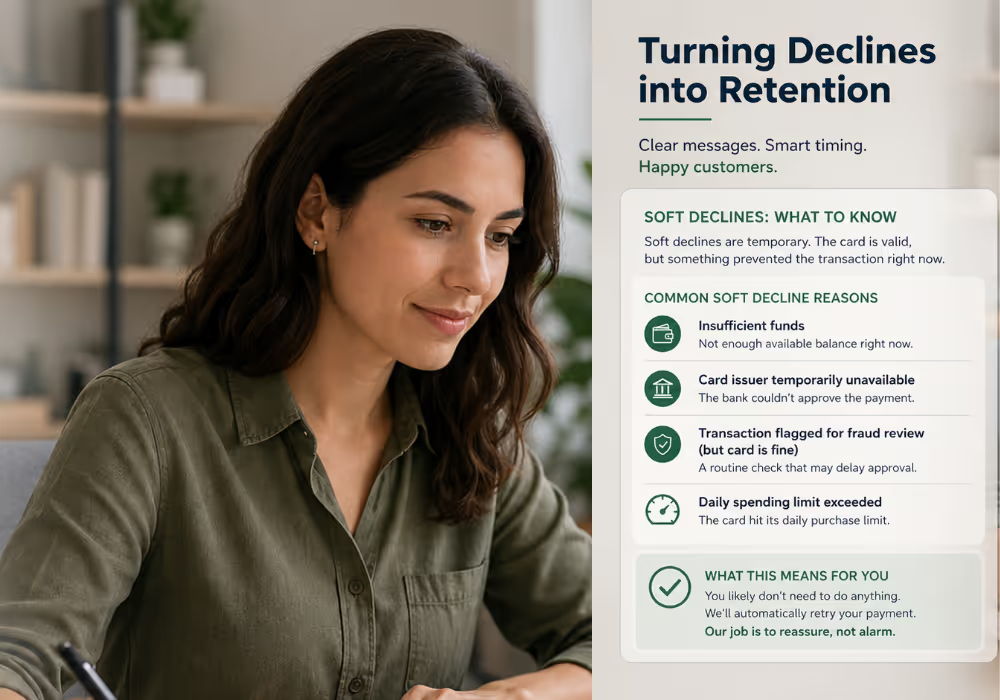
Soft declines are temporary. The card is valid, but something prevented the transaction right now.
Common soft decline reasons:
Insufficient funds
Card issuer temporarily unavailable
Transaction flagged for fraud review (but card is fine)
Daily spending limit exceeded
What this means for support: The customer likely doesn't need to do anything. Their card will probably work on the next retry attempt. Your job is to reassure, not alarm.
Hard Declines
Hard declines are permanent—at least for that card. Something fundamental is wrong.
Common hard decline reasons:
Card expired
Card reported lost or stolen
Account closed
Invalid card number (data entry error)
What this means for support: The customer needs to update their payment method. There's no amount of retrying that will fix a canceled card.
How to Identify Decline Type
Most payment processors include decline codes in their dashboards and webhook data. Here's a quick reference:
| Decline Code Pattern | Likely Type | Customer Action Needed |
| Insufficient funds | Soft | Usually none—wait for retry |
| Do not honor | Soft (usually) | May need to contact bank |
| Card expired | Hard | Update payment method |
| Invalid card number | Hard | Re-enter card details |
| Lost/stolen card | Hard | Add new card |
A note on Stripe and similar processors: Many modern payment platforms use machine learning (Stripe calls this "Smart Retries") to automatically retry soft declines at optimal times—often in the evening when daily limits reset or funds become available. This means your manual intervention should focus primarily on hard declines and customers who haven't responded after automated retries have failed.
If you're not sure which type you're dealing with, default to treating it as a soft decline first. Better to reassure a customer unnecessarily than to alarm someone whose card will work fine tomorrow.
The Failed-Payment Ticket Flow: Step by Step
Here's the exact process for handling a failed-payment ticket, from first notice to final resolution.
Step 1: Triage Within 24 Hours
When a payment fails, you should know about it within one business day. If you're relying solely on automated emails, you're missing the human touch that actually recovers customers.
Triage checklist:
Identify the decline type (soft or hard)
Check customer account history (first-time failure or repeat?)
Note the dunning email schedule (when did automated emails go out?)
Flag high-value accounts for priority response
Step 2: Send Your First Human Email
This email does the heavy lifting. It needs to accomplish three things: acknowledge without embarrassing, explain clearly, and make the next step obvious.
For Soft Declines:
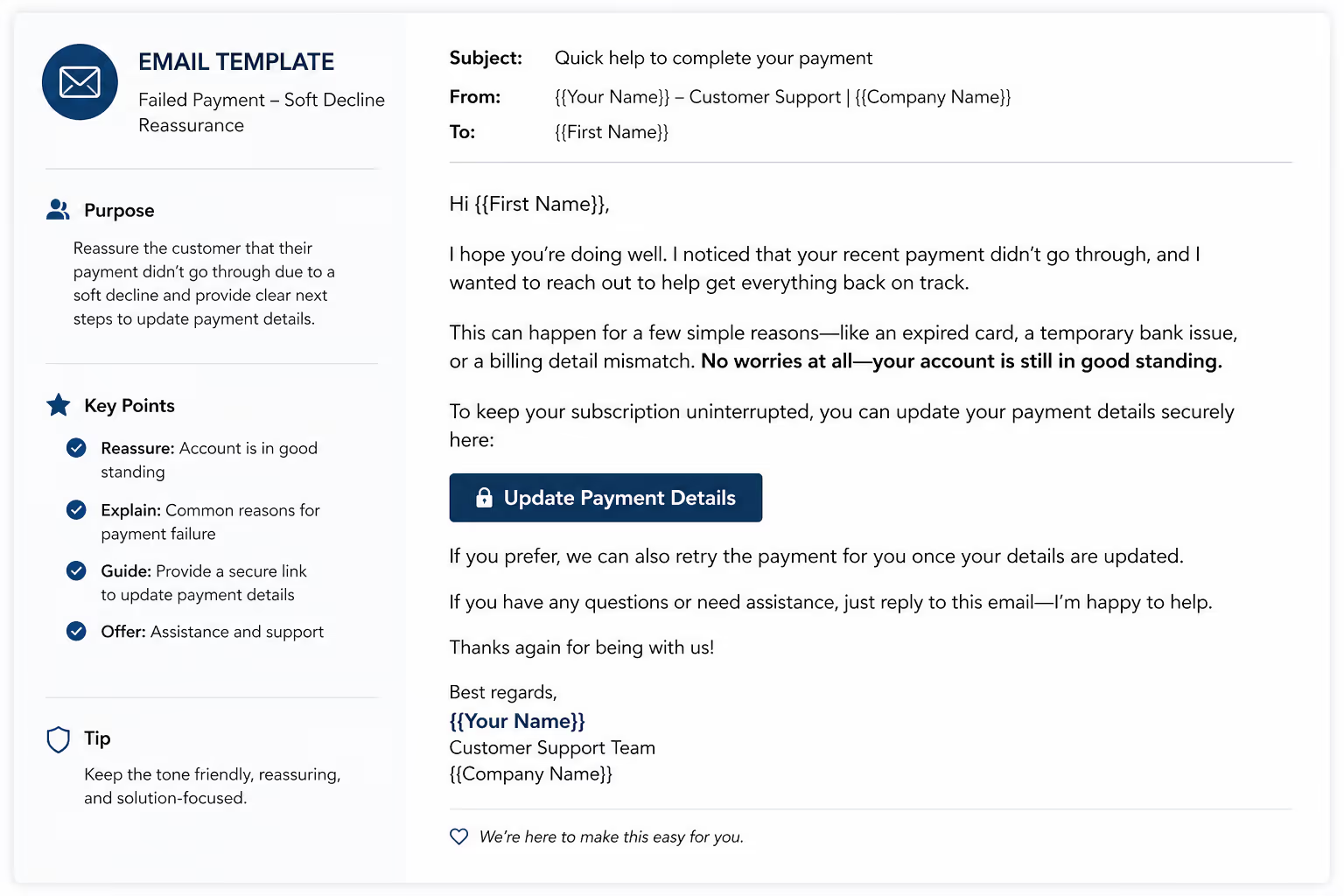
Subject: Quick heads up about your [Product Name] subscriptionHi [First Name],I noticed your recent payment for [Product Name] didn't go through—this happens sometimes with temporary bank holds or daily spending limits.Good news: we'll automatically retry the charge in [X days], and these usually clear up on their own. Your account is still fully active in the meantime.If you'd like, you can also update your payment method here: [Payment Link]Let me know if you have any questions—happy to help.[Your Name]
For Hard Declines:
Subject: Action needed: Your [Product Name] paymentHi [First Name],Your recent payment for [Product Name] didn't go through—it looks like the card on file may have expired or been replaced.To keep your account active, you can update your payment method here: [Payment Link]It only takes a minute, and you won't lose any of your data or settings.If you're having trouble or need a few extra days, just reply to this email and I'll sort it out.[Your Name]
Notice what's not in these emails: guilt trips, urgency panic, or threats about account cancellation. The goal is helpful, not pushy.
Step 3: Wait for the Dunning Window
Here's where patience matters. Your payment processor has a retry schedule—typically every 3-7 days for soft declines. Let the system work before escalating your outreach.
Dunning window basics:
Most processors retry 3-4 times over 7-14 days
Each retry happens at a different time (evening retries often succeed when morning ones fail)
Payment retry timing matters because card limits reset and funds become available
During this window, monitor for:
Successful payment (close the ticket, send a quick "all set" confirmation)
Customer reply (respond promptly, offer to help)
Continued failures (escalate to next step)
Step 4: Send a Follow-Up at Day 5-7
If the first retry failed and you haven't heard back, send a second email. This one can be slightly more direct—but still helpful, not threatening.
Subject: Following up on your [Product Name] accountHi [First Name],I wanted to follow up about the payment issue on your account. We've tried processing the charge again, but it's still not going through.If your card recently changed, you can update it here: [Payment Link]If something else is going on—maybe you need to pause your subscription for a bit, or switch to a different billing date—just let me know. I'm happy to work something out.[Your Name]
Key addition here: Offering alternatives like a pause or billing date change. Sometimes customers are embarrassed about a temporary cash flow issue. Giving them an out (without requiring them to explain) recovers more accounts than hardline "update or lose access" messaging.
Step 5: Final Outreach Before Account Suspension
If you're approaching the end of your dunning window (usually day 10-14), send one more human email. This is your last chance before the account gets suspended or canceled.
Subject: Your [Product Name] account will be paused soonHi [First Name],I've reached out a couple of times about the billing issue on your account, and wanted to give you one more heads up before we pause your subscription.If you'd like to keep your account active, you can update your payment method here: [Payment Link]If you've decided to move on, no hard feelings at all—your data will be saved for [X days] in case you want to come back.Either way, thanks for being a customer. Let me know if there's anything I can help with.[Your Name]
This email does something important: it gives the customer a graceful exit. Some failed payments are intentional—people who forgot to cancel but don't actually want the service. Acknowledging that reality prevents annoyed replies and preserves the relationship for potential reactivation later.
Step 6: Post-Resolution Follow-Up
When payment finally succeeds (either through retry or updated card), close the loop. A quick confirmation email shows you were paying attention and reinforces trust.
Subject: You're all set!Hi [First Name],Just wanted to confirm that your payment went through and your [Product Name] account is back in good standing.Thanks for sorting that out. Let me know if you need anything else![Your Name]
Three sentences. That's all it takes to end the experience on a positive note.
The Follow-Up Cadence: Timing That Recovers Revenue
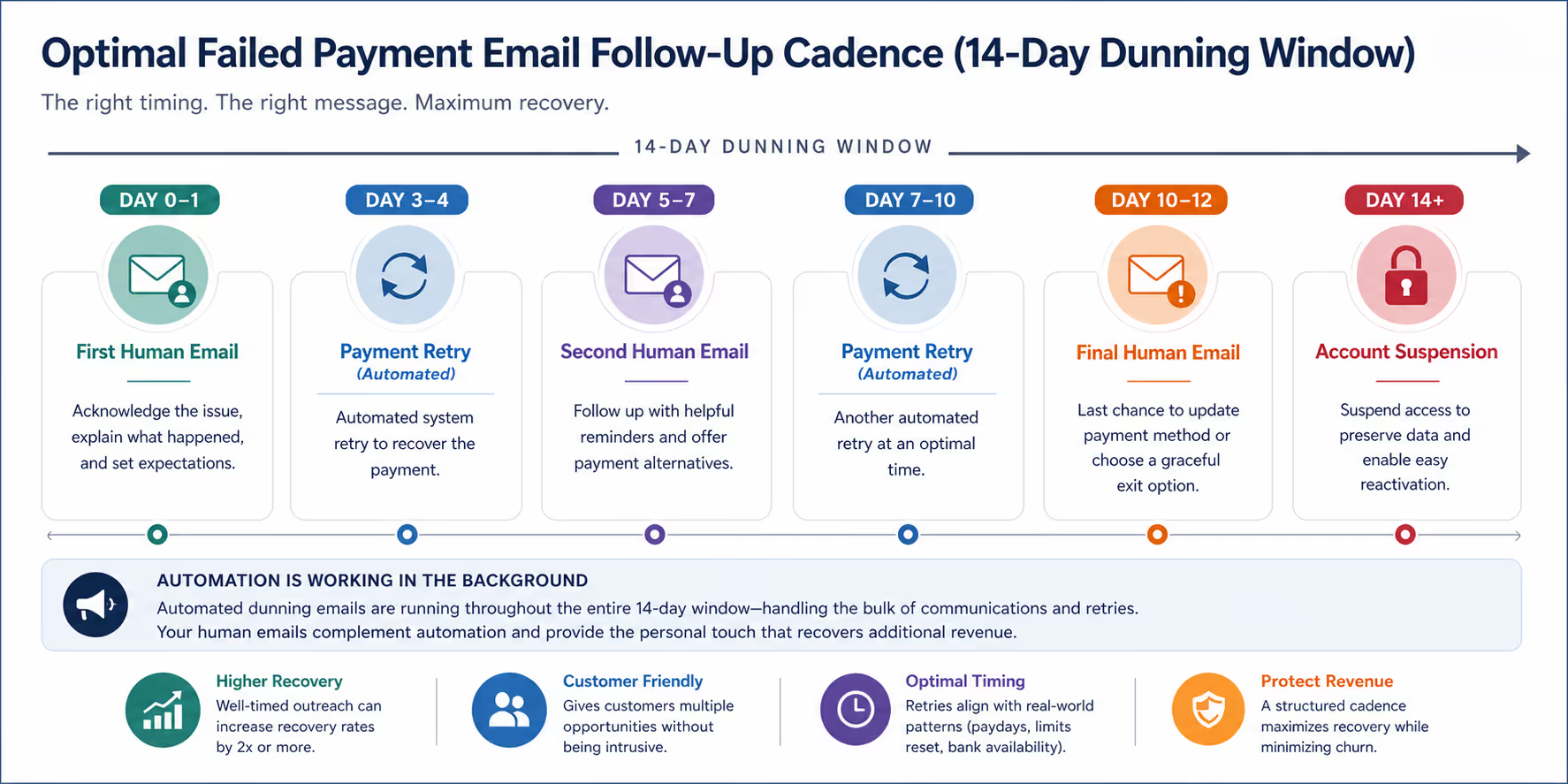
Timing your outreach correctly makes the difference between recovering 30% of failed payments and recovering 70%. Here's the cadence that works:
| Day | Action | Purpose |
| 0-1 | First human email | Acknowledge and explain |
| 3-4 | Payment retry (automated) | Technical recovery attempt |
| 5-7 | Second human email | Follow up, offer alternatives |
| 7-10 | Payment retry (automated) | Another technical attempt |
| 10-12 | Final human email | Last chance, graceful exit option |
| 14+ | Account suspension | Preserve data, enable reactivation |
Important: This cadence assumes your automated dunning emails are also running. Human outreach should complement automation, not replace it. The automated emails handle the bulk; your human emails catch the customers who need a personal touch.
Common Failed-Payment Scenarios (And Exactly What to Say)
Scenario 1: Customer Replies "I Didn't Know My Card Expired"
This is the most common response. The fix is simple—just make it easy.
Hi [First Name],Happens to all of us! You can update to your new card here: [Payment Link]Once that's done, we'll process the payment and you'll be all set. Takes about 30 seconds.[Your Name]
Scenario 2: Customer Says "I'm Having Money Problems Right Now"
This requires genuine understanding—not just a payment link.
Hi [First Name],Thanks for letting me know. I totally understand—these things happen.Here's what I can do: I can pause your subscription for [X weeks/months] so you don't get charged, and your account will be right here when you're ready. No data lost, no need to re-sign up.Would that help? Just let me know and I'll set it up.[Your Name]
Offering a pause recovers more long-term revenue than forcing someone to cancel entirely. They'll remember you worked with them.
Scenario 3: Customer Is Annoyed About Multiple Emails
Sometimes dunning emails (especially automated ones) irritate customers. Acknowledge and fix.
Hi [First Name],I'm sorry about the extra emails—I know that's frustrating. The billing system sends them automatically when a payment doesn't go through, but I can see how it feels like a lot.If you'd like me to pause those while you get the card updated, I'm happy to do that. Just let me know.[Your Name]
Scenario 4: Customer Didn't Realize They Were Still Subscribed
This happens more than anyone admits. Handle it gracefully—a goodwill refund costs less than a chargeback.
Hi [First Name],Thanks for letting me know. I've canceled your subscription so you won't be charged going forward.I also went ahead and refunded your most recent charge since you weren't using the service. That should show up in your account within 5-7 business days.If you ever want to give [Product Name] another try, you're always welcome back.[Your Name]
No fight. No hoops. Just a clean resolution that protects your reputation.
When Failed Payments Signal Bigger Problems
Sometimes a pattern of failed payments points to issues beyond individual credit cards:
Multiple customers failing on the same day? Check your payment processor's status page. Outages happen, and they're not your customers' fault.
Same customer failing repeatedly? After two successful outreach cycles, consider a direct call (if you have their number) or an account review to see if there's a product fit issue.
High failure rate on specific plan tiers? Pricing might be misaligned with customer ability to pay. That's business intelligence hiding in your support queue.
Your support inbox is a leading indicator of business health. Pay attention to patterns, not just individual tickets.
Tools That Make Failed-Payment Support Easier
You don't need expensive dunning software to handle failed payments well. Here's what actually helps:
Saved replies/templates: Pre-written responses for each scenario (soft decline, hard decline, follow-up) save time and maintain consistency. Most helpdesk tools like Help Scout, Zendesk, or Intercom support these.
Payment link generator: A direct link to your payment update page is essential. Make sure it's easy to find in your billing system (Stripe, Braintree, or similar) and ready to drop into any email.
Customer account access: Your support team needs to see payment history, decline reasons, and subscription status. If that information lives in a separate dashboard, make sure support has access.
A calendar reminder system: If you're handling failed payments manually, set reminders for follow-ups. Day 5, Day 10, Done.
Integration between tools: The real time-saver is when your helpdesk can pull in billing data automatically. Many small teams use Stripe alongside Help Scout or similar tools to create a single view of the customer.
How This Fits Into Your Broader Support Strategy
Failed-payment tickets sit at the intersection of support and revenue—which means they deserve priority even when your inbox is full.
Here's how to prioritize them:
Same-day triage for all payment failures. Even if you can't write a full response, at least categorize the decline type and set a follow-up reminder.
Batch process if volume is high. If you have 20 failed payments this week, handle all the soft declines in one session, then all the hard declines. Efficiency matters when you're a small team.
Track recovery rate. Measure how many failed payments you ultimately recover versus how many churn. That number tells you whether your approach is working.
If failed-payment emails are eating hours of your week—or worse, slipping through the cracks entirely—that's a signal your inbox might need more coverage.
Request a Free Inbox Audit
Recovering failed payments isn't complicated, but it does require consistent attention. The customers are willing to pay. They just need someone to help them over the billing hurdle.
If your support inbox has become a revenue bottleneck—failed payments piling up, follow-ups getting missed, recovery rates slipping—it might be time for a second set of eyes.
Request a free Inbox Audit from Evergreen Support. We'll review your failed-payment threads specifically, identify where customers are dropping off, and show you exactly what's recoverable. No commitment, no pressure—just a clear picture of what your inbox is costing you.
Book your Inbox Audit and see where the opportunities are hiding.
Frequently Asked Questions
How quickly should I respond to a failed-payment notification?
Within 24 hours is ideal, but within one business day is the minimum. The dunning window—the time between first failure and account suspension—is typically 7-14 days, so early outreach makes a significant difference. Customers who hear from a human early are more likely to update their payment information than those who only receive automated emails.
Should I offer discounts to customers whose payments failed?
Generally, no—at least not automatically. Failed payments are usually technical issues, not pricing objections. Offering discounts trains customers to expect them and devalues your product. Instead, offer flexibility: billing date changes, temporary pauses, or extended grace periods. Save discounts for customers who explicitly indicate pricing is the problem.
What if a customer's payment keeps failing even after they update their card?
First, verify the new card was saved correctly (data entry errors are common). If the card is correct, ask the customer to contact their bank—some issuers flag recurring subscription charges as suspicious, especially after a previous decline. You can also try a smaller test charge to see if the card works at all before attempting the full subscription amount.
How do I handle failed payments for annual subscribers?
Annual payments deserve extra attention because the revenue at stake is larger and customers expect more stability. Send your first human email within hours, not days. Offer to split the annual payment into smaller chunks if the full amount is causing issues. Extend your follow-up window—annual subscribers often need more time to sort out larger charges with their banks.
Is it okay to suspend accounts immediately after a failed payment?
No. Immediate suspension frustrates customers and increases churn, including customers who would have paid if given time. Industry standard is a 7-14 day grace period with multiple retry attempts. Suspend only after the dunning window expires and human outreach has failed. Even then, preserve customer data for at least 30 days to enable easy reactivation.
Why This Guidance Works
This guide reflects practical experience handling support for small SaaS and e-commerce businesses—the exact companies where failed-payment emails land in already-overwhelmed inboxes. Evergreen Support specializes in US-based, human-powered email support for small online businesses, providing the consistent coverage that prevents revenue from slipping through billing cracks. Every recommendation here comes from real-world support workflows, not theoretical best practices.
Cited Works
[1] ProfitWell — "The Complete Guide to Involuntary Churn." https://www.profitwell.com/recur/all/involuntary-churn
[2] Recurly — "The State of Subscription Payment Declines." https://recurly.com/research/state-of-subscriptions/


