

Switching customer support providers feels a lot like changing the engine on a plane mid-flight. Your customers expect seamless service, your team needs continuity, and one wrong move could leave tickets unanswered and customers frustrated.
Here's the thing: most guides on switching customer support providers focus on the "why" without giving you a practical roadmap for the "how." They skip over the uncomfortable reality that transitions go wrong when businesses wing it.
This guide is different. You'll get a step-by-step transition playbook designed specifically to help you switch customer support providers without service disruptions—whether you're moving from an in-house setup, a freelancer, or another agency entirely.
Why Switching Providers Often Goes Wrong
Before diving into the playbook, it's worth understanding why customer support transitions fail. The most common culprits include:
Knowledge gaps. Your current provider (or team member) holds institutional knowledge that never gets documented. When they leave, that knowledge walks out the door.
Timing mismatches. The old provider stops before the new one is ready. Tickets pile up. Customers wait.
Brand voice inconsistency. The new team sounds nothing like your company. Customers notice immediately.
Tool confusion. Access credentials, system setups, and workflow configurations get lost in the shuffle.
Security oversights. Sensitive customer data changes hands without proper agreements or access controls in place.
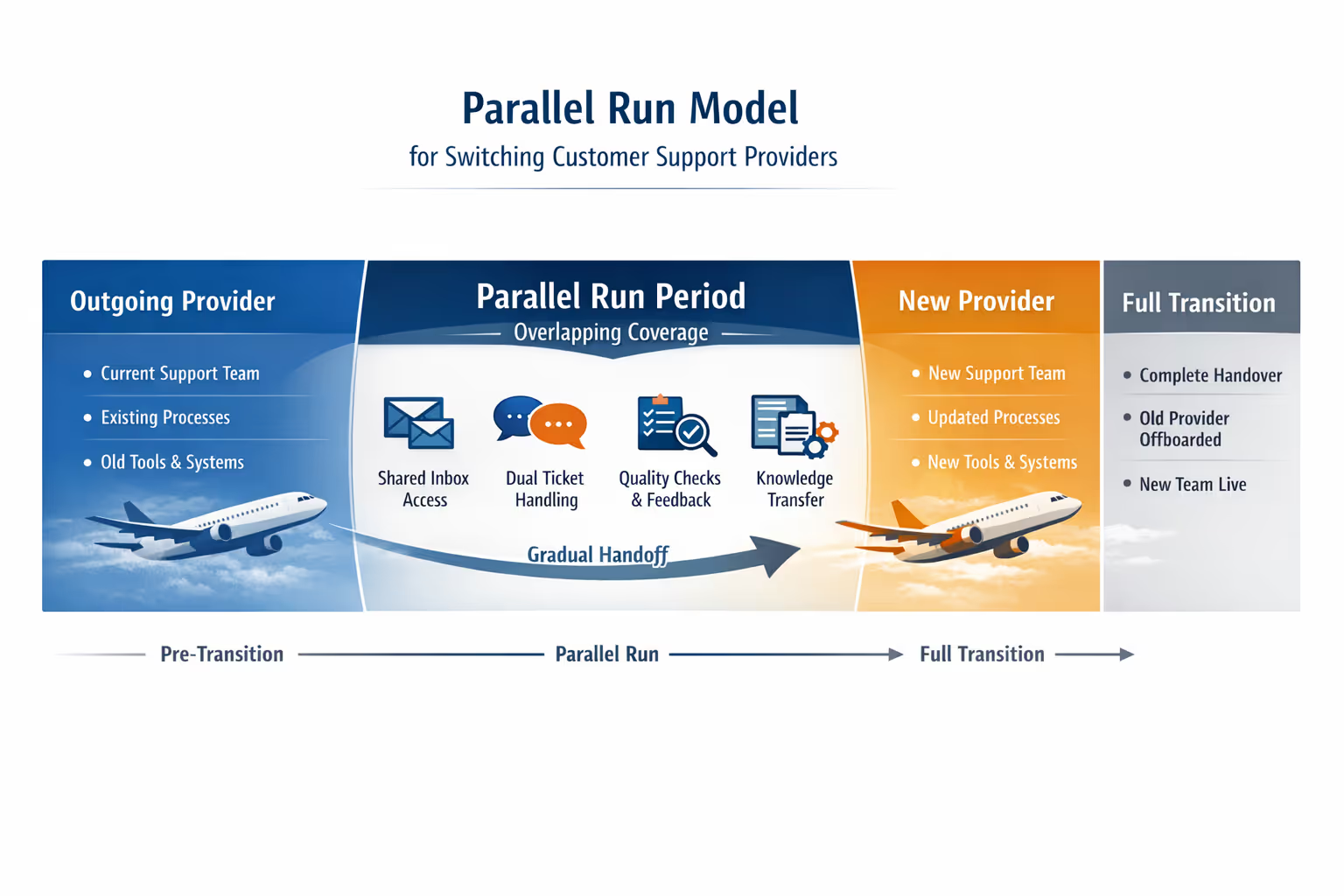
The solution to all of these? A parallel run model—running both providers simultaneously during a structured handoff period. More on that shortly.
Phase 1: Pre-Transition Preparation (Weeks 1–2)
Audit Your Current Support Operation
Start by documenting everything your current support setup handles. This isn't just about counting tickets. You need clarity on:
Ticket volume and patterns. How many emails or support requests come in daily, weekly, monthly? When are the peak times?
Common request types. What questions come up repeatedly? Refunds? Technical troubleshooting? Shipping inquiries?
Escalation paths. Which issues require input from your team versus what can be resolved independently?
Tools in use. What helpdesk, CRM, or communication platforms are involved?
Response time expectations. What SLAs (if any) are you currently meeting?
If you don't have this documented already, now is the time. A thorough audit prevents surprises during the transition.
Review Existing Contracts and Termination Terms
Before you sign with a new provider, check the fine print on your current arrangement:
Notice periods. How much advance warning does your contract require? Some agreements auto-renew if you miss the cancellation window.
Data ownership clauses. Who owns the support documentation, saved replies, and historical ticket data? Clarify this before you need to retrieve anything.
Transition assistance. Some providers include (or charge for) knowledge transfer support during offboarding.
Catching these details early prevents awkward timing gaps—or unexpected fees—later in the process.
Define What Success Looks Like
Before engaging a new provider, get specific about what you need. Vague expectations lead to vague results.
Ask yourself:
What response time do my customers actually expect? (Industry benchmarks suggest most consumers expect responses within a few hours for email support, not days.) [1]
Do I need coverage on weekends, or is Monday–Friday sufficient?
What channels matter—email only, or also chat and phone?
How involved do I want to be in day-to-day support decisions?
Write these down. Share them with prospective providers. The clearer your expectations, the smoother your transition.
Evaluate and Select Your New Provider
When evaluating customer support providers, look beyond pricing. Consider:
Specialization. Do they work with businesses like yours (SaaS, ecommerce, etc.)?
Team structure. Will you have dedicated agents, or a rotating pool?
Onboarding process. How do they learn your business and brand voice?
Communication style. Do they use Slack, email, scheduled calls?
Flexibility. Can you scale up or down as needed? Are there long-term contracts?
Security practices. Will they sign an NDA? What data protection policies do they follow?
For small businesses in particular, agencies that specialize in your niche often outperform generalist providers. They understand your customer base and typical pain points without a lengthy learning curve. [2]
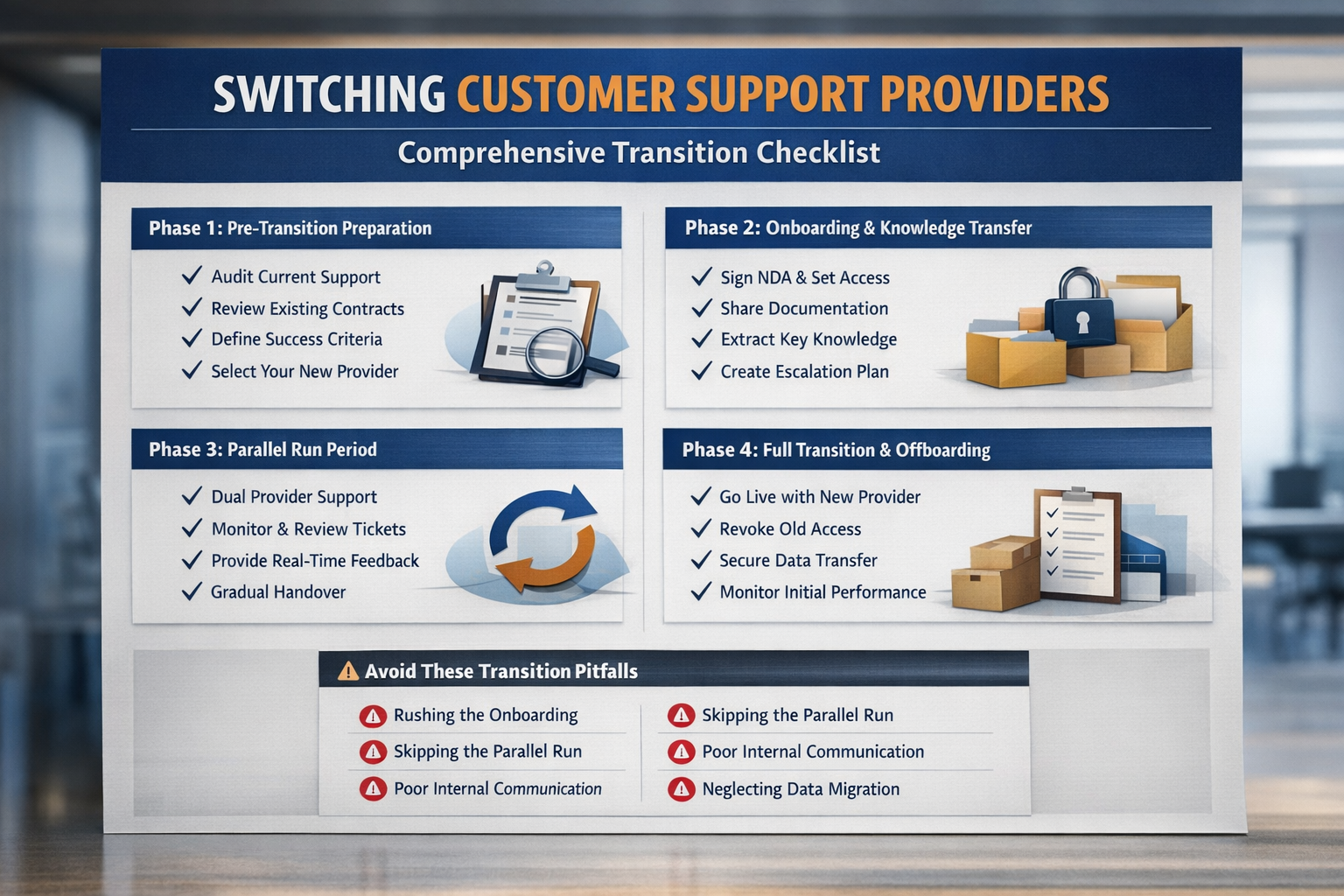
Phase 2: Onboarding Your New Provider (Weeks 2–3)
Address Security and Confidentiality First
Before sharing any access, handle the legal and security basics:
Sign an NDA. Protect your customer data and business information with a mutual non-disclosure agreement.
Verify compliance. If you serve customers in the EU, confirm your provider understands GDPR requirements. For US-based businesses handling sensitive data, ask about their security protocols.
Document access permissions. Create a clear record of exactly what systems and data the new provider can access—and what's off-limits.
These steps protect both parties and establish professional expectations from the start.
Share Access and Documentation
Once security agreements are in place, give your new provider what they need to succeed:
Helpdesk access. Add them to your existing support platform (Zendesk, HelpScout, Freshdesk, etc.).
Slack or communication channel. Set up a dedicated channel for quick questions and escalations.
Existing documentation. Share any FAQ docs, saved replies, process guides, or internal wikis.
Brand voice guidelines. Provide examples of how you want responses to sound—and how you don't.
If documentation is sparse or outdated, be honest about it. A good provider will help you build out what's missing during onboarding.
Extract Knowledge from Your Current Setup
If your outgoing provider (or in-house team member) didn't document processes thoroughly, you'll need to capture that knowledge before they leave:
Review historical tickets. Pull a sample of resolved tickets from the past few months. Look for patterns in how common issues were handled.
Conduct exit interviews. If possible, schedule a conversation with whoever currently handles support. Ask them to walk through their most frequent scenarios and any "tribal knowledge" that never made it into writing.
Build FAQs from real data. Use your ticket history to identify the top 10–20 questions customers ask. Document the approved answers.
This knowledge extraction often takes a few days but prevents the new team from starting blind.
Collaborate on Saved Replies and Processes
Work with your new provider to create or refine saved reply templates for common questions. This accomplishes two things:
It ensures consistency in how customers receive answers.
It forces you to articulate your policies and preferences clearly.
This collaborative process typically takes a few days but pays dividends in quality and speed once the new team goes live.

Establish an Escalation Framework
Not every support issue can or should be handled by your provider. Define what gets escalated and to whom:
| Issue Type | Handling |
| Basic product questions | Provider handles independently |
| Refund requests under $X | Provider handles per policy |
| Technical bugs or outages | Escalate to your engineering team |
| VIP or enterprise customers | Escalate to you directly |
| Requests outside documented scope | Escalate for guidance |
Clear escalation rules prevent both over-reliance (everything gets escalated) and under-communication (critical issues get missed).
Phase 3: The Parallel Run Model (Weeks 3–4)
Here's where most transitions either succeed or fall apart. The parallel run model minimizes risk by overlapping your old and new support coverage during a transition window.
How It Works
During the parallel run period:
Both providers have access to your support inbox or helpdesk.
The new provider handles tickets under supervision or with review.
You (or your outgoing provider) review responses before they're sent, catching errors and providing feedback.
Gradual handoff occurs as confidence builds.
This might last one to two weeks depending on ticket volume and complexity. The goal is to catch issues in a controlled environment, not in front of customers.
Practical Tips for the Parallel Run
Start with low-stakes tickets. Let the new provider handle simple, common requests first. Build up to complex or sensitive issues.
Provide real-time feedback. Catch tone or accuracy issues early. Don't save all feedback for a weekly recap.
Document what you learn. If the new provider asks clarifying questions, add the answers to your shared documentation. Future agents will thank you.
Set a go-live date. The parallel run shouldn't drag on indefinitely. Agree on a specific date when the new provider takes full ownership.
What to Watch For
During the parallel run, pay attention to:
Response quality. Do answers actually solve the problem?
Tone alignment. Does the new team sound like your brand?
Response time. Are tickets getting answered within your expected SLA?
Escalation judgment. Are the right issues being escalated?
If something feels off, address it immediately. Minor course corrections now prevent major problems later.
Phase 4: Full Transition and Offboarding (Week 5)
Go Live with the New Provider
Once you're confident in the new provider's performance, make the official switch:
Remove the previous provider's access to support systems.
Confirm the new provider has all credentials and documentation.
Communicate internally (to your team) that the transition is complete.
You don't need to announce the change to customers. If the transition is smooth, they won't notice—and that's the point.
Offboard the Previous Provider Securely
Don't skip this step. Proper offboarding includes:
Revoking access to all systems (helpdesk, Slack, CRM, payment tools, any shared drives).
Changing shared passwords if any were used (best practice is to avoid shared credentials, but reality varies).
Requesting knowledge transfer of any undocumented processes or tribal knowledge.
Exporting historical data if your contract allows—ticket history can be valuable for training and reference.
Settling final invoices and confirming contract end dates.
A clean offboarding protects your business, your customers' data, and maintains professional relationships.
Monitor Performance Post-Transition
Plan for a 30-day review period after the transition. Track:
Customer satisfaction indicators (CSAT scores, feedback comments)
Response time averages
Escalation frequency
Any recurring issues or gaps
Share this data with your new provider. Good agencies want this feedback—it helps them serve you better.
Common Transition Pitfalls (and How to Avoid Them)
Even with a solid plan, things can go sideways. Here's what to watch for:
Pitfall 1: Rushing the Onboarding
Trying to compress onboarding into a few days rarely works. Support agents need time to learn your product, policies, and customer base. Budget at least one to two weeks for proper onboarding.
Pitfall 2: Skipping the Parallel Run
Going from zero to full coverage overnight is risky. The parallel run model exists precisely to catch errors before customers see them. Don't skip it.
Pitfall 3: Under-Communicating Internally
Make sure your team knows who handles what during and after the transition. Confusion about escalation paths or responsibilities leads to dropped tickets.
Pitfall 4: Expecting Perfection Immediately
No provider—no matter how experienced—will be perfect from day one. Expect a learning curve. Provide feedback generously. Quality improves over time with good communication.
Pitfall 5: Neglecting Historical Data Migration
Your ticket history contains valuable information: common issues, successful resolutions, customer preferences. If you don't export or migrate this data before cutting off your old provider, you may lose access to it permanently. Check your contract terms and export what you need early.
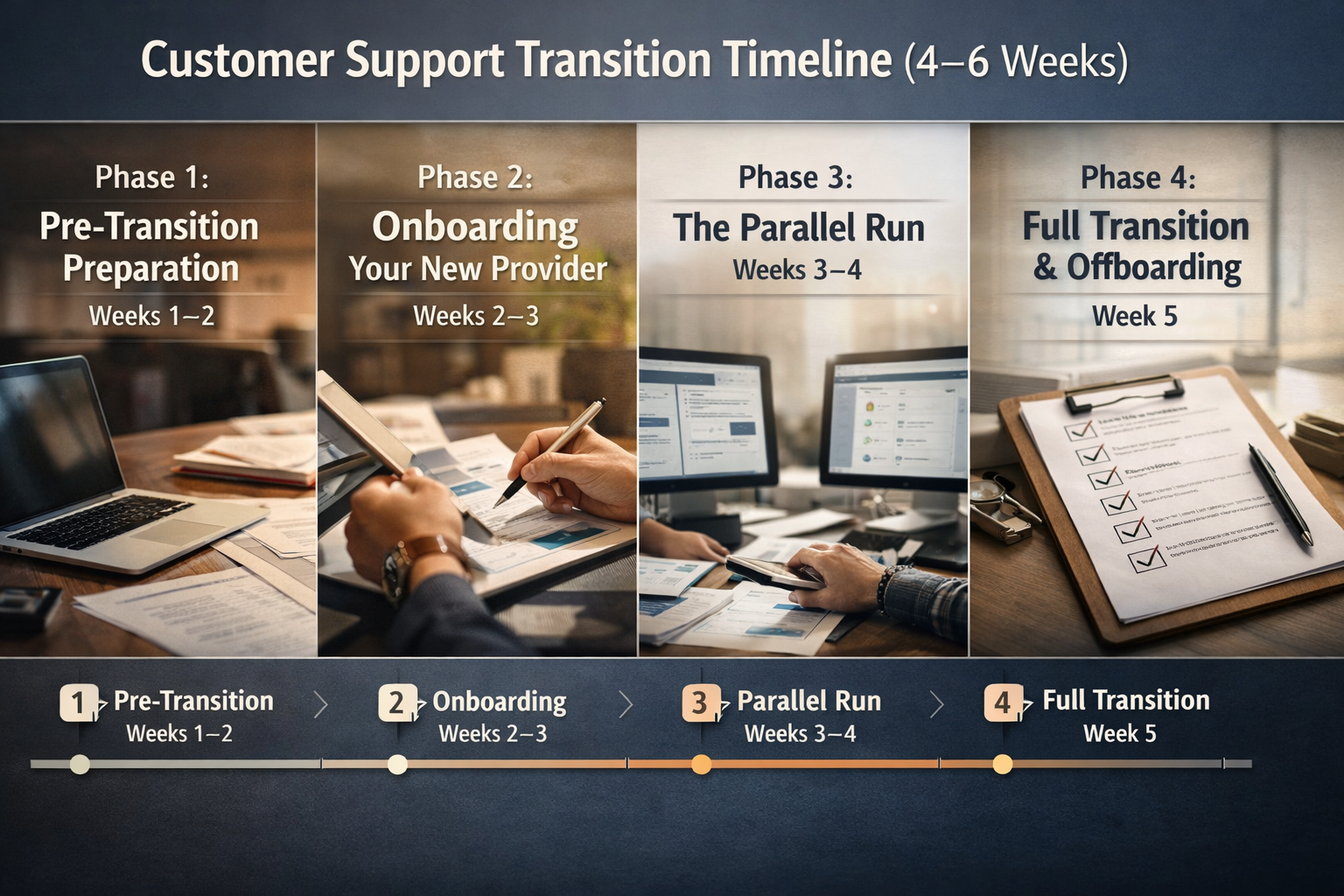
Transition Timeline at a Glance
| Phase | Timeline | Key Activities |
| Pre-Transition | Weeks 1–2 | Audit current support, review contracts, define needs, select provider |
| Onboarding | Weeks 2–3 | Security agreements, share access, build documentation, establish escalations |
| Parallel Run | Weeks 3–4 | Supervised ticket handling, real-time feedback, knowledge capture |
| Full Transition | Week 5 | Go live, offboard previous provider securely, monitor performance |
Most transitions take four to six weeks total. Rushing shortens the timeline but increases risk.
When to Consider Professional Help
If your current support situation is chaotic—undocumented, inconsistent, or simply overwhelming—bringing in a specialized agency can actually simplify the transition. Agencies with structured onboarding processes often build your internal documentation as part of their setup, leaving you better organized regardless of what happens next.
For small SaaS and ecommerce businesses, working with a provider that specializes in your space means less time explaining basics and more time focused on what makes your business unique.
Ready to see where your current support stands? Request a free inbox audit. You'll get a clear-eyed assessment of your support operation, plus actionable recommendations—whether or not you decide to make a change.
Frequently Asked Questions
How long does a typical customer support provider transition take?
Most transitions take four to six weeks when following a structured playbook. This includes pre-transition preparation, onboarding, a parallel run period, and post-transition monitoring. Rushing the process increases the risk of service disruptions and quality issues.
Will my customers notice the switch to a new support provider?
If the transition is handled properly, customers shouldn't notice. The parallel run model and thorough onboarding ensure the new team matches your brand voice and maintains response quality. Consistency is the goal—seamless service regardless of who's behind the inbox.
What's the biggest risk when switching customer support providers?
Knowledge loss is the most common pitfall. When undocumented processes and institutional knowledge leave with your previous provider, the new team starts from scratch. Thorough documentation, exit interviews with outgoing team members, and reviewing historical ticket data significantly reduce this risk.
Should I tell customers I'm switching support providers?
Generally, no. If the transition is smooth, customers experience continuity rather than disruption. Proactively announcing a switch can create unnecessary concern. Focus on maintaining quality, and customers won't have reason to question who's helping them.
How do I handle historical ticket data during a provider switch?
Check your contract with the outgoing provider regarding data ownership and export rights. Before the transition completes, export ticket history, saved replies, and any documentation you may need for reference or training. If your old provider hosted your helpdesk, confirm you can migrate or download that data before losing access.
About Evergreen Support
Evergreen Support is a US-based customer support agency built specifically for small SaaS and ecommerce businesses. Founded by Emma Fletcher and Ellis Annichine, the team provides human-powered email support with guaranteed 24-hour response times (Monday–Friday) and dedicated agents who learn your business inside and out. No AI chatbots. No offshore call centers. Just real people helping your customers—so you can get back to building your business.
Cited Works
[1] Zendesk — "Customer Experience Trends Report." https://www.zendesk.com/blog/customer-experience-trends-report/
[2] Evergreen Support — "How to Choose the Right Customer Service Agency for Your Business."
https://www.evergreensupport.co/blog/how-to-choose-customer-service-agency


