
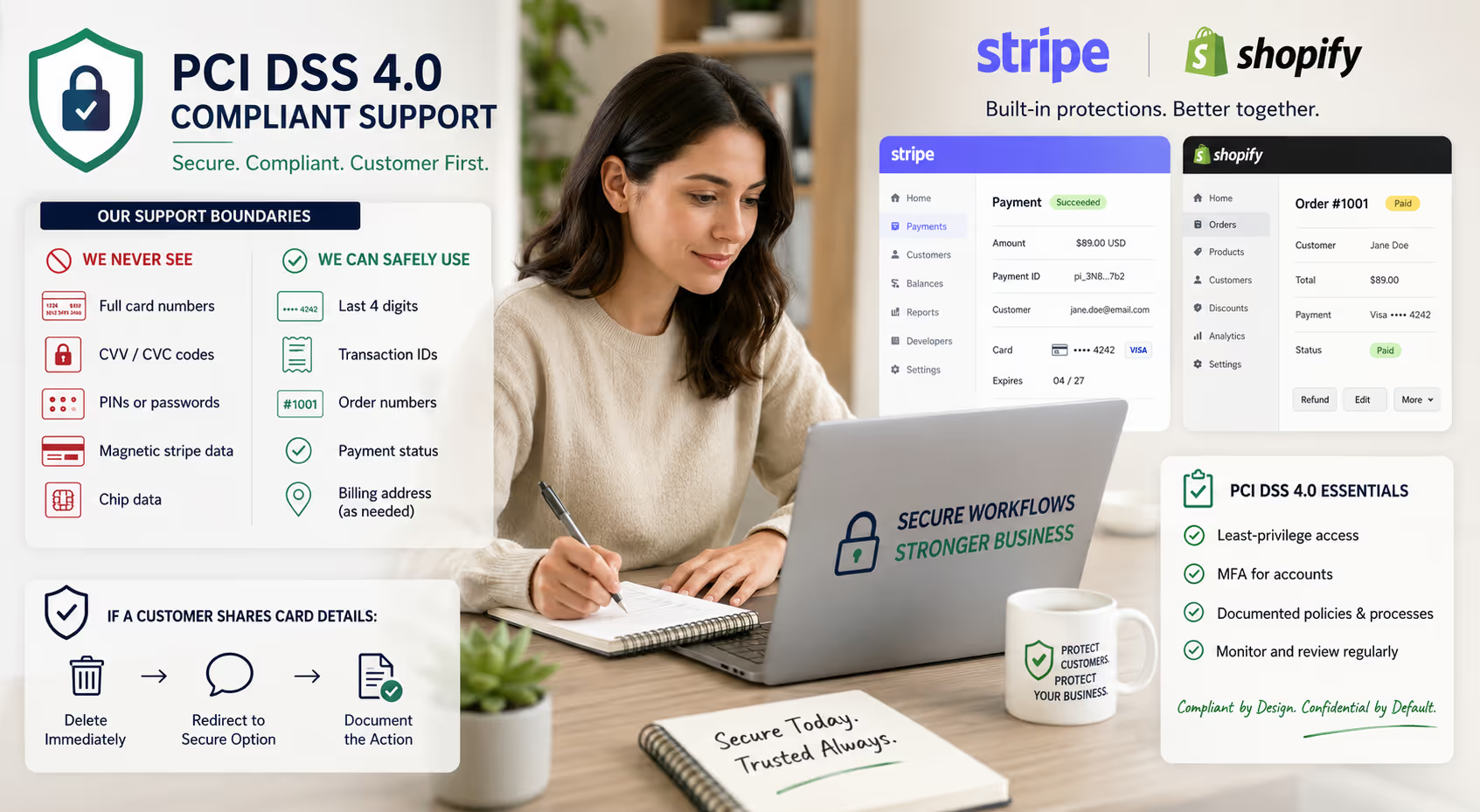
Your support inbox just pinged. A customer can't complete checkout and wants to read their card number over email so you can "just run it through." Helpful? Sure. Also a compliance nightmare that could cost your small business thousands in fines and put customer data at serious risk.
PCI DSS 4.0 changes the game for how support teams handle payment-related requests. If you're running a small e-commerce operation on Stripe or Shopify—and especially if you're considering outsourcing support—you need clear boundaries around what agents can and can't touch.
This guide breaks down the practical realities of PCI compliance for customer support workflows. No dense legalese. Just actionable guidance you can implement this week.
What PCI DSS 4.0 Actually Means for Support Teams
The Payment Card Industry Data Security Standard (PCI DSS) exists to protect cardholder data from breaches. Version 4.0, which becomes mandatory for all organizations by March 31, 2025, introduces stricter requirements around access controls, authentication, and data handling [1].
For small online businesses, the core principle remains unchanged: support agents should never have direct access to full card numbers, CVVs, or sensitive authentication data. What's new is the emphasis on documented processes, role-based access, and continuous monitoring.
Here's what matters for your support operation:
Least-privilege access is now explicitly required. Agents should only access the minimum data necessary to resolve a ticket [2].
Multi-factor authentication extends to all accounts with access to cardholder data environments—not just admin accounts.
Documentation requirements have teeth. You need written policies specifying who can access what, and you need to prove you're following them.
The good news? If you're using Stripe or Shopify correctly, these platforms handle the heavy compliance lifting. Your job is making sure your support workflows don't accidentally bypass their protections.
What Support Agents Should Never See or Handle
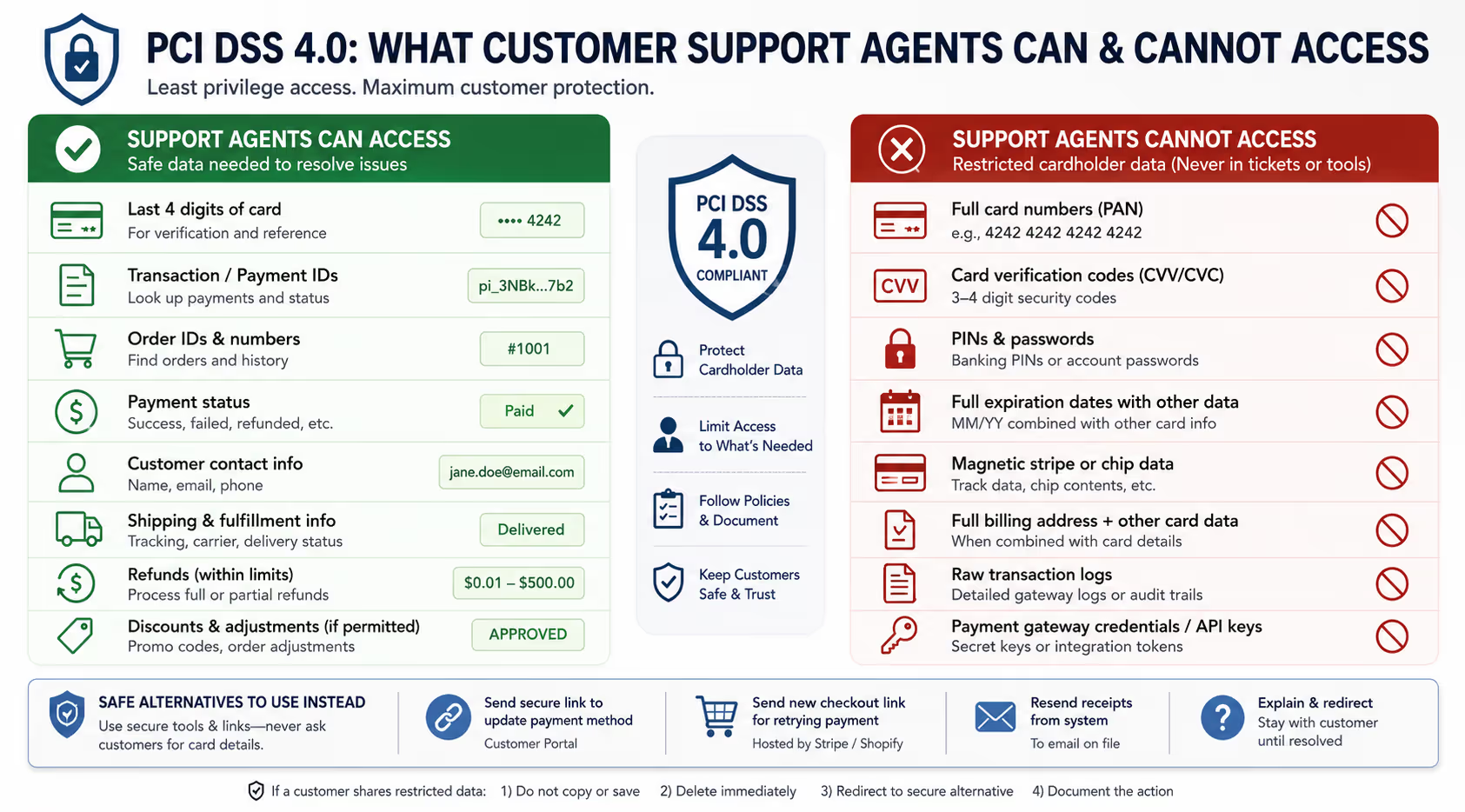
Let's get specific. These items should never appear in your support inbox, helpdesk, Slack channel, or anywhere your team operates:
The Absolute No-Touch List
Full primary account numbers (PANs). That's the 16-digit card number. If a customer emails it, your response should be to delete it immediately and explain why they shouldn't share it.
Card verification codes (CVV/CVC). The 3-4 digit security code should never be stored anywhere, by anyone, for any reason. This includes screenshots, chat logs, and "temporary" notes.
PINs or passwords. Self-explanatory, but worth stating: if a customer shares their banking PIN thinking it will help, your agent needs to know this is a red flag.
Full expiration dates combined with other card data. On their own, expiration dates are less sensitive. Combined with partial card numbers in a support ticket? That's approaching dangerous territory.
Magnetic stripe data or chip data. Less relevant for online businesses, but if you have any physical payment touchpoints, this applies.
The Gray Zone (Proceed with Caution)
Last four digits of a card. Generally safe for verification purposes. Stripe and Shopify display these in their dashboards specifically because they're not considered sensitive cardholder data [3].
Transaction IDs and order numbers. These are your friends. They let agents look up everything they need without touching card data.
Billing addresses. Technically "cardholder data" under PCI DSS, but lower-risk. Still, don't store these in unsecured locations like plain-text Slack messages.
Safe Alternatives That Actually Work
When a customer has a payment issue, your support team needs tools that solve problems without creating compliance risks. Here's what that looks like in practice.
For Stripe Workflows
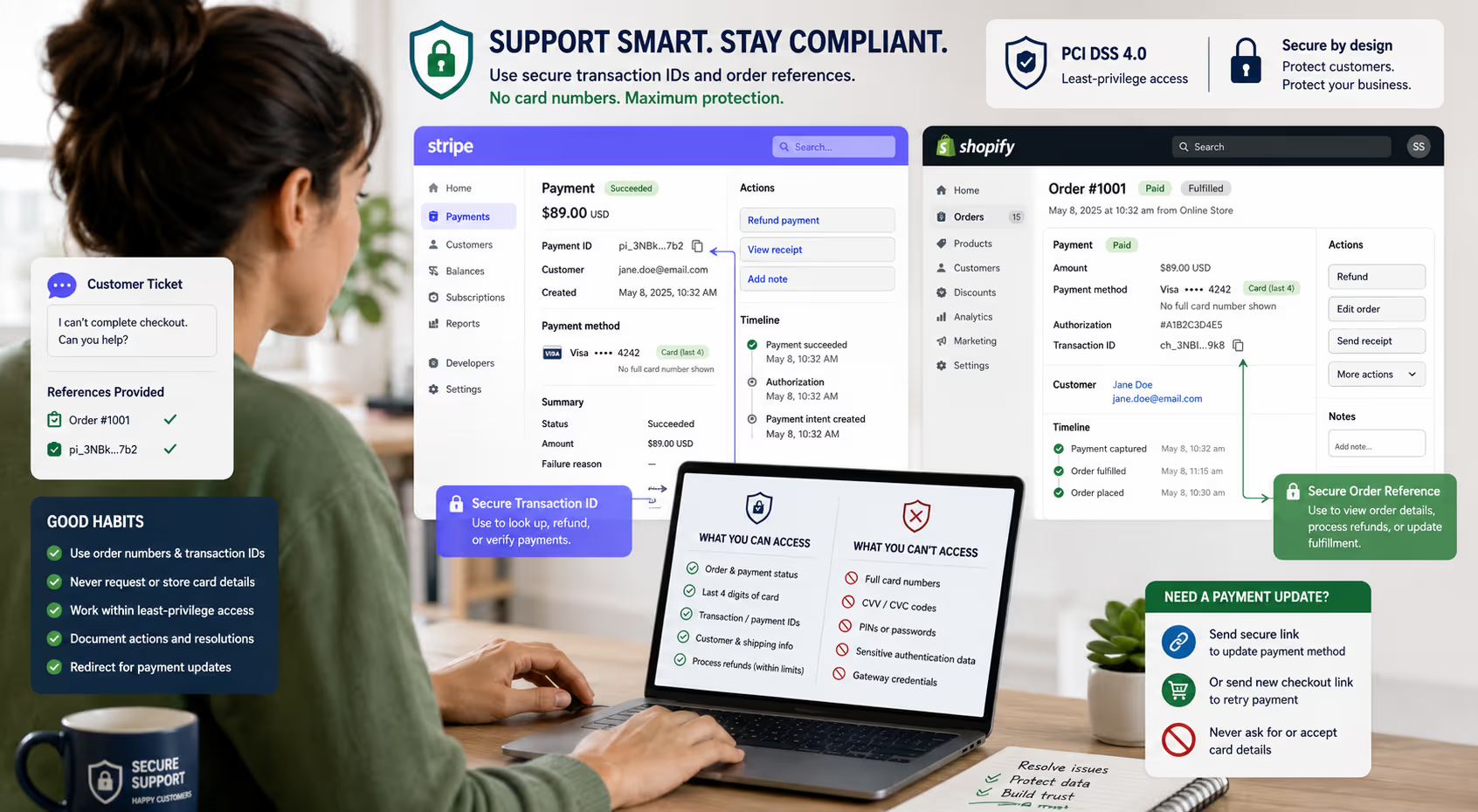
Stripe's dashboard is designed with support use cases in mind. Agents with appropriate permissions can:
View the last four digits of a card associated with a payment
Issue full or partial refunds using the transaction ID
See payment failure reasons (declined, insufficient funds, fraud flags)
Resend receipts to the email on file
Update customer contact information (not payment methods)
What agents shouldn't do in Stripe: create charges using manually-entered card details. The dashboard technically allows this with certain permissions, but it's almost never necessary and introduces risk. If a customer needs to retry a payment, send them a fresh checkout link instead.
For Shopify Workflows
Shopify similarly protects cardholder data by default. Your support team can:
Look up orders by order number, email, or customer name
View payment status and the last four digits of the card used
Process refunds directly from the order screen
Cancel or modify orders before fulfillment
Create draft orders with Shopify's hosted checkout (which handles card entry securely)
The key principle: Shopify's checkout collects and processes card data. Your team works with order references and status information, not raw payment credentials.
When Customers Insist on Sharing Card Details
This happens more often than you'd think. A frustrated customer wants to "just give you the number" so you can fix their problem faster.
Your response should be friendly but firm:
"I completely understand the frustration—thank you for trusting us with that. For your security, we actually can't accept card numbers directly. What I can do is send you a secure link to update your payment method, and I'll stay with you until it's resolved."
Then immediately delete any card data from the ticket and note that you did so. This protects both the customer and your business.
Building Permission Boundaries That Scale
Least-privilege access sounds straightforward until you try to implement it. Here's a practical framework for small teams.
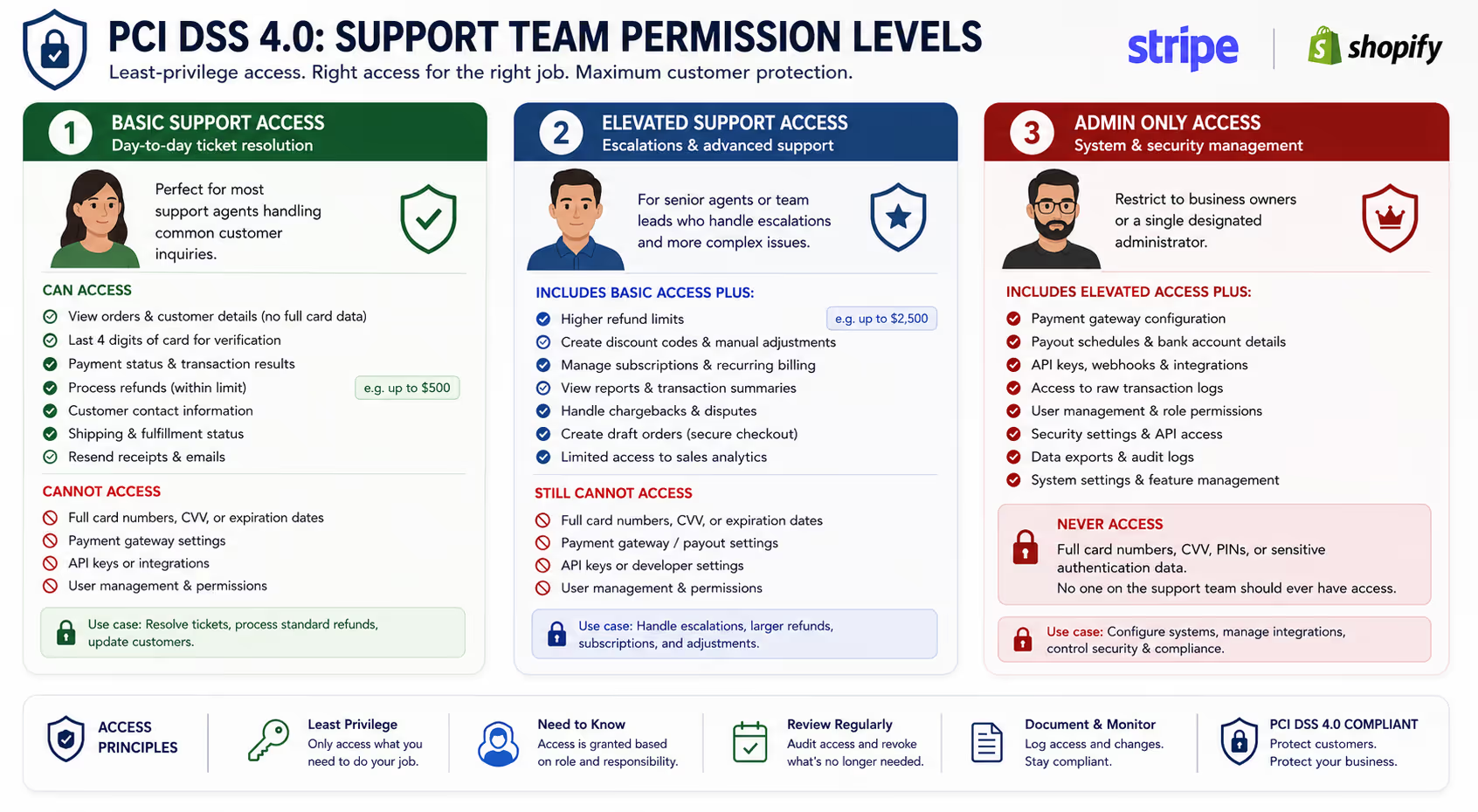
Tier 1: Basic Support Access
Most support agents need only:
Read access to order details (excluding full payment data)
Ability to process refunds within a dollar threshold you define
Access to customer contact information for communication
Read access to shipping and fulfillment status
This covers the vast majority of support tickets without exposing sensitive data.
Tier 2: Elevated Support Access
Senior agents or team leads might additionally need:
Higher refund authorization limits
Ability to create discount codes or manual adjustments
Access to subscription management (for SaaS businesses)
Limited reporting on transaction volumes or common issues
Tier 3: Admin-Only Actions
Reserve these for business owners or a single designated administrator:
Adding or modifying payment gateway settings
Changing payout schedules or bank account information
Creating API keys or integrations
Accessing raw transaction logs
Modifying user permissions for other team members
The goal isn't bureaucracy—it's reducing your attack surface. The fewer people who can access sensitive systems, the fewer opportunities for accidental exposure or malicious access.
Practical Implementation Checklist
Getting compliant doesn't require a consultant or months of work. Here's what to tackle this week.
Document Your Policies (Even Informally)
Write down:
What data support agents can access
What data they cannot access
What to do if a customer shares card information
Who has authority to process refunds and at what limits
A Google Doc works fine. The point is having it written and shareable.
Audit Your Current Access Levels
In Stripe, review your team members under Settings > Team. Remove anyone who doesn't actively need access, and downgrade permissions where possible.
In Shopify, check Staff accounts under Settings > Users and permissions. Use Shopify's built-in permission groups rather than giving everyone full access.
Train Your Team on the "Delete and Redirect" Response
Every support agent—whether in-house or outsourced—should know exactly what to do when they encounter card data in a ticket:
Do not copy, forward, or store the information
Delete it from the ticket immediately
Respond with a secure alternative
Document that the deletion occurred
Set Up Secure Alternatives Before You Need Them
Have these ready to send at a moment's notice:
A link to update payment methods in your customer portal
A fresh checkout link for retry attempts
A clear explanation of why you're redirecting them
What This Means for Outsourced Support
If you're working with—or considering—an outsourced support team, PCI compliance creates specific considerations.
First, the reassuring reality: a well-structured outsourced arrangement can actually improve your compliance posture. Professional support teams that operate within defined boundaries, using your existing tools and documented processes, reduce the risk of ad-hoc "helpful" actions that create exposure.
The key questions to ask any support partner:
Do they operate within your systems, or theirs? A team that works directly in your Stripe dashboard or Shopify admin—with permissions you control—is far safer than one asking you to export data into separate tools.
Do they have documented security practices? Not a 50-page policy manual, but clear answers about how they handle sensitive information and train their team.
Can they work within strict access controls? The right partner should be comfortable operating with only the access they need—not pushing for admin credentials "just in case."
What's their escalation process for compliance-sensitive situations? When a customer shares card data or requests something outside normal boundaries, how does the team respond?
An email-focused support model—where agents handle tickets asynchronously through your helpdesk—naturally creates more documentation and fewer opportunities for verbal card number exchanges compared to phone or live chat support.
Frequently Asked Questions
What happens if a customer emails their full card number before I can stop them?
Delete it immediately from your ticketing system and any associated notifications (email, Slack alerts, etc.). Respond to the customer explaining that you've removed the information for their security and offer a secure alternative. Document that you deleted it and when. This is exactly what PCI DSS expects—the requirement isn't that card numbers never appear anywhere, but that you have procedures to handle it when they do.
Does using Stripe or Shopify make me automatically PCI compliant?
These platforms handle the most complex compliance requirements by processing and storing card data in their certified environments. However, you're still responsible for how your team interacts with those platforms and any cardholder data that might flow through your other systems (like your helpdesk or email). Think of it as Stripe/Shopify handling 90% of the heavy lifting—your job is not undoing their work through insecure practices.
How do I know what permission level my support agents should have?
Start with the minimum and add only what's necessary. Can they resolve most tickets with read-only order access and basic refund capability? Then that's your baseline. Only expand permissions when there's a documented, recurring need—not "just in case."
Is email support more or less secure than phone support from a PCI perspective?
Email creates a written record, which has both advantages and risks. The advantage: you can see exactly what was shared and delete it. The risk: card data in email can persist in logs, backups, and forwarded messages. Phone support avoids written records but introduces the possibility of verbal card number entry. For small teams, email support with clear deletion protocols and secure payment link alternatives is typically the more manageable approach.
What are the actual penalties for PCI non-compliance?
Fines range from $5,000 to $100,000 per month depending on the severity and duration of non-compliance, assessed by the card brands through your payment processor [4]. Beyond fines, a data breach can mean liability for fraudulent charges, mandatory forensic audits, and potentially losing the ability to accept card payments entirely. For a small business, the reputational damage alone can be devastating.
The Bottom Line
PCI DSS 4.0 isn't about making support harder—it's about building systems where sensitive data stays protected by default. For small e-commerce teams using Stripe or Shopify, that means letting those platforms handle card data while your support team works with order references, transaction IDs, and secure payment links.
The practical steps: document your access policies, audit who can touch what, train your team on the delete-and-redirect response, and have secure alternatives ready before customers need them.
Whether you handle support yourself or work with an outsourced team, the same principles apply. Clear boundaries, least-privilege access, and documented processes protect both your customers and your business.
Feeling overwhelmed by inbox management on top of compliance concerns? Evergreen Support provides US-based, human-powered email support that operates within your existing systems and access controls. Our team handles your tickets in your Stripe and Shopify dashboards—with only the permissions you authorize. Book a call to discuss how we structure secure support workflows for small e-commerce and SaaS businesses.
E-E-A-T Statement
This guide was developed by the Evergreen Support team, which provides outsourced customer support services for small online businesses. Our approach to compliance reflects hands-on experience operating within clients' payment systems while maintaining appropriate access boundaries. We work directly in platforms like Stripe and Shopify daily, following the permission structures and secure workflows described in this article. For specific legal or compliance advice regarding your business, consult with a qualified PCI QSA (Qualified Security Assessor).
Works Cited
[1] PCI Security Standards Council — "PCI DSS v4.0." https://www.pcisecuritystandards.org/document_library/
[2] PCI Security Standards Council — "PCI DSS Quick Reference Guide." https://www.pcisecuritystandards.org/documents/PCI_DSS_QRG_v4.0.pdf
[3] Stripe — "Security at Stripe." https://stripe.com/docs/security
[4] Visa — "What Merchants Need to Know About PCI DSS." https://usa.visa.com/support/small-business/security-compliance.html


