

Last month, a $5 proration charge almost cost one of our clients a customer.
The customer had upgraded plans mid-cycle. Stripe did exactly what it was supposed to do: credited the unused portion of the old plan, charged a prorated amount for the new one, and spit out an invoice for $27.43. The customer saw that number, didn't recognize it, and filed a chargeback with their bank before anyone could explain what happened.
By the time our team responded, the dispute was already open. We won it—barely—but the whole mess took three weeks to resolve and left the customer feeling embarrassed. All because a weird-looking charge went unexplained for 48 hours.
For small SaaS teams running lean with one to five people, billing support can eat hours every week. These tickets feel urgent because money is involved. Customers get anxious. And unlike feature requests you can batch for later, billing questions demand timely, accurate responses.
Most billing confusion isn't actually complicated. It just feels that way because the math looks unfamiliar and customers don't understand how subscription billing works behind the scenes.
This playbook gives you something practical: a billing ticket map that tells you exactly what information you need, who owns resolution, and ready-to-customize email templates for the most common SaaS billing scenarios. No generic advice. Just the stuff you'll actually use tomorrow morning when that next billing notification hits.
Table of Contents
Why Billing Tickets Deserve Their Own Playbook
The Billing Ticket Map: Your Quick-Reference Framework
Proration: The #1 Source of Billing Confusion
Plan Change Requests: Upgrades, Downgrades, and Timing
Invoice Questions: What Customers Actually Want to Know
Failed Payments and Dunning: Recovering Revenue Without Annoying Customers
Billing Descriptor Confusion: Preventing Disputes Before They Start
Escalation Rules for Small Teams
Building Your Billing Macro Library
Frequently Asked Questions
Why Billing Tickets Deserve Their Own Playbook
Billing tickets aren't like other support requests. When someone asks how to use a feature, a delayed response is annoying but rarely catastrophic. When someone questions a charge, that delay can trigger a chargeback, a cancellation, or a very public complaint.
Failed payments and billing confusion contribute significantly to involuntary churn for subscription businesses. According to Stripe's research on subscription billing, payment failures alone account for up to 9% of total churn for SaaS companies [1]. For a small SaaS doing $30K in monthly recurring revenue, that could mean losing $2,700 every month to preventable billing issues.
But there's another reason billing deserves special attention: these tickets are highly pattern-based. Unlike technical bugs that require investigation, most billing questions fall into a handful of categories:
Proration confusion
Plan change requests
Invoice clarification
Failed payment troubleshooting
Refund requests
Billing descriptor questions
That predictability is actually good news. It means you can systematize your responses, reduce handling time, and deliver consistently helpful answers—even when you're juggling product work, sales calls, and everything else on your plate.
The Billing Ticket Map: Your Quick-Reference Framework
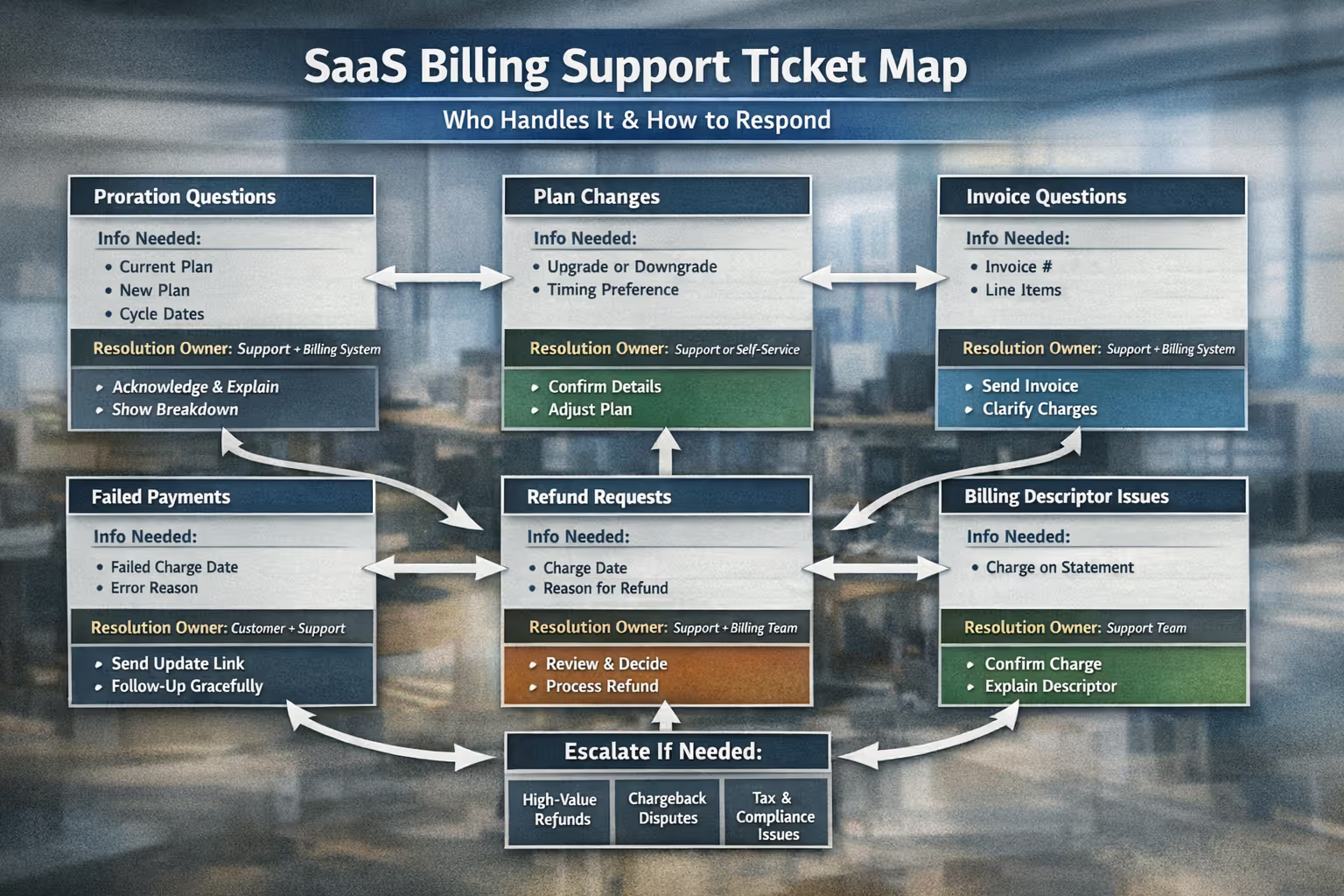
Before diving into specific scenarios, here's a framework you can reference quickly. For each billing ticket type, you'll see what information you need, who can actually resolve it, and the basic structure of your response.
| Ticket Type | Required Fields | Resolution Owner | Macro Skeleton |
| Proration Questions | Customer email, current plan, new plan, billing cycle date, proration calculation from Stripe/billing system | Support (explanation) + Billing system (automatic calculation) | Acknowledge → Explain the math simply → Show the breakdown → Offer to clarify further |
| Plan Upgrades | Customer email, current plan, desired plan, preferred timing (immediate vs. next cycle) | Support or customer self-service (depending on your setup) | Confirm request → Explain what happens to billing → Execute or guide → Confirm completion |
| Plan Downgrades | Customer email, current plan, desired plan, reason for downgrade (optional but useful) | Support or customer self-service | Acknowledge → Explain timing/access changes → Execute or guide → Offer alternatives if appropriate |
| Invoice Requests | Customer email, invoice date or number, specific question | Support (for explanations) + Billing system (for re-sending or adjustments) | Attach/link invoice → Explain line items → Offer additional documentation if needed |
| Failed Payments | Customer email, failed charge date, error reason from processor | Customer (card update) + Support (dunning follow-up) | Explain what happened → Provide update link → Clarify what happens next (grace period, access) |
| Refund Requests | Customer email, charge date, amount, reason for request | Support (decision) + Billing system (execution) | Acknowledge → State policy or decision → Execute if approved → Confirm timeline |
| Billing Descriptor Questions | Customer email, charge date, amount shown on statement | Support (confirmation that charge is legitimate) | Confirm the charge is from your company → Explain what it was for → Offer receipt |
A note on Stripe vs. Merchant of Record platforms: If you're using Stripe directly, you (or your support team) have full control over invoice adjustments, refunds, and subscription changes. If you're using a Merchant of Record platform like Paddle or LemonSqueezy, they handle tax compliance and often process refunds on your behalf—which means some resolution steps require going through their support rather than doing it yourself. The templates below work for both setups, but adjust your "Resolution Owner" accordingly.
Proration: The #1 Source of Billing Confusion
If you use Stripe Billing or a similar subscription platform, you've almost certainly fielded a proration question. The customer expected to pay $49. They got charged $23.47. Now they're confused—or worse, suspicious.
Proration happens when a customer changes plans mid-billing cycle. Instead of charging the full amount of the new plan, the system calculates a partial charge based on remaining days in the cycle.
Here's how it works:
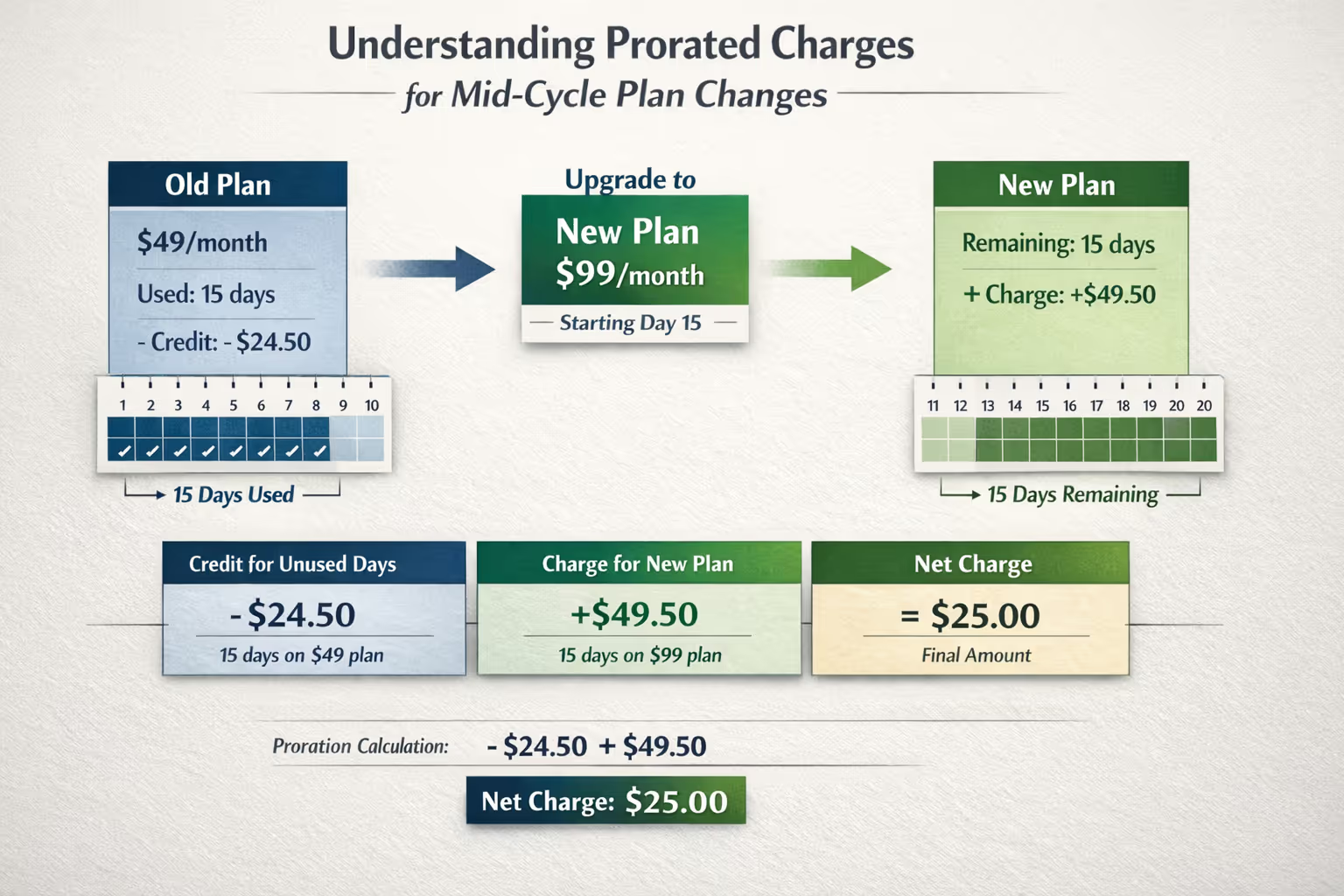
Scenario: Customer on $49/month plan upgrades to $99/month plan on day 15 of a 30-day billing cycle.
They've already paid $49 for the full month
They've "used" 15 days of the $49 plan (~$24.50 in value)
They have 15 days left, which should be on the $99 plan (~$49.50 in value)
The system credits the unused $24.50 from the old plan and charges $49.50 for the new plan
Net charge: roughly $25
The math makes sense once you explain it. But on a bank statement, "$25.47" looks random.
Email Template: Proration Explanation
Subject: Your recent charge explainedHi [Name],Thanks for reaching out about the charge you saw.When you upgraded from [Old Plan] to [New Plan] on [Date], our billing system calculated a prorated amount rather than charging you the full price immediately. Here's the breakdown:Credit for unused time on [Old Plan]: $[X]Charge for remaining days on [New Plan]: $[Y]Net charge: $[Z]Starting [Next Billing Date], you'll see the regular [New Plan] charge of $[Monthly Amount].If anything looks off or you'd like me to walk through the math in more detail, just let me know.Best,[Your Name]
Pro tip: Stripe's customer portal and dashboard both show proration calculations. If you can, include a screenshot or link directly to their invoice so they can see the breakdown themselves.
Plan Change Requests: Upgrades, Downgrades, and Timing
Plan changes seem straightforward until you realize there are actually several variations, each with different customer expectations:
Immediate upgrade: Customer wants access to new features right now
Upgrade at renewal: Customer wants to lock in the upgrade but not pay until next cycle
Immediate downgrade: Customer wants to reduce their plan today
Downgrade at renewal: Customer wants to keep current access until the cycle ends, then switch
Most billing systems handle these differently, so you need to know your specific setup. Stripe, for example, offers options for immediate changes with proration, scheduled changes at period end, or backdated changes [2].
Email Template: Upgrade Confirmation
Subject: Your upgrade to [New Plan] is completeHi [Name],Great news—your account is now on [New Plan].Here's what changed:New features available: [List key features]Today's charge: $[Prorated Amount] (covers the remainder of this billing cycle)Next regular charge: $[Full Amount] on [Date]You can access everything in your account right now. If you have questions about any of the new features, I'm happy to point you in the right direction.Thanks for upgrading,[Your Name]
Email Template: Downgrade Acknowledgment
Subject: Your plan change is scheduledHi [Name],I've scheduled your switch from [Old Plan] to [New Plan].Here's how it works:Until [Current Cycle End Date]: You'll keep full access to all [Old Plan] featuresStarting [Next Cycle Date]: Your account will switch to [New Plan] at $[Amount]/monthIf you change your mind before then, just let me know and I can cancel the scheduled change.Is there anything specific that prompted the switch? I'd love to understand if there's something we could do better.Best,[Your Name]
Notice that downgrade email? It includes a soft question about why they're downgrading. This isn't pushy—it's genuinely useful feedback. Sometimes customers downgrade because they don't realize a feature they need is actually included in their current plan.
Invoice Questions: What Customers Actually Want to Know
Most invoice questions boil down to three things:
"What is this charge for?" — They need context
"Can I get a copy of this invoice?" — They need documentation (often for expense reports or accounting)
"This doesn't match what I expected" — They need explanation or correction
The good news: all three are quick to resolve if you have the right information handy.
Required Invoice Information
When responding to invoice questions, pull these details from your billing dashboard:
Invoice number and date
Line items and amounts
Payment status (paid, pending, failed)
Payment method used (last 4 digits of card)
Link to downloadable PDF
Email Template: Invoice Clarification
Subject: Re: Question about your invoiceHi [Name],Happy to help clarify.Your invoice from [Date] for $[Amount] covers:Total: $[Amount]I've attached a PDF copy. If you need any additional documentation—like an invoice with your company's billing address or a specific format for accounting—just let me know and I'll get that sorted.Best,[Your Name]
Email Template: Sending a Requested Invoice
Subject: Your invoice from [Date]Hi [Name],Here's the invoice you requested.Invoice #[Number]Date: [Date]Amount: $[Amount]Status: PaidI've attached the PDF. You can also access all your past invoices anytime through your billing portal: [Link]Let me know if you need anything else.Best,[Your Name]
Failed Payments and Dunning: Recovering Revenue Without Annoying Customers
Failed payments are one of the most expensive billing problems for SaaS companies—and one of the most recoverable. Most payment failures happen because of expired cards, insufficient funds, or bank declines, not because customers want to stop paying.
The key is responding quickly without being aggressive. Your goal: make it easy for the customer to fix their payment method before their access gets interrupted.
The Failed Payment Timeline
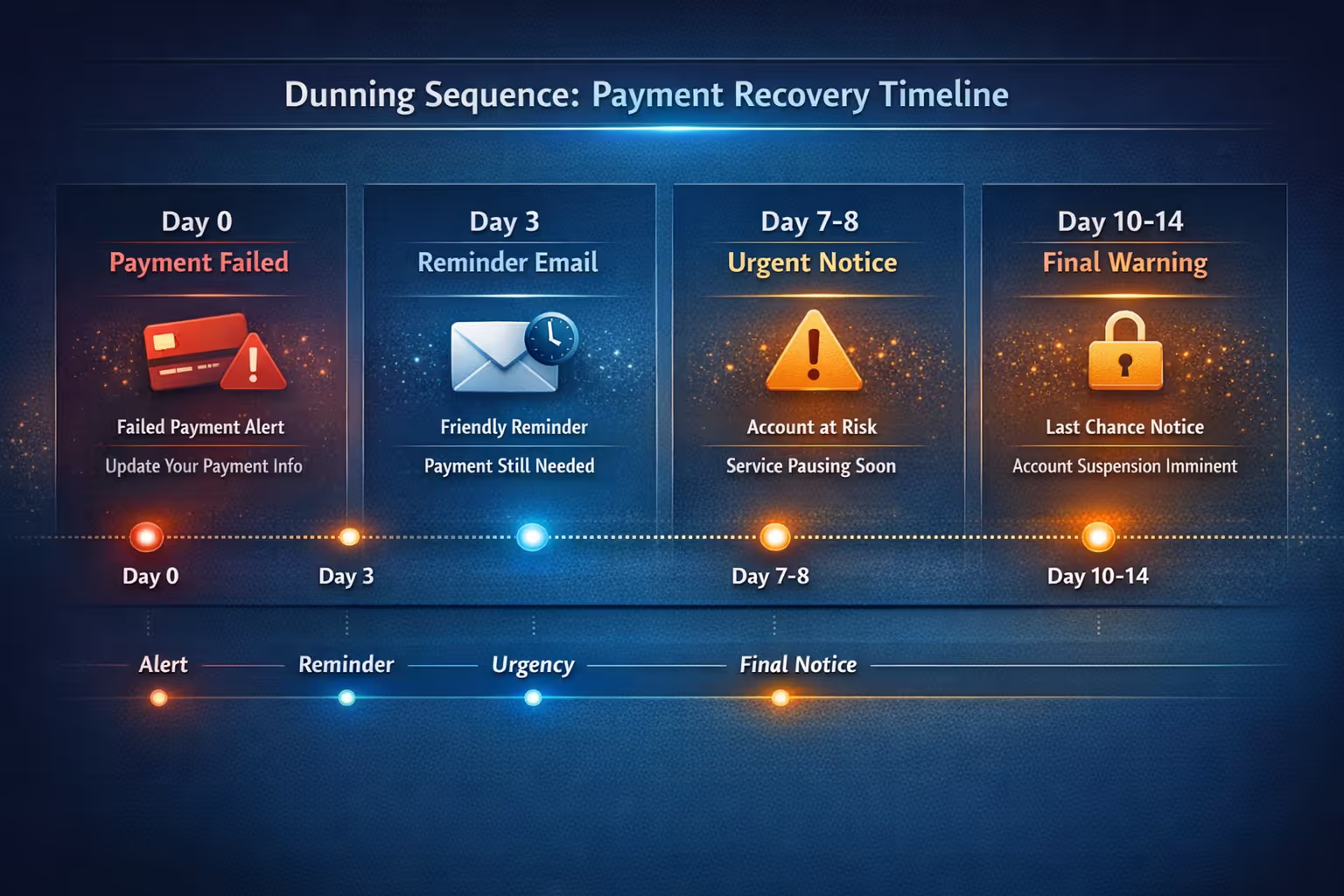
Here's a typical dunning sequence that balances persistence with respect:
Day 0 (Payment fails): Send immediate notification with update link
Day 3: First reminder if card hasn't been updated
Day 7: Second reminder, mention upcoming access restriction
Day 10-14: Final notice before account downgrade or pause
Most billing systems (Stripe, Chargebee, etc.) can automate this sequence. But if you're handling it manually or want to personalize the outreach, here are templates that work.
Email Template: Payment Failed (Day 0)
Subject: Quick heads up: Your payment didn't go throughHi [Name],I wanted to let you know that your payment of $[Amount] for [Product Name] didn't go through on [Date].This usually happens when a card expires or your bank flags an unfamiliar charge. Either way, it's an easy fix.Update your payment method here: [Link to billing portal]Your account is still fully active, and I've paused any retry attempts for 24 hours so you have time to update your info without getting multiple notifications.If you ran into this because something's not working with [Product Name], I'd be happy to help figure that out too.Best,[Your Name]
Email Template: Payment Reminder (Day 3)
Subject: Following up on your [Product Name] paymentHi [Name],Just a quick follow-up—it looks like your payment method still needs to be updated. Your $[Amount] charge from [Date] is still pending.Update your card here: [Link]If you're having trouble with the update or have questions about your subscription, just reply to this email and I'll help you sort it out.Best,[Your Name]
Email Template: Final Notice (Day 7-10)
Subject: Your [Product Name] access will be paused soonHi [Name],I wanted to give you a heads up: because we haven't been able to process your payment from [Date], your [Product Name] access will be paused on [Date + 3-7 days].I know things get busy, and this is just an automated timeline—if you need more time or want to chat about your subscription, just let me know.Update your payment method: [Link]Don't worry about losing your data. Everything will be saved, and your account will reactivate as soon as the payment goes through.Best,[Your Name]
Pro tip: The tone of your dunning emails matters. Aggressive "YOUR ACCOUNT WILL BE TERMINATED" messaging might create urgency, but it also damages the relationship. Most failed payments aren't intentional—treat them that way.
Billing Descriptor Confusion: Preventing Disputes Before They Start
Here's a scenario that catches many small SaaS teams off guard: a customer sees a charge on their bank statement from "STRIPE* ACME" or some variation and doesn't recognize it. They dispute the charge with their bank. You lose the funds, pay a chargeback fee, and now you're dealing with a frustrated customer who may have genuinely forgotten they signed up.
This happens more often than you'd think. Industry data from Chargebacks911 indicates that up to 75% of all chargebacks result from "friendly fraud"—customers who don't recognize legitimate charges or forget about recurring subscriptions [3].
The culprit is often your billing descriptor. This is the text that appears on customer bank statements. If your company is "Acme Project Tools" but your descriptor says "STRIPE* ACMEPRO," customers might not connect the dots.
How to Reduce Descriptor Confusion
Check your current descriptor: In Stripe, go to Settings → Business Settings → Public Details. Make sure your statement descriptor matches what customers would recognize.
Include descriptor info in receipts: Add a line to your email receipts like: "This charge will appear on your statement as [DESCRIPTOR]."
Mention it in onboarding emails: A simple note during signup like "You'll see charges from [DESCRIPTOR] on your bank statement" can prevent confusion later.
Email Template: Confirming a Questioned Charge
Subject: Re: Unknown charge on my statementHi [Name],Thanks for reaching out—I can confirm that charge is from us.The $[Amount] charge on [Date] was for your [Product Name] subscription. Our charges appear on bank statements as [DESCRIPTOR], which I know can look a bit different from our actual name.Here's your receipt for that payment: [Link or Attachment]If you have any other questions about your account or subscription, I'm happy to help.Best,[Your Name]
Responding quickly to these questions matters. If you can clarify before the customer contacts their bank, you avoid the chargeback entirely.
Escalation Rules for Small Teams
On a larger team, billing issues might route to a dedicated billing specialist or finance person. When you're running a one-to-five person operation, everyone wears multiple hats. But you still need clarity on who handles what—especially when real money is involved.
Here's a simple escalation framework:
Tier 1: Support Handles Directly
Explaining charges and proration
Sending invoices and receipts
Processing standard plan changes
Answering billing portal questions
Confirming legitimate charges
First dunning outreach for failed payments
Tier 2: Founder/Finance Review Required
Refunds over $[X threshold—pick what makes sense for your business]
Custom pricing requests
Disputed charges and chargebacks
Annual billing requests or exceptions
Failed payment situations requiring judgment calls (long-time customer, extenuating circumstances)
Tier 3: Payment Processor Required
Chargeback evidence submission
Payment method issues on Stripe's end
Tax calculation questions
Payout timing questions
For Tier 2 situations, create a simple process. Maybe it's a Slack message with the customer email, issue summary, and recommended action. The goal isn't bureaucracy—it's making sure someone with authority signs off on decisions that affect revenue.
Sample Escalation Note
Customer: [email]Issue: Requesting $200 refund for annual plan, 3 months into subscriptionReason given: Not using the product as much as expectedRecommendation: Offer prorated refund of $150 (unused months) or downgrade to monthly with $50 creditAwaiting decision from: [Founder/Finance Person]
Building Your Billing Macro Library
If you're using a helpdesk like Help Scout, Zendesk, or even just Gmail templates, you can turn the email templates above into saved responses (often called macros or canned responses).
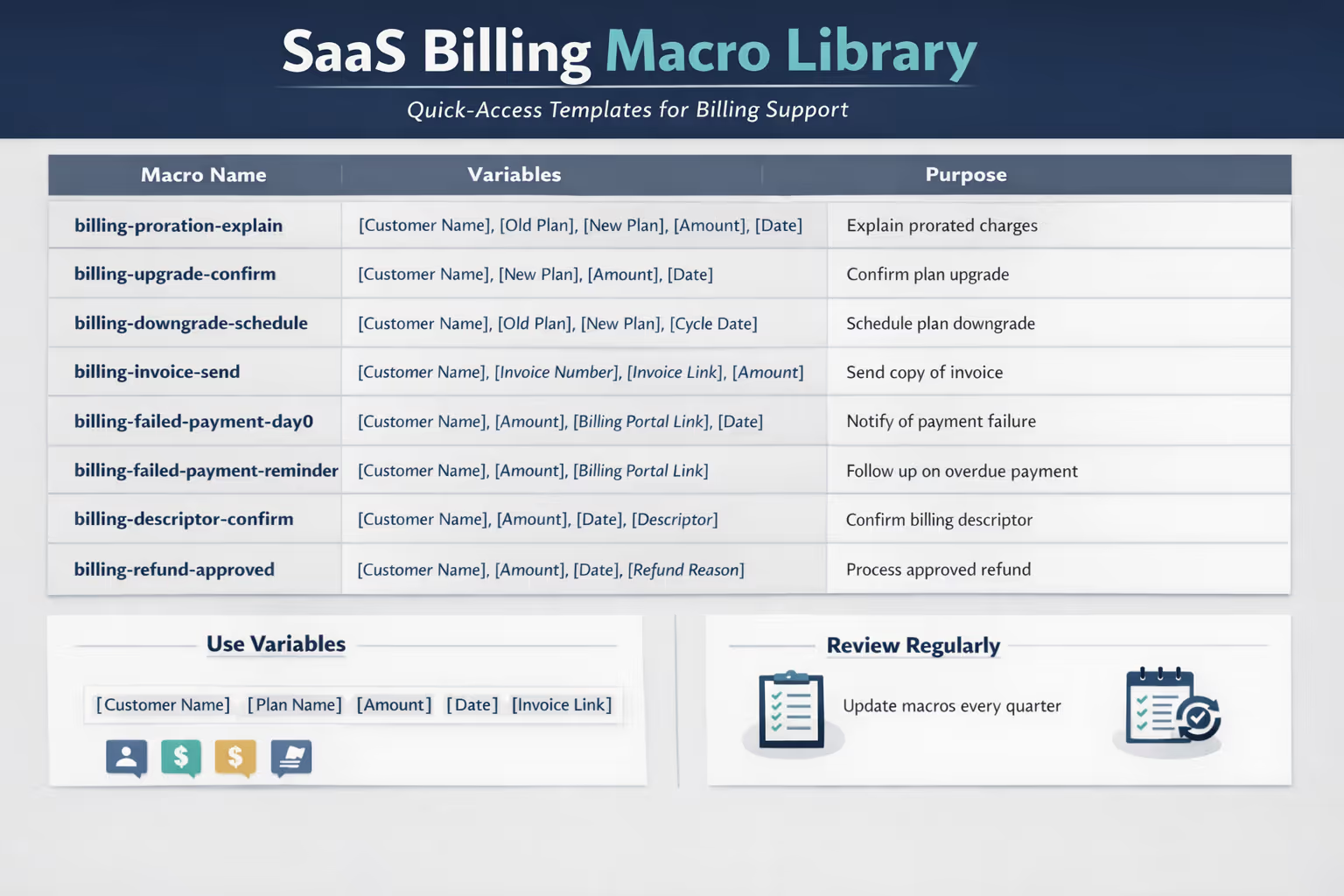
Here's how to structure your billing macro library for quick access:
Naming Convention
Use a consistent prefix so billing macros are easy to find:
billing-proration-explain
billing-upgrade-confirm
billing-downgrade-schedule
billing-invoice-send
billing-descriptor-confirm
billing-failed-payment-day0
billing-failed-payment-reminder
billing-refund-approved
billing-refund-denied
Variables to Include
Most helpdesks support variables you can customize per ticket. Build these into your macros:
[Customer Name]
[Plan Name]
[Amount]
[Date]
[Invoice Link]
[Billing Portal Link]
Review Quarterly
Set a calendar reminder to review your billing macros every quarter. Plans change. Pricing changes. What was accurate in January might be wrong by April. A quick audit ensures customers aren't getting outdated information.
Your Next Step
Billing support doesn't have to eat your week. With a clear ticket map, ready-to-use templates, and simple escalation rules, you can handle most billing questions in minutes rather than spending precious time reinventing the wheel for each ticket.
But if your inbox is already overwhelming and you'd rather focus on building your product, there's another option.
Book a call with Evergreen Support to learn how our US-based team can handle your day-to-day email support—including billing tickets. We'll learn your billing setup, build custom macros for your specific plans and pricing, and make sure your customers get fast, accurate responses. For teams that want a head start, we also offer an Inbox Audit where we analyze your current billing tickets and build a macro library tailored to your most common questions.
No chatbots. No call centers. Just humans helping humans.
Frequently Asked Questions
How do I explain proration without confusing customers?
Focus on the concept, not the math. Explain that when they changed plans mid-cycle, the system credited unused time from their old plan and charged proportionally for the new one. Offer to show the exact calculation if they want details, but most customers just need reassurance that the charge is correct and their account is in good standing. Including a link to their invoice where they can see the line items helps.
What should I do when a customer disputes a legitimate charge?
Respond immediately with confirmation that the charge is from your company and provide documentation (receipt, invoice, account activity). If they've already filed a chargeback with their bank, gather evidence quickly—most processors like Stripe give you a limited window to respond. Evidence should include proof of service delivery, customer communication, and terms of service acknowledgment.
How quickly should I respond to billing questions?
Faster than other ticket types. Billing questions involve money and tend to create anxiety for customers. Aim for same-business-day responses at minimum. If you can't resolve immediately, at least acknowledge the question and give a timeline for resolution. This prevents customers from escalating to their bank while waiting.
Should I offer refunds to unhappy customers?
It depends on your policy and the specific situation. For subscription SaaS, a common approach is offering prorated refunds for unused time but not full refunds for time already used. Whatever you decide, be consistent and document your policy so you're not making judgment calls under pressure for every request.
How do I prevent chargebacks from customers who forgot they signed up?
Three tactics help: clear billing descriptors that match your brand name, confirmation emails at signup that mention how charges will appear on statements, and quick responses when customers question charges. The goal is recognition and easy verification before they contact their bank.
E-E-A-T: Why Trust This Playbook
This playbook was developed by Evergreen Support, a US-based customer support agency that specializes in email support for small SaaS and ecommerce businesses. Our team handles billing tickets daily for companies using Stripe, Paddle, and other subscription billing platforms. The templates and frameworks here come from real-world experience resolving thousands of billing questions for growing software companies—not abstract theory.
Works Cited
[1] Stripe — "Guide to Subscription Billing."
https://stripe.com/guides/billing
[2] Stripe — "Subscription Schedules Documentation." https://stripe.com/docs/billing/subscriptions/subscription-schedules
[3] Chargebacks911 — "Friendly Fraud: The Hidden Threat to Your Business." https://chargebacks911.com/friendly-fraud/


