
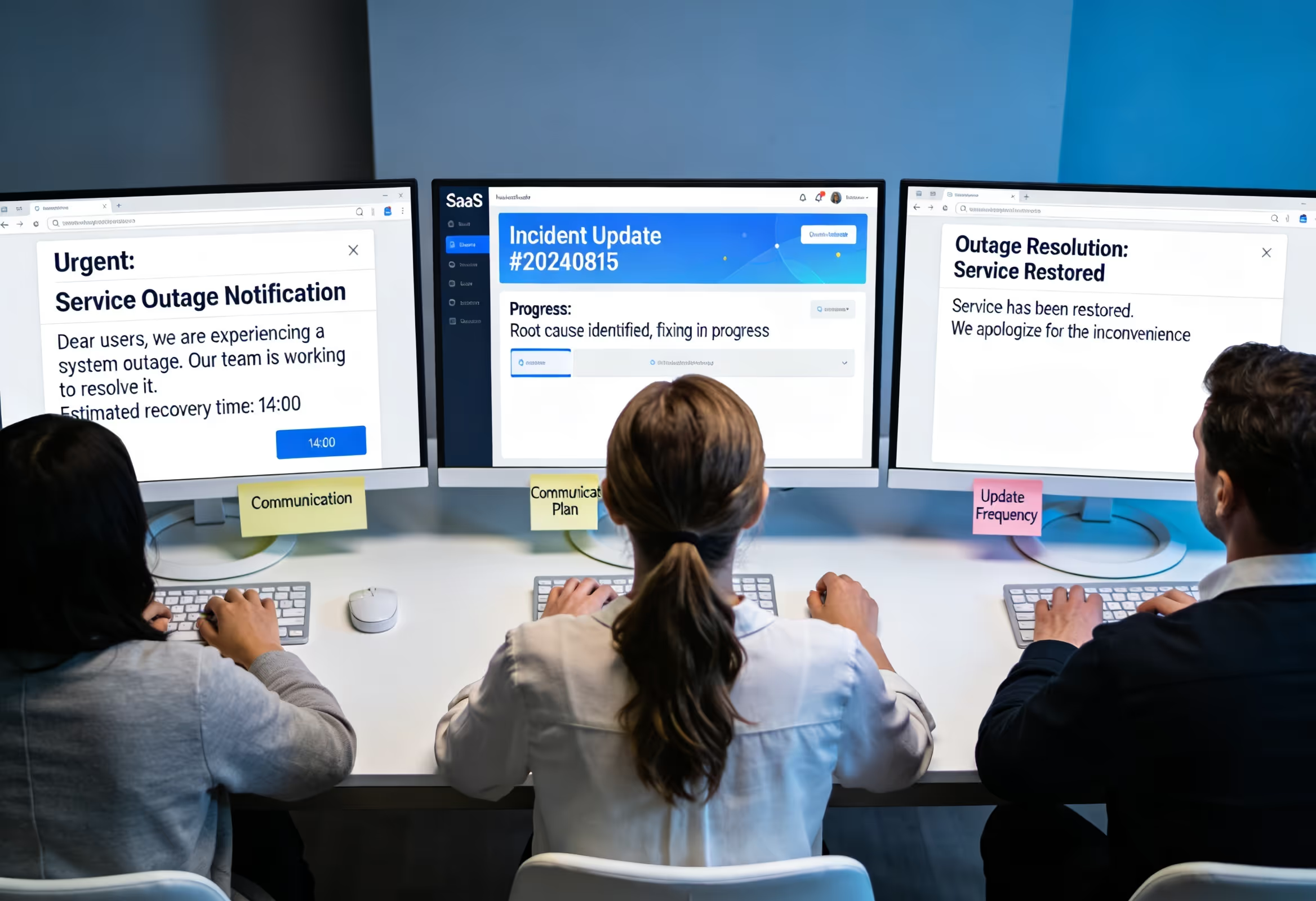
Your status page just turned red. Slack is exploding. And somewhere between debugging the root cause and coordinating with engineering, you realize 47 support tickets have piled up—all asking the same question: "Is anyone else experiencing this?"
Here's the uncomfortable truth about SaaS outages: the technical fix is only half the battle. How you communicate with customers during and after an incident often determines whether they stick around or start shopping for alternatives. A study by PwC found that one in three customers will leave a brand they love after just one bad experience [1]. And few experiences feel worse than watching your workflow grind to a halt while radio silence fills your inbox.
The good news? You don't need a crisis communications team or a PR agency to handle outage emails well. You need a repeatable cadence, honest language, and a system that keeps customers informed without pulling your entire team away from actually fixing the problem.
This guide gives you exactly that—a step-by-step framework for incident communication that reduces ticket volume, preserves trust, and (critically) prevents churn when things go sideways.
Why Outage Communication Matters More Than You Think
Let's be direct: customers understand that software breaks. They use dozens of SaaS tools, and they've seen outages before. What they don't tolerate is feeling ignored or confused.
When an outage hits and customers hear nothing, their brains fill the silence with worst-case scenarios. Is my data safe? Is this company going under? Should I migrate to a competitor before this gets worse?
Research from Salesforce indicates that 80% of customers consider the experience a company provides to be as important as its products [2]. During an outage, that experience is almost entirely defined by your communication. Fast, honest updates transform a frustrating situation into evidence that you're competent and trustworthy. Silence does the opposite.
There's a practical angle too. Every unanswered ticket during an outage is a support burden that compounds. If you're a small team (or a founder handling support yourself), you simply don't have bandwidth to respond individually to hundreds of "Is it down?" messages while also coordinating a technical fix. A solid communication cadence deflects those tickets before they're sent.
The Four-Stage Incident Communication Cadence
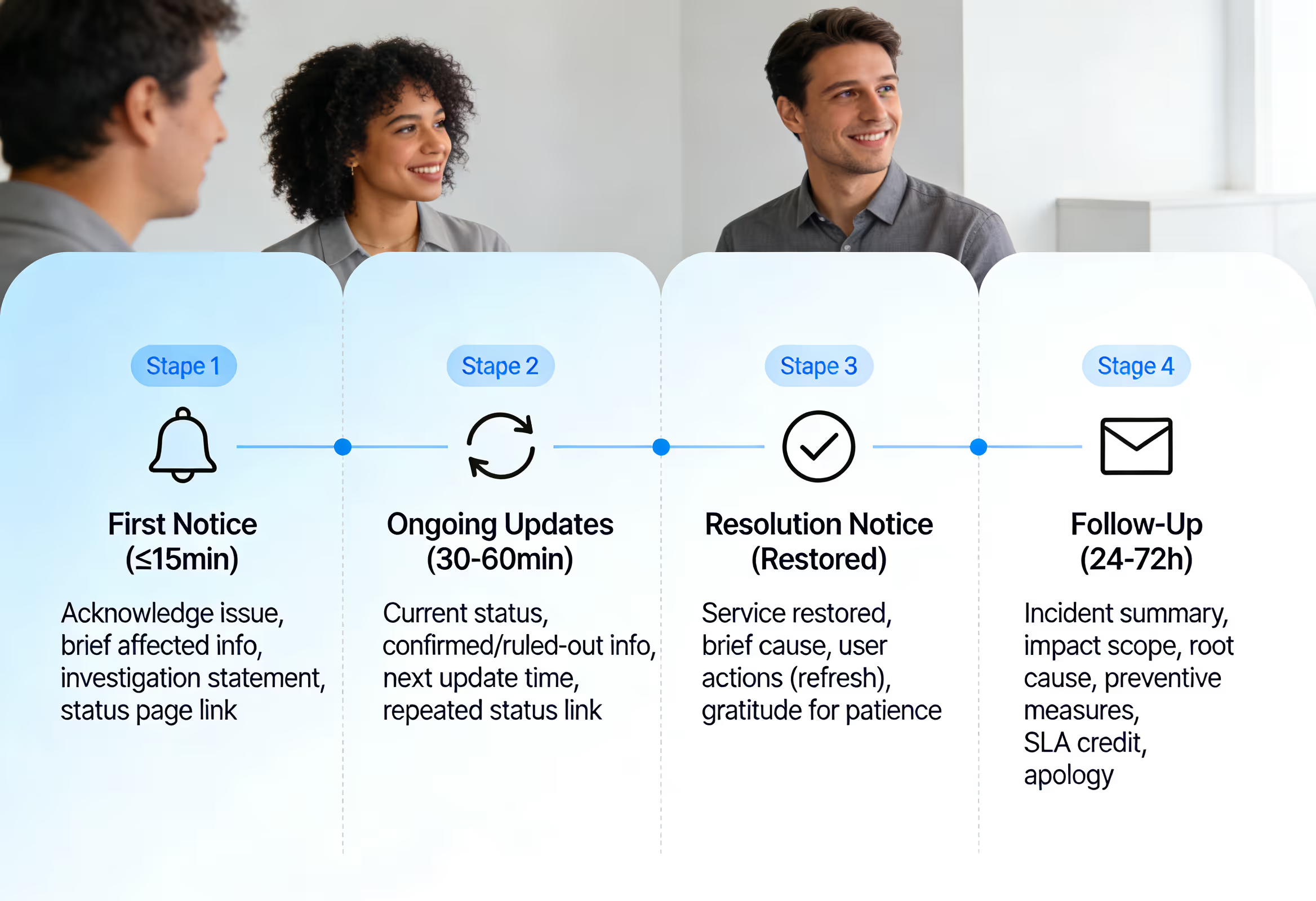
Effective outage communication follows a predictable rhythm. Each stage has a specific purpose and a specific set of information customers need. Skip a stage or get the timing wrong, and you'll create confusion or frustration—even if your technical response is flawless.
Stage 1: First Notice (Within 15 Minutes of Detection)
Speed matters enormously here. The moment you confirm an issue exists, customers need to know you're aware. This initial message doesn't need to explain everything—it just needs to establish that you're on it.
What to include:
Clear acknowledgment that there's a problem
Brief description of what's affected (if known)
Statement that you're investigating
Link to your status page for real-time updates
Sample email:
Subject: Service Disruption – We're InvestigatingHi [Name],We're aware of an issue affecting [specific feature or service]. Some users are experiencing [brief symptom description].Our team is actively investigating, and we'll share updates as we learn more. You can also check our status page for real-time information: [status page link]We know this is frustrating, and we're working to resolve it as quickly as possible.— The [Company] Team
Notice what's absent: speculation about causes, promises about resolution times, or technical jargon. You don't know those things yet, and guessing creates problems later.
Timing tip: Send this within 15 minutes of confirming the issue. If you're still figuring out the scope, that's fine—say so. "We're investigating reports of..." is honest and buys you time without appearing unaware.
Stage 2: Ongoing Updates (Every 30-60 Minutes)
Once the first notice goes out, customers enter waiting mode. And waiting without information feels interminable. Regular updates—even when there's no major news—signal that you're still working and haven't forgotten them.
What to include:
Current status (still investigating, identified cause, working on fix)
What you've ruled out or confirmed
Estimated time to next update
Repeated status page link
Sample email:
Subject: Update: Service Disruption – Cause IdentifiedHi [Name],Quick update on the service disruption we reported earlier.We've identified the root cause: [brief, non-technical explanation]. Our engineering team is implementing a fix, and we expect to have more information within the next 45 minutes.Current impact: [What's still affected and what's working]We'll send another update by [specific time] or sooner if the situation changes. Status page: [link]Thank you for your patience.— The [Company] Team
About ETAs: This is where many teams get nervous. Should you give a timeline?
Here's the rule: never promise a resolution time unless you're genuinely confident. Instead, commit to an update time. "We'll share another update in 45 minutes" is a promise you can keep. "We'll have this fixed in 45 minutes" might not be.
If you do have a realistic ETA, phrase it carefully: "We anticipate service restoration within the next two hours, though this may change as we work through the fix." This sets expectations while preserving flexibility.
Stage 3: Resolution Notice (When Service Is Restored)
The moment things are back online, customers need to know immediately. But don't just say "it's fixed" and disappear—this message should confirm resolution and briefly explain what happened.
What to include:
Clear statement that service is restored
Brief explanation of what caused the issue
Any user actions needed (refresh, re-login, etc.)
Acknowledgment of impact and gratitude for patience
Sample email:
Subject: Resolved: Service Disruption – All Systems OperationalHi [Name],Good news—service has been fully restored as of [time].What happened: [One or two sentences explaining the cause in plain language]. Our team has resolved the issue and implemented measures to prevent recurrence.If you're still experiencing problems, try refreshing your browser or logging out and back in. If issues persist, reply to this email and we'll help you directly.We know this disruption affected your work, and we genuinely appreciate your patience.— The [Company] Team
Transparency note: You don't need to provide a technical deep-dive here, but vague non-answers ("we experienced a technical issue") erode trust. Something like "a database configuration error caused authentication failures" is honest without being overwhelming.
Stage 4: Follow-Up (24-72 Hours Later)
This stage separates companies that handle incidents adequately from those that handle them excellently. A thoughtful follow-up demonstrates accountability and often determines whether customers leave feeling frustrated or impressed.
What to include:
Summary of what happened
Impact scope and duration
Root cause analysis (accessible version)
What you're doing to prevent recurrence
SLA credit information (if applicable)
Genuine apology
Sample email:
Subject: Incident Follow-Up: What Happened and What We're Doing About ItHi [Name],We want to follow up on the service disruption that occurred on [date] between [times].
What happened: [Clear, honest explanation—aim for 2-3 sentences that a non-technical reader can understand]Impact: [Duration, which features were affected, approximate number of users impacted]
What we're doing: [Specific preventive measures you're implementing]
Your account: [If you offer SLA credits, explain eligibility and how they'll be applied. If you don't have formal SLAs, consider a goodwill gesture for significantly impacted customers.]We take reliability seriously, and we know we fell short of your expectations. If you have questions or want to discuss how this affected your work, please reach out—we're here.— [Name], [Role] at [Company]
That final follow-up should come from a real person (ideally a founder or support lead for small teams), not a generic company signature. It humanizes the communication and signals genuine accountability.
Wording That Works: Phrases to Use (and Avoid)
Language choices during outages carry significant weight. Here's a quick reference for phrases that build trust versus those that undermine it.
Use these:
"We're aware of..." (immediate acknowledgment)
"Our team is actively investigating..." (action-oriented)
"We'll share an update by [specific time]" (commitment you can keep)
"We know this is frustrating" (empathy without over-apologizing)
"Here's what we know so far" (transparency)
"We've identified the cause and are implementing a fix" (progress)
Avoid these:
"We apologize for any inconvenience" (generic and hollow)
"This rarely happens" (defensive and irrelevant)
"Due to unforeseen circumstances" (vague corporate-speak)
"We're working around the clock" (performative)
"It should be fixed soon" (undefined timeline creates anxiety)
"Our engineers are aware" (passive; customers want action, not awareness)
Linking Your Status Page Effectively
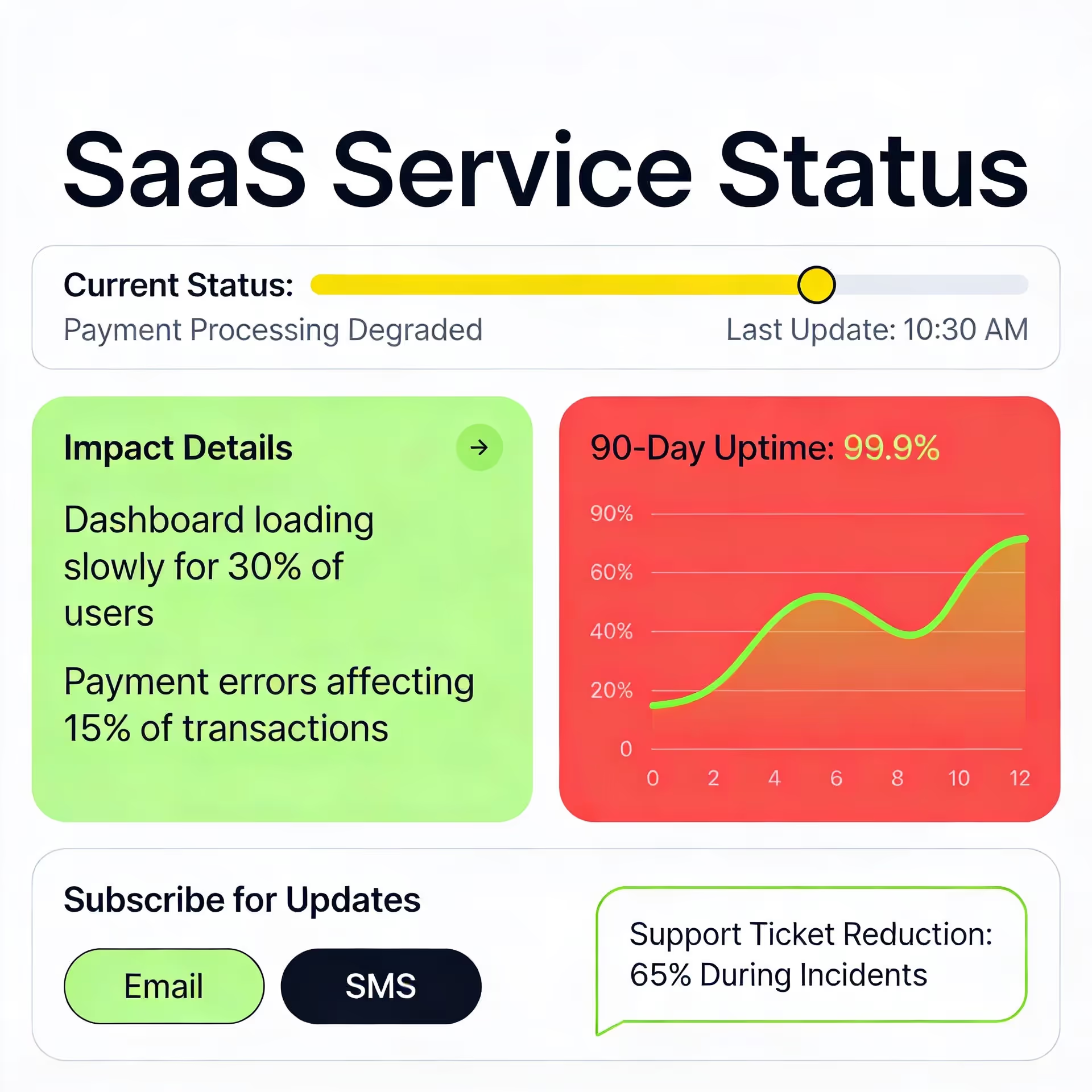
If you have a status page (and you should), it becomes your single source of truth during incidents. But simply having one isn't enough—you need to drive customers there consistently and make it genuinely useful.
Status page best practices:
Link prominently in every outage email. Don't make customers search.
Update the status page before sending emails. Customers who check the page should find information at least as current as what's in their inbox.
Use clear impact descriptions. "Degraded performance" means different things to different people. Specify: "Dashboard loading slowly for some users" or "Payment processing unavailable."
Show historical uptime. Customers who see 99.9% uptime over the past 90 days will be more forgiving of a current issue than those who have no context.
Offer subscription options. Let customers subscribe to status updates via email or SMS so they don't have to manually check.
Your status page should reduce support ticket volume during incidents. If customers can get accurate, real-time information without emailing you, many will.
SLA Credits: When and How to Communicate Them
If your service includes SLA commitments with credit provisions, you need a clear process for communicating eligibility and application.
Key principles:
Be proactive. Don't wait for customers to ask about credits. If they're entitled to compensation, tell them.
Explain eligibility clearly. "Based on our SLA and the duration of this incident, your account qualifies for a service credit equal to [X]."
Describe application method. Will the credit appear automatically on their next invoice? Do they need to request it? Eliminate ambiguity.
Handle exceptions gracefully. For customers outside formal SLA coverage but significantly impacted, consider goodwill gestures. A small credit or extended trial costs you little and can salvage a relationship.
Sample SLA credit language:
Based on our service level agreement, this incident qualifies your account for a credit of [amount or percentage]. This credit will be automatically applied to your next invoice—no action required on your part. If you have questions about how this was calculated, we're happy to walk you through our SLA terms.
Deflecting Tickets Without Ignoring Customers
During an active outage, your inbox will fill with variations of the same question: "Is the system down?" Every individual response pulls attention from resolution. Here's how to deflect gracefully.
Automated response option:
Set up an auto-reply for support emails that acknowledges the ongoing incident:
Thanks for reaching out. We're currently experiencing a service disruption affecting [feature/service], and our team is working on a fix. For real-time updates, please check our status page: [link]. We'll notify all customers when service is restored. If your question is unrelated to this incident, we'll respond as quickly as possible.
Proactive communication reduces inbound volume. Customers who receive your first-notice email are less likely to submit tickets asking if you're aware of a problem. The math is straightforward: one well-timed broadcast email can eliminate dozens of individual support requests.
In-app messaging: If you have the capability, display a banner or notification within your product acknowledging the issue. Customers who see the acknowledgment before experiencing problems are less likely to panic or contact support.
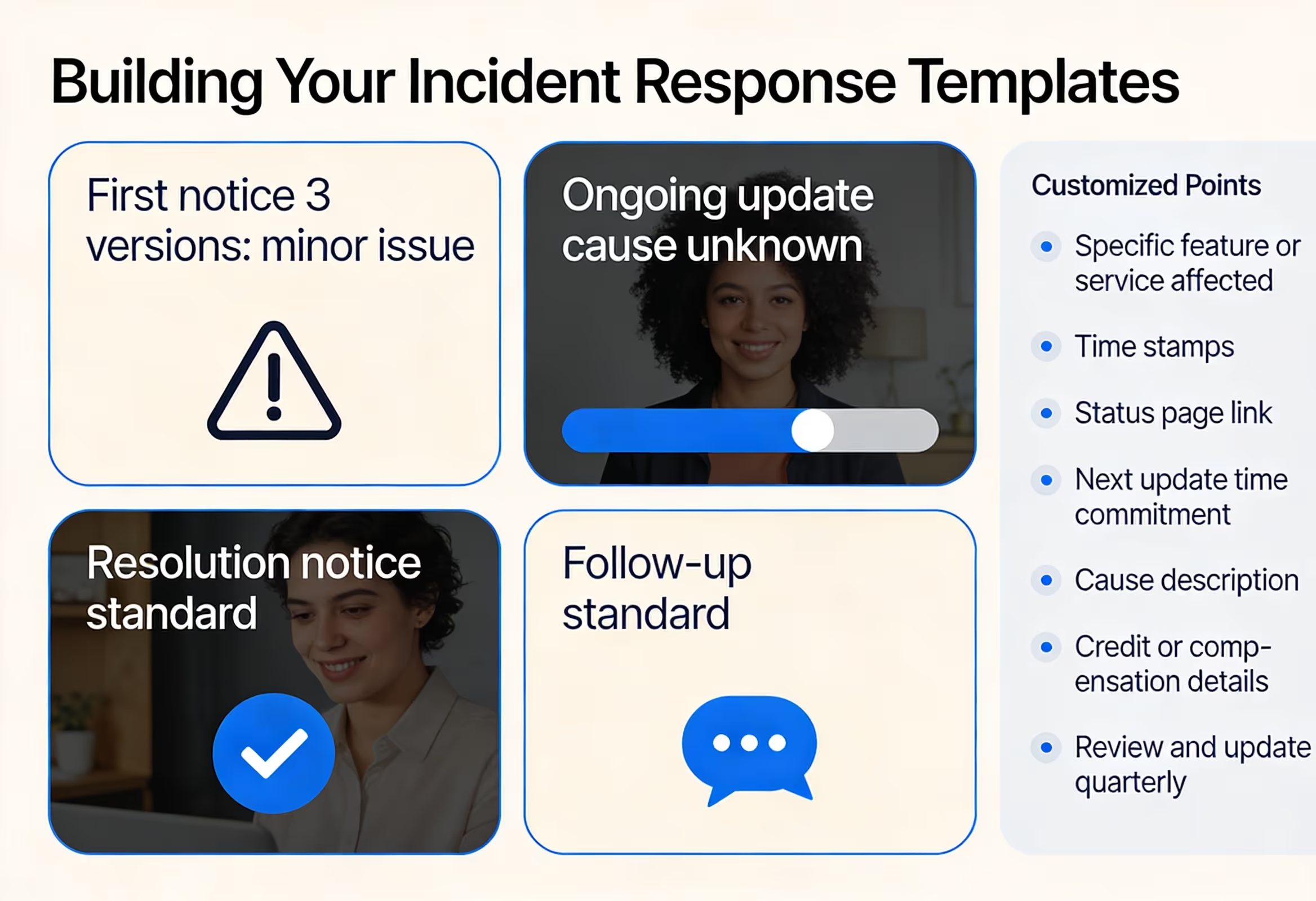
Building Your Incident Response Templates
You don't want to write outage emails from scratch under pressure. Create templates for each stage of the communication cadence and customize them when incidents occur.
Template structure:
Keep a document with these templates ready:
First notice (3 versions: minor issue, major outage, data security concern)
Ongoing update (cause unknown, cause identified, fix in progress)
Resolution notice (standard, with workarounds required, with data recovery steps)
Follow-up (standard, with SLA credits, significant incident requiring executive signature)
Customization points to mark:
Specific feature or service affected
Time stamps
Status page link (keep this consistent)
Next update time commitment
Cause description (once identified)
Credit or compensation details
Review and update these templates quarterly. The language that felt right a year ago might need refreshing as your product and customer base evolve.
What Happens When You Get It Wrong
Let's be honest about the stakes. Poor outage communication doesn't just frustrate customers—it actively drives churn.
Customers who feel ignored during an incident start questioning their vendor choice. They search for alternatives while they're waiting. They remember the silence the next time a competitor reaches out or their contract comes up for renewal.
Conversely, customers who feel informed and respected during an outage often emerge with stronger loyalty than before. The incident becomes evidence that your company handles problems with transparency and competence. That's actually valuable.
One small SaaS company discovered this firsthand: after a significant outage, they sent a detailed postmortem to all affected users, including specific technical changes they were implementing. Multiple customers replied saying the transparency increased their confidence in the platform. Several mentioned they'd been considering competitors but decided to stay after seeing how the incident was handled.
The communication isn't separate from the fix. It's part of it.
When You Can't Handle It Alone
Here's a scenario many founders know too well: it's 2 AM, something's broken, you're debugging with one hand while answering customer emails with the other, and neither task is getting the attention it deserves.
During an outage, you have two competing priorities. Fix the problem (which requires technical focus) and communicate with customers (which requires a different kind of attention). For small teams, that split is brutal.
This is where having dedicated support coverage changes everything. While you focus on root cause analysis and implementing fixes, someone else handles the communication cadence—sending updates, monitoring inbound tickets, reassuring customers who need individual attention.
It's not about having someone to dump work on. It's about having someone who can maintain the human connection with your customers while you do the technical work that only you can do.
Your Outage Communication Checklist
Before an outage happens:
[ ] Status page is operational and customers know it exists
[ ] Communication templates are drafted and accessible
[ ] Team knows who's responsible for customer communication during incidents
[ ] Auto-response is configured for support inbox during major outages
During an outage:
[ ] First notice sent within 15 minutes of confirmation
[ ] Status page updated before or simultaneous with emails
[ ] Update cadence established (every 30-60 minutes)
[ ] ETAs given for updates, not resolutions (unless confident)
[ ] Inbound ticket volume monitored
After resolution:
[ ] Resolution notice sent immediately
[ ] Any user actions required clearly explained
[ ] Follow-up email scheduled (24-72 hours)
[ ] SLA credits calculated and communicated
[ ] Internal postmortem conducted
[ ] Templates updated based on lessons learned
Your Next Step
Outages are inevitable. Your response to them isn't.
If you're a founder or small team currently juggling support alongside everything else, consider what it would mean to have dedicated coverage during your next incident. Someone who handles the communication cadence while you focus on the fix. Someone who reassures individual customers while you coordinate with engineering.
That's exactly what a fractional support team provides. If you're curious about how it works, book a call with Evergreen Support to discuss your situation—no pressure, just a conversation about whether dedicated human support makes sense for your business.
Frequently Asked Questions
How quickly should we send the first outage notification?
Within 15 minutes of confirming the issue. Speed matters more than completeness at this stage. Customers need to know you're aware before they need to know why it happened. A brief "we're investigating" message sent quickly beats a detailed explanation sent an hour later.
Should we give estimated resolution times during an outage?
Only if you're genuinely confident in the estimate. Instead, commit to update times: "We'll share another update in 45 minutes." This sets expectations you can reliably meet. If you do have a realistic ETA, phrase it with flexibility: "We anticipate resolution within two hours, though this may change."
How do we handle customers who are angry despite our communication efforts?
Acknowledge their frustration specifically, not generically. "I understand this outage affected your team's deadline" is better than "We apologize for any inconvenience." Offer direct contact with someone senior if appropriate. Some customers need human conversation, not just updates.
What if we don't have a formal SLA—should we offer compensation anyway?
For significant incidents, goodwill gestures build loyalty even without contractual obligations. A small credit, extended trial period, or complimentary service costs you little but demonstrates accountability. Judge case by case based on impact severity and customer relationship.
How detailed should our post-incident follow-up be?
Detailed enough to demonstrate accountability and specific preventive measures, but accessible to non-technical readers. A paragraph or two explaining the cause in plain language, plus bullet points on what you're changing, typically strikes the right balance.
About Evergreen Support
Evergreen Support provides US-based, human-powered customer support for small online businesses. Our team handles your day-to-day support emails so you can focus on building your product—and when incidents happen, we manage the communication cadence while you focus on the fix. We've helped SaaS founders and ecommerce operators reclaim their time without sacrificing the personal touch their customers love. Learn more at outsourcedemailsupport.com.
Works Cited
[1] PwC — "Experience is everything: Here's how to get it right." https://www.pwc.com/us/en/services/consulting/library/consumer-intelligence-series/future-of-customer-experience.html
[2] Salesforce — "State of the Connected Customer." https://www.salesforce.com/resources/research-reports/state-of-the-connected-customer/


