
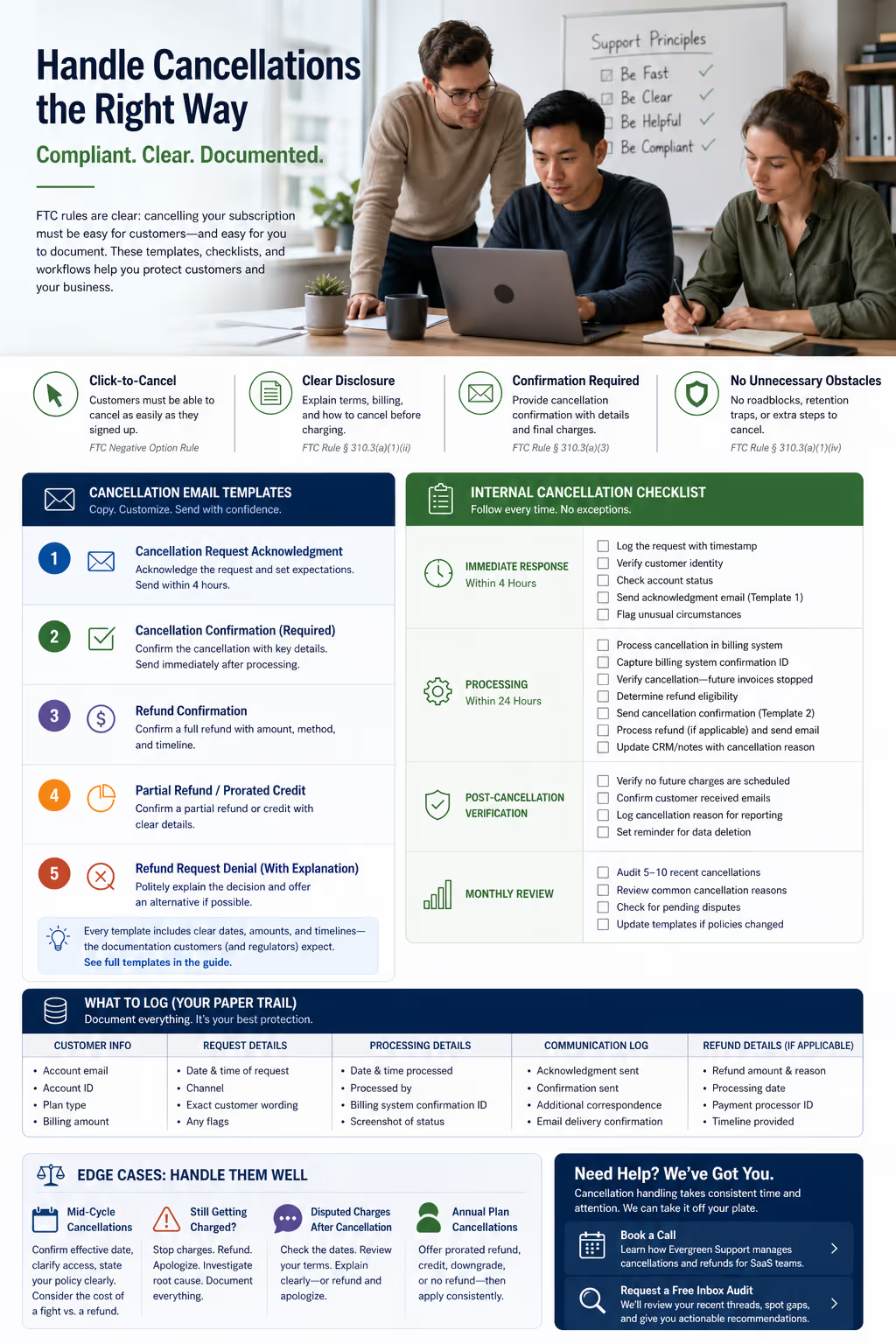
Last month, a SaaS founder I know got hit with three chargebacks in a single week. The customers claimed they'd cancelled. He swore they hadn't. His billing logs showed active subscriptions. Their inboxes showed... nothing. No confirmation emails. No paper trail. Just rage and disputed charges.
He lost all three disputes.
The FTC's updated Negative Option Rule—often called the "click-to-cancel" rule—has fundamentally changed what subscription businesses must do when customers want out [1]. If your cancellation process frustrates customers or hides the exit, you're not just losing goodwill. You're creating legal exposure.
For small SaaS teams, this creates an operational problem that's easy to ignore until it isn't. You probably don't have a compliance department. You might not even have a dedicated support person. What you have is an inbox with cancellation requests mixed in with feature questions and bug reports, and a vague sense that you should be handling them more carefully.
This guide provides the exact emails, internal checklists, and documentation workflows to handle subscription cancellations compliantly—practical resources you can implement this week without hiring a lawyer or rebuilding your billing stack.
What the FTC's Negative Option Rule Actually Requires
The FTC's Negative Option Rule applies to any business that charges customers on a recurring basis until they actively cancel [1]. That includes virtually every SaaS subscription model.
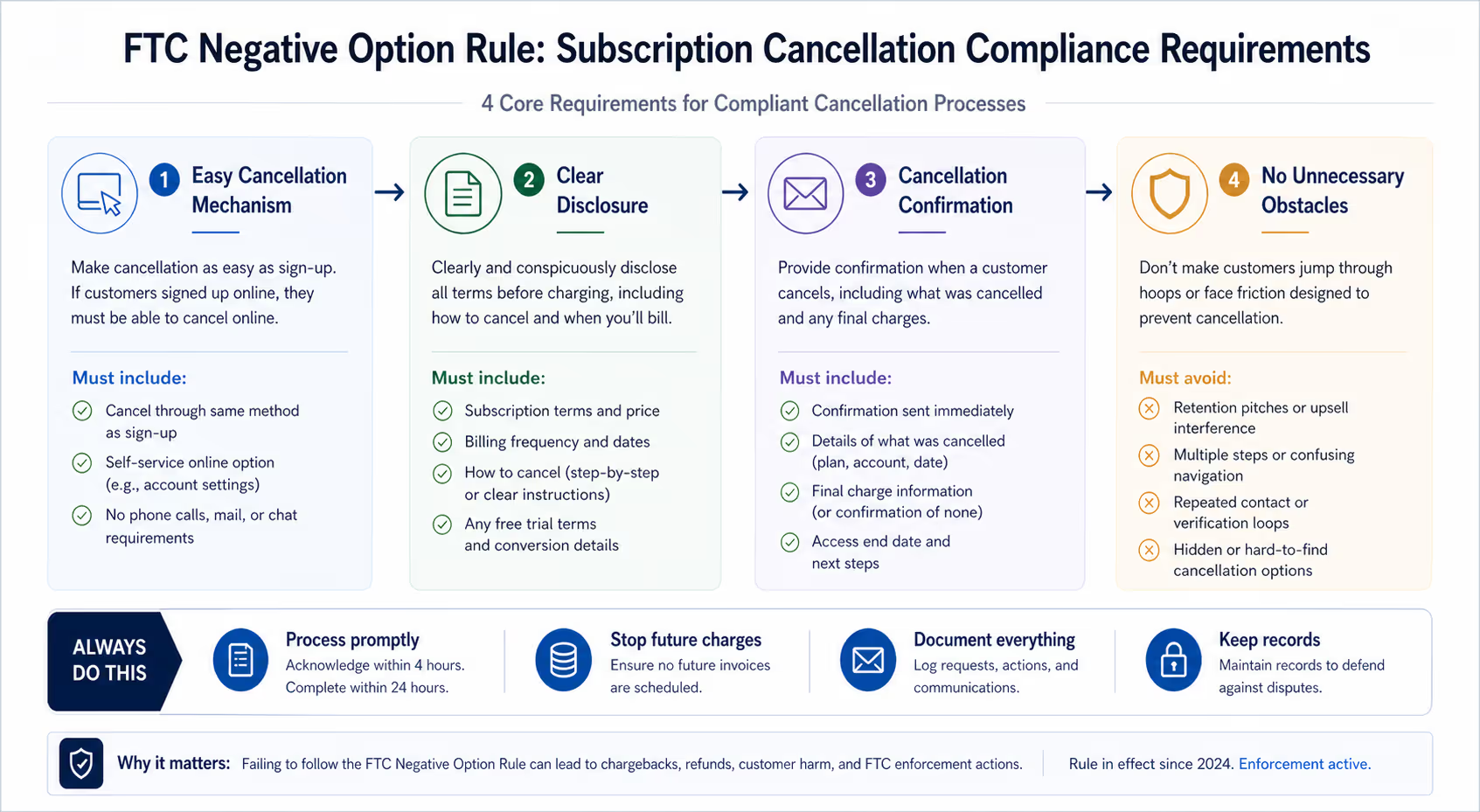
Here's what compliance looks like in practice:
Easy cancellation mechanisms: Customers must be able to cancel through the same method they used to sign up. If someone subscribed online, they need to cancel online—not by calling a phone number during limited business hours [1].
Clear disclosure: Before charging someone, you must clearly explain the subscription terms, including how to cancel and when charges will occur [2].
Cancellation confirmation: You must provide confirmation when someone cancels, including details about what was cancelled and any final charges [1].
No unnecessary obstacles: You can't require customers to listen to retention pitches, navigate multiple screens, or contact you repeatedly to complete a cancellation [2].
The rule took full effect in 2024, with enforcement ramping up throughout 2025 [1]. Companies that violate it face FTC action, including significant fines.
For your support inbox, this means every cancellation request needs a clear, documented response. Every refund needs proper confirmation. And your process needs to be simple enough that a customer can complete it without sending follow-up emails asking "did this actually work?"
Billing Platform Considerations: Where These Templates Meet Your Tech Stack
Before diving into templates, a practical note: these workflows need to connect with whatever billing system you're using. Whether that's Stripe, Chargebee, Paddle, or something else, the manual steps differ slightly.
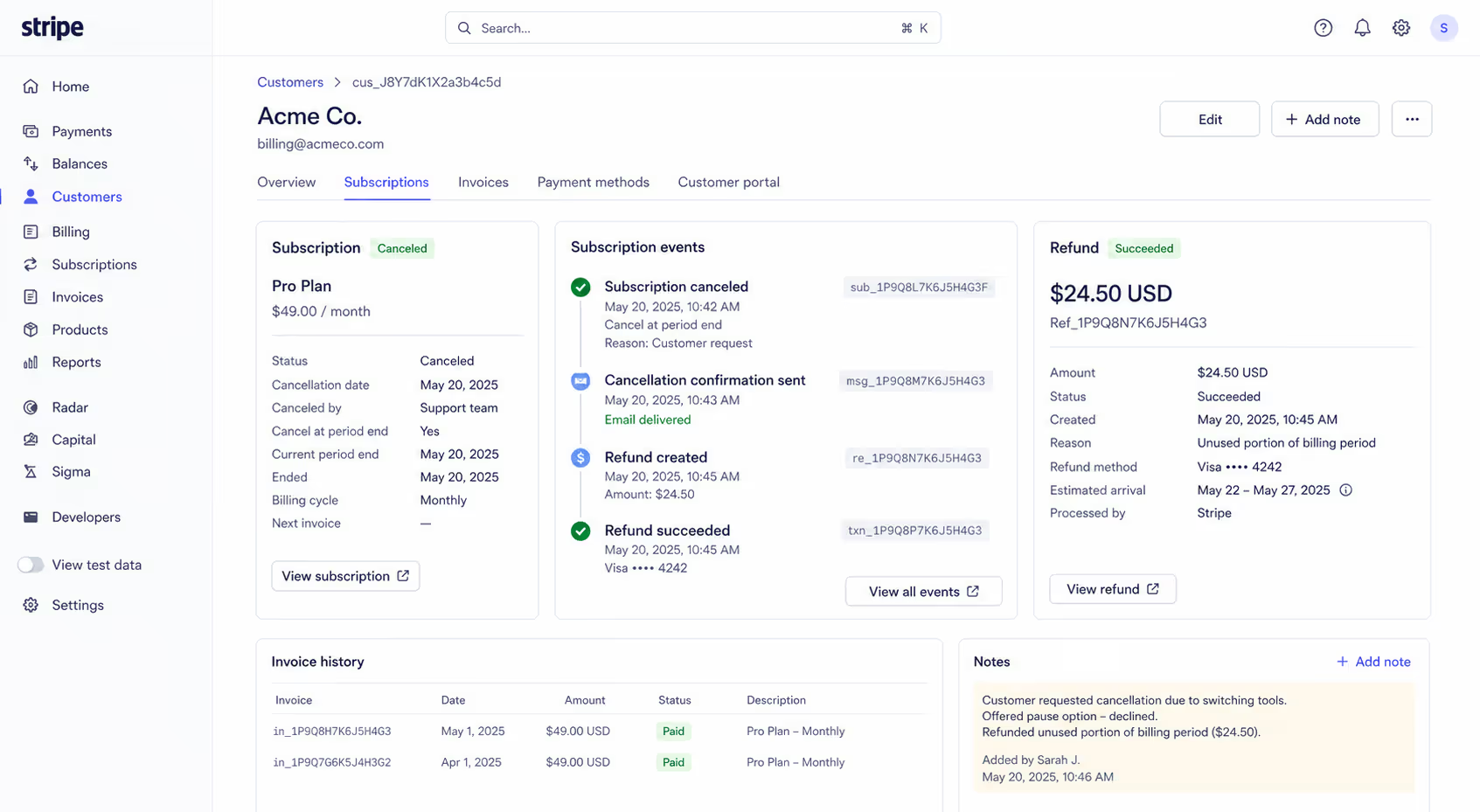
For Stripe users: When you process a cancellation, you'll typically cancel the subscription in the Stripe dashboard or via API, which stops future invoices. Refunds are processed separately through the Payments section. The confirmation ID you'll reference in emails comes from the subscription cancellation event or refund transaction.
For Chargebee or Recurly: These platforms often have built-in cancellation flows with automated emails—but those automated messages frequently lack the compliance-specific language required. You may need to supplement or replace them with the templates below.
For Paddle: Since Paddle acts as merchant of record, refund processing happens through their dashboard. Your confirmation emails should reference Paddle's transaction IDs.
The key point: your email templates are the customer-facing documentation layer. Your billing platform handles the actual subscription state. Both need to align, and your logs should capture confirmation from both systems.
The Support Email Templates
These templates cover the messages customers need at each stage. Adapt the bracketed sections for your product, and adjust the timeline promises based on your actual operational capacity.
Template 1: Cancellation Request Acknowledgment
Use when: A customer emails asking to cancel (send within 4 hours of receiving the request)
Subject: Your [Product Name] cancellation request – received
Hi [First Name],
Thanks for reaching out. I've received your request to cancel your [Product Name] subscription.
Here's what happens next:
Your subscription will end on [billing cycle end date]
You'll retain full access until that date
No further charges will be processed
I'll send a separate confirmation email once the cancellation is complete in our system.
If you'd like to share what prompted this decision, I'm genuinely interested—it helps us improve. No pressure, though.
[Optional: If applicable] If you'd prefer to pause your subscription instead, I can set that up for [X weeks/months] with no charge.
Thanks for being a [Product Name] customer.
[Agent Name]
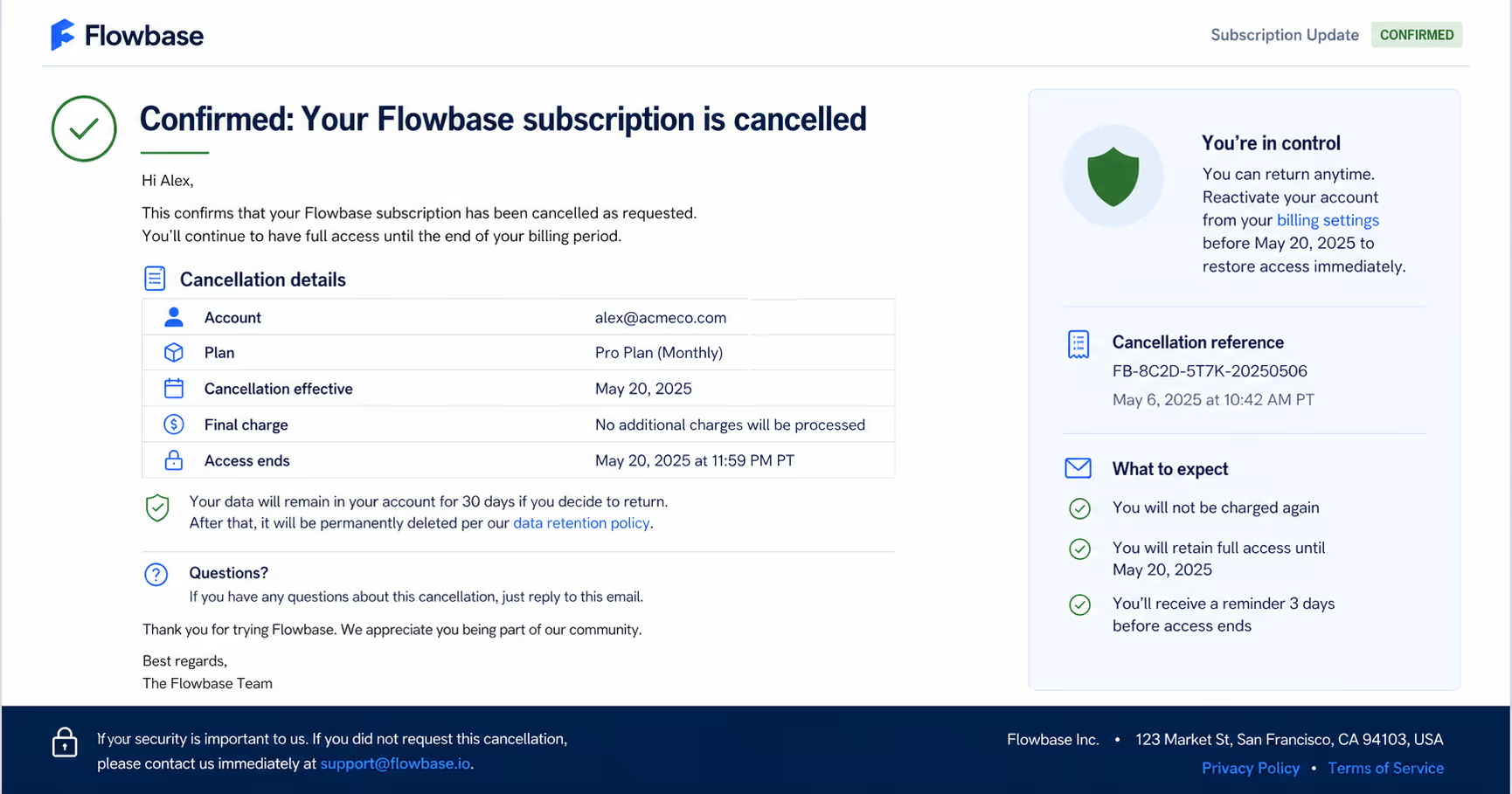
Template 2: Cancellation Confirmation (Required by FTC)
Use when: Cancellation has been processed in your billing system (send immediately after processing)
Subject: Confirmed: Your [Product Name] subscription is cancelled
Hi [First Name],
This confirms that your [Product Name] subscription has been cancelled.
Cancellation details:
Account: [email or account ID]
Plan: [plan name]
Cancellation effective: [date]
Final charge: [amount] on [date] – or "No additional charges will be processed"
Access ends: [date]
Your data will remain in your account for [X days] if you decide to return. After that, it will be permanently deleted per our data retention policy.
If you have questions about this cancellation, just reply to this email.
Thank you for trying [Product Name].
[Agent Name]
Template 3: Refund Confirmation
Use when: You've processed a full or partial refund
Subject: Your [Product Name] refund has been processed
Hi [First Name],
Your refund has been processed.
Refund details:
Amount: [refund amount]
Original charge date: [date]
Refund method: [credit card ending in XXXX / original payment method]
Expected timeline: 5-10 business days to appear on your statement
Your subscription has been cancelled, and no further charges will occur.
If the refund doesn't appear within 10 business days, please let me know and I'll investigate with our payment processor.
[Agent Name]
Template 4: Partial Refund or Prorated Credit
Use when: Refunding a portion of a charge or providing account credit
Subject: Your [Product Name] partial refund – processed
Hi [First Name],
I've processed a partial refund for your [Product Name] account.
Refund details:
Refund amount: [amount]
Original charge: [total amount] on [date]
Reason: [brief explanation—unused portion of billing period, service issue, etc.]
Expected timeline: 5-10 business days
[If applicable] Your subscription remains active until [date], and you'll retain full access during that time.
Questions? Just reply here.
[Agent Name]
Template 5: Refund Request Denial (With Explanation)
Use when: A refund request falls outside your stated policy
Subject: Regarding your refund request for [Product Name]
Hi [First Name],
Thanks for reaching out about a refund.
I reviewed your account, and this request falls outside our refund policy because [specific reason—e.g., "the charge occurred more than 30 days ago" or "usage exceeded our refund eligibility threshold"].
Here's what I can offer instead:
[Alternative—account credit, extended trial, downgrade to free plan, etc.]
I understand that's not the answer you were hoping for. If there's something specific about your experience that prompted this request, I'd like to hear it.
[Agent Name]
Internal Cancellation Checklist
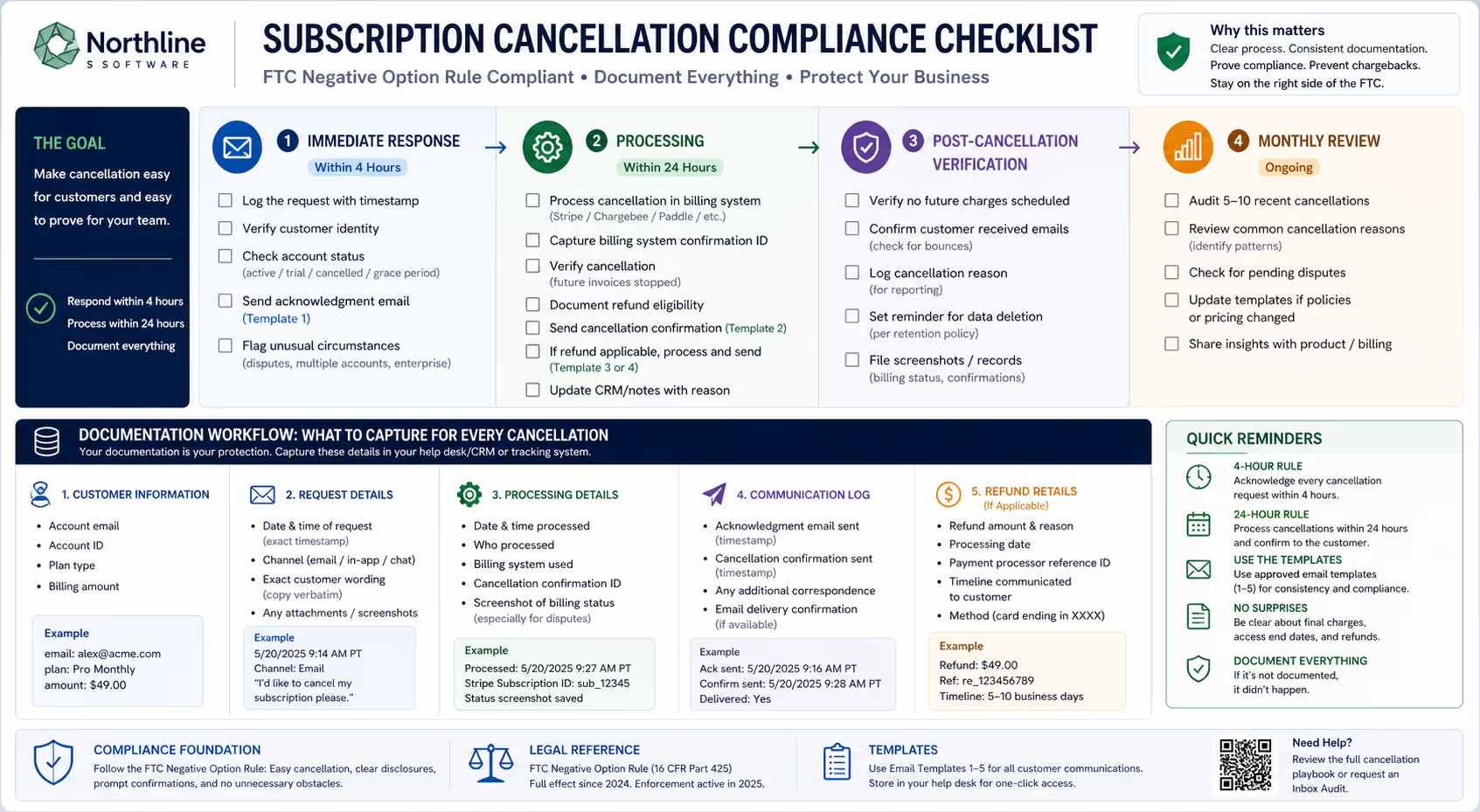
Templates only work if they're sent consistently. Here's the operational checklist to run for every cancellation request.
Immediate Response (Within 4 Hours)
[ ] Log the request in your support system with timestamp
[ ] Verify customer identity (email matches account)
[ ] Check account status: active, trial, already cancelled, or in grace period?
[ ] Send acknowledgment email (Template 1)
[ ] Flag unusual circumstances (disputed charges, multiple accounts, enterprise client)
Processing (Within 24 Hours)
[ ] Process cancellation in billing system (Stripe, Chargebee, Paddle, etc.)
[ ] Capture billing system confirmation ID
[ ] Verify cancellation is reflected correctly—future invoices stopped
[ ] Document any refund eligibility
[ ] Send cancellation confirmation email (Template 2)
[ ] If refund applicable, process and send confirmation (Template 3 or 4)
[ ] Update internal CRM/notes with cancellation reason (if provided)
Post-Cancellation Verification
[ ] Verify no future charges are scheduled in billing system
[ ] Confirm customer received cancellation email (check for bounces)
[ ] Log cancellation reason for monthly reporting
[ ] Set reminder for data deletion per your retention policy
Monthly Review
[ ] Audit sample of 5-10 recent cancellations against this checklist
[ ] Review common cancellation reasons—patterns to address?
[ ] Check for any pending disputes related to cancellations
[ ] Update templates if policies or pricing have changed
What to Log (And Why Documentation Saves You)
When a customer disputes a charge six months later or claims they "never received" a cancellation confirmation, your logs are your only defense. We've seen founders lose chargeback disputes they should have won because they couldn't produce documentation.
For every cancellation, record:
Customer Information
Account email
Account ID
Plan type and billing amount
Request Details
Date and time of initial request (exact timestamp)
Channel (email, in-app, chat)
Exact customer wording (copy the original request verbatim)
Processing Details
Date and time cancellation processed
Who processed it
Billing system confirmation ID
Screenshot of billing system status (especially for disputed cases)
Communication Log
Timestamp of acknowledgment email sent
Timestamp of confirmation email sent
Any additional correspondence
Email delivery confirmation (if your system provides it)
Refund Details (if applicable)
Refund amount and reason
Processing date
Payment processor reference number
Timeline provided to customer
Most help desk tools can automate portions of this logging. If you're working from Gmail or a basic shared inbox, a simple spreadsheet or Notion database tracking cancellations will work until you can implement better tooling.
Handling Edge Cases
Straightforward cancellations are easy. Here's how to handle the situations that actually create problems.
Mid-Cycle Cancellations
Many SaaS companies don't offer prorated refunds for mid-cycle cancellations—and that's generally fine, as long as it's disclosed in your terms.
Your response should:
Confirm the cancellation effective date (usually end of current billing period)
Clarify that access continues until that date
State your policy clearly without being defensive
If a customer pushes back, weigh the math. For a $49/month subscription, a $25 prorated refund might cost less than the time spent on a chargeback dispute, the inevitable negative review, and the mental energy of an escalating email thread.
The Customer Who Cancelled But Keeps Getting Charged
This is a compliance emergency. We've seen this happen when a billing system glitch prevents cancellation from processing, when a subscription has multiple associated payment methods, or when human error results in cancelling the wrong subscription.
Immediate response:
Stop all future charges immediately
Refund the erroneous charge(s) without making the customer ask
Send a clear apology acknowledging the error
Investigate the root cause (billing bug? process failure? duplicate accounts?)
Document everything—you'll need this if they file a complaint
One legitimate "I cancelled but you kept charging me" situation, handled poorly, can trigger a chargeback, regulatory attention, or a Twitter thread that gets picked up by Hacker News.
Disputed Charges After Cancellation
Sometimes customers forget they had a subscription, or they cancelled late in a billing cycle and don't understand why they were charged one more time.
Before responding:
Check your logs for when they actually cancelled
Check your billing system for when the charge occurred
Review your terms—was the charge correct according to your policy?
If the charge was correct, explain the timeline clearly. Show them the dates: "You cancelled on [date], which was [X days] after your billing cycle renewed on [date]. Per our terms, that final charge was already processed before your cancellation."
If appropriate, offer a one-time courtesy refund anyway. If the charge was incorrect, refund immediately, apologize clearly, and document what went wrong.
Annual Subscribers Who Want Out
Annual plans create complexity because the amounts are larger and refund calculations get more contentious.
Options to consider:
Prorated refund for unused months (most customer-friendly)
Account credit for future use (preserves relationship, costs you nothing immediately)
Downgrade to monthly for remainder (keeps them as a customer)
No refund but immediate cancellation (least customer-friendly—ensure your terms support this)
Whatever your policy, state it clearly in your annual plan terms at signup and apply it consistently. Inconsistency across customers creates both support headaches and potential legal exposure.
Keeping Your Process Current
Subscription compliance isn't static. The FTC continues to refine enforcement guidance, billing platforms update their interfaces, and your own pricing and policies evolve.
Build these reviews into your calendar:
Quarterly: Review cancellation email templates for accuracy. Do they reflect current pricing, plan names, and policies?
After any billing system change: Test the entire cancellation flow yourself. Create a test account, subscribe, cancel. Verify confirmations send correctly and billing actually stops. This takes fifteen minutes and catches problems before customers find them.
When FTC guidance updates: The Negative Option Rule is being refined through enforcement actions and published guidance. Monitor FTC announcements or set a Google Alert for "FTC subscription rule" [1].
When you change pricing or plans: Update all templates that reference specific amounts, plan names, or billing cycles. Outdated information in confirmation emails looks unprofessional at best, deceptive at worst.
Common Mistakes That Create Risk
These are the cancellation-handling errors that cause actual problems:
Slow response times: A cancellation request sitting unanswered for 72 hours while another billing cycle processes creates chargebacks and complaints. Acknowledge within 4 hours, process within 24.
Ambiguous confirmation language: "Your request has been received" is not "Your subscription is cancelled." Customers need explicit confirmation that cancellation is complete, not that you've read their email.
No documentation: "We don't have any record of that cancellation request" is the worst possible response to a dispute. If it's not logged, it didn't happen.
Inconsistent policy application: One agent offers full refunds, another denies them. Customers compare notes. Inconsistency breeds complaints and creates legal exposure.
Buried cancellation options: If customers have to email you to cancel because they can't find the self-service option, you're creating both support volume and compliance risk. The FTC's click-to-cancel rule specifically addresses this.
Vague refund timelines: "You'll get a refund" without specifying when creates anxiety and follow-up emails. Always include the 5-10 business day timeline and the payment method being credited.
Implementation Path
If you're handling support yourself or with a very small team, here's how to implement this:
Week 1: Customize the email templates for your product. Save them as canned responses in your email client or help desk. Create your logging system (spreadsheet, Notion, or help desk tags).
Week 2: Use the internal checklist for every cancellation, even if it feels tedious. The goal is building the habit.
Week 3: Review what's working. Which template responses generate follow-up questions? Adjust language based on actual customer reactions. Add any edge cases you encountered to your documentation.
Ongoing: Monthly audit of recent cancellations against the checklist. Quarterly template review.
This takes real time—time you're probably already short on. Cancellation handling is repetitive enough to benefit from specialization but important enough that mistakes create meaningful problems.
When to Consider Getting Help
You've probably noticed this guide describes a process that, done properly, takes consistent attention every single day. For founders already stretched across product, sales, and operations, that consistency is often the first thing to slip when things get busy.
If you're finding that cancellation requests pile up during product launches, or that you've processed a few without proper documentation, or that the whole thing just feels like one more operational burden you shouldn't be managing directly—those are signals.
Book a call to talk about how Evergreen Support handles daily support operations, including the cancellation and refund workflows described here. We can take over the inbox so you can focus on building.
Or, if you want to see where your current process stands first, request a free Inbox Audit. We'll review your recent cancellation and refund threads, identify compliance gaps or documentation holes, and give you specific recommendations—whether or not you end up working with us.
Frequently Asked Questions
How quickly do I need to respond to a cancellation request?
There's no legally mandated response time, but best practice is acknowledgment within 4 business hours and processing within 24 hours. Delays create customer frustration, increase chargeback risk, and can result in additional charges you'll need to refund anyway. The faster you confirm cancellation, the cleaner the process.
Do I have to offer refunds when customers cancel?
Not necessarily. Your refund policy is generally up to you, as long as it's clearly disclosed before purchase. However, the FTC requires that cancellation itself must be easy—you can't make refunds the only way to stop future charges. Many SaaS companies offer prorated or courtesy refunds as a goodwill practice, but it's typically not legally required if your terms state otherwise.
What's the difference between click-to-cancel and having a self-service portal?
Click-to-cancel means customers must be able to complete cancellation as easily as they signed up. If you have a self-service portal where customers can subscribe with a credit card, you need a self-service option to cancel. You can offer email support as an additional option, but you can't require it as the only method if signup was self-service [2].
How long should I keep cancellation records?
Keep cancellation documentation for at least three years. Chargebacks can be filed months after a transaction, and regulatory inquiries can look back further. Storage is essentially free; recreating documentation you deleted is impossible.
What if a customer cancels via social media or another unofficial channel?
Treat it as a legitimate cancellation request. Respond acknowledging the request, then either process it directly or guide them to your standard process. Document the original request source and timestamp. The channel doesn't matter—the obligation to process the cancellation does.
Why Trust This Guide
Evergreen Support handles daily email support for small SaaS and ecommerce businesses across the US, UK, and Europe. We process cancellation requests, refunds, and billing inquiries as part of our regular work—and we've seen what documentation practices hold up during disputes and what creates problems.
This guide reflects operational experience, not theoretical compliance frameworks. The templates and checklists here are based on actual customer situations and regulatory requirements. When billing platforms update or regulations change, we update our processes—and the clients we support benefit from that ongoing attention without tracking the changes themselves.
Works Cited
[1] Federal Trade Commission — "FTC Announces Final 'Click-to-Cancel' Rule." https://www.ftc.gov/news-events/news/press-releases/2024/10/ftc-announces-final-click-cancel-rule-making-it-easier-consumers-end-recurring-subscriptions
[2] Federal Trade Commission — "Negative Option Rule."
https://www.ftc.gov/legal-library/browse/rules/negative-option-rule


