
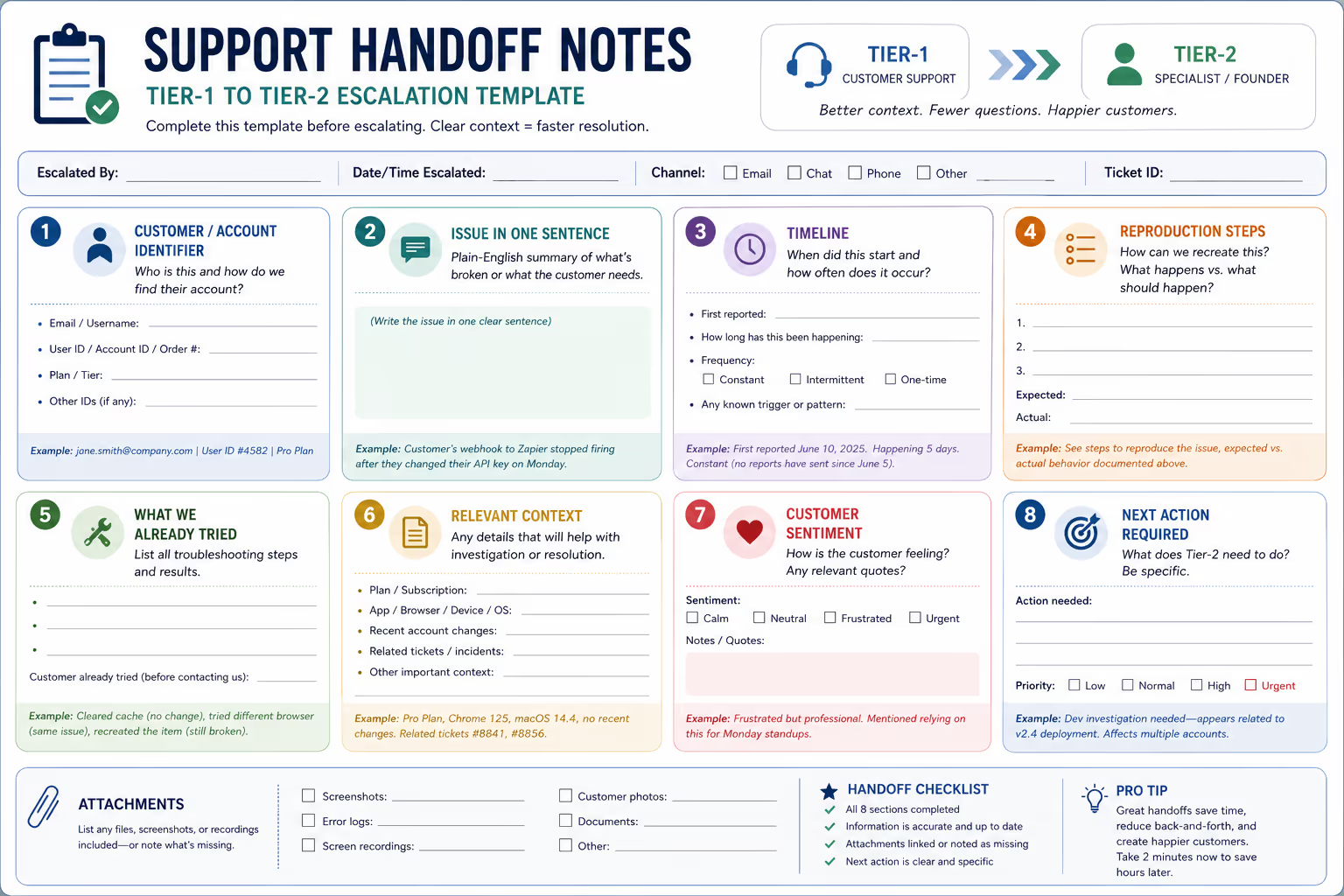
You finally outsourced your Tier-1 support. The daily password resets and shipping questions aren't eating your mornings anymore. But now a different problem shows up in Slack: "Hey, escalating this one to you."
You click the ticket. There's a customer message. Maybe a one-line note saying "needs founder help." That's it.
Now you're playing detective. What did the customer already try? What version are they on? Did anyone ask for screenshots? You fire off three questions before you can even start solving the actual problem.
This back-and-forth kills the time savings you were supposed to get from outsourcing in the first place.
The fix isn't complicated. It's a simple internal note template that your Tier-1 team fills out before every escalation. When done right, these support handoff notes let you resolve Tier-2 issues in minutes instead of hours—often on the first reply.
Here's the exact template we use, plus guidance on adapting it for SaaS and ecommerce teams.
Why Most Escalations Waste Founder Time
The typical escalation looks like this: a customer writes in with a problem, your support agent can't solve it, and they pass it along with minimal context. Maybe they include the original message. Maybe they add "customer seems frustrated."
That's not a handoff. That's a hot potato.
When escalations lack structure, three things happen:
You ask questions the customer already answered. The support agent had a conversation. You didn't see it. Now you're asking the customer to repeat themselves—which makes your company look disorganized.
You troubleshoot issues that were already ruled out. Without knowing what the agent already tried, you suggest the same fixes. More delay. More frustration.
You lose the timeline. How long has this been happening? When did it start? Is it intermittent or constant? These details disappear into a wall of conversation text unless someone extracts them.
According to research from the customer service industry, most customers expect a response within a few hours [1]. When escalations require multiple rounds of clarification, you're burning through that window before you even start solving anything.
The Internal Note Template That Actually Works
After handling thousands of escalations, we've landed on a format that consistently gives founders and Tier-2 teams what they need on the first pass.
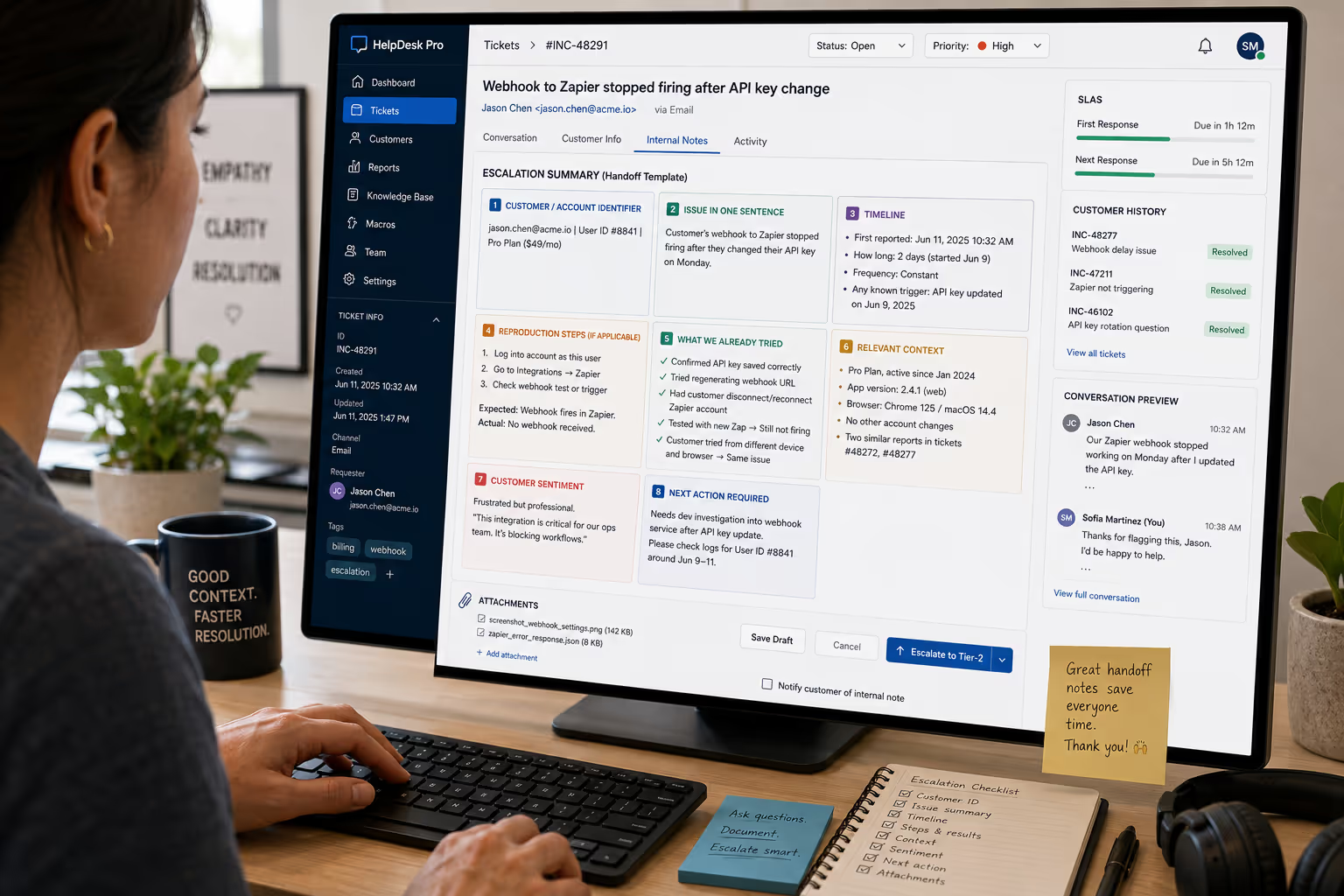
Here's the template:
ESCALATION SUMMARY
Customer/Account Identifier:[Account email, user ID, order number, or subscription ID]
Issue in One Sentence:[Plain-English summary of what's broken or what the customer needs]
Timeline:
First reported: [Date/time]
How long has this been happening: [Duration or "first occurrence"]
Frequency: [Constant / Intermittent / One-time]
Reproduction Steps (if applicable):
[Step one]
[Step two]
[What happens vs. what should happen]
What We Already Tried:
[Fix attempt 1 + result]
[Fix attempt 2 + result]
[Customer already tried X before contacting us]
Relevant Context:[Plan type, app version, browser, device, recent account changes, related tickets]
Customer Sentiment:[Calm / Frustrated / Urgent—plus any relevant quotes]
Next Action Required:[Specific ask: "Needs refund approval," "Requires dev investigation," "Waiting on customer screenshot"]
Attachments:[Screenshots, error logs, screen recordings—or "none provided"]
That's it. Eight sections. Takes about two minutes to fill out when your agent is already in the ticket.
Breaking Down Each Field
Let's walk through why each section matters and how to fill it out properly.
Customer/Account Identifier
This sounds obvious, but it's skipped constantly. Your Tier-2 person needs to pull up the account immediately—not search through your database trying to match a first name.
For SaaS, include the account email and user ID. For ecommerce, include the order number and customer email. If your system uses internal identifiers, add those too.
Good example: "jane.smith@company.com | User ID #4582 | Pro Plan"
Bad example: "Jane from the sales team at some company"
Issue in One Sentence
Force clarity here. If your agent can't summarize the problem in one sentence, they probably don't understand it yet—which means they should ask more questions before escalating.
Good example: "Customer's webhook to Zapier stopped firing after they changed their API key on Monday."
Bad example: "Something's wrong with their integration."
Timeline
Timing changes everything. A bug that started today might be related to your latest deploy. A problem that's been happening for three weeks suggests something else entirely.
Capture three things: when the customer first reported it, how long they say it's been happening, and whether it's constant or comes and goes.
Reproduction Steps
This field is critical for SaaS issues and relevant for some ecommerce scenarios (like checkout bugs or app glitches).
Write the steps as numbered actions someone could follow to recreate the problem. Include what actually happens and what the customer expected instead.
Good example:
Log into dashboard
Click "Export" on the reports page
Select "CSV" format
Expected: CSV downloads
Actual: Spinner appears, then page refreshes with no download
Bad example: "Export isn't working."
For ecommerce, reproduction steps might look like: "Added item #SKU-2847 to cart, applied code SUMMER20, proceeded to checkout, discount didn't apply."
What We Already Tried
This section prevents duplicate troubleshooting. List every fix the agent attempted, the customer's response, and anything the customer tried on their own before contacting support.
Good example:
Suggested clearing browser cache → Customer tried, issue persists
Had customer try Chrome instead of Safari → Same problem
Customer mentioned they already reinstalled the app before emailing
Bad example: "Tried the usual stuff, didn't work."
Relevant Context
Dump anything useful here: plan type, subscription status, app or browser version, operating system, whether they've had similar issues before, if they mentioned any recent changes on their end.
For ecommerce, this might include order history, return history, whether they're a VIP customer, or if they mentioned they're buying for an event with a deadline.
Customer Sentiment
Your response tone should match the situation. A calm customer asking a technical question gets a different approach than someone who's been dealing with a problem for two weeks and is ready to cancel.
Keep it brief: "Frustrated, mentioned considering cancellation" or "Patient, said no rush."
Next Action Required
This is the handoff itself. Be specific about what you need from the Tier-2 person.
Good examples:
"Needs dev to check webhook logs for User ID #4582"
"Awaiting founder approval for $200 refund"
"Customer sending video of the bug—will update ticket when received"
Bad examples:
"Please help"
"Not sure what to do"
"Escalating"
Attachments
Note what's attached and what's missing. If you asked for a screenshot and the customer hasn't sent one yet, say so. This prevents the Tier-2 person from searching for files that don't exist.
Template Variations: SaaS vs. Ecommerce
The core template works for both, but some fields carry more weight depending on your business type.
For SaaS Teams
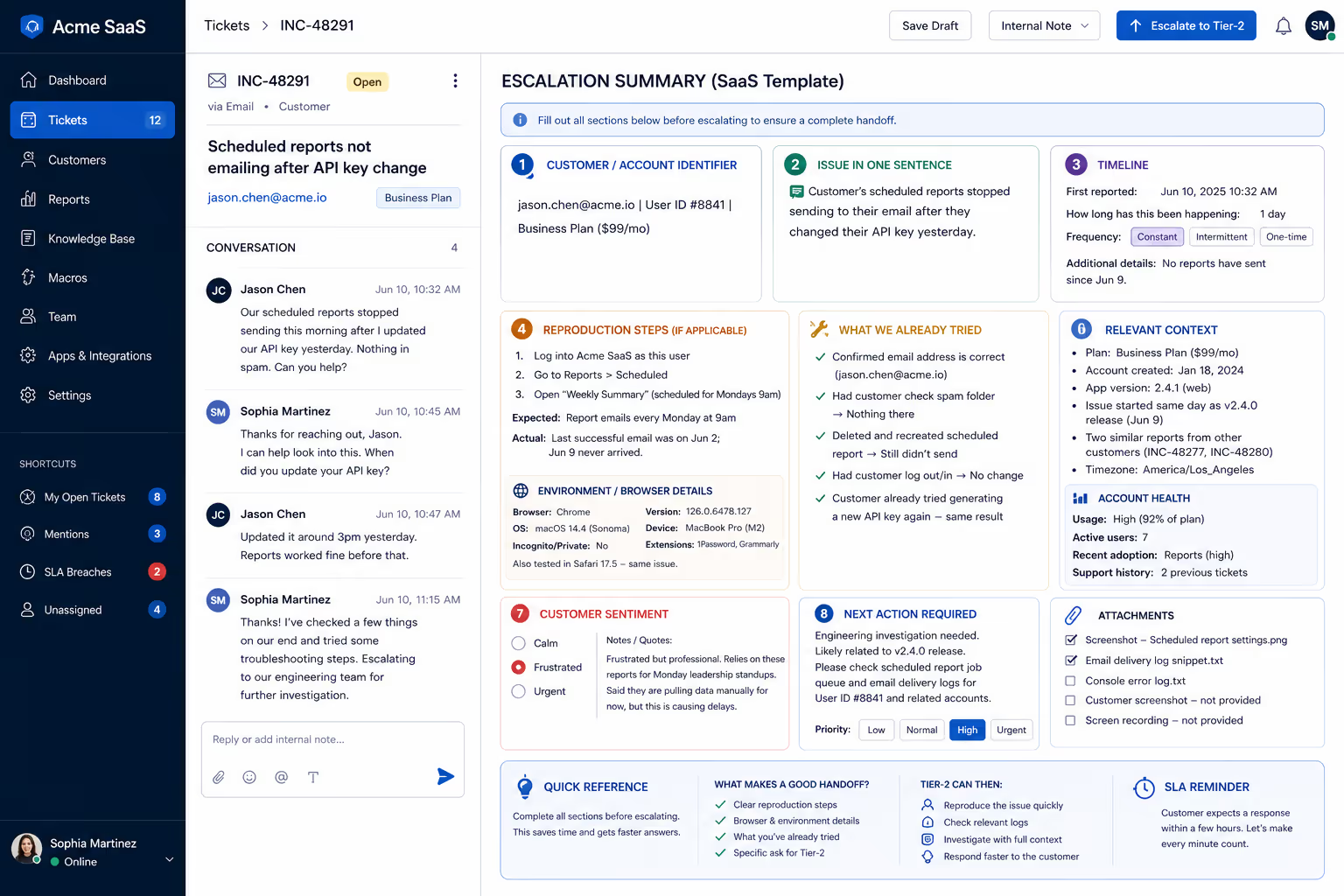
Reproduction steps matter more. Most SaaS issues involve a specific workflow or feature behaving unexpectedly. Without clear steps, your developer or technical founder will have to schedule a call with the customer just to understand what's happening.
Also prioritize: app version, browser, operating system, and whether the issue happens in multiple environments.
Add a field for "Account Health" if useful—things like usage patterns, recent feature adoption, or whether they're in a trial period.
For Ecommerce Teams
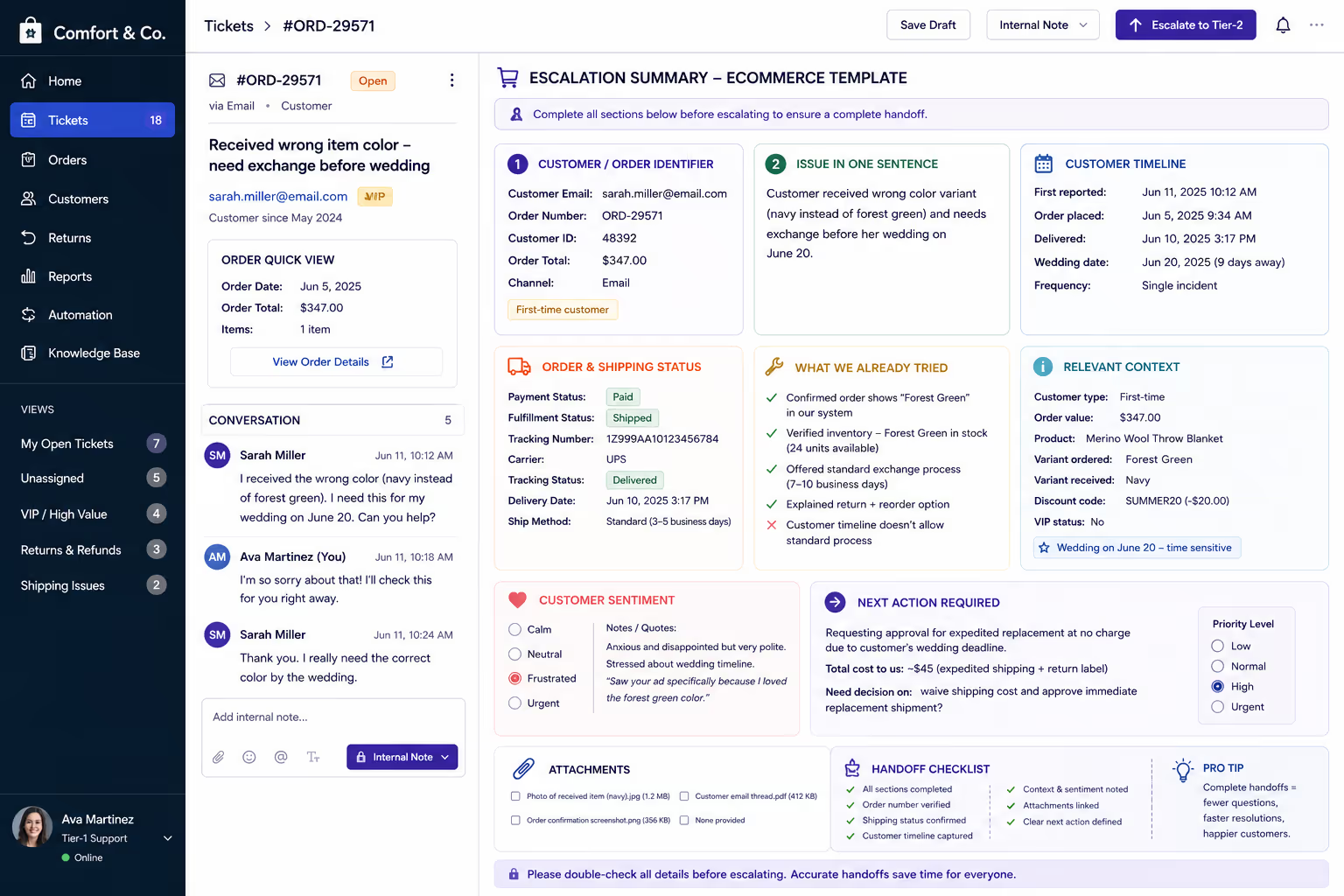
Order identifiers matter more. Every escalation should include the order number prominently. Your Tier-2 person should be able to pull up the order in your admin panel within seconds.
Prioritize: shipping status, payment status, discount codes used, and whether the customer has a purchase deadline (birthday, event, etc.).
Add a field for "Order Value" if you use tiered support or have different refund thresholds.

What Good Handoff Notes Look Like in Practice
Let's see two complete examples—one SaaS, one ecommerce.
SaaS Example
ESCALATION SUMMARY
Customer/Account Identifier:marcus.chen@techstartup.io | User ID #11847 | Business Plan ($99/mo)
Issue in One Sentence:Customer's scheduled reports stopped sending to their email after our platform update last Thursday.
Timeline:
First reported: June 10, 2025
How long has this been happening: 5 days
Frequency: Constant (no scheduled reports have sent since June 5)
Reproduction Steps:
Log into dashboard as this user
Go to Reports → Scheduled
View "Weekly Sales Summary" (scheduled for Mondays 9am)
Expected: Report emails every Monday
Actual: Last successful send was June 2; June 9 never arrived
What We Already Tried:
Confirmed email address is correct (marcus.chen@techstartup.io)
Had customer check spam folder → Nothing there
Deleted and recreated the scheduled report → Still didn't send on test
Relevant Context:
Business Plan, subscribed since January 2024
No account changes on their end
Issue started same day as our v2.4 release
Two other customers reported similar symptoms (tickets #8841, #8856)
Customer Sentiment:Frustrated but professional. Mentioned they rely on these reports for Monday standups and have been pulling data manually.
Next Action Required:Dev investigation needed—appears related to v2.4 deployment. Affects multiple accounts.
Attachments:Screenshot of scheduled report settings attached.
Ecommerce Example
ESCALATION SUMMARY
Customer/Account Identifier:sarah.miller@email.com | Order #ORD-29571 | $347.00
Issue in One Sentence:Customer received wrong color variant (received navy, ordered forest green) and needs exchange before June 20 wedding.
Timeline:
First reported: June 11, 2025
Order placed: June 5, 2025
Delivered: June 10, 2025
Frequency: Single incident
Reproduction Steps:N/A (fulfillment error, not system bug)
What We Already Tried:
Verified order shows "Forest Green" in system
Checked inventory—Forest Green variant is in stock (24 units)
Offered standard exchange process (7-10 days)
Customer said timeline doesn't work for wedding deadline
Relevant Context:
First-time customer
Order value: $347
Wedding is June 20 (9 days away)
Product: Merino Wool Throw Blanket (wedding gift)
Expedited shipping to reach her by June 18 would cost $45
Customer Sentiment:Anxious and disappointed. Very polite but stressed about deadline. Mentioned she chose us specifically for the color selection.
Next Action Required:Approve expedited replacement shipping at no charge? Total cost to us: ~$45 shipping + standard return label. Customer lifetime value consideration for wedding-related purchase.
Attachments:Photo of received item (navy) attached. Order confirmation screenshot attached.
See the difference? In both cases, the founder or Tier-2 person can act immediately. No clarifying questions needed.
Getting Your Team to Actually Use the Template
Templates only work if people fill them out. Here's how to make adoption stick.
Build it into your helpdesk. Most support tools let you create internal note templates or macros. Set up the template as a one-click insert. Your agent shouldn't have to remember the format or copy-paste from a document.
Make it required before escalation. If an escalation arrives without the template filled out, send it back. It sounds harsh, but after two or three returns, agents learn that incomplete handoffs waste everyone's time—including their own.
Review escalations together. Pick a few escalations each week and discuss what was captured well and what was missing. This turns the template into a shared standard rather than a bureaucratic checkbox.
Celebrate good handoffs. When someone writes a handoff note that lets you solve a complex issue in one reply, mention it. People repeat behavior that gets recognized.
How This Reduces Founder Involvement Over Time
Here's the unexpected benefit: structured handoff notes train your Tier-1 team to think more carefully about problems.
When agents know they'll have to document what they tried and what didn't work, they try more things before escalating. They ask better questions upfront because they know they'll need to fill in the timeline field.
Over a few months, you'll notice two shifts:
Fewer escalations overall. Problems that seemed like Tier-2 issues turn out to be solvable at Tier-1 once the agent slows down and works through the template fields.
Faster resolutions when escalations do happen. The escalations that reach you are genuinely complex—and they arrive with everything you need to solve them.
Both outcomes mean you spend less time on support, not more. That's the point of outsourcing in the first place.
The Bottom Line
Bad escalations aren't a people problem. They're a process problem.
Your Tier-1 team isn't intentionally giving you incomplete information. They just don't have a structure that tells them what "complete" looks like.
The template we've outlined takes two minutes to fill out. It captures the customer identifier, the issue summary, the timeline, reproduction steps, what's already been tried, relevant context, customer sentiment, and the specific next action needed.
When this becomes standard on your team, you'll stop playing detective. You'll start solving problems on the first reply. And you'll finally get the time savings you expected when you decided to outsource support.
Ready to stop context-switching on every escalation? At Evergreen Support, we train our US-based agents to capture exactly this level of detail before anything reaches your desk. If you want Tier-2 issues that arrive ready to resolve, book a call and let's talk about how we can take support off your plate—without losing the context that makes fast resolution possible.
Frequently Asked Questions
How long should it take to fill out a handoff note?About two minutes once your agent is familiar with the template. The key is capturing information they already have from the conversation—not conducting new research. If it's taking longer, the agent may need to ask the customer better questions upfront before escalating.
Should we use this template for every escalation, even simple ones?Yes. Simple escalations stay simple when the handoff is clear. The template scales down naturally—if there are no reproduction steps needed, that field just says "N/A." Consistency matters more than customizing for complexity.
What if the customer hasn't provided enough information to fill out the template?That's a signal to go back to the customer first. The template exposes information gaps that would otherwise show up after escalation. If you can't fill in the timeline or relevant context, ask the customer before passing the ticket along.
Can this template work with chatbots or AI-assisted support?The template is designed for human handoffs. If you're using AI for initial triage, the handoff note format still applies when a human agent escalates to Tier-2. The structure ensures nothing gets lost regardless of what handled the earlier steps.
How do we handle urgent escalations that need immediate attention?Fill out the template anyway—just do it fast. Urgent issues still benefit from context. Add "URGENT" at the top and note the time sensitivity in the "Next Action Required" field. Structure and speed aren't mutually exclusive.
About Evergreen Support
Evergreen Support is a US-based customer support agency built for small SaaS and ecommerce businesses. Founded by Emma Fletcher and Ellis Annichine—two operators who spent years in the trenches of startup support—we specialize in providing human-powered email support that maintains your brand voice and keeps your customers happy. Our team handles your daily tickets so you can focus on building your business, not managing your inbox.
Works Cited
[1] HubSpot — "Customer Service Statistics." https://www.hubspot.com/service-statistics


