

You're finally ready to hand off your support inbox. The weight of 2 AM customer emails and weekend ticket anxiety is about to lift. But then a thought creeps in: Wait, I'm about to give strangers access to my Stripe dashboard, my customer database, and my helpdesk full of sensitive conversations.
Suddenly, that NDA template you found on Google doesn't feel quite right.
Most NDA templates floating around the internet were written for software development projects or marketing agency relationships. They cover the basics, sure. But they weren't designed for the unique situation you're in: sharing live customer data, admin panel credentials, and potentially years of support documentation with an external team.
This guide walks you through what actually belongs in a support-specific NDA and access policy. We're not lawyers (and this isn't legal advice—please run anything by your attorney before signing), but we've seen enough small business owners stress over this that we know what questions you should be asking. Understanding these policies is crucial for making the business case for outsourcing customer support responsibly.
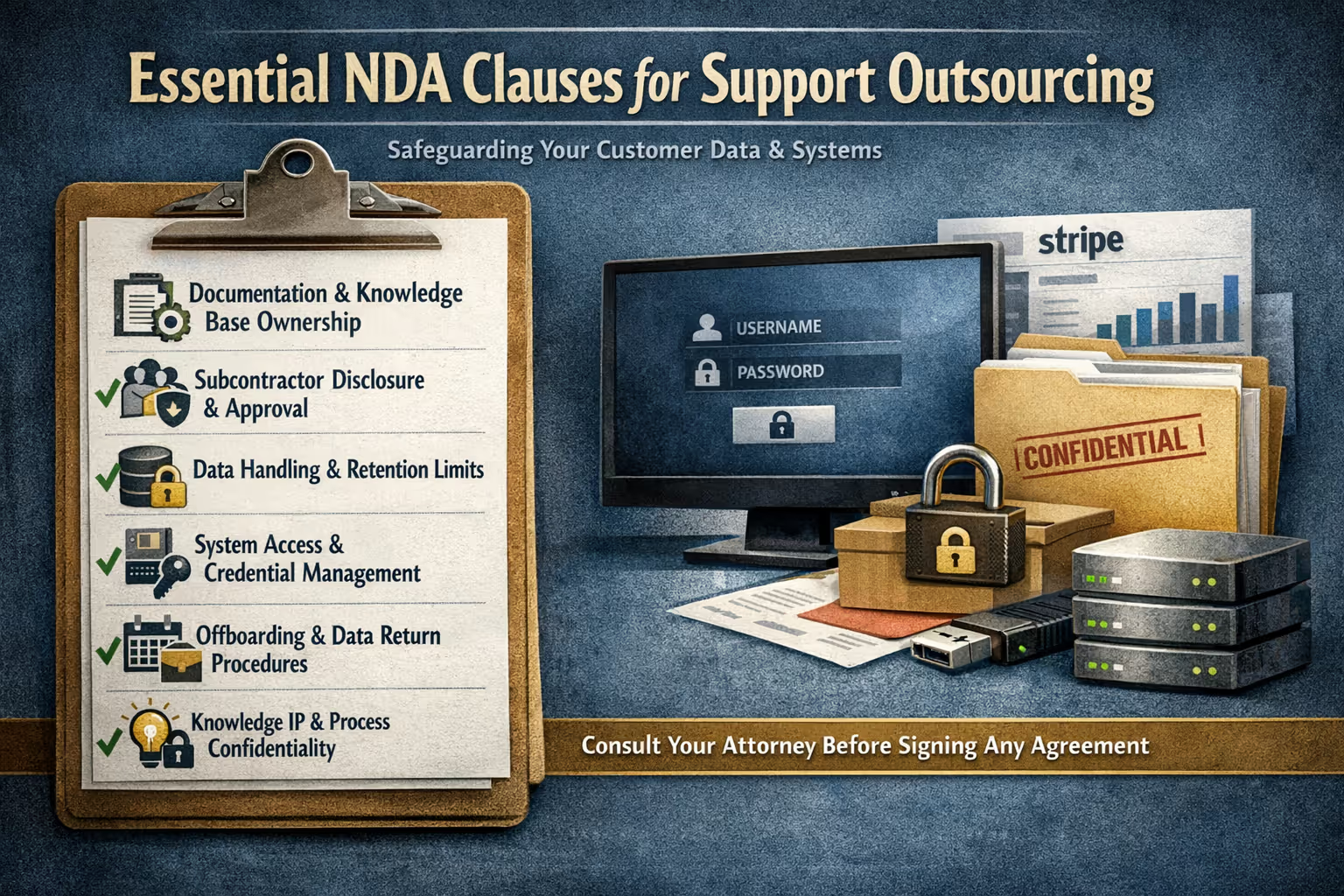
Key Takeaways: The Six Essential Clauses
Documentation and knowledge base ownership
Subcontractor disclosure and approval
Data handling and retention limits
System access and credential management
Offboarding timeline and procedures
Knowledge base IP and process confidentiality
Why Generic NDA Templates Fall Short for Support Outsourcing
A standard NDA covers confidentiality. It says "don't share my secrets." That's necessary but nowhere near sufficient when you're outsourcing customer support.
Think about what support work actually involves:
Reading and responding to customer emails containing personal information
Accessing billing systems to process refunds or update payment details
Logging into admin panels with elevated permissions
Creating documentation that captures your internal processes
Potentially using your brand voice to communicate with customers
Generic templates weren't built for this level of operational intimacy. They don't address who owns the knowledge base your support partner builds. They don't specify what happens to customer data when the relationship ends. They don't clarify whether your partner can use subcontractors who might work from anywhere in the world.
These gaps matter more than you might think.
The Six Clauses Your Support NDA Actually Needs
Let's break down the specific provisions that separate a support-ready NDA from a generic confidentiality agreement.
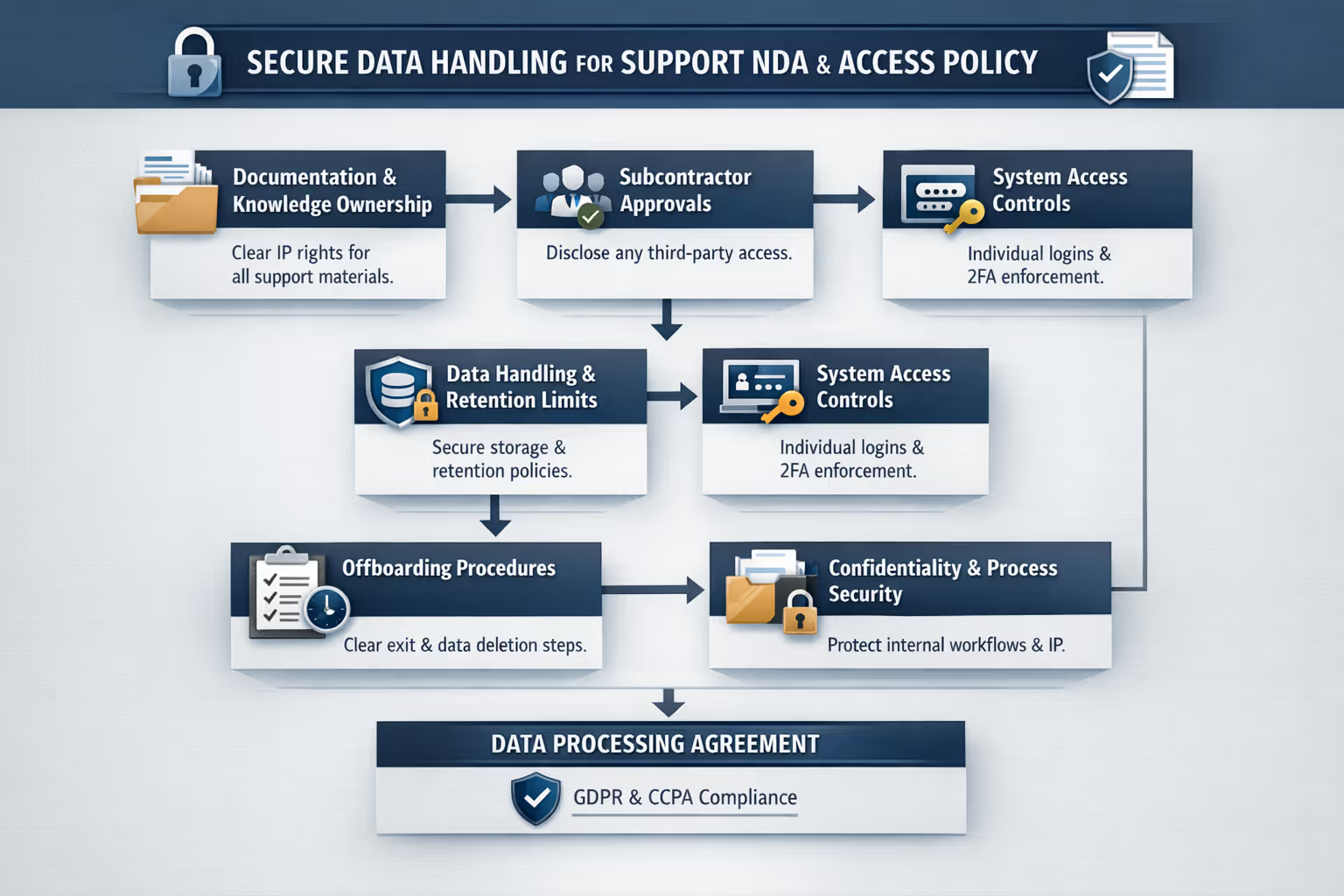
Clause 1: Documentation and Knowledge Base Ownership
Here's a scenario that plays out more often than you'd expect: a business works with a support partner for two years. During that time, the partner creates an extensive internal knowledge base—FAQs, troubleshooting guides, saved reply templates, process documentation. Then the relationship ends.
Who owns all that work?
Without explicit language, this gets murky fast. The partner might argue they created it, so it's theirs. You might argue it's about your product, so it's yours.
What to include: Clear language stating that any documentation, templates, macros, knowledge base articles, or process guides created during the engagement are works made for hire and belong to you. This should cover materials created using your systems, your product information, and your customer interactions—regardless of who typed the words.
Why it matters: That documentation represents real value. It's what enables consistent, quality support. If you ever bring support in-house or switch providers, you need to take that institutional knowledge with you.
Clause 2: Subcontractor Disclosure and Approval
Many outsourcing arrangements involve subcontractors. Your support partner might use freelancers during peak seasons, or they might have team members who technically work for a separate entity.
This isn't inherently bad. But you deserve to know about it.
What to include: A requirement that your partner disclose any subcontractors or third parties who will have access to your data or systems. Ideally, you want approval rights—meaning they can't bring in additional people without your explicit okay. At minimum, you need to know who's touching your customer data and where they're located.
Why it matters: Data protection regulations like GDPR and CCPA don't care whether the person who mishandled customer data was an employee or a subcontractor. You're still responsible. You need visibility into everyone who accesses your systems.
Clause 3: Data Handling and Retention Limits
Customer support generates data. Lots of it. Ticket histories, customer emails, internal notes, screenshots, screen recordings from training sessions. What happens to all of this?
What to include: Specific language about how customer data should be handled, where it can be stored, and crucially—how long it can be retained. Many businesses overlook retention limits and end up with former partners sitting on years of customer communications indefinitely.
Consider including:
Permitted storage locations (cloud services, local drives, etc.)
Encryption requirements for data at rest and in transit
Prohibition on downloading customer data to personal devices
Maximum retention period after the engagement ends
Requirements for secure deletion upon termination
Why it matters: Data privacy regulations increasingly require you to know where customer data lives and to limit retention to what's necessary. A support partner with poor data hygiene becomes your liability.
Clause 4: System Access and Credential Management
You're going to give your support partner access to sensitive systems. Helpdesk software. CRM. Billing platforms. Maybe even your product's admin panel. How that access gets granted, managed, and revoked matters enormously.
What to include:
A requirement that each team member have individual credentials (no shared logins)
Two-factor authentication requirements where available
A process for immediately revoking access when team members leave
Restrictions on what systems can be accessed from which locations
Logging and audit trail requirements so you can see who did what
Why it matters: Shared credentials are a security nightmare. If something goes wrong, you can't trace who did it. Individual accounts with proper access controls give you visibility and accountability. The principle of least privilege—giving access only to what's needed—is a foundational security practice that should guide your access policy [2].
Clause 5: Offboarding Timeline and Procedures
Relationships end. Sometimes planned, sometimes not. When they do, you need a clear process for unwinding the arrangement without leaving loose ends. This is especially true when you switch customer support providers.
One founder we know discovered—three months after switching providers—that a former support contractor still had active Stripe admin access. Nobody had revoked it. Nothing bad happened, but the realization kept him up for a few nights.
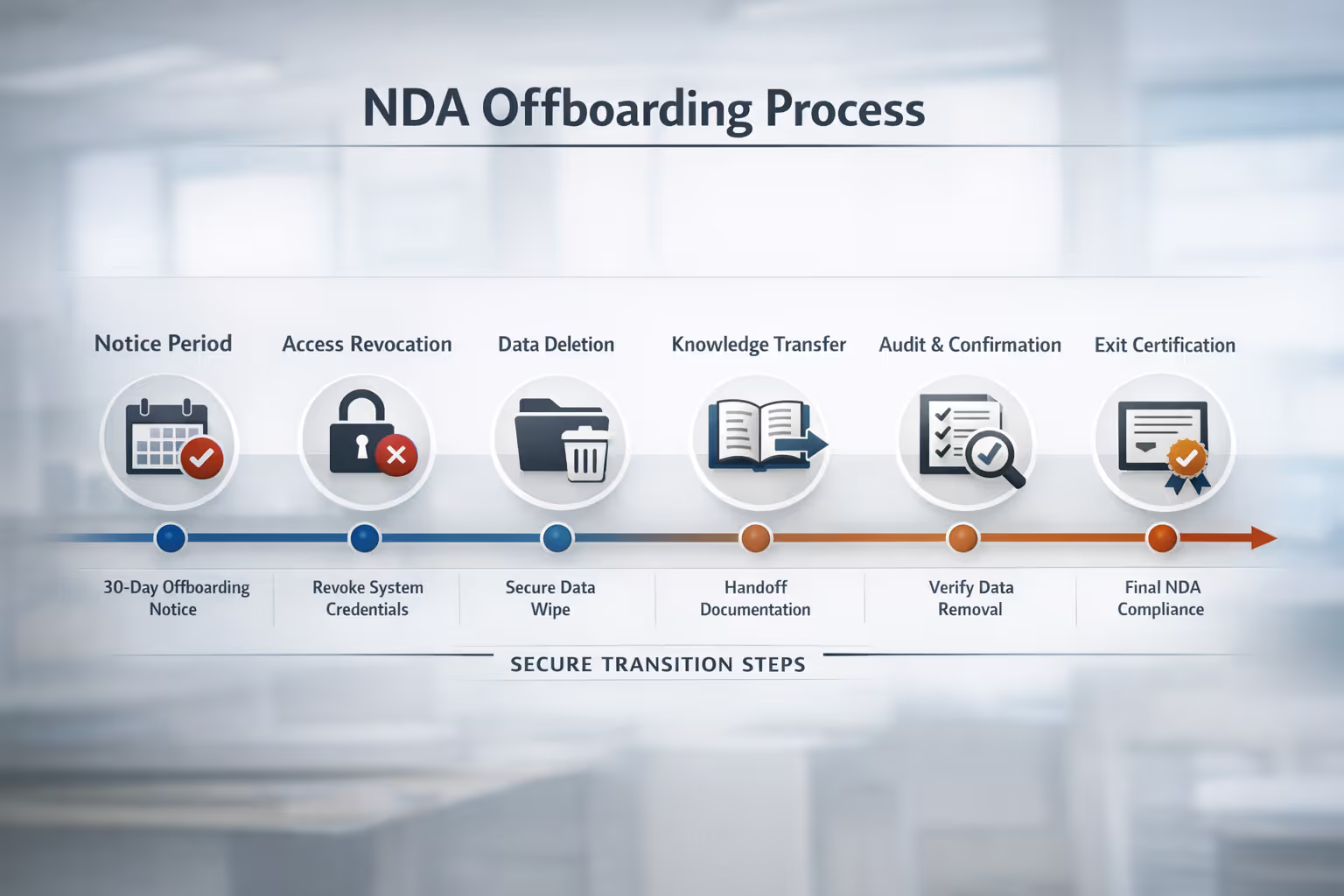
What to include: A detailed offboarding procedure that specifies:
Notice period required from either party
Timeline for transitioning active tickets and ongoing customer conversations
Deadline for returning or destroying all company data and materials
Process for credential revocation (ideally same-day for system access)
Knowledge transfer requirements to ensure continuity
Certification of data deletion after offboarding completes
Why it matters: A messy offboarding can mean customer conversations falling through cracks, lingering system access that creates security risks, or lost documentation that sets your next support solution back months.
Clause 6: Knowledge Base IP and Process Confidentiality
This one's subtle but important. Your support partner is going to learn a lot about how you operate. Your refund policies. Your escalation procedures. The workarounds you use for product bugs. The specific language that resonates with your customers.
Some of this is obvious confidential information. Some of it exists in a gray area.
What to include: Explicit acknowledgment that operational processes, support workflows, customer communication strategies, and internal policies constitute confidential information—even if they seem like common practices. Your partner shouldn't be able to take your playbook to a competitor.
Why it matters: The "secret sauce" of great support often isn't fancy technology. It's accumulated knowledge about what works for your specific customers. That knowledge has real competitive value.
The NDA Isn't Enough: You Also Need a Data Processing Agreement
Here's something many small business owners miss: when you outsource support, an NDA alone doesn't satisfy your legal obligations for handling customer data.
An NDA protects your business secrets. A Data Processing Agreement (DPA) is a separate document that specifically addresses how personal data will be processed when you share it with a third party.
Why this matters for support outsourcing:
Under GDPR (if you have EU customers) and increasingly under CCPA and other privacy laws, when you share customer personal data with an external support team, you're required to have a DPA in place. This isn't optional—it's a legal requirement.
What a DPA covers that an NDA doesn't:
The specific types of personal data being processed
The purposes for which data can be used
Security measures the processor must implement
Requirements for notifying you of data breaches
Rights of data subjects and how requests will be handled
Sub-processor requirements and notifications
The practical takeaway: Ask your support partner if they have a standard DPA, or work with your attorney to create one. Many established support providers will have this ready. If a provider seems confused by the request or dismissive of the need, that's a red flag worth noting.
Building Your Access Policy
An NDA covers confidentiality. An access policy covers the day-to-day practicalities of how your support partner interacts with your systems. Think of it as the operational companion to your legal agreement.
What Systems Need Access
Start by listing every system your support partner will need:
Helpdesk or ticketing platform (Zendesk, Help Scout, Intercom, etc.)
Customer database or CRM
Billing platform (Stripe, Chargebee, etc.)
Product admin panel
Internal communication tools (Slack, email)
Documentation platforms (Notion, Confluence, etc.)
For each system, decide what level of access is actually necessary. Does your support team need full admin access to Stripe, or just the ability to view transactions and issue refunds up to a certain amount? Give access to what's needed, nothing more—a principle the National Institute of Standards and Technology recommends as foundational for small business security [3].
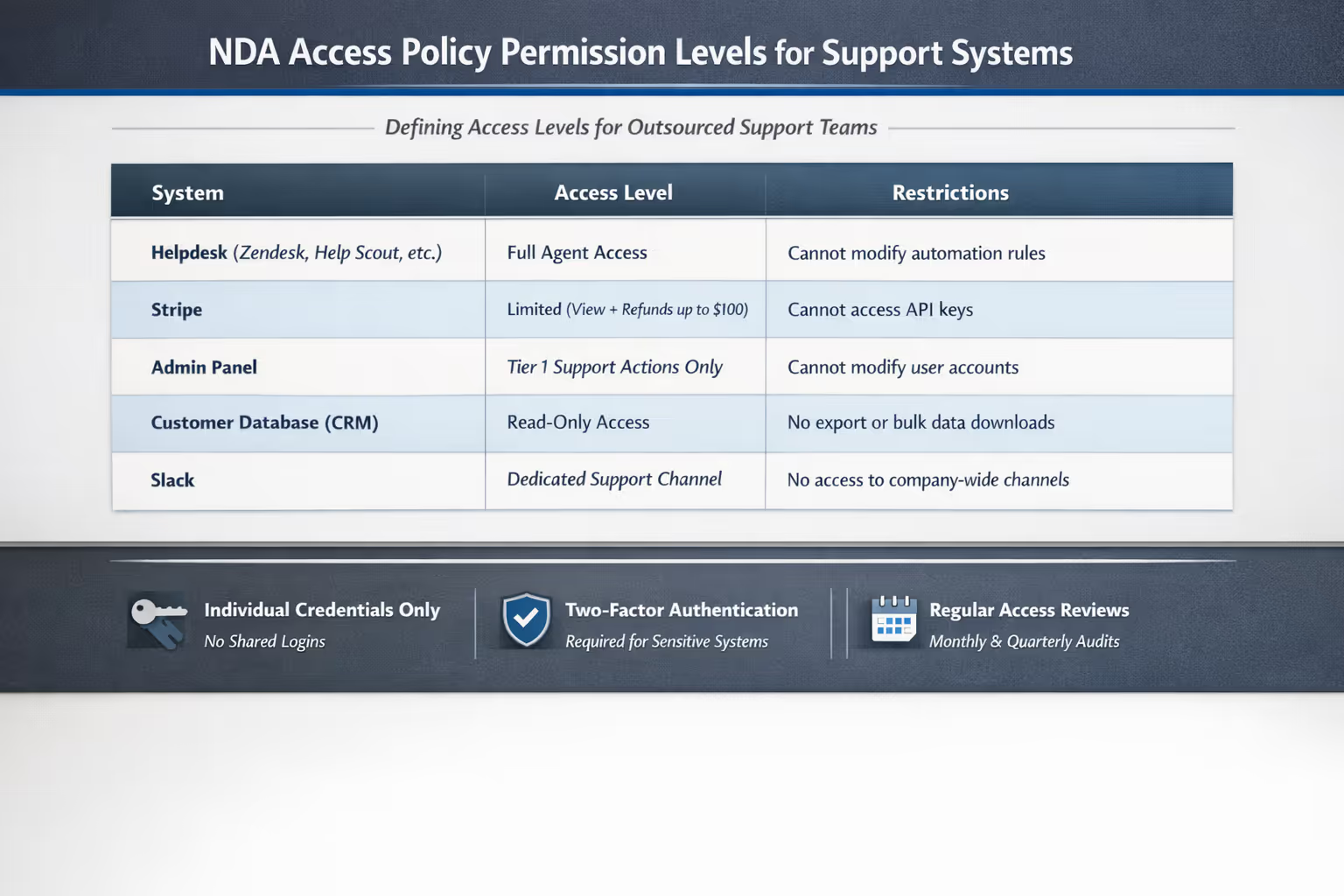
Permission Levels and Restrictions
Document specific permissions for each system:
| System | Access Level | Restrictions |
| Helpdesk | Full agent access | Cannot modify automation rules |
| Stripe | Limited (view + refunds up to $100) | Cannot access API keys |
| Admin panel | Tier 1 support actions only | Cannot modify user accounts |
| Slack | Dedicated support channel | Cannot access company-wide channels |
This table becomes your reference document. When someone asks "should support be able to do X?"—you have an answer.
Access Review Schedule
Set a regular cadence for reviewing who has access to what:
Monthly: Verify all team members with access are still active
Quarterly: Review permission levels against actual usage
Annually: Full audit of all systems and access rights
Systems like Stripe and most helpdesks have activity logs. Use them. Regular reviews catch orphaned accounts and permission creep before they become problems.
Access Policy Checklist
Use this as a starting point when building your own policy:
[ ] All team members have individual credentials (no shared logins)
[ ] Two-factor authentication enabled on all sensitive systems
[ ] Permission levels documented for each system
[ ] Process defined for adding new team members
[ ] Process defined for removing departing team members (same-day revocation)
[ ] Regular access review schedule established
[ ] Audit logging enabled where available
[ ] Restrictions on personal device access documented
[ ] Emergency access revocation procedure defined
Common Mistakes to Avoid
We've seen small businesses make these missteps repeatedly. Learn from their experience.
Mistake 1: Assuming your support partner's standard agreement covers everything. Most providers have their own contracts. These protect them. Make sure your specific concerns—particularly around data ownership and IP—are explicitly addressed.
Mistake 2: Forgetting about backups and exports. Your partner might back up ticket data to their own systems for business continuity. That's reasonable, but those backups need the same protection and deletion requirements as primary data.
Mistake 3: Overlooking training materials. Screen recordings, annotated screenshots, Loom videos walking through your product—all of this gets created during onboarding. All of it contains potentially sensitive information. All of it should be covered by your agreements.
Mistake 4: Waiting until something goes wrong. The time to discuss these issues is before you sign, not after an incident. A good partner will welcome these conversations. If they seem annoyed or dismissive, that tells you something.
When to Involve Legal Counsel
We've given you a framework for thinking about these issues. But there's a reason lawyers exist. You should involve legal counsel when:
Your business handles sensitive data (health information, financial data, anything involving children)
You're subject to specific regulatory requirements (HIPAA, PCI-DSS, SOC 2)
Your customers include enterprise clients with their own vendor requirements
The dollar value of the relationship is significant
You're operating in multiple jurisdictions with different data protection laws
An attorney can review your specific situation and ensure your agreements actually do what you think they do. The cost is usually modest compared to the protection it provides. The U.S. Small Business Administration offers additional guidance on data security considerations for small businesses [1].
Frequently Asked Questions
Can I use the same NDA for multiple support partners?
The core clauses can be consistent, but you should customize specifics like permitted systems, access levels, and data handling procedures for each relationship. What works for a helpdesk integration might not fit a partner accessing your payment systems.
What if my support partner refuses to sign a custom NDA?
This is worth a conversation. Understand their concerns. Some providers have legitimate reasons for preferring their own agreements—insurance requirements, for example. But if they're unwilling to address reasonable data protection concerns, that's a red flag. This directly impacts how to choose your customer support partner.
How do I handle existing customer data when starting a new support relationship?
Your NDA should cover historical data the same way it covers new data created during the engagement. Be explicit that customer communications and data from before the relationship began are subject to the same confidentiality and handling requirements.
What happens to customer data if my support partner goes out of business?
This is worth addressing explicitly in your agreement. Specify that data destruction requirements survive termination of the business relationship—meaning they're obligated to securely delete your data even if they're shutting down. Get this in writing before you need it.
Should my access policy be part of the NDA or a separate document?
Either approach works. Some businesses prefer a single comprehensive agreement. Others like keeping the legal terms (NDA) separate from operational procedures (access policy) so the policy can be updated without amending a legal contract. Choose whatever makes sense for how you work.
Your Next Step
Getting these documents right matters. They're what let you hand off your inbox and actually relax—knowing your customers' data is protected and your interests are covered.
We're happy to take a look at your existing NDA during a pre-sales conversation. Not to practice law (we'll leave that to your attorney), but to flag common gaps we've seen and share what's worked for other small businesses in your situation. Sometimes a fresh set of eyes catches things you've been staring past.
Book a call with Evergreen Support and bring your questions. We'll walk through how we handle data, what our own security practices look like, and help you think through what protections matter most for your specific business.
Because the goal isn't just to outsource your support. It's to do it in a way that lets you actually sleep at night.
About the Author
Evergreen Support provides US-based, human-powered customer support for small SaaS and ecommerce businesses. Our team has helped dozens of founders navigate the practical and operational questions that come with outsourcing support for the first time. We specialize in making the transition smooth—including helping you think through the security and data protection considerations covered in this guide.
Cited Works
[1] U.S. Small Business Administration — "Data Security: A Guide for Business." https://www.sba.gov/business-guide/manage-your-business/stay-safe-cybersecurity-threats
[2] International Association of Privacy Professionals — "What is the Principle of Least Privilege?" https://iapp.org/resources/article/what-is-the-principle-of-least-privilege/
[3] National Institute of Standards and Technology — "Small Business Information Security: The Fundamentals." https://nvlpubs.nist.gov/nistpubs/ir/2016/NIST.IR.7621r1.pdf


