Not all support tickets deserve the same response time. Some are questions. Others are quiet revenue emergencies.
Picture this: a frustrated customer whose password reset request has been sitting in your queue since yesterday morning. Meanwhile, buried somewhere below twenty "how do I change my billing address?" emails, there's a chargeback notification from your payment processor. By the time you reach the dispute, the evidence submission window is closing—or already closed.
When a customer disputes a charge, threatens to cancel, or sits locked out of their account, every hour of delay chips away at revenue you already earned. These "money-on-the-line" tickets demand a different kind of attention—and most small support teams don't have a system for spotting them fast enough.
Support triage rules solve that problem. By sorting incoming tickets into clear priority tiers based on revenue risk, you stop treating every request equally and start protecting the dollars actually at stake.
This guide walks through a lean P0–P3 triage framework built for SaaS and ecommerce teams. You'll learn exactly which ticket types belong in each tier, what response times to aim for, and how to keep chargeback-risk triggers, cancellation urgency, and account lockout situations from slipping through the cracks.
Table of Contents
Why Revenue-Risk Triage Matters More Than FIFO
The P0–P3 Priority Framework Explained
P0 Triggers: Chargebacks, Fraud Alerts, and Payment Disputes
P1 Triggers: Cancellation Requests and Churn Signals
P2 Triggers: Account Lockouts and Access Issues
P3 and Below: Standard Support Requests
Recommended SLAs by Priority Tier
Building Triage Rules Into Your Helpdesk
Frequently Asked Questions
Why Revenue-Risk Triage Matters More Than FIFO
First-in, first-out sounds fair. But it's also how money walks out the door.
When you process tickets in arrival order, a password reset from yesterday morning sits ahead of today's chargeback notification. By the time you reach the dispute, the window for evidence submission may be closing—or already closed.
The cost adds up fast. Chargebacks don't just take the transaction amount. You also lose the product (in ecommerce) or the subscription revenue (in SaaS), plus you absorb processor fees that typically range from $15 to $100 per dispute [1]. And if your dispute rate climbs above card network thresholds, you risk losing your merchant account entirely [2].
Cancellation requests carry their own price tag. Research from Bain & Company found that increasing customer retention by just 5% can boost profits by 25% to 95% [3]. Every cancellation you fail to address quickly is a missed shot at retention.
Account lockouts seem less urgent—until you consider that a locked-out customer can't use your product, can't renew, and has every reason to dispute the charge for a service they couldn't access.
Revenue-risk triage flips the script. Instead of asking "who waited longest," you ask "where is money actively at risk?" That question reshapes your queue.
The P0–P3 Priority Framework Explained
A lean triage system doesn't need a dozen categories. Four priority tiers cover most situations without overwhelming your team.
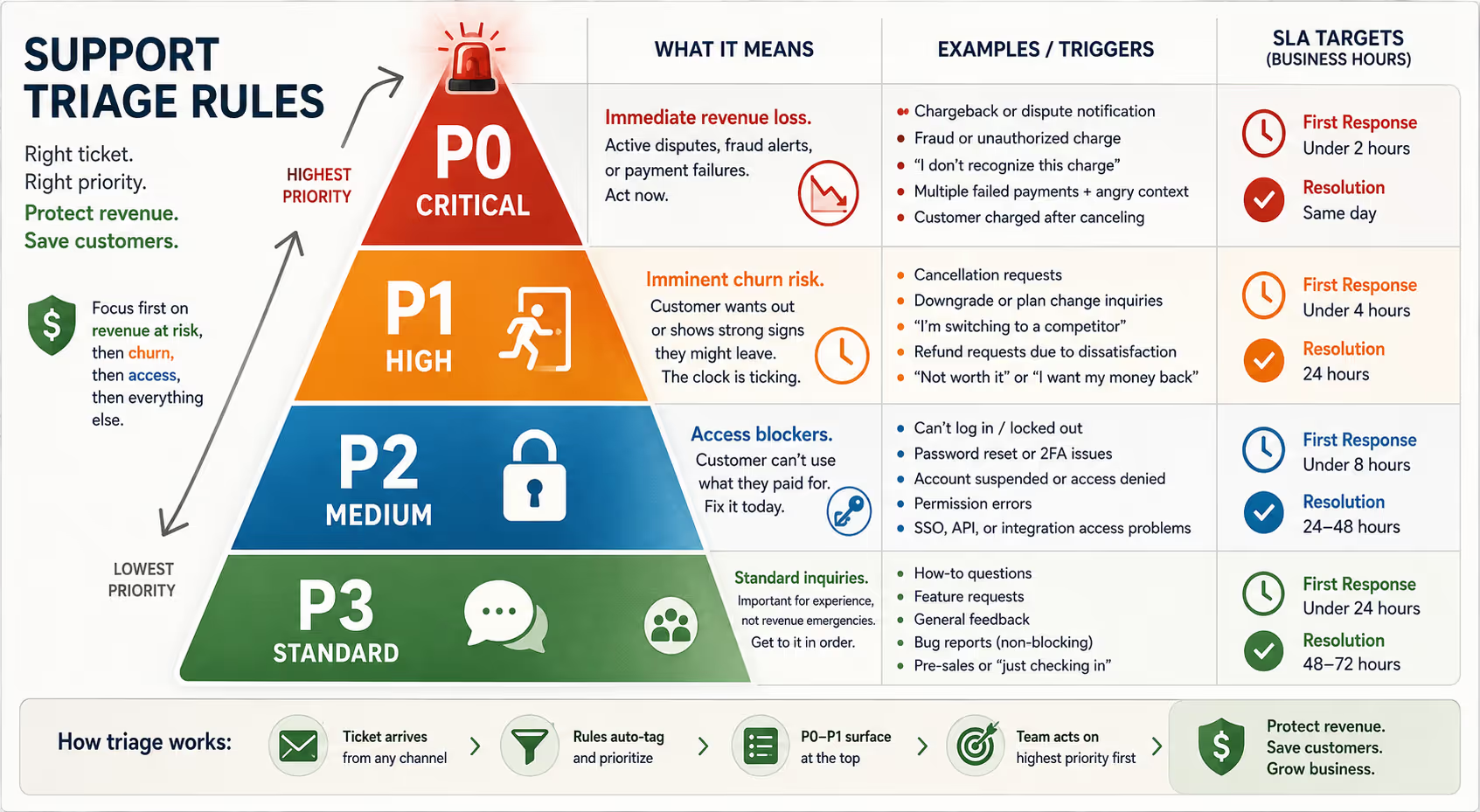
[Consider adding a visual diagram here showing the P0–P3 priority pyramid with P0 at the top]
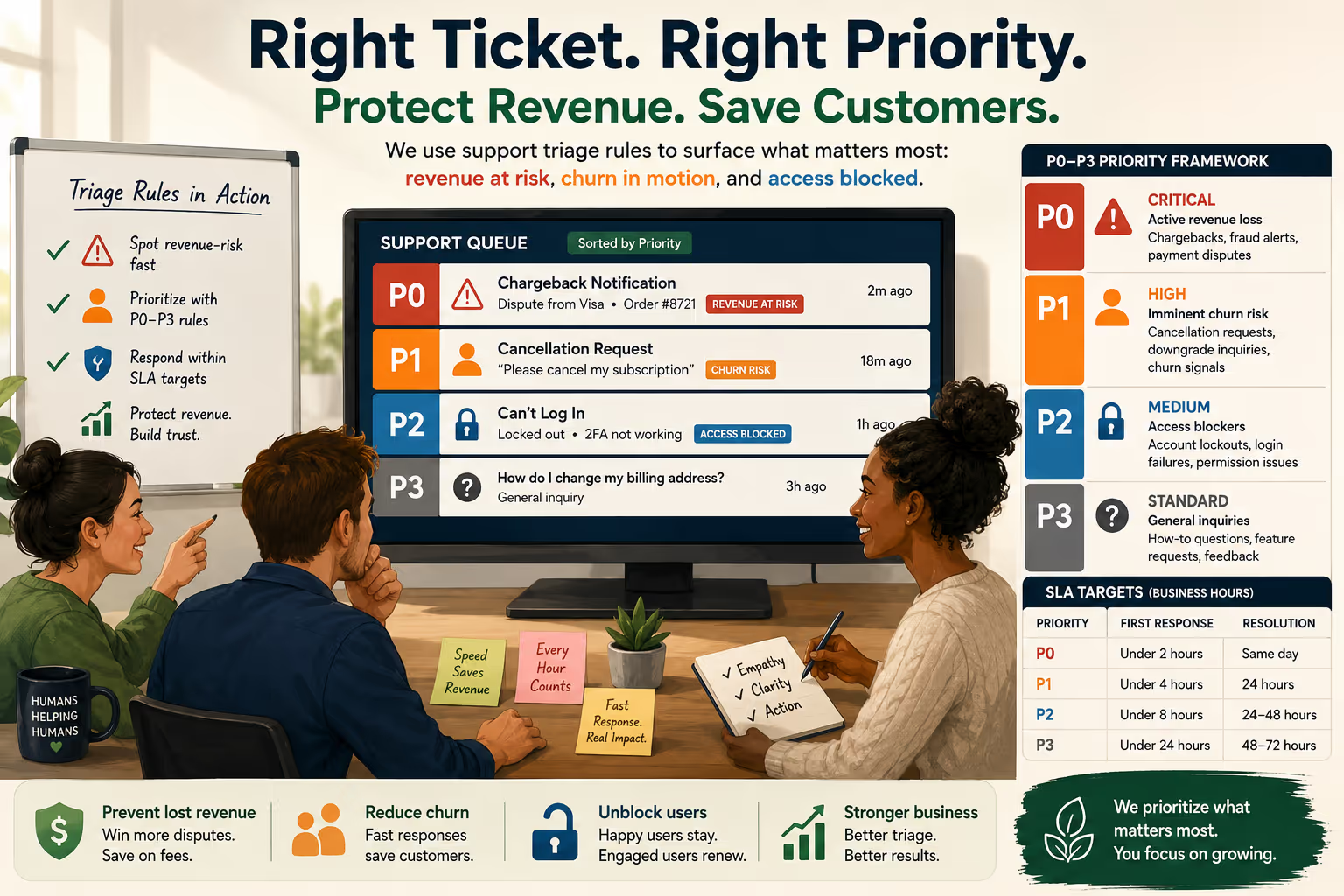
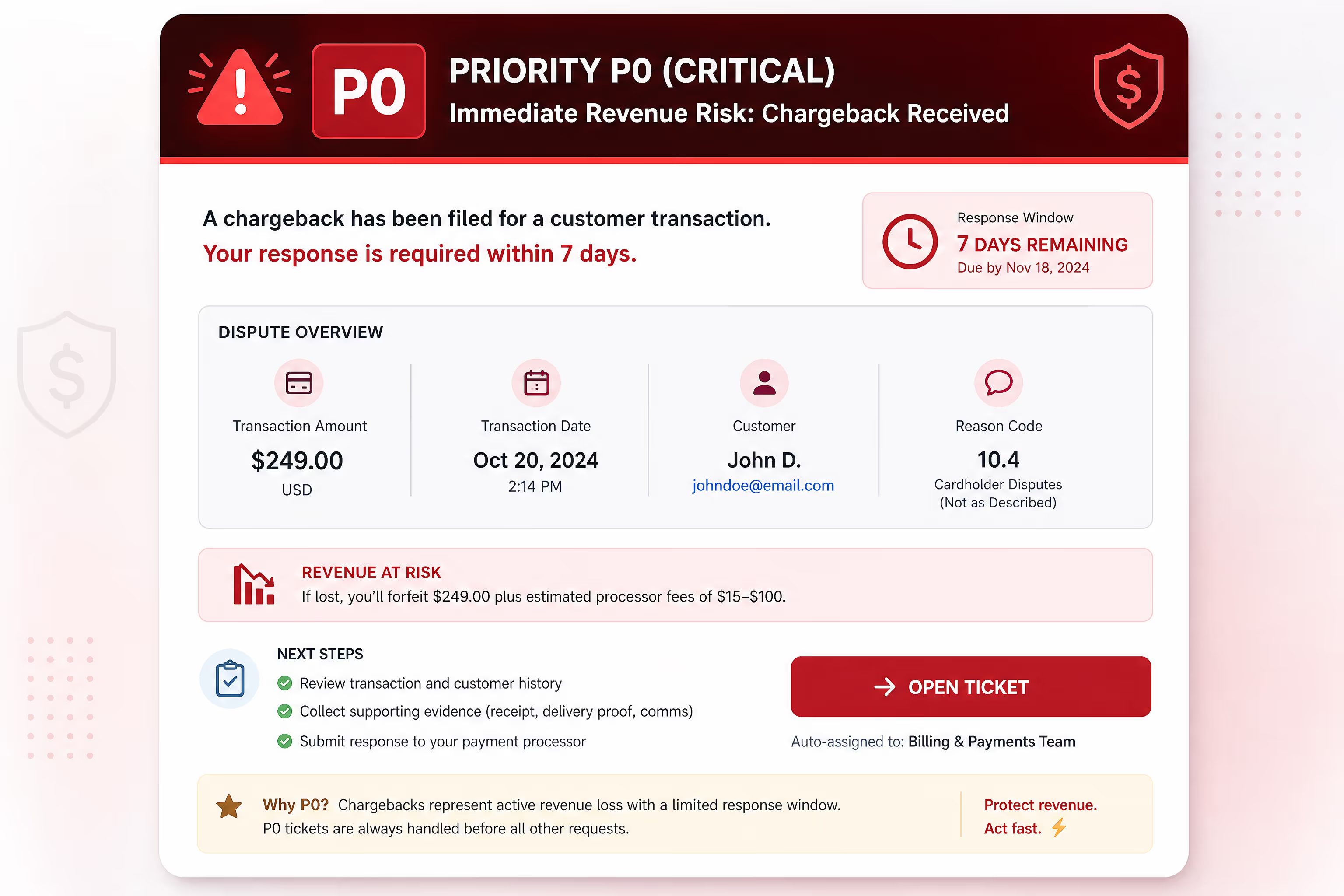
P0 – Critical (Immediate Revenue Loss)Active disputes, fraud flags, and payment failures where revenue is already walking out the door. These get touched first, always.
P1 – High (Imminent Churn Risk)Cancellation requests, downgrade inquiries, and explicit "I'm leaving" signals. Revenue isn't lost yet, but the clock is ticking.
P2 – Medium (Access Blockers)Account lockouts, login failures, and permission issues that prevent customers from using what they paid for. Not an immediate revenue event, but a churn accelerant if ignored.
P3 – Standard (General Inquiries)Feature questions, how-to requests, feedback, and non-urgent bug reports. Important for customer experience, but not revenue emergencies.
The key insight: P0 and P1 tickets should never wait behind P3 tickets. Period.
P0 Triggers: Chargebacks, Fraud Alerts, and Payment Disputes
P0 tickets represent active revenue loss. The customer—or their bank—has already initiated action against a charge. Your window to respond is narrow and often non-negotiable.
Chargeback-Risk Triggers to Watch
Incoming dispute notifications. When your payment processor flags a chargeback or retrieval request, that ticket jumps to the front. Most processors give you 7 to 21 days to respond with evidence, though some payment networks require responses in as few as 3 to 5 days [4]. The sooner you act, the better your odds.
"I don't recognize this charge" messages. These often precede formal disputes. A fast, friendly explanation—paired with a receipt or order confirmation—can resolve the confusion before the customer calls their bank.
Fraud alerts from your gateway. If your system flags a transaction as potentially fraudulent, treat it as P0. Either confirm the order is legitimate or refund proactively before a dispute hits.
Payment failure notices with angry context. A declined card is routine. A declined card plus "I've been trying to pay for three days and I'm done" is a P0.
SaaS-Specific P0 Examples
Customer emails saying they were charged after canceling
Dispute notification for an annual renewal the customer forgot about
Multiple failed payment attempts followed by "just refund me"
Ecommerce-Specific P0 Examples
"Package never arrived, I'm disputing with my bank"
Chargeback notification for order delivered but claimed as not received
Customer reports unauthorized purchase on their account
Why Speed Matters Here
Chargeback win rates drop significantly when responses are delayed. Providing clear documentation quickly—order confirmations, delivery tracking, communication logs—gives you the best chance of winning the dispute [5]. And even if you lose, a fast refund before the formal dispute can save you the processor fee.
P1 Triggers: Cancellation Requests and Churn Signals
P1 tickets aren't lost revenue yet. But they're standing at the exit.
Cancellation urgency varies by business model. For SaaS, a cancellation request often triggers at renewal or billing. For ecommerce, it might be a subscription box pause or a loyalty program exit. Either way, time matters.
High-Urgency Cancellation Signals
Explicit cancellation requests. "How do I cancel?" or "Please cancel my account" are clear P1 triggers. These deserve a fast, human response—not a delayed autoresponder.
Downgrade inquiries. "Can I switch to a cheaper plan?" is a churn warning. It's also an opportunity to understand what's not working and potentially save the account.
Refund requests tied to dissatisfaction. "This isn't what I expected, I want my money back" signals both a potential chargeback (if ignored) and a retention opportunity (if handled well).
"I'm switching to [competitor]" statements. These customers are telling you exactly where they're going. That's valuable intel and a chance to respond.
Why Response Time Affects Save Rates
The longer a cancellation request sits unanswered, the more the customer's frustration solidifies. A fast reply—even if it's just acknowledging the request and asking a question—creates space for conversation.
According to HubSpot research, 90% of customers rate an "immediate" response as important or very important when they have a customer service question [6]. For cancellation requests specifically, "immediate" can mean the difference between a saved account and a lost one.
What a Good P1 Response Includes
Acknowledgment within your SLA (ideally same business day)
A genuine question about why they're leaving
A relevant offer if appropriate (discount, pause, plan change)
A clear path to cancel if they still want to
The goal isn't to trap anyone. It's to understand and, when possible, address the root issue.
P2 Triggers: Account Lockouts and Access Issues
Account lockout priority sits below chargebacks and cancellations, but above general questions. Here's why.
A locked-out customer isn't just inconvenienced. They're experiencing a version of your product that's worth exactly zero to them. Every hour they can't log in is an hour they're not getting value—and an hour they might spend reconsidering whether they need your product at all.
Common Account Lockout Scenarios
Password reset failures. Sometimes the reset email doesn't arrive. Sometimes it lands in spam. Sometimes the customer tries three times and gives up. These deserve fast attention.
Two-factor authentication issues. Lost phone, new device, expired authentication app—all common and all frustrating. A locked-out customer who can't access 2FA recovery is stuck.
Permission and access errors. "I can't see my dashboard" or "my team member lost access" might not sound urgent, but if that dashboard contains customer data or critical workflows, it's blocking real work.
Account suspension notices. Whether due to billing failure, policy violation, or system error, a suspended account is a customer who can't use what they're paying for.
SaaS-Specific Access Issues
SSO configuration failures preventing entire team access
API key revocations blocking integrations
Admin account lockouts affecting the decision-maker
Ecommerce-Specific Access Issues
Customer can't log in to track an order in transit
Loyalty account locked, blocking point redemption at checkout
Subscription management portal inaccessible
The Hidden Churn Risk
Account access issues correlate with churn for a simple reason: customers who can't use your product don't renew. A study from Totango found that customers who engage regularly with a SaaS product are significantly less likely to churn [7]. Lockouts interrupt that engagement.
Treating access issues as P2—higher than general questions but below active revenue loss—ensures they get resolved the same business day while still leaving room for true emergencies.
P3 and Below: Standard Support Requests
Everything else falls here. And that's fine.
P3 tickets include:
How-to questions
Feature requests
General feedback
Bug reports that don't block access
Pre-sales inquiries
"Just checking in" messages
These tickets matter. They affect customer satisfaction, inform product decisions, and shape your brand perception. But they don't carry the same revenue urgency as P0–P2.
Managing P3 Without Neglecting It
The risk of any triage system is that lower-priority tickets get perpetually deprioritized. A P3 ticket from Monday shouldn't still be sitting unanswered on Friday.
Set clear SLAs for P3 (more on this below) and stick to them. If your queue consistently can't clear P3 tickets within SLA, that's a capacity signal—not permission to let them slip.
Recommended SLAs by Priority Tier
SLAs need to match both urgency and realistic capacity. Here's a framework that works for small teams handling support in-house or with a partner.
| Priority | First Response Target | Resolution Target | Examples |
| P0 | Under 2 hours (business hours) | Same day | Chargebacks, fraud alerts, payment disputes |
| P1 | Under 4 hours (business hours) | 24 hours | Cancellation requests, explicit churn signals |
| P2 | Under 8 hours (business hours) | 24–48 hours | Account lockouts, access issues |
| P3 | Under 24 hours (business hours) | 48–72 hours | General questions, feature requests |
A Few Notes on These Targets
"Business hours" is intentional. Most small online businesses don't offer weekend or overnight support. These SLAs assume Monday–Friday coverage. If you promise 24/7, adjust accordingly.
First response isn't resolution. For P0 and P1 especially, a fast acknowledgment ("We see this, we're on it, here's what happens next") buys goodwill even if full resolution takes longer.
Resolution targets are guidelines, not guarantees. Some chargebacks require back-and-forth with payment processors. Some account lockouts need engineering involvement. The goal is to keep the customer informed throughout.
Building Triage Rules Into Your Helpdesk
The best triage framework is useless if it lives only in a document. You need to bake it into your actual workflow.
Step-by-Step: Setting Up Automated Triage Rules
Most helpdesk platforms (Zendesk, HelpScout, Freshdesk, Intercom) support rule-based tagging and prioritization. Here's how to set it up:
Step 1: Create priority tags or fields
Add a custom priority field with values: P0-Critical, P1-High, P2-Medium, P3-Standard. Most helpdesks have this built in.
Step 2: Build P0 keyword triggers
Create an automation rule that scans subject lines and body text:
Example Zendesk trigger:
IF Subject contains ANY of: "chargeback," "dispute," "fraud," "unauthorized charge," "filing a claim"
AND Status is "New"
THEN Set Priority to "Urgent" AND Add tag "P0-revenue-risk"
Step 3: Build P1 keyword triggers
Example trigger:
IF Body contains ANY of: "cancel," "cancellation," "close my account," "downgrade," "switching to," "not worth it"
THEN Set Priority to "High" AND Add tag "P1-churn-risk"
Step 4: Build P2 access triggers
Example trigger:
IF Body contains ANY of: "can't log in," "locked out," "password not working," "account suspended," "access denied"
THEN Set Priority to "Normal" AND Add tag "P2-access-blocker"
Step 5: Default everything else to P3
Set a catch-all rule that tags remaining tickets as P3-Standard unless manually adjusted.
Quick-Reference Keyword Cheat Sheet
Copy these into your helpdesk rules:
P0 Keywords: chargeback, dispute, fraud, unauthorized charge, bank, credit card company, filing a claim, reported to my bank, transaction dispute
P1 Keywords: cancel, cancellation, close my account, downgrade, switching to, not worth it, want my money back, unsubscribe, ending my subscription
P2 Keywords: can't log in, locked out, password not working, account suspended, access denied, permission error, can't access, 2FA, authentication failed
Human Review Layer
Automation catches most cases, but edge cases need human judgment. Train your team (or your support partner) to:
Upgrade priority when context suggests higher urgency
Combine related tickets from the same customer
Escalate when SLAs are at risk
Visibility for the Team
Create a view or dashboard that shows P0 and P1 tickets prominently. These should be impossible to miss. Some teams use Slack integrations to ping a channel when a P0 arrives—a simple webhook can save thousands in prevented chargebacks.
The Bottom Line
Support triage isn't about playing favorites. It's about matching urgency to action.
When chargebacks, cancellations, and account lockouts get the same treatment as feature questions, you're leaving revenue on the table. A lean P0–P3 framework gives your team (or your support partner) a clear rule set for what to tackle first.
The logic is simple: protect the money that's actively at risk, save the customers who are actively leaving, and unblock the users who are actively stuck. Everything else can wait—but not forever.
If building and running these triage rules sounds like more than your team can handle alongside everything else, that's a sign you might need dedicated support coverage. Real humans who know your product, follow your playbook, and actually prioritize by revenue risk—not just arrival time.
Ready to hand off your support queue to a team that gets this? Book a call with Evergreen Support to see how we run triage and response queues with consistent weekday SLAs. We're humans helping humans—no bots, no guesswork, no missed P0s.
Frequently Asked Questions
What if I don't have enough ticket volume to justify a triage system?
Even at low volumes, triage thinking helps. You might not need automation, but training yourself or your team to scan for chargeback keywords and cancellation signals before diving into the queue prevents expensive oversights. The framework scales down—start by mentally categorizing tickets as you open your inbox each morning.
How do I handle a ticket that fits multiple priority levels?
Default to the highest applicable priority. A customer who says "I'm locked out and I want to cancel" is both P2 (access) and P1 (churn). Treat it as P1. Address the access issue first, then the cancellation conversation. One ticket, one priority—always the most urgent one.
Should I tell customers about priority levels?
No need to expose the internal system. Customers care about response speed, not your triage labels. Just meet your SLAs and communicate clearly. If you need to set expectations, say "We'll get back to you within [X hours]" rather than "Your ticket is a P2."
What's the biggest mistake teams make with triage?
Treating it as set-and-forget. Triage rules need periodic review as your product, customer base, and ticket patterns evolve. What triggered a P0 last year might be less urgent now—or you might have new P0 scenarios you haven't accounted for. Review your rules quarterly.
Can an outsourced support team follow these rules?
Absolutely. In fact, a support partner with clear triage protocols and consistent coverage can be more reliable than an in-house hire who's splitting attention across roles. The key is documentation, training, and ongoing communication about what counts as high-priority for your business.
How do we handle P0 revenue-risk tickets over the weekend if our team only works Monday–Friday?
This is a real tension for small teams. A few options: set up automated acknowledgment emails for known P0 keywords ("We received your message about a billing dispute and will respond first thing Monday morning"), check the queue briefly on weekend mornings for true emergencies, or work with a support partner who can provide weekend coverage for critical issues only. The goal is preventing a chargeback window from closing before anyone sees it.
About Evergreen Support
Evergreen Support is a US-based customer support agency built for small SaaS and ecommerce businesses. We specialize in email support—real humans answering your customers, Monday through Friday, with guaranteed 24-hour response times. Our team learns your product, your voice, and your triage priorities so nothing slips through. If you're tired of managing support yourself or worried about dropped balls, we'd love to talk.
Works Cited
[1] Chargebacks911 — "The True Cost of Chargebacks." https://chargebacks911.com/chargeback-costs/
[2] Stripe — "Understanding Chargebacks and Disputes." https://stripe.com/docs/disputes
[3] Bain & Company — "Prescription for Cutting Costs." https://www.bain.com/insights/prescription-for-cutting-costs-bain-book/
[4] Visa — "Visa Core Rules and Visa Product and Service Rules." https://usa.visa.com/dam/VCOM/download/about-visa/visa-rules-public.pdf
[5] Signifyd — "The State of Chargebacks." https://www.signifyd.com/resources/ebooks/state-of-chargebacks/
[6] HubSpot — "The State of Customer Service Report." https://www.hubspot.com/state-of-customer-service
[7] Totango — "The Impact of Customer Engagement on Retention." https://www.totango.com/blog/customer-engagement-retention/