
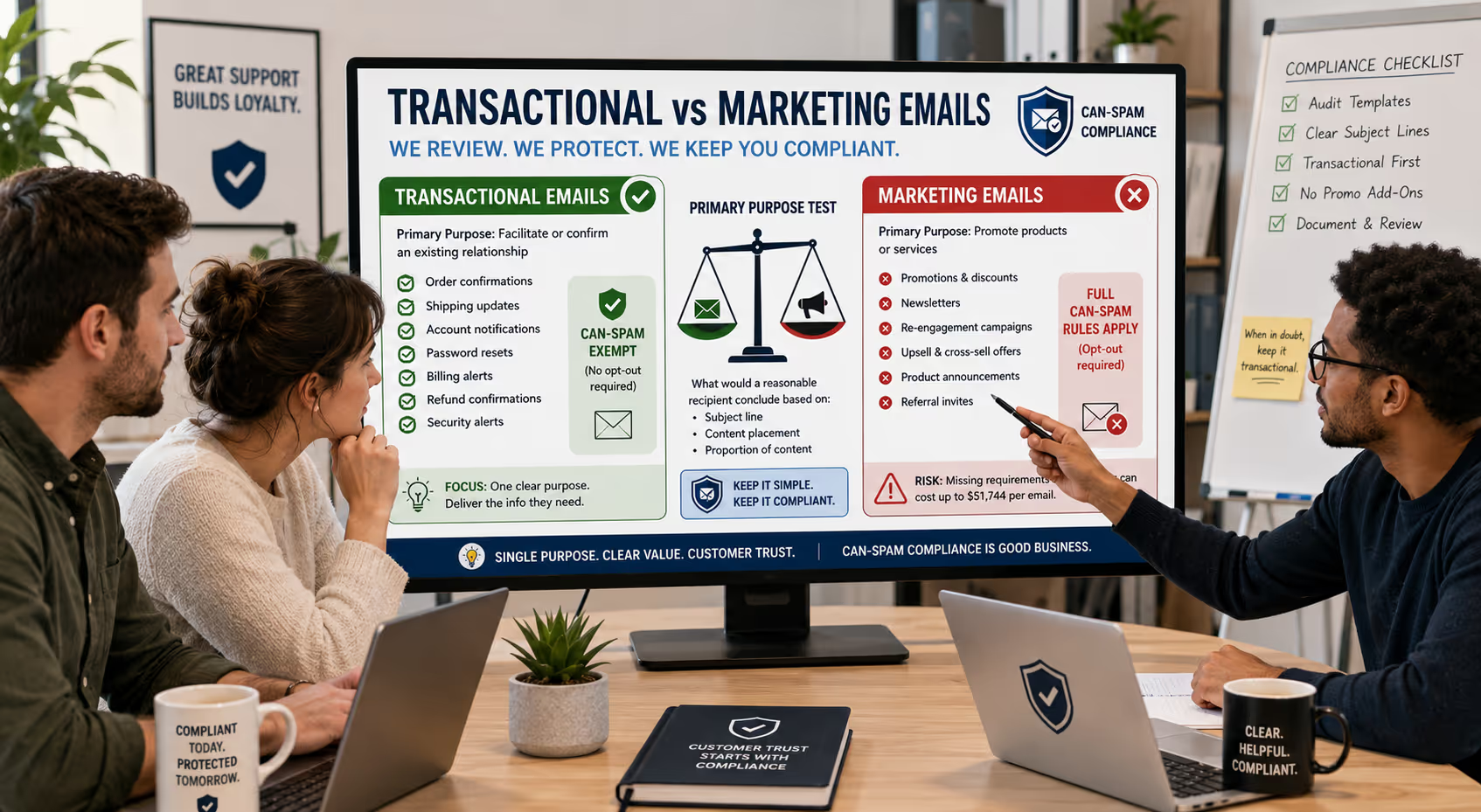
Your support inbox handles hundreds of customer emails every week. Refund confirmations. Password resets. Shipping updates. Account notifications. Each message seems routine until you realize some of those "helpful" emails might actually violate federal law.
The CAN-SPAM Act draws a critical line between transactional emails and marketing emails—and getting it wrong can cost your business up to $51,744 per email [1]. For small SaaS and ecommerce teams without dedicated legal counsel, understanding where your support communications fall on that spectrum isn't just good practice. It's essential protection.
Here's the good news: once you understand the primary purpose test and a few straightforward rules, keeping your support emails compliant becomes second nature. Let's break down exactly what makes an email transactional, when support messages accidentally cross into marketing territory, and how to structure your customer communications safely.
What Makes an Email Transactional Under CAN-SPAM
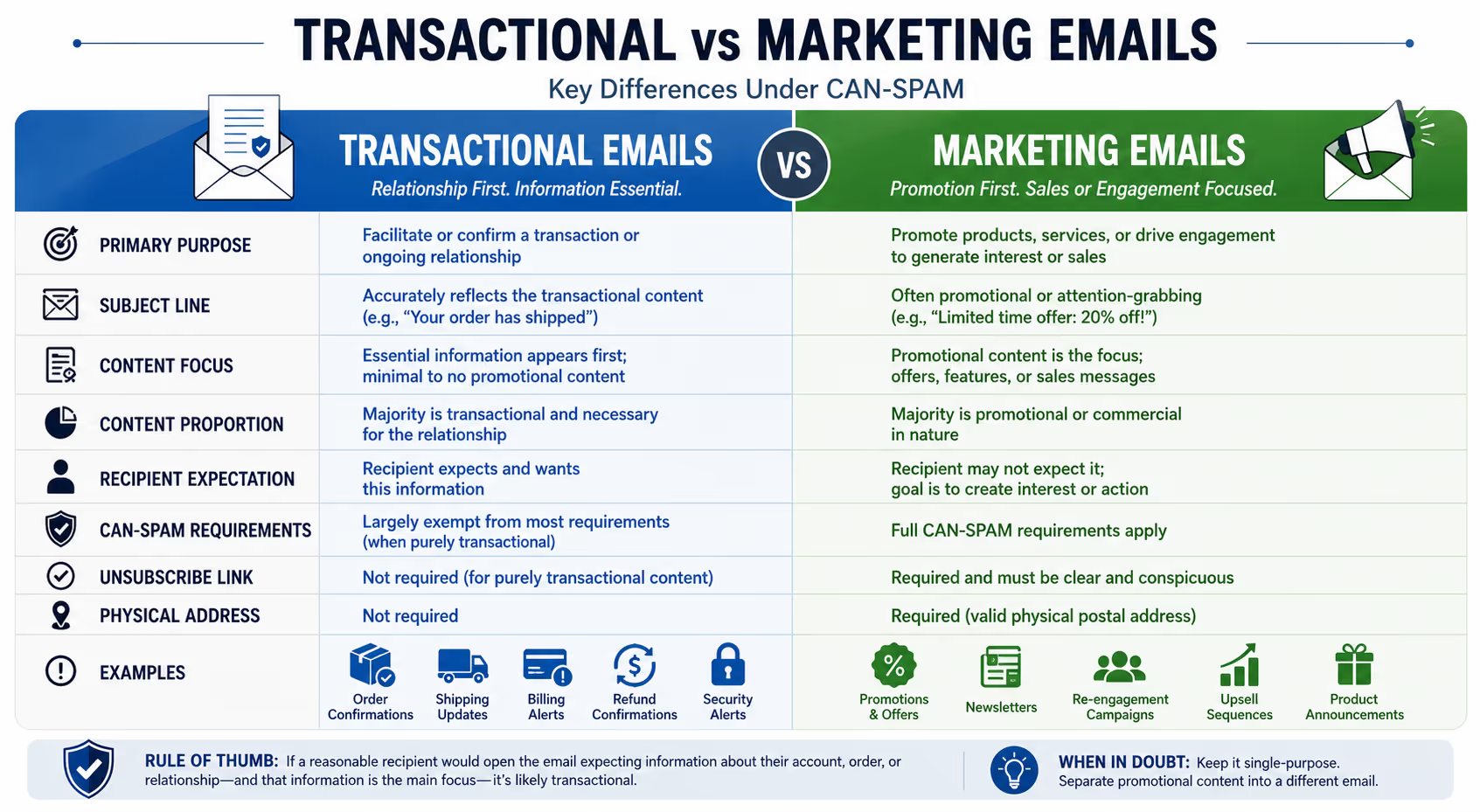
The Federal Trade Commission uses what's called the "primary purpose test" to determine whether an email is transactional or commercial [2]. This distinction matters enormously because transactional emails are largely exempt from CAN-SPAM's strictest requirements.
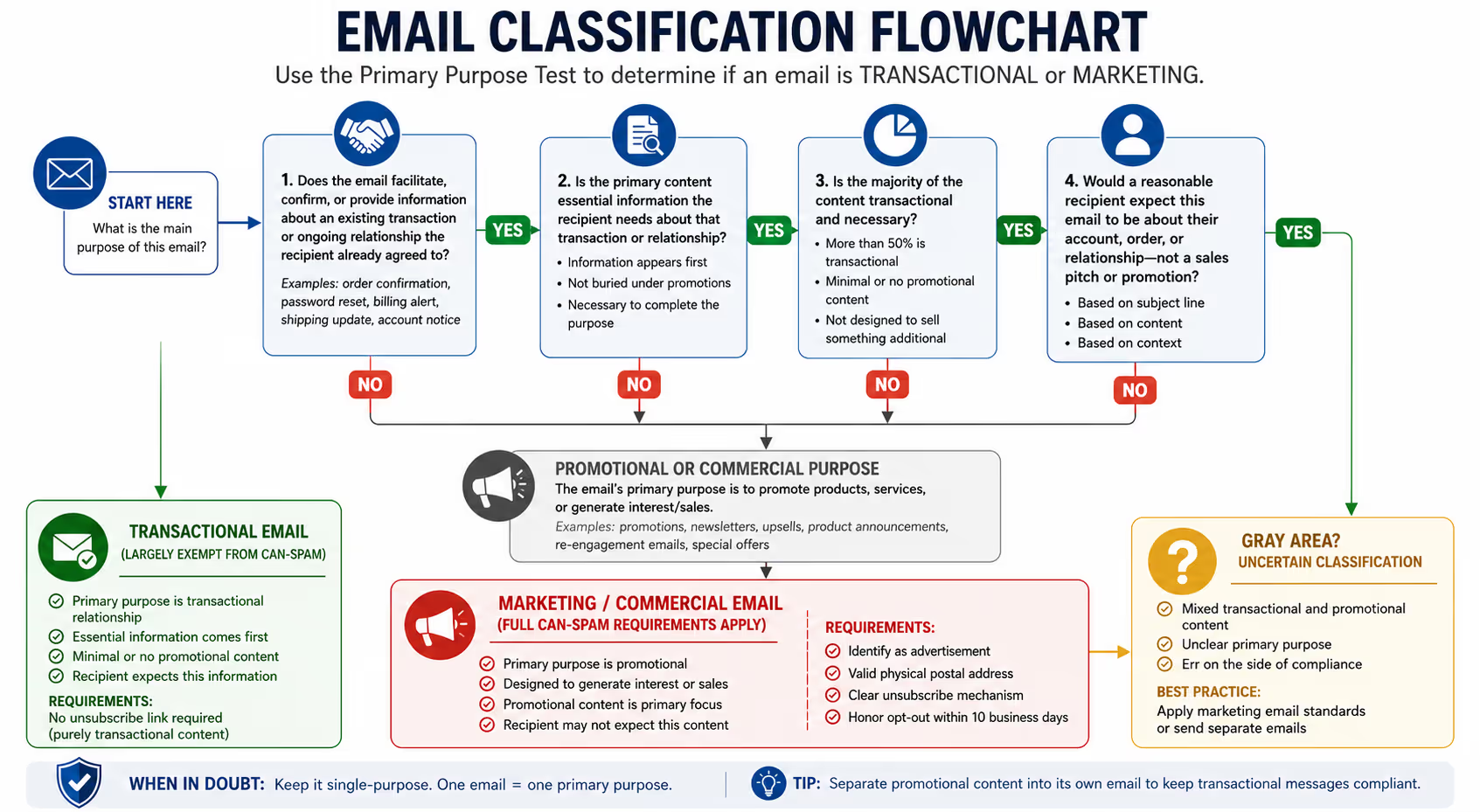
An email qualifies as transactional when its primary purpose is to:
Facilitate or confirm a commercial transaction the recipient already agreed to
Provide warranty, recall, safety, or security information about a product or service
Deliver information about an ongoing commercial relationship (subscription changes, account updates, billing)
Provide information related to employment or benefits
Deliver goods or services as part of a transaction the recipient already agreed to
The keyword here is "primary." If someone purchases your software, the email confirming their purchase and delivering their login credentials is clearly transactional. The message exists to complete a transaction they initiated.
But if that same email spends three paragraphs promoting your premium upgrade before mentioning their purchase confirmation at the bottom? Now you're in murky waters.
The Primary Purpose Test: How Regulators Actually Evaluate Your Emails
The FTC doesn't just look at your intent. They examine what a reasonable recipient would conclude based on the subject line, the content placement, and the overall proportion of transactional versus promotional material [2].
Think of it this way: if a customer opens your email expecting information about their order and instead gets hit with a sales pitch, you've likely failed the primary purpose test.
Three factors determine primary purpose:
Subject line content — Does it accurately reflect transactional information, or does it emphasize promotional content?
Placement of transactional content — Does the essential information appear first, or is it buried beneath marketing messages?
Proportion of content — Is the majority of the email devoted to facilitating the transaction, or does promotional material dominate?
An email with a subject line reading "Your order shipped + 20% off your next purchase!" immediately signals dual purposes. Whether it tips into commercial territory depends on how much of the body is shipping information versus how much pushes that discount.
Common Support Emails: Where They Actually Fall
Let's get specific. Here's how typical support and lifecycle emails break down:
Clearly Transactional (CAN-SPAM Exempt)
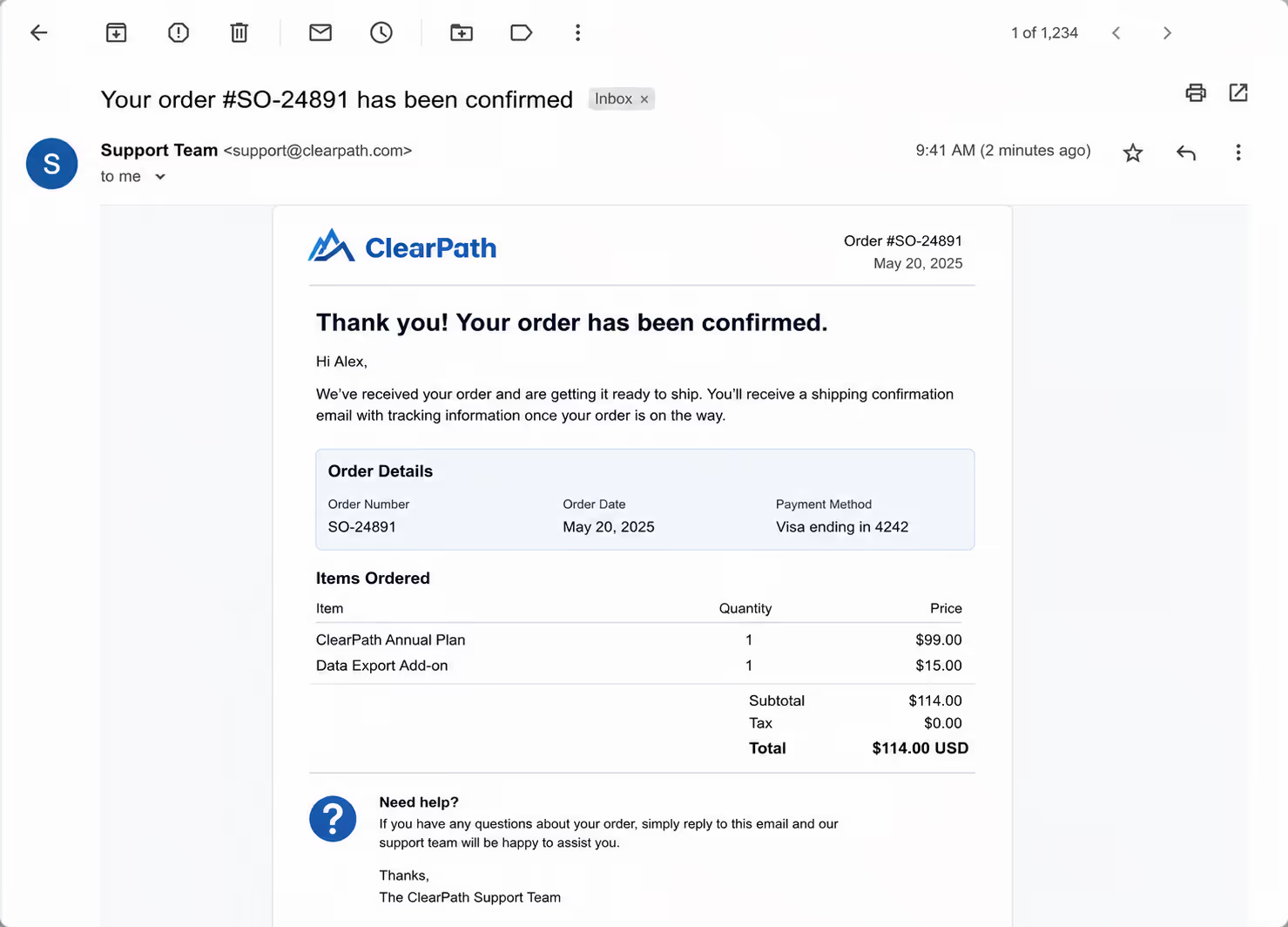
Password reset emails — These exist solely to restore account access. Pure transactional.
Order and shipping confirmations — Messages confirming purchases, providing tracking numbers, or notifying delivery completion fall squarely in the transactional category.
Subscription renewal notices — Informing customers their subscription will renew, when it will charge, and how to manage it qualifies as ongoing relationship communication.
Billing issue alerts — Letting someone know their payment failed or their card expires soon is transactional. You're facilitating the existing commercial relationship.
Refund confirmations — Notifying customers their refund processed and when to expect funds is completing a transaction.
Security alerts — Two-factor authentication codes, suspicious login notifications, and breach disclosures are transactional.
Clearly Commercial (Full CAN-SPAM Requirements Apply)
Promotional campaigns — Announcing sales, new products, or special offers requires full CAN-SPAM compliance including opt-out mechanisms.
Newsletter content — Regular content marketing emails are commercial, even if they provide valuable information.
Re-engagement campaigns — "We miss you!" emails attempting to win back inactive users are commercial in nature.
Upsell sequences — Emails specifically designed to move customers to higher tiers or additional products are promotional.
The Gray Zone: Support Emails That Can Go Either Way
Cancellation confirmations — The confirmation itself is transactional. But if you add a "Here's what you'll be missing" section with feature highlights and a "resubscribe now" button? That's promotional content creeping in.
Account update summaries — Monthly usage reports are transactional. Monthly usage reports that conclude with "Upgrade to unlock more features" are hybrid.
Support ticket follow-ups — Checking if an issue was resolved is transactional. Including a product tutorial video and asking them to explore new features moves toward commercial.
Onboarding sequences — This gets tricky. Emails teaching customers how to use what they already purchased lean transactional. Emails pushing them to buy add-ons or upgrade are commercial.
Safe Templates for Support Teams
Here are frameworks for common support scenarios that keep you firmly in transactional territory.
Refund Confirmation Template
Subject: Your refund for [Order #] has been processed
Hi [Name],
We've processed your refund of [amount] for [Order #]. You should see this reflected in your [payment method] within 5-10 business days, depending on your financial institution.
Refund details:
Original order date: [date]
Refund amount: [amount]
Expected return: 5-10 business days
If you have questions about this refund, reply directly to this email and we'll help.
[Support Team Signature]
Why it works: Single purpose. No promotional content. Subject line matches body content exactly.
Subscription Cancellation Confirmation Template
Subject: Your [Product Name] subscription has been canceled
Hi [Name],
This confirms your [Product Name] subscription has been canceled as of [date].
What this means:
Your access continues through [end of billing period]
You won't be charged again unless you resubscribe
Your data will be retained for [timeframe] before deletion
If you canceled by mistake or have questions about your account, reply to this email.
[Support Team Signature]
Why it works: Focuses entirely on information the customer needs. No "here's what you'll lose" guilt content.
Billing Issue Alert Template
Subject: Action needed: Payment issue on your [Product Name] account
Hi [Name],
We tried to process your payment of [amount] for [Product Name] on [date], but it didn't go through.
What happened: [Brief reason if known, e.g., "Your card on file has expired"]
What to do: Update your payment method in your account settings before [date] to keep your subscription active.
[Link to payment settings]
If you have questions or need to discuss your account, reply to this email.
[Support Team Signature]
Why it works: Pure information about their existing subscription. The link goes to account management, not a sales page.
Support Ticket Resolution Follow-Up Template
Subject: Following up on your recent support request [Ticket #]
Hi [Name],
We wanted to check in about the [brief description of issue] you reported on [date].
Has everything been working properly since our last conversation? If you're still experiencing issues or have additional questions, just reply to this email.
[Support Team Signature]
Why it works: Focuses solely on service quality. No promotional CTAs or product pitches.
Red Flags: When Support Emails Cross the Line
Watch for these patterns that can push transactional emails into commercial territory:
"While you're here" additions — Adding product recommendations to shipping confirmations converts transactional into hybrid.
Feature highlight sections — Including "Did you know you can also..." blocks in account update emails shifts the primary purpose.
Urgency language around promotions — Phrases like "limited time offer" or "before it's gone" signal commercial intent, even in otherwise transactional emails.
Referral program mentions — "Love us? Tell a friend and get $10!" turns a support email into a marketing vehicle.
Cross-sell blocks — "Customers who bought X also bought Y" sections belong in commercial emails, not order confirmations.
The FTC specifically warns that including promotional content in transactional emails risks reclassification [2]. When in doubt, keep support emails single-purpose.
Unsubscribe Requirements: What Applies When
One of the biggest practical differences between transactional and commercial emails involves opt-out mechanisms.
Commercial emails must include:
Clear identification that the message is an advertisement
A valid physical postal address
A clear, conspicuous opt-out mechanism
Honor opt-out requests within 10 business days [1]
Transactional emails don't require:
Unsubscribe links (for purely transactional content)
Physical address
Advertisement disclosure
However, if your transactional email contains any promotional content—even a small section—the safest approach is to apply commercial email standards to the entire message.
Many email platforms now include unsubscribe links by default. For transactional emails, this isn't legally required, but it doesn't hurt compliance. The concern is the opposite: sending commercial emails without proper opt-out mechanisms.
Building a Compliant Template Library
For small support teams juggling multiple responsibilities, consistency protects you. Here's how to systematize compliance:
Audit existing templates — Review every customer-facing email template your team uses. Identify which are purely transactional, which are commercial, and which fall in the gray zone.
Separate templates by type — Maintain distinct template sets for transactional communications and promotional messages. Don't mix purposes within single templates.
Establish review triggers — Any time someone wants to add content to a transactional email ("Can we mention the new feature in the refund confirmation?"), flag it for compliance review.
Document decisions — Keep a simple record of which emails your team has classified as transactional versus commercial, and why. This helps maintain consistency as team members change.
Standardize subject lines — Create subject line formats for each transactional email type that clearly signal their purpose. Consistency helps recipients recognize legitimate messages and helps you maintain clear primary purpose.
When to Get Expert Review
Most support emails are straightforward. But certain scenarios warrant a closer look:
Lifecycle email sequences — Onboarding flows that blend education with upselling need careful primary purpose analysis.
Hybrid communications — If you legitimately need to combine transactional and promotional content, consider sending separate emails instead.
International customers — CAN-SPAM is US law, but the EU's GDPR, Canada's CASL, and other regulations may impose stricter requirements. International customer bases may need additional compliance review.
High-volume automated emails — The more emails you send, the more exposure you have. Automated sequences deserve extra scrutiny.
Your Next Step
Getting your support templates compliant isn't complicated once you understand the rules. But it does require actually looking at every customer-facing email your team sends—something most small businesses haven't done systematically.
If you're not sure where your current templates fall, or you want a second set of eyes on your customer communications, we offer a free Inbox Audit. We'll review your support email templates, identify any risky language or structural issues, and provide specific recommendations for staying compliant while keeping your customer experience strong.
Request your free Inbox Audit and get clarity on your support communications.

Frequently Asked Questions
Can I include a small promotional section in a transactional email?
Technically yes, but it's risky. The FTC evaluates the email's "primary purpose" based on subject line, content placement, and proportion. If promotional content dominates or appears prominently, the entire email may be reclassified as commercial, requiring full CAN-SPAM compliance including opt-out mechanisms. The safest approach is keeping transactional emails single-purpose.
Do I need an unsubscribe link in order confirmation emails?
No. Purely transactional emails facilitating agreed-upon transactions are exempt from CAN-SPAM's opt-out requirements. However, if your order confirmation includes promotional content like product recommendations or discount codes for future purchases, the email may shift into commercial territory where unsubscribe links become mandatory.
What about onboarding email sequences—are they transactional or commercial?
It depends on content. Emails teaching customers to use a product they already purchased lean transactional. Emails pushing upgrades, add-ons, or premium tiers are commercial. Many onboarding sequences mix both, which means applying commercial email standards to the entire sequence is the cautious approach.
How do I handle international customers with different email laws?
CAN-SPAM applies to emails sent to US recipients. But international regulations like GDPR (EU), CASL (Canada), and others often impose stricter consent requirements. If you serve international customers, you may need to comply with multiple frameworks. When in doubt, following the strictest applicable standard protects you across jurisdictions.
What's the penalty for getting this wrong?
CAN-SPAM violations can result in penalties up to $51,744 per email [1]. While enforcement typically targets egregious spammers rather than small businesses making honest mistakes, the per-email penalty structure means even moderate-volume senders face significant potential liability. Proper classification and compliance isn't optional.
About Evergreen Support
Evergreen Support provides human-powered customer support for small SaaS and ecommerce businesses across the US, UK, and Europe. Our US-based team handles your email support so you can focus on growing your business—not drowning in your inbox. We specialize in helping small teams maintain the personal touch their customers love while ensuring consistent, compliant customer communications. Learn more at outsourcedemailsupport.com.
Works Cited
Federal Trade Commission — "CAN-SPAM Act: A Compliance Guide for Business." ftc.gov/business-guidance/resources/can-spam-act-compliance-guide-business
Federal Trade Commission — "16 CFR Part 316: Definitions and Implementation Under the CAN-SPAM Act."
ecfr.gov/current/title-16/chapter-I/subchapter-C/part-316


