

Picture this: it's December, and you're presenting your annual budget to the board. You get to the support line item, someone asks how you calculated it, and you realize your answer is basically "I guessed." The room goes quiet. Your CFO's pen stops moving.
That's the conversation nobody wants to have.
When it comes to budgeting for outsourced email support, most small SaaS and ecommerce founders either dramatically overshoot (leaving money on the table) or underestimate (cue the awkward mid-year budget revision). Neither scenario builds confidence with the people who approve your spending.
Here's the thing: forecasting outsourced support costs doesn't require a crystal ball. It requires a method. And if you're running a business with somewhere between zero and 500 support tickets per month, this guide will walk you through exactly how to build a defensible, realistic budget line item that holds up to scrutiny.
Why Outsourced Support Budgeting Trips People Up
Most founders approach support budgeting backwards. They start with "what can we afford?" instead of "what will we actually need?"
The problem compounds when you're forecasting for an outsourced partner rather than an in-house hire. With a full-time employee, the math feels deceptively simple: salary plus benefits plus overhead equals annual cost. Done.
Outsourced support typically follows a different model—often volume-based pricing tied to ticket counts or hours worked [1]. This means your costs flex with your business. Great for scaling efficiently. Tricky for producing a fixed budget number.
Add in the reality that support volume rarely stays flat throughout the year, and you've got a forecasting puzzle that genuinely requires some thought.
The Foundation: Understanding Your Current Ticket Volume
Before you can forecast where you're going, you need to know exactly where you are. This sounds obvious, but you'd be surprised how many founders guess at their ticket volume rather than measuring it.
Pull the last three to six months of data from your helpdesk. You're looking for:
Total tickets per month (not conversations or threads—actual discrete customer inquiries)
Average first response time (this hints at current capacity strain)
Resolution time patterns (longer resolution times often mean more complex tickets that cost more to handle)
Channel breakdown if you track it (email versus form submissions versus forwarded social messages)
If you've been handling support yourself or spreading it across team members, you might not have clean data. That's fine. Estimate conservatively based on inbox volume, and plan to track properly starting now.
One SaaS founder I spoke with recently discovered he'd been mentally estimating "around 50 tickets a month" when his actual count was closer to 120. That's a 140% gap—the kind of variance that wrecks a budget.
Projecting Volume Growth: The Variables That Matter
Your ticket volume next year won't match this year's. The question is: by how much?
Three factors drive support volume growth for small businesses:
Customer Base Growth
More customers generally mean more tickets. The relationship isn't perfectly linear—a customer who's been with you for two years typically generates fewer support requests than a brand-new one—but it's the primary driver.
If you're projecting 30% customer growth, budget for at least 20-25% ticket volume growth as a starting point.
Product Changes
Launching new features? Changing your pricing model? Expanding to new markets? Each of these creates temporary support volume spikes as customers adapt.
A single major feature launch can increase ticket volume by 15-40% for four to eight weeks [2]. If you've got three significant releases planned, build that into your forecast.
Seasonal Patterns
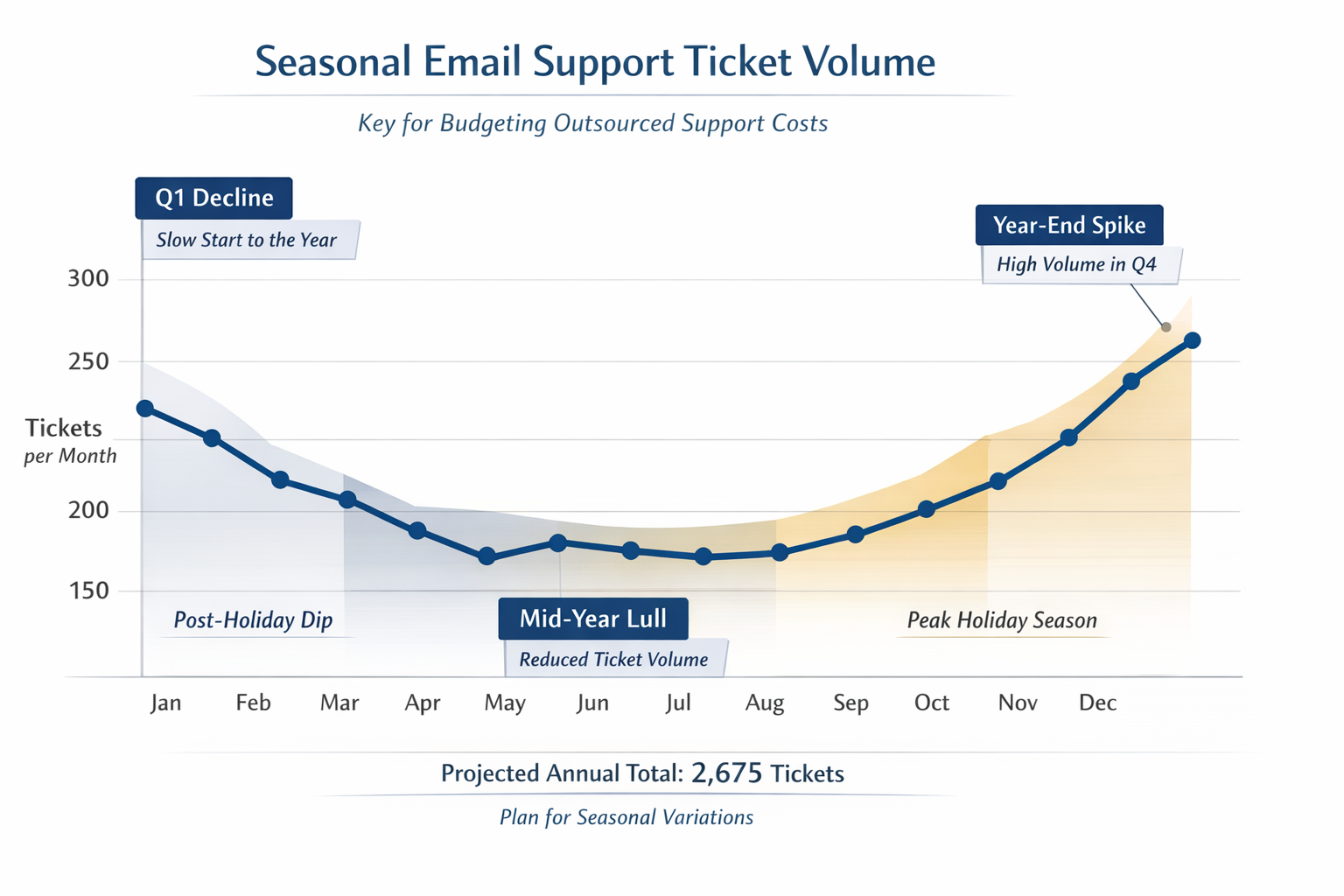
Ecommerce businesses obviously see holiday spikes—Black Friday through December can triple normal support volume [3]. But SaaS companies have seasonality too. B2B products often see upticks at fiscal year-end when companies are making purchasing decisions (and have questions). Consumer-focused tools might spike around New Year's resolution season.
Look at your historical data for patterns. If Q4 consistently runs 25% higher than your annual average, your budget needs to reflect that.
Building Your Annual Forecast: A Practical Framework
Here's a straightforward approach that works for businesses in the 50-500 tickets/month range:
Step 1: Establish Your Baseline
Take your average monthly ticket volume from the past six months. If you're newer or don't have clean data, use your best three-month estimate.
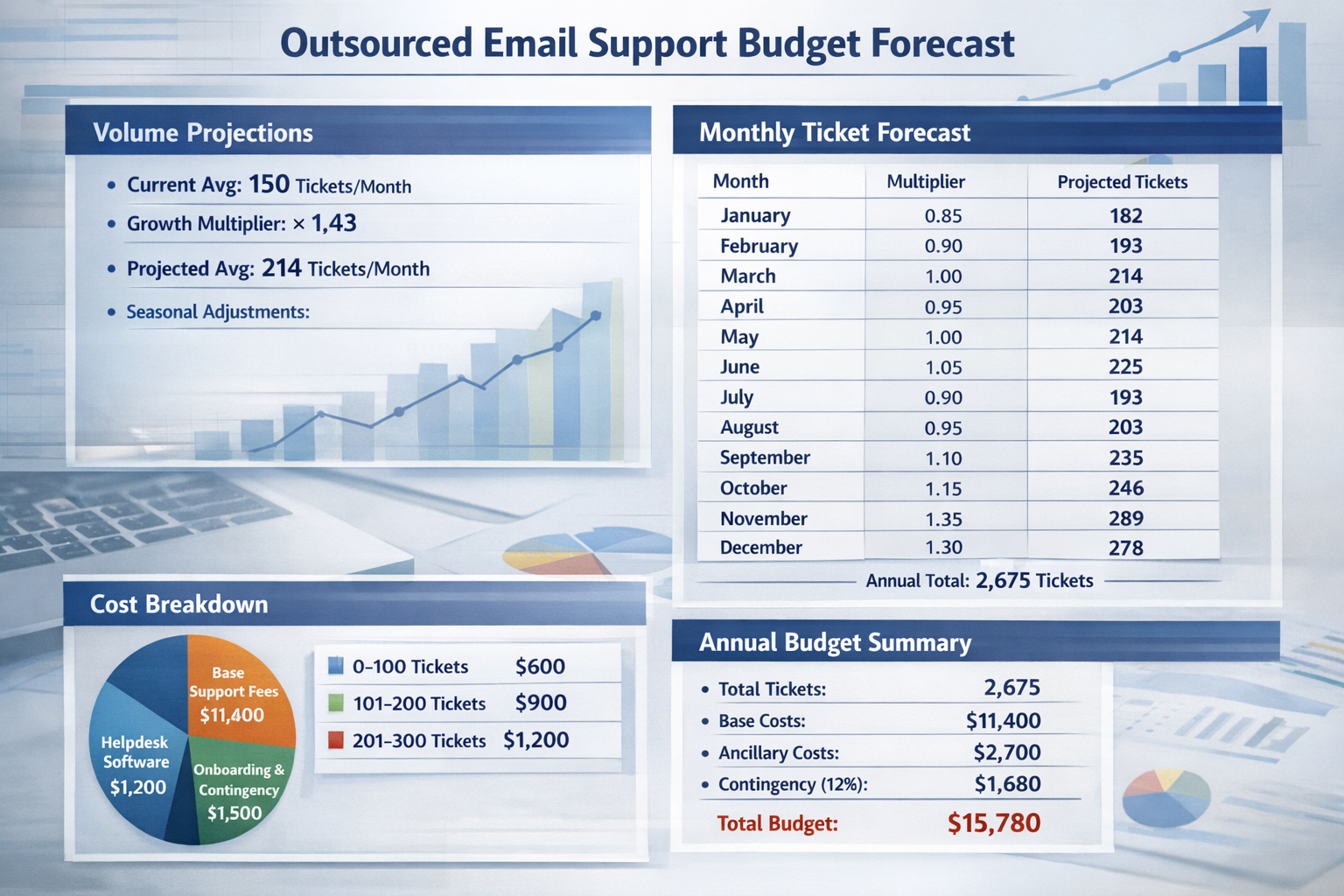
Let's say you're averaging 150 tickets per month currently.
Step 2: Apply Your Growth Multiplier
Based on your projected customer growth and product roadmap, estimate your volume increase. Be honest here—optimistic revenue projections shouldn't automatically translate to conservative support volume estimates.
If you're expecting 40% business growth with two major feature launches:
Base growth multiplier: 1.30 (30% volume increase, slightly below revenue growth)
Feature launch buffer: 1.10 (10% additional for launch-related tickets)
Combined multiplier: 1.43
Your projected average monthly volume: 150 × 1.43 = 214 tickets/month
Step 3: Build Your Seasonal Model
Don't just multiply by 12. Map out each month based on your historical patterns and known events.
A sample breakdown for an ecommerce business might look like:
| Month | Multiplier | Projected Tickets |
| January | 0.85 | 182 |
| February | 0.90 | 193 |
| March | 1.00 | 214 |
| April | 0.95 | 203 |
| May | 1.00 | 214 |
| June | 1.05 | 225 |
| July | 0.90 | 193 |
| August | 0.95 | 203 |
| September | 1.10 | 235 |
| October | 1.15 | 246 |
| November | 1.35 | 289 |
| December | 1.30 | 278 |
Annual total: 2,675 tickets
Step 4: Translate to Costs
Now you need to understand how your outsourced partner prices their service. Volume-based pricing—where you pay a monthly rate based on ticket count—is common for small business support providers.
For example, if pricing breaks down as:
0-100 tickets: $600/month
101-200 tickets: $900/month
201-300 tickets: $1,200/month
Your annual cost using the seasonal model above would be approximately $11,400 (not $10,800 if you'd just used the average).
That $600 difference matters. It's the difference between a budget that holds and one that needs revision in November.
The Hidden Costs Most Budgets Miss
Here's where many founders get tripped up: the agency fee isn't always the complete picture. A CFO-proof budget accounts for ancillary costs that can quietly inflate your support spend.
Tech Stack Considerations
Who pays for the helpdesk software seats? Some outsourced providers work within your existing system (and you pay for the seats), while others include tooling in their pricing. Clarify this upfront.
If you're paying separately, add the cost of agent licenses to your budget. For a team of two dedicated agents, that might mean an extra $50-150/month depending on your platform.
Onboarding and Setup
Many agencies charge a one-time onboarding fee to cover the initial training, documentation building, and process setup. This is typically a Q1 expense. Some providers (like Evergreen Support) include onboarding in their service model, but always confirm.
If there's a setup fee, budget it as a separate line item so it doesn't distort your monthly run-rate calculations.
Internal Management Time
Even with a great outsourced partner, someone on your team will spend time on oversight—reviewing escalations, updating the team on product changes, participating in periodic check-ins. This isn't a cash cost, but if you're doing true cost accounting, factor in a few hours per month of internal time.
Where Support Costs Live on the P&L
This might seem like an accounting detail, but it affects how your CFO and board evaluate the expense.
Outsourced support is typically classified as Cost of Goods Sold (COGS) rather than Operating Expenses (OpEx). Why does this matter? COGS directly impacts your gross margin, while an in-house support hire would typically sit in OpEx and affect your operating margin differently.
For SaaS companies especially, investors and boards scrutinize gross margin carefully. Positioning support costs appropriately—and being able to explain why you chose outsourcing over hiring—demonstrates financial sophistication.
The short version: outsourcing support can actually improve your operating leverage compared to hiring, since you're paying for productive support hours rather than carrying fixed headcount costs during slow periods.
The Contingency Question: How Much Buffer Is Enough?
Every experienced CFO will ask about contingency. They've seen too many "accurate" forecasts go sideways.
For outsourced support budgeting, I recommend a 10-15% contingency buffer for most small businesses. Here's why:
10% buffer covers:
Slightly higher-than-expected growth
One unexpected product issue causing a temporary spike
Normal forecasting variance
15% buffer is appropriate if:
You're launching into a new market segment
Your business is growing faster than 50% year-over-year
You have significant product uncertainty (major pivot, new platform, etc.)
Going higher than 15% usually means your underlying forecast needs more work, not more padding.
Presenting the Budget: What CFOs and Boards Actually Want to See
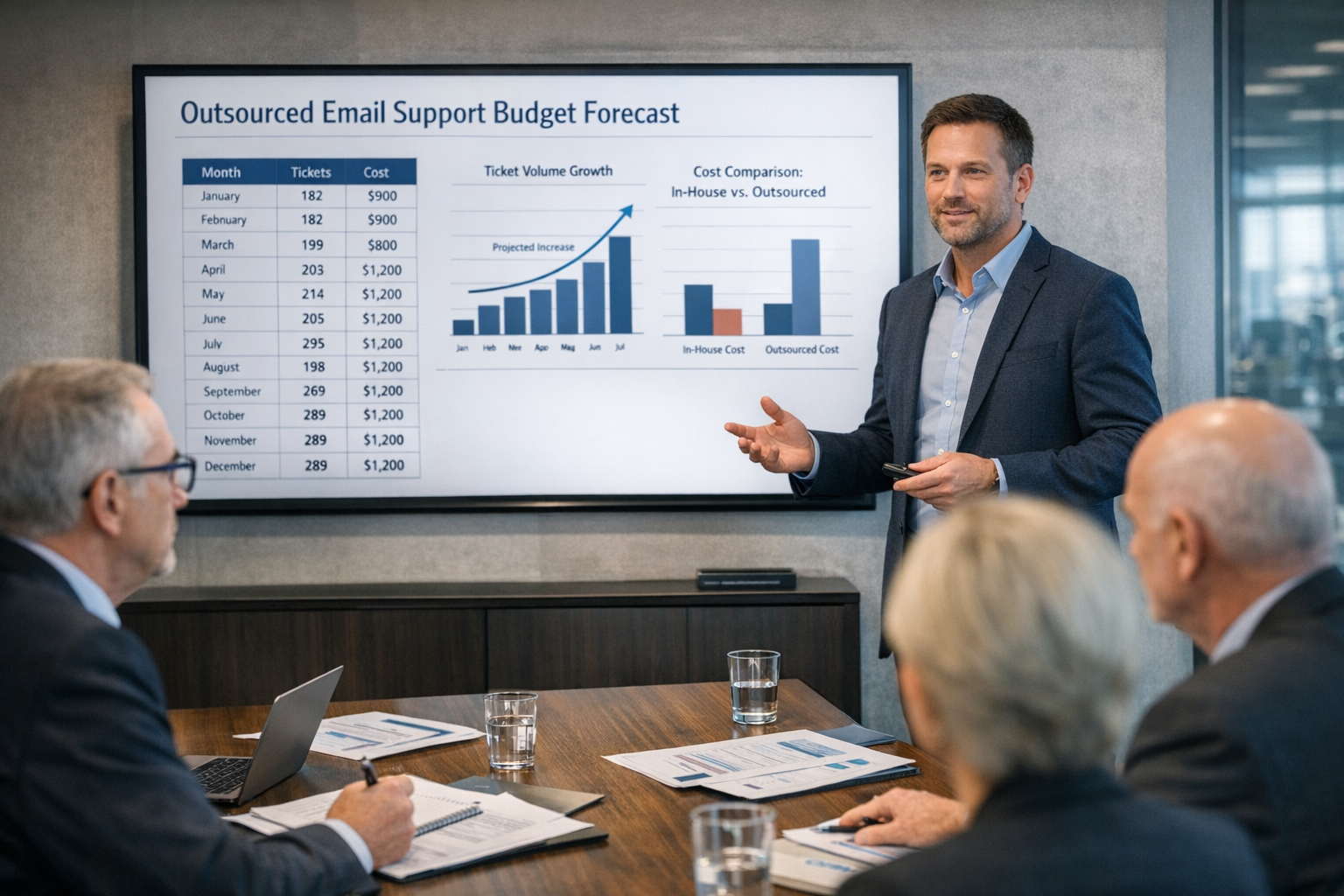
The number itself is only part of the story. How you present it determines whether you get quick approval or a skeptical interrogation.
Include these elements:
The Historical Anchor
Show your current costs and volume. This grounds the conversation in reality rather than abstraction.
"We handled an average of 150 tickets/month this year at a cost of approximately X. Here's how that breaks down..."
The Logic Chain
Walk through your assumptions explicitly. Customer growth drives volume. Seasonal patterns affect timing. Pricing tiers affect cost curves.
CFOs respect transparent methodology even when they question specific assumptions. They distrust black-box numbers.
The Sensitivity Analysis
Show what happens if your assumptions are wrong. "If growth comes in at 25% instead of 40%, our annual cost would be Y instead of Z."
This demonstrates you've thought through scenarios and aren't just presenting a single-point estimate as gospel.
The Comparison Point: Fully Burdened Cost
What would this cost if you handled it differently? Compare against the fully burdened cost of an in-house hire—not just salary, but the complete picture:
Base salary
Payroll taxes (typically 7.65% for employer FICA)
Benefits (health insurance, retirement contributions)
Equipment and software
Training and management time
Coverage gaps (vacation, sick days, turnover)
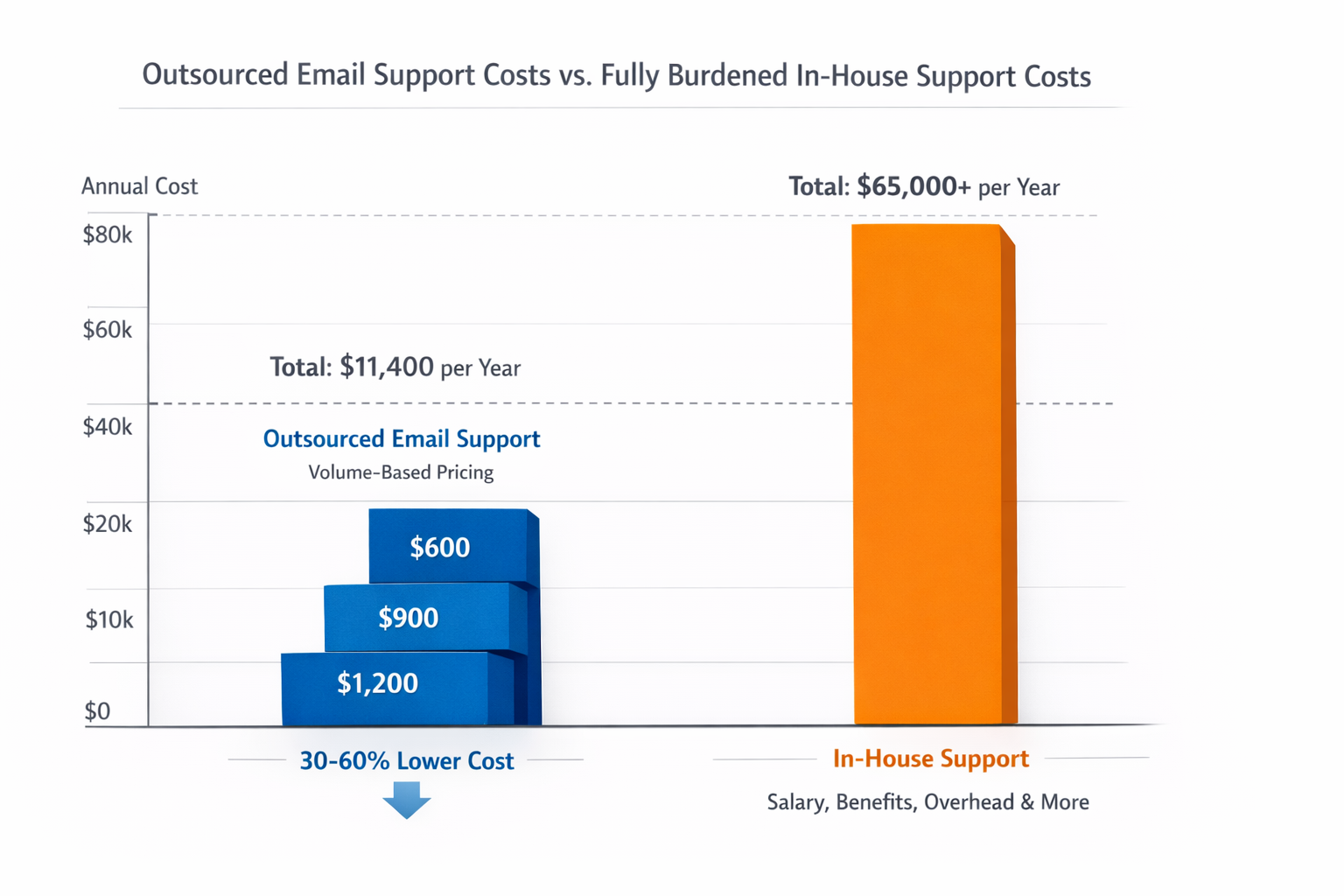
A common rule of thumb: the fully burdened cost of an employee runs 1.25x to 1.4x their base salary. So a $50,000/year support hire actually costs $62,500-$70,000 when you account for everything.
For most businesses handling under 500 tickets monthly, outsourcing runs 30-60% less than a dedicated hire when you account for all these factors [4]. Making this comparison explicit helps justify the spend as an investment, not just an expense.
Common Budgeting Mistakes (And How to Avoid Them)
Mistake 1: Using Annual Averages for Monthly Budgets
If your actual cash outflow varies significantly month-to-month due to seasonal pricing tiers, your monthly budget allocation should reflect that. Finance teams hate actuals that consistently miss monthly targets even when annual totals are fine.
Mistake 2: Ignoring the Ramp-Up Period
If you're new to outsourced support, the first one to two months often look different. There's onboarding time. There might be a learning curve. Budget accordingly—don't assume month one costs match month six.
Mistake 3: Forgetting About Scope Creep
What starts as "email support" sometimes expands. Maybe you add a second product line mid-year. Maybe you ask your support partner to handle returns processing. If there's any chance of scope expansion, build in flexibility or explicitly note it as out-of-scope for this budget.
Mistake 4: Not Locking in Rates
If you're concerned about mid-year pricing changes, ask your provider about rate guarantees. Many reputable providers offer annual commitments that lock in pricing, or at minimum give advance notice of any adjustments. Build a small buffer (2-3%) for potential pricing changes if you're on month-to-month terms without a rate lock.
Mistake 5: Setting and Forgetting
A budget isn't a prophecy. Plan to review actuals versus forecast quarterly and adjust if you're tracking significantly off. It's much easier to revise a budget proactively than to explain a 30% overage in December.
A Sample Budget Template
Here's a simplified structure you can adapt:
Section 1: Current State
Average monthly ticket volume (past 6 months): ___
Current monthly cost (if applicable): ___
Current handling method: ___
Section 2: Projections
Projected customer growth: ___%
Volume growth multiplier: ___
Major launches/changes planned: ___
Seasonal adjustment factors: ___
Section 3: Annual Forecast
Projected annual ticket volume: ___
Month-by-month breakdown: [table]
Base annual cost (agency fees): $___
Ancillary costs (software, onboarding): $___
Contingency (% ): $
Total budget request: $___
Section 4: Scenario Analysis
Low scenario (growth at % ): $
Base scenario: $___
High scenario (growth at % ): $
Section 5: Comparison
Alternative approach (in-house, fully burdened): $___
Cost difference: $___
Making It Real: Next Steps
Budgeting for outsourced support doesn't have to be a guessing game. With your historical ticket data, realistic growth assumptions, and an understanding of how pricing models work, you can build a forecast that holds up to scrutiny.
If you're currently estimating your ticket volume rather than measuring it, start tracking now. Even two months of clean data dramatically improves your forecasting accuracy.
If you're evaluating outsourced support providers, ask specifically about their pricing structure and how it scales with volume. Volume-based pricing models—where costs adjust based on your actual ticket count—give you natural budget flexibility as your business grows.
Ready to put numbers to your forecast? Evergreen Support uses transparent, volume-based pricing that makes annual budgeting straightforward. Schedule a call to walk through your specific situation and get clarity on what next year's support costs would actually look like.
Frequently Asked Questions
How far back should I look when establishing my baseline ticket volume?
Three to six months typically provides enough data to identify patterns without including outdated information. If your business has changed significantly in the past year (new product launch, major customer segment shift), weight recent months more heavily. For seasonal businesses, you'll want a full year of data to capture cyclical patterns accurately.
What if I'm currently handling support myself and don't have ticket data?
Start by counting emails in your support inbox over the past 30 days. Include anything that required a response—questions, complaints, requests, even positive feedback that needed acknowledgment. This gives you a rough baseline. Going forward, use a basic helpdesk tool (even a free tier) to track properly. Two months of measured data beats six months of estimates.
Should I budget differently for SaaS versus ecommerce support?
The methodology is similar, but the seasonal patterns differ significantly. Ecommerce businesses typically see dramatic Q4 spikes (sometimes 200-300% of baseline) concentrated in six to eight weeks. SaaS businesses tend to have gentler seasonality but more pronounced spikes around product launches. Match your seasonal multipliers to your actual business patterns rather than generic templates.
How do I handle mid-year pricing changes from my support provider?
Build in a small buffer (2-3%) for potential pricing adjustments, or confirm with your provider whether current rates are locked for the contract period. Most reputable providers give advance notice of pricing changes. If you're concerned, ask about annual commitments that guarantee rates, or negotiate a "rate lock" clause in your agreement.
What metrics should I track to validate my forecast throughout the year?
Monitor actual versus projected ticket volume monthly. If you're consistently 15%+ over projection, you'll likely need a budget revision. Also track cost per ticket—if this changes significantly, investigate whether ticket complexity has shifted or if there are process issues to address. Quarterly reviews give you time to course-correct before year-end surprises.
About Evergreen Support
Evergreen Support is a US-based customer support agency built specifically for small SaaS and ecommerce businesses. Our team of real humans—not chatbots or overseas call centers—handles your email support Monday through Friday with guaranteed 24-hour response times. Founded by Emma Fletcher and Ellis Annichine after experiencing firsthand the challenges of providing excellent support as a small team, we specialize in maintaining the personal touch your customers love while freeing you to focus on growing your business. Every client works with two dedicated support specialists who learn your product and brand voice inside and out.
Works Cited
[1] Evergreen Support — "Customer Support Agency Pricing." https://www.evergreensupport.co/pricing
[2] ProductPlan — "Feature Launch Planning Guide." https://www.productplan.com/learn/feature-launch/
[3] Zendesk — "Customer Service During Peak Seasons." https://www.zendesk.com/blog/peak-season-customer-service/
[4] Evergreen Support — "Outsource Customer Support Costs vs In-House: 2025 Guide." https://www.evergreensupport.co/blog/outsource-customer-support-cost-comparison