

You're drowning in customer emails. Your inbox has become a second job—one that eats into product development, sales calls, and whatever remains of your personal life. You know something needs to change, but here's the problem: you can't improve what you don't measure.
Most customer support KPI guides assume you have a dedicated support manager, an analytics dashboard, and time to obsess over twenty different metrics. You have none of those things. You're a founder or small team lead juggling support alongside your actual job.
This guide is different. It covers the essential customer support KPIs that 1–5 person teams actually need to track—the minimum viable metrics that will tell you whether support is healthy, when it's time to get help, and how to evaluate any outsourcing partner you bring on board.
Why Small Teams Need Different Metrics
Enterprise support teams track everything. First contact resolution rates across channels. Customer effort scores segmented by product line. Sentiment analysis on every interaction.
That level of measurement requires infrastructure you don't have. More importantly, it solves problems you don't have yet.
Small teams face a simpler challenge: understanding whether support is sustainable and whether customers are getting adequate help. You need metrics that answer two questions:
Can we keep up?
Are customers satisfied with the help they're getting?
Everything else is noise until you've got those fundamentals covered.
The metrics below form a starter kit. They require minimal tooling, take minutes to calculate, and provide genuine insight into your support operation's health. They're also exactly what you'll want baseline data on before evaluating any outsourcing option—including working with a fractional support team.
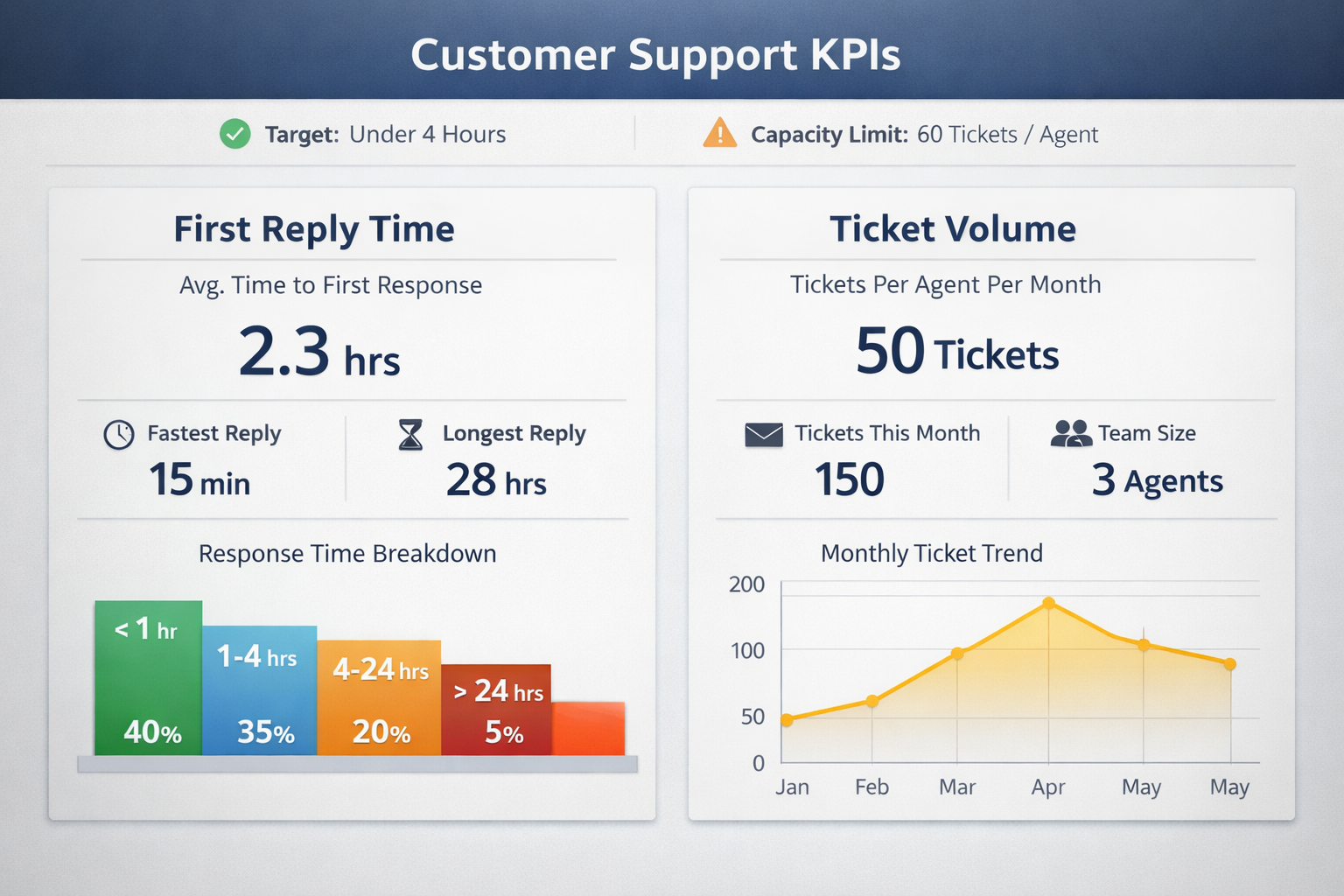
The Four Essential Customer Support KPIs
First Reply Time: How Long Customers Wait
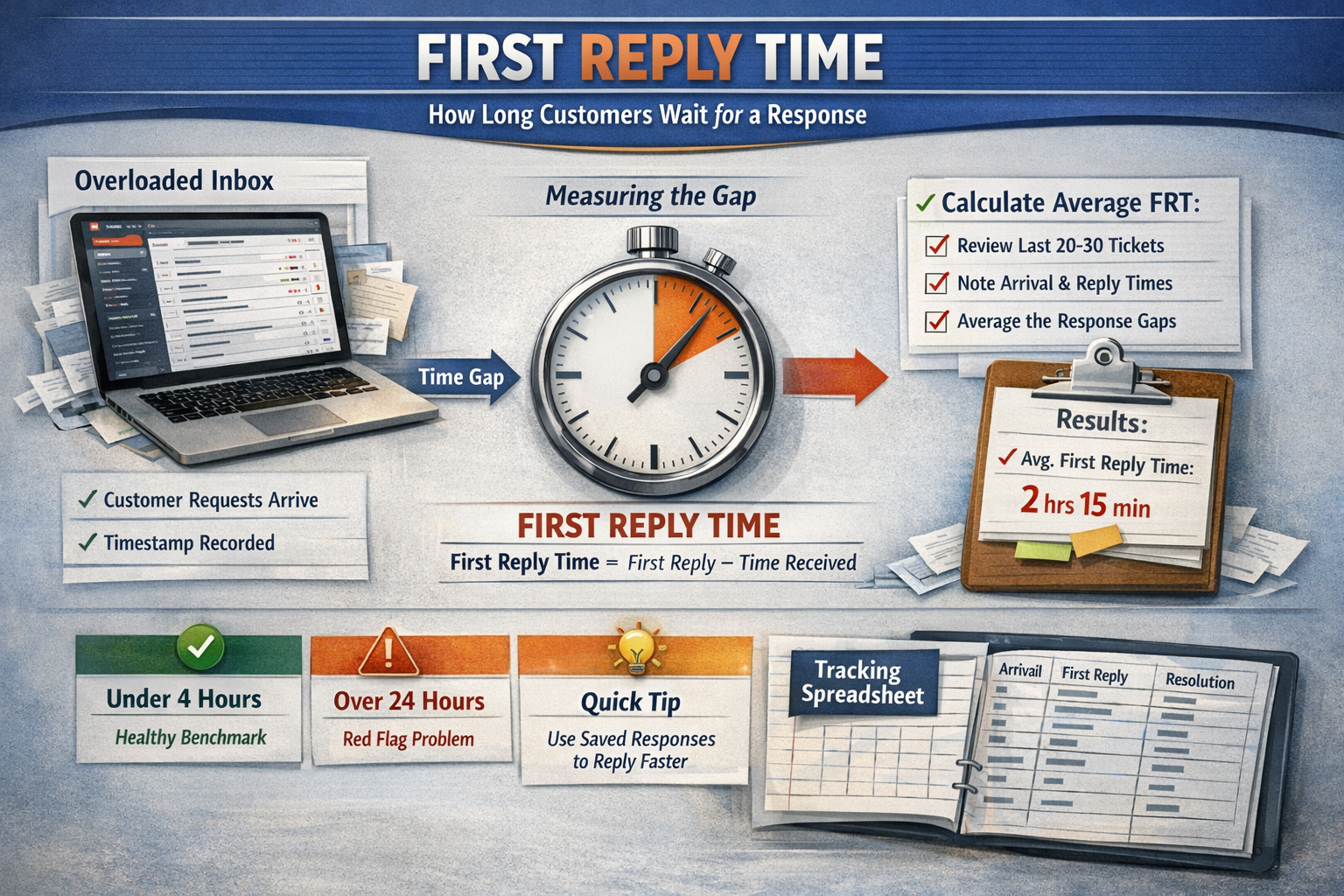
First reply time (FRT) measures the gap between when a customer sends a support request and when they receive a human response. Not an auto-responder. An actual acknowledgment that a real person has seen their issue.
Why it matters: Customer expectations for response time have compressed dramatically. According to Zendesk's Customer Experience Trends Report, the majority of customers now expect a response within a few hours for email support—not days. When you take 48 hours to reply, customers don't just get frustrated—they start looking for alternatives.
How to calculate it: Pull your last 20–30 support tickets. Note the timestamp when each arrived and when you sent the first real reply. Average those gaps. That's your baseline FRT.
If you use a helpdesk tool like Help Scout or Zendesk, this metric is usually calculated automatically. If you're working from a shared Gmail inbox (no judgment—many successful businesses start there), you'll need to do this manually, but it only takes 15 minutes.
What "good" looks like: For email support during business hours, aim for under 4 hours as a starting benchmark. Under 1 hour is excellent. Over 24 hours is a red flag that you're falling behind.
Quick win to improve it: Set up text expander snippets or saved replies for your five most common questions. This alone can shave 30–60 seconds off each response—which adds up fast when you're handling dozens of tickets.
The small-team trap: FRT often looks fine on average but hides dangerous outliers. You might reply within 2 hours to most tickets but have a handful that sat for 3 days because they arrived during a product launch. Those outliers matter more than your average. When reviewing your FRT, look at both the average and your longest response times.
Ticket Volume Per Person: Your Capacity Reality Check
This metric answers a deceptively simple question: how many support requests is each person handling?
Why it matters: There's a sustainable ceiling for how many tickets one person can handle well. Push past it, and quality drops. Response times slip. Burnout accelerates. Understanding your volume per person tells you whether your current setup is sustainable or a ticking time bomb.
How to calculate it: Count your total tickets over the past 30 days. Divide by the number of people handling support. If support duties are split (say, you spend 25% of your time on it), count that as 0.25 of a person.
Important: Include all channels in this count—email, Slack messages from customers, Twitter DMs, support chat, comments on your app store listing. If a customer reached out and you responded, it counts.
What "good" looks like: This varies significantly by ticket complexity. Simple password resets and shipping inquiries might allow one person to handle 40–50 tickets per day. Technical troubleshooting for a software product might cap at 15–20 per day for quality responses.
The useful benchmark isn't an industry average—it's your own sustainable threshold. Ask yourself: at what volume does quality start slipping? At what point do you stop enjoying customer conversations and start resenting them?
The small-team trap: Founders often dramatically undercount their actual volume because they handle "quick" requests from Slack, Twitter DMs, and comments without logging them. For one week, track every single customer interaction, regardless of channel. The real number is usually 20–40% higher than you think.
Backlog Age: The Pile You're Pretending Doesn't Exist
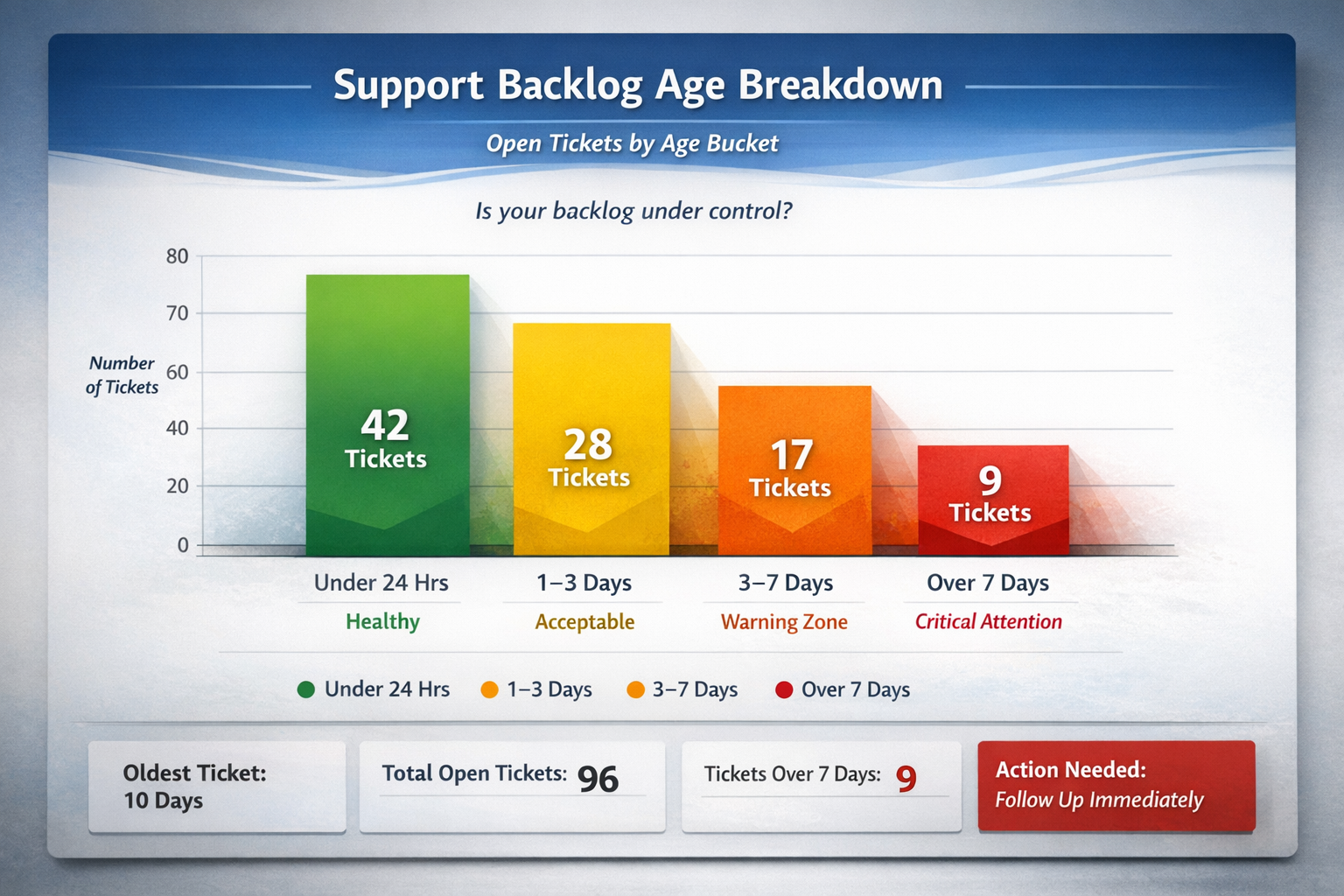
Backlog age measures how many tickets remain unresolved and how long they've been sitting.
Why it matters: A growing backlog is the leading indicator that support is becoming unsustainable. It's the warning light that flashes before response times crater and customers start complaining publicly.
How to calculate it: At any given moment, count how many open tickets you have. Group them by age:
| Age Bucket | Status |
| Under 24 hours | Healthy |
| 1–3 days | Acceptable for complex issues |
| 3–7 days | Warning zone |
| Over 7 days | Requires immediate attention |
The distribution tells you whether you're keeping up or slowly drowning.
What "good" looks like: Ideally, zero tickets should be older than your stated response time commitment. If you promise replies within 24 hours, nothing should sit longer than that without at least a human acknowledgment.
For practical small-team operations: having a handful of tickets in the 1–3 day bucket is normal (complex issues take time). Having anything over 7 days old is a problem that needs immediate attention.
The small-team trap: Old tickets tend to get psychologically deprioritized. They feel harder to tackle because you'll need to apologize for the delay. But those aging tickets represent customers who've been waiting the longest—often your most frustrated or most important customers. Check your backlog weekly. Make "ticket zero" a regular goal, even if it takes dedicated time to achieve.
Customer Satisfaction Signals: Are They Actually Happy?
This metric answers the ultimate question: when customers get help, do they feel helped?
Why it matters: You can reply quickly to every ticket and still provide terrible support. Speed is necessary but not sufficient. You need some signal that customers are satisfied with the outcomes, not just the response times.
How to measure it: There are several approaches, ranging from simple to sophisticated:
Simple approach (5 minutes to set up):After closing a ticket, send a one-question follow-up: "Did we solve your problem? Yes / No." Track your "yes" percentage. Most email tools can automate this with a simple template.
Intermediate approach:Use a Customer Satisfaction (CSAT) survey built into your helpdesk. Customers rate their experience on a 1–5 scale after ticket resolution. Most tools handle this automatically.
Lightweight proxy approach (no survey needed):If surveys feel like overkill for your volume, track qualitative signals instead:
How many customers reply with "thank you" or positive language?
How many escalate or reply frustrated?
How many issues require multiple back-and-forth exchanges before resolution?
What "good" looks like: According to the American Customer Satisfaction Index, industry CSAT benchmarks typically fall between 75–85% satisfaction rates. For small teams with strong product-market fit, you should aim higher—your early customers are often your most forgiving and most invested in your success.
The small-team trap: Low response rates on satisfaction surveys can make the data unreliable. If you've got fewer than 20 responses in a month, look at trends and qualitative patterns rather than precise percentages. A handful of glowing replies (or frustrated ones) tells you more than a statistically insignificant average.
How to Track These Metrics Without a Dashboard
You don't need sophisticated software to measure these KPIs. Here's the minimal setup:
Option 1: Simple Spreadsheet
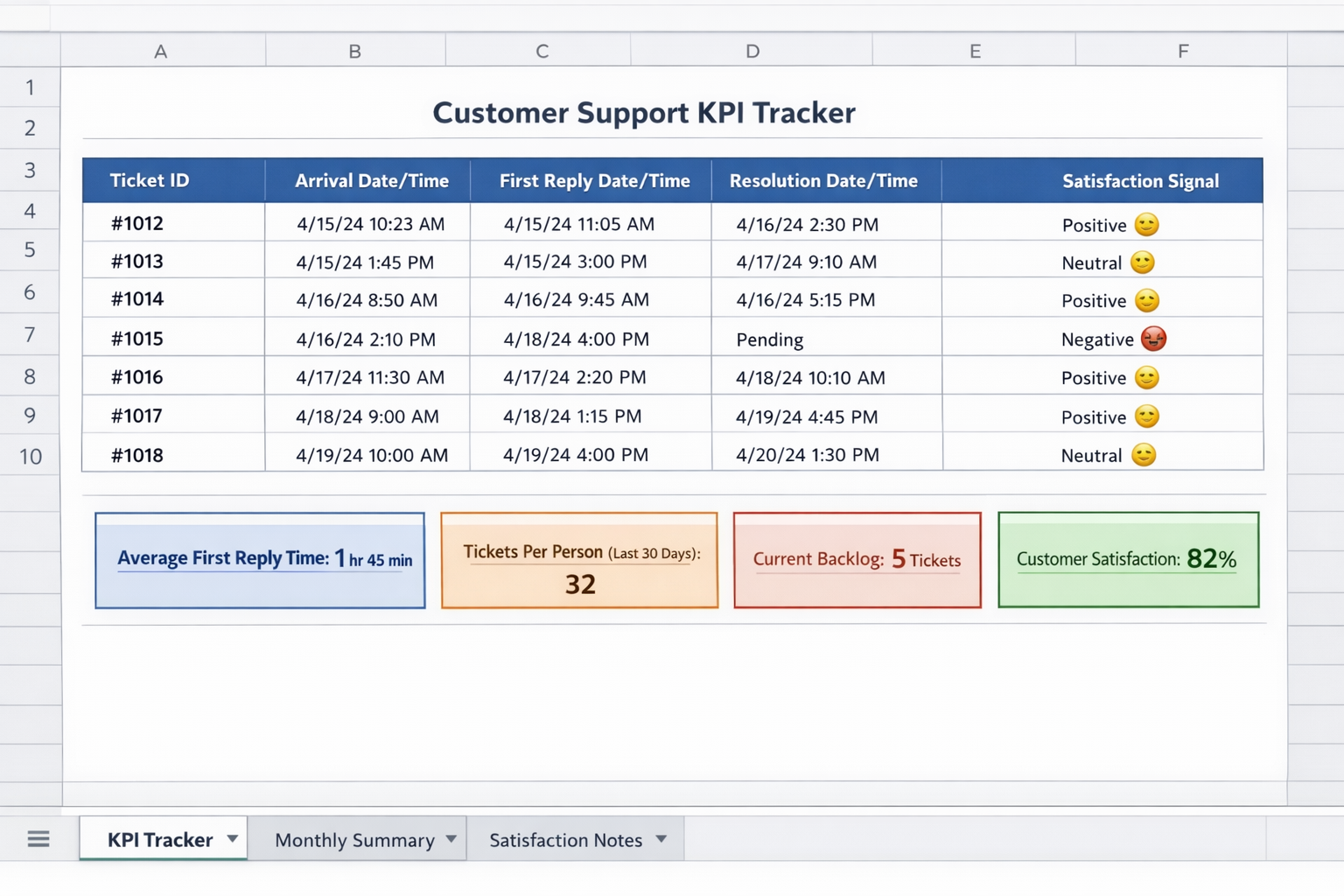
Create a basic tracker with these columns:
| Column | What to Record |
| Ticket ID | Reference number or subject line |
| Arrival Date/Time | When the request came in |
| First Reply Date/Time | When you sent a human response |
| Resolution Date/Time | When the issue was closed |
| Satisfaction Signal | Positive / Neutral / Negative |
Update it weekly. Calculate averages monthly. Takes 15 minutes per week.
Option 2: Helpdesk Built-In Reports
If you're using Help Scout, Zendesk, Freshdesk, or similar tools, these metrics are calculated automatically. Schedule a weekly 10-minute review of your dashboard. Most tools offer free or low-cost plans that include basic reporting.
Option 3: Monthly Audit
If ongoing tracking feels unsustainable right now, commit to a monthly audit. Pick a random sample of 25–30 tickets from the past month. Calculate your metrics manually. It's not perfect data, but it's infinitely better than guessing.
The goal isn't perfect measurement. It's directional awareness. You need to know whether things are getting better, getting worse, or holding steady.
What Your Numbers Are Telling You
Once you've got baseline data, interpretation is straightforward:
Healthy Pattern:
FRT under 4 hours consistently
Volume per person feels sustainable (you're not working nights and weekends to keep up)
Backlog rarely exceeds 24 hours
Satisfaction signals are consistently positive
If this describes you, congratulations. Your support operation is sustainable. Focus on maintaining quality as you grow.
Warning Pattern:
FRT creeping upward over the past 3 months
Volume per person increasing without relief
Backlog occasionally hits 3+ days during busy periods
Satisfaction still solid but trending down
This is the "act soon" zone. Your current setup is showing strain. Start evaluating options—hiring, outsourcing, or operational changes—before things deteriorate further.
Crisis Pattern:
FRT regularly exceeds 24 hours
Volume per person is clearly unsustainable
Backlog consistently contains tickets over a week old
Satisfaction complaints appearing in reviews or social media
This requires immediate action. Every day you wait, customer relationships erode. The cost of inaction compounds quickly.
Setting Baseline Data Before You Outsource
Here's why these metrics matter specifically for outsourcing decisions: they become the foundation for evaluating any partner you bring on.
When you hand off support to a fractional team or agency, you need to answer: "Is this actually working?" Without baseline data, you're guessing.
With baseline data, you can measure:
Did FRT improve after the handoff?
Is the backlog actually staying at zero?
Are satisfaction signals holding steady or improving?
These same metrics become the basis for ongoing monthly reviews. A good outsourcing partner will welcome this kind of accountability because it demonstrates their value clearly.
If you're considering outsourcing, spend 2–4 weeks establishing clean baseline measurements first. Track all four metrics. Document your current state honestly. This small investment in measurement makes the entire evaluation process dramatically more objective.
The Metrics That Can Wait
A quick note on what you don't need to track yet:
First Contact Resolution (FCR): Valuable for mature teams but requires consistent categorization and tracking infrastructure. Revisit this once your basics are solid.
Average Handle Time: Matters for phone support and large teams optimizing efficiency. For small email support operations, it's noise.
Net Promoter Score: Useful for overall business health but too broad for support-specific insights. CSAT is more actionable.
Channel-Specific Metrics: Until you have multiple channels running smoothly, aggregate metrics are sufficient.
These metrics aren't unimportant—they're just not urgent. Master the four essentials first.
Moving From Measurement to Action
Tracking metrics is only valuable if it drives decisions. Here's how to connect measurement to action:
Weekly: Glance at your backlog. Address anything over 3 days old immediately.
Monthly: Calculate your FRT and volume per person. Note trends. If either is worsening, identify why.
Quarterly: Review satisfaction signals. Look for patterns in complaints or praise. Adjust processes accordingly.
When evaluating outsourcing: Compare your baseline to what a partner promises and delivers. Monthly reviews should include all four metrics, showing trends over time.
The goal is building a habit of awareness. Support health shouldn't be a mystery you discover only when customers start complaining publicly.
Your Next Step
If you've read this far, you already suspect your support metrics need attention. Here's what to do this week:
Calculate your current FRT using the last 20 tickets
Count your backlog right now—how many open tickets, and how old are they?
Estimate your monthly ticket volume per person (include all channels)
Decide on one satisfaction signal you'll start tracking
These four data points take less than an hour to gather. They'll tell you whether your current support situation is sustainable—and give you the foundation you need to evaluate any future changes, including bringing on a fractional support team.
If those numbers reveal you're in the warning or crisis zone, you don't have to figure out next steps alone. Evergreen Support helps small SaaS and ecommerce teams get their inbox under control with human-powered support that maintains your brand voice. Book a call to discuss what your metrics are telling you and whether outsourcing makes sense for your situation.
Frequently Asked Questions
What's the single most important KPI if I can only track one?
Track first reply time. It's the metric customers feel most acutely, it's easy to measure, and it reveals capacity problems before they become crises. If your FRT is consistently under 4 hours, you're likely keeping up. If it's creeping toward 24+ hours, that's your clearest signal something needs to change—whether that's process improvements, better templates, or outside help.
How do I know when my metrics are "bad enough" to justify outsourcing?
The clearest signal is sustained deterioration despite your best efforts. If FRT has worsened for three consecutive months, if your backlog regularly exceeds 3 days, and if you're working evenings and weekends just to keep up—you've likely passed the point where outsourcing becomes more cost-effective than struggling alone. The math usually tips around 20–30 hours per week of support work.
What metrics should I expect from an outsourced support partner?
A quality partner should commit to specific FRT targets (typically same-day or faster), maintain zero backlog of unaddressed tickets, and provide regular reporting on volume handled and satisfaction scores. These metrics should be part of your monthly reviews and should equal or exceed your baseline within the first few months. If a partner can't commit to measurable standards, that's a red flag.
How often should I review customer support KPIs?
For small teams, weekly backlog checks and monthly metric reviews strike the right balance. Weekly reviews catch problems early—you'll spot a growing backlog before it becomes a crisis. Monthly analysis reveals trends that weekly noise might hide. Anything more frequent becomes busywork that takes time away from actually helping customers.
Do I need special software to track these metrics?
No. A simple spreadsheet works fine for teams handling under 100 tickets monthly. Most helpdesk tools (Help Scout, Zendesk, Freshdesk) include built-in reporting even on lower-tier plans. The barrier isn't software—it's building the habit of consistent measurement. Start with whatever method you'll actually stick with, even if it's manual.
Why This Guide Exists
This article was created by Evergreen Support, a US-based customer support agency helping small SaaS and ecommerce teams reclaim their time without losing the personal touch their customers love. Our team has helped founders establish baseline metrics, transition support operations, and build sustainable measurement practices. We believe tracking the right KPIs shouldn't require an enterprise toolkit—just clear thinking about what actually matters for your customers and your sanity.
Cited Works
[1] Zendesk — "Customer Experience Trends Report." https://www.zendesk.com/customer-experience-trends/
[2] American Customer Satisfaction Index — "ACSI Benchmarks." https://www.theacsi.org/